Last updated: March 20, 2026
Teach Your AI Coding Agent OpenTelemetry Best Practices with Dash0 Agent Skills
Your team adopts an AI coding agent. Velocity goes up. PRs start landing faster than your team can review them. And then something breaks in production and nobody can tell where. The traces are missing. The metrics are wrong. The Collector configuration someone merged three weeks ago has no memory limiter and it just took down the pipeline.
The problem is not that AI agents are bad at OpenTelemetry (OTel). It is that they do not have the context to do it well. An agent that knows how to write application code will reach for whatever OTel patterns it has seen in training data. It will set the wrong span status codes. It will put user IDs on metric labels and create one time series per user. It will generate a Collector config that works in development and falls over under real load. Not because the agent is wrong in general, but because writing correct, production-grade observability requires OTel-specific knowledge that most agents simply do not have.
Dash0 Agent Skills fix this at the source. They are packaged instructions that plug directly into your AI coding agent and give it the OTel knowledge it needs to get instrumentation right from the start. The guidance is grounded in semantic conventions, real-world Collector patterns, and the kind of rules that normally live in internal runbooks that nobody reads until something goes wrong.
Let's get started.
Prerequisites
-
An AI coding agent that supports the Agent Skills format — Claude Code, Cursor, Windsurf, GitHub Copilot, or any of the 38 other supported agents.
-
A Dash0 account — start a free trial if you do not have one yet.
-
If you want to follow the Collector and data redaction steps locally, you will also need Docker.
The examples in this guide use Node.js, but the skills cover ten languages including Go, Python, Java, Scala, .NET, Ruby, PHP, Browser, and Next.js. Prompts are identical across languages; the agent applies language-specific rules automatically.
Installing Dash0 Agent Skills
Run this command once in your project folder:
npx skills add dash0hq/agent-skills
The CLI clones the skill definitions from GitHub, runs a security assessment across all four skills, and installs them into your project. When prompted, select all four skills and choose your agent. Claude Code gets a symlink so updates flow through automatically. All other agents get a universal copy.
The output will look like this:
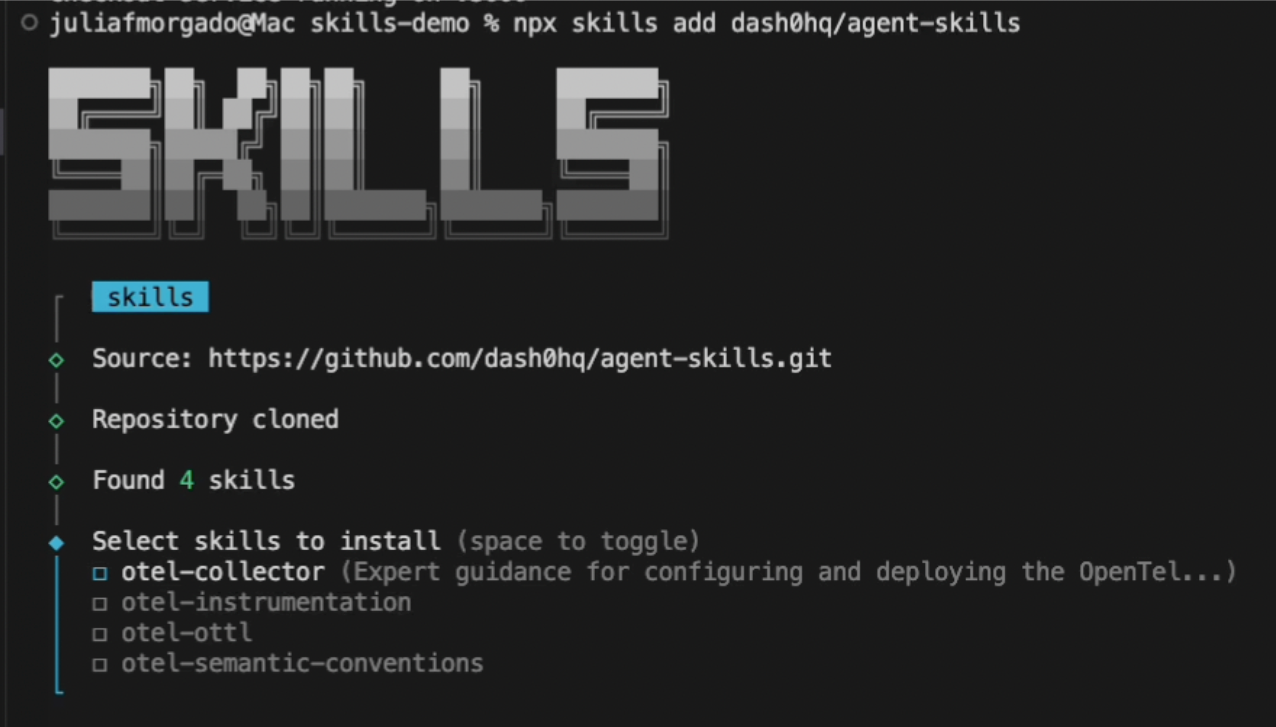
Once installed, the skills activate automatically whenever your agent works on a relevant task. You do not need to reference them in your prompts.
If you want to see the instrumentation step in action before reading through the workflow, watch the demo on YouTube.
Watch the instrumentation demo on YouTube
The four skills
otel-instrumentation handles traces, metrics, and logs across ten languages. Node.js, Go, Python, Java, Scala, .NET, Ruby, PHP, Browser, and Next.js are all covered. The skill provides rules for resource attributes, span status codes, metric instrument types, cardinality management, error handling, and Kubernetes-specific configuration.
otel-semantic-conventions is a decision framework for selecting, placing, and reviewing OpenTelemetry attribute names. It teaches the agent to search the OpenTelemetry Attribute Registry before inventing custom attributes, place them at the correct telemetry level, and flag common mistakes like high-cardinality metric dimensions.
otel-collector covers everything needed to configure and deploy the OpenTelemetry Collector. Receivers, processors, exporters, and pipelines are all included, along with memory limiting, batching, tail sampling, agent versus gateway deployment patterns, and four deployment methods including raw manifests, the Collector Helm chart, the OpenTelemetry Operator, and the Dash0 Operator.
otel-ottl guides the agent through writing OpenTelemetry Transformation Language (OTTL) expressions for the transform, filter, and routing processors. It covers syntax, contexts, converters, path expressions, and common patterns including sensitive data redaction and attribute enrichment.
Seeing them work together is the best way to understand their impact.
How to use the skills together
The four skills are designed to complement each other. Each one handles a distinct part of the observability stack, and using them in sequence gives you instrumentation that is not just present but correct, well-configured, and secure.
Instrumenting your application
When you ask your agent to add OpenTelemetry to a service, the otel-instrumentation skill activates automatically. You do not need to specify SDK versions, package names, or configuration details. A prompt like this is enough:
Add OpenTelemetry instrumentation to this Node.js checkout service so I can see traces, errors and performance data in Dash0
The skill gives the agent guidance on several decisions that are easy to get wrong without deep OTel knowledge. For a Node.js Express service, it knows to install @opentelemetry/auto-instrumentations-node rather than reaching for lower-level SDK packages that require significantly more manual setup. Auto-instrumentation captures HTTP spans but misses the business logic in between. By adding named internal spans for critical steps, the waterfall view in Dash0 becomes far more useful. Without them, you only see the request arriving and the response leaving, with no visibility in between.
The diff below shows how the agent modifies the checkout route. On the left is the original, minimal Express handler. On the right, the agent enhances it by using trace.getActiveSpan() to attach business context directly to the auto-instrumented HTTP span, such as user.id, user.tier, and checkout.item_count, and by wrapping critical operations in named child spans with proper error handling.
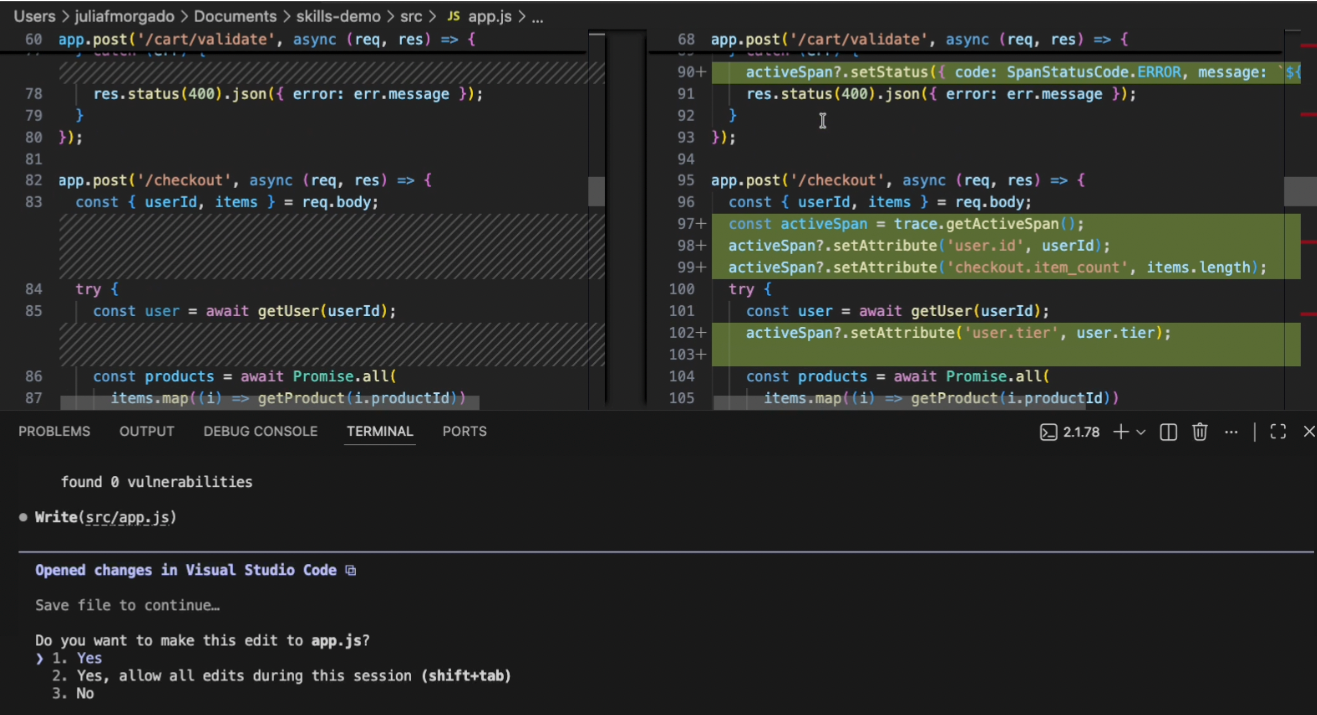
Instead of hardcoding endpoint URLs and authentication tokens, the skill also generates a .env.local file that sources configuration from environment variables.
Auditing for semantic convention compliance
Getting instrumentation running is the first step. Making sure it is correct is the second, and this is where most teams stop. The otel-semantic-conventions skill exists specifically to close that gap. Once your instrumentation is in place, ask your agent to review it:
Review the OpenTelemetry instrumentation in this app and check if I am using the correct attribute names according to semantic conventions
The skill gives the agent a framework for auditing every span attribute, metric label, and status code against the official OTel Attribute Registry and HTTP semantic convention rules. Two mistakes are common in AI-generated instrumentation.
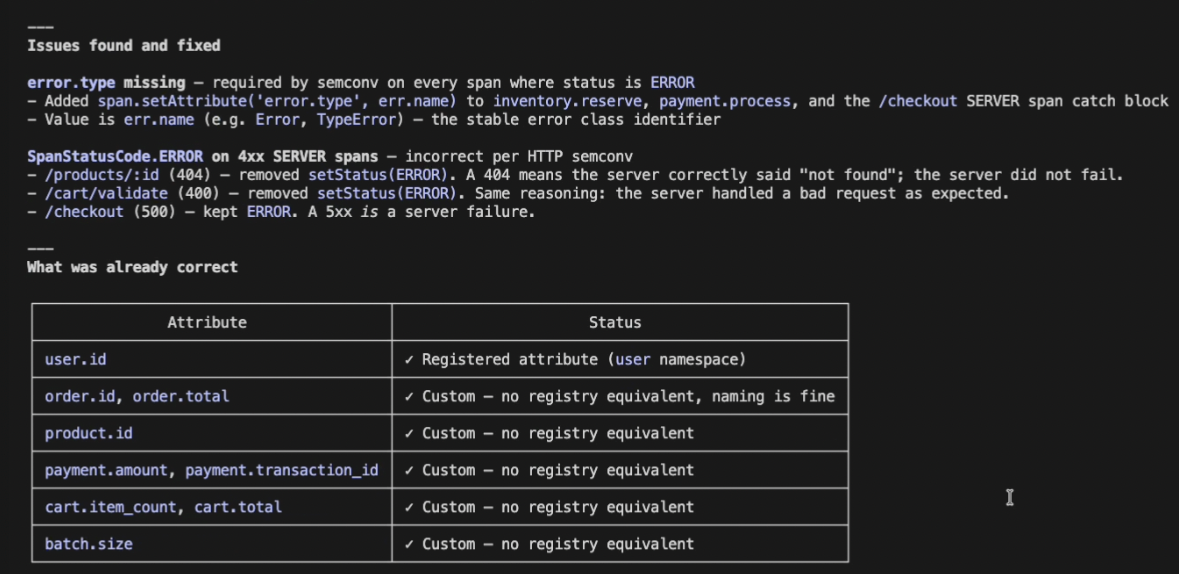
Common mistake #1: Missing span status message
The OpenTelemetry specification requires this attribute on every span where SpanStatusCode.ERROR is set. It is the field that backends use to group and count error types. When it is missing, your error analytics are incomplete and you cannot answer basic questions like "what is the most common error in the checkout flow this week."
Common mistake #2: Marking 4xx server responses as errors
This is one of the most common instrumentation mistakes and it has a real impact on your error rate metrics. But 4xx HTTP status codes mark client errors, not server errors (5xx). Accordingly, the HTTP semantic convention is clear: on a SERVER span, only 5xx responses are errors. A 404 is the server correctly reporting that a resource does not exist. A 400 is the server correctly rejecting a malformed request. Both are the server doing its job. Marking them as errors pollutes your error rate and makes it impossible to distinguish between a broken service and a misbehaving client.
The screenshot below shows the full audit output from the checkout service. The agent identified both issues, explained exactly why each one was wrong, fixed them, and produced a table showing every other attribute that was already correct — confirming that user.id, order.id, payment.amount, and the other custom attributes all have valid names with no registry equivalent to replace them with.
Setting up the Collector
Sending telemetry directly from your application to Dash0 works fine for development, but in production you want the OpenTelemetry Collector in between. The Collector gives you a place to sample, transform, and route telemetry independently of your application code. It also means auth credentials live in one place rather than being distributed across every service.
Set up an OpenTelemetry Collector configuration that receives traces from my app and forwards them to Dash0
The otel-collector skill generates a complete, production-ready collector-config.yaml and a docker-compose.yml to run it locally. The screenshot below shows the agent's explanation of every decision it made such as the processor ordering, why gRPC is used for the Dash0 connection, why file_storage is included for queue persistence, along with a before/after table of the .env.local changes that route the application through the local Collector instead of directly to Dash0.
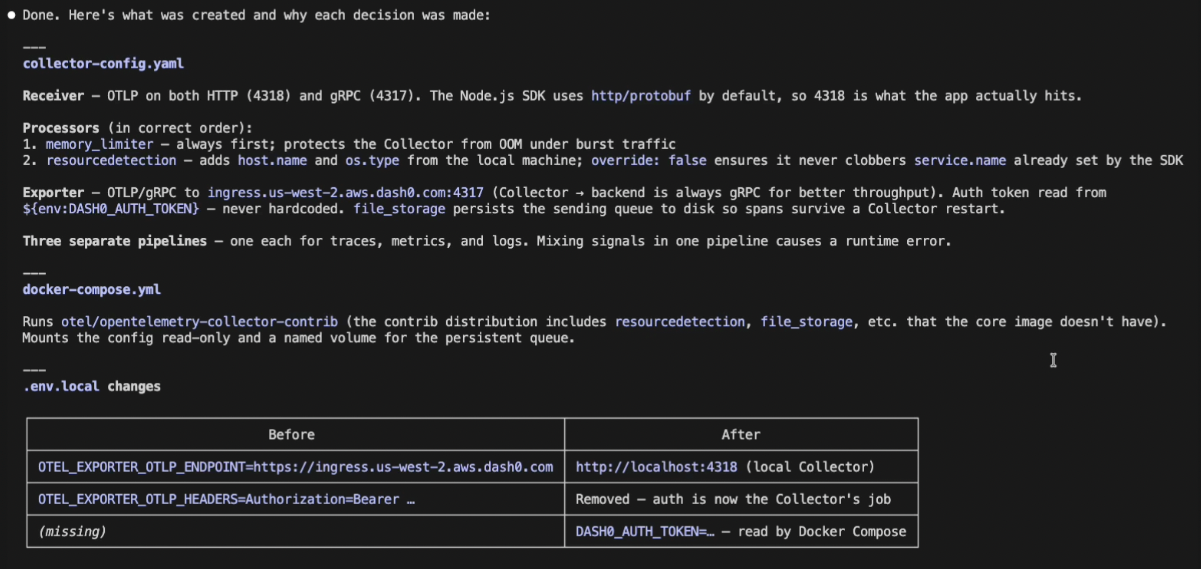
A few of those decisions are worth highlighting. The memory_limiter processor must always be first in the processor list — if it comes after a processor that has already buffered data, it cannot protect the Collector from running out of memory under traffic spikes. The resourcedetection processor runs with override: false so it never overwrites the service.name that the SDK already set correctly. And auth tokens are read from ${env:DASH0_AUTH_TOKEN}, never hardcoded in the config file.
Redacting sensitive data
Auto-instrumentation captures HTTP request and response headers by default. This is useful for debugging, but it creates a security risk. If your service passes Bearer tokens or API keys in outbound request headers, those values will appear in your traces. The right place to strip them is in the Collector, before anything leaves your infrastructure.
Write an OTTL expression to redact any authorization headers from my spans before they leave the Collector
The otel-ottl skill generates a transform/redact-auth processor that uses delete_matching_keys to remove the attributes entirely. This matters because setting a value to "REDACTED" still reveals that an authorization header was present. Deleting the key entirely leaves no trace.
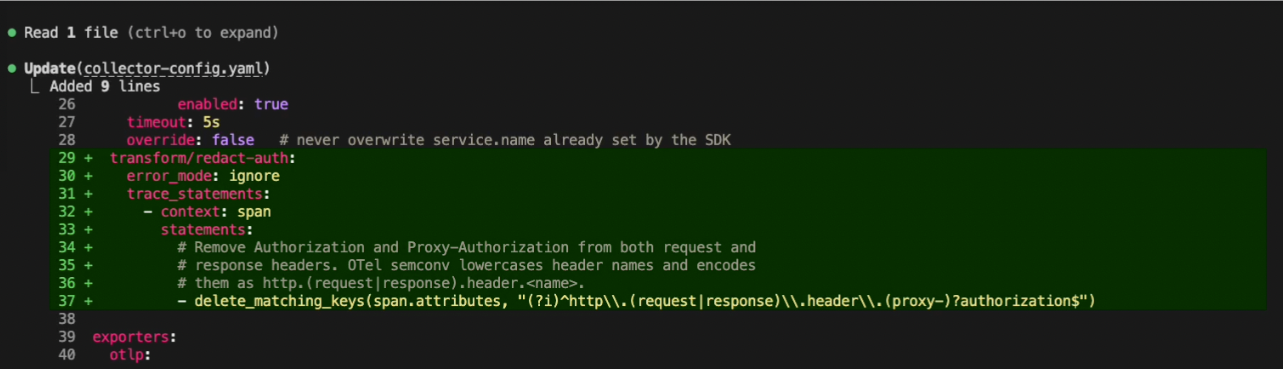
The screenshot below shows the generated OTTL statement, a table of the four header variants it covers in a single regex, and the reasoning behind each decision, including why the processor is placed after resourcedetection and before the exporter, and why error_mode: ignore is the correct production default.
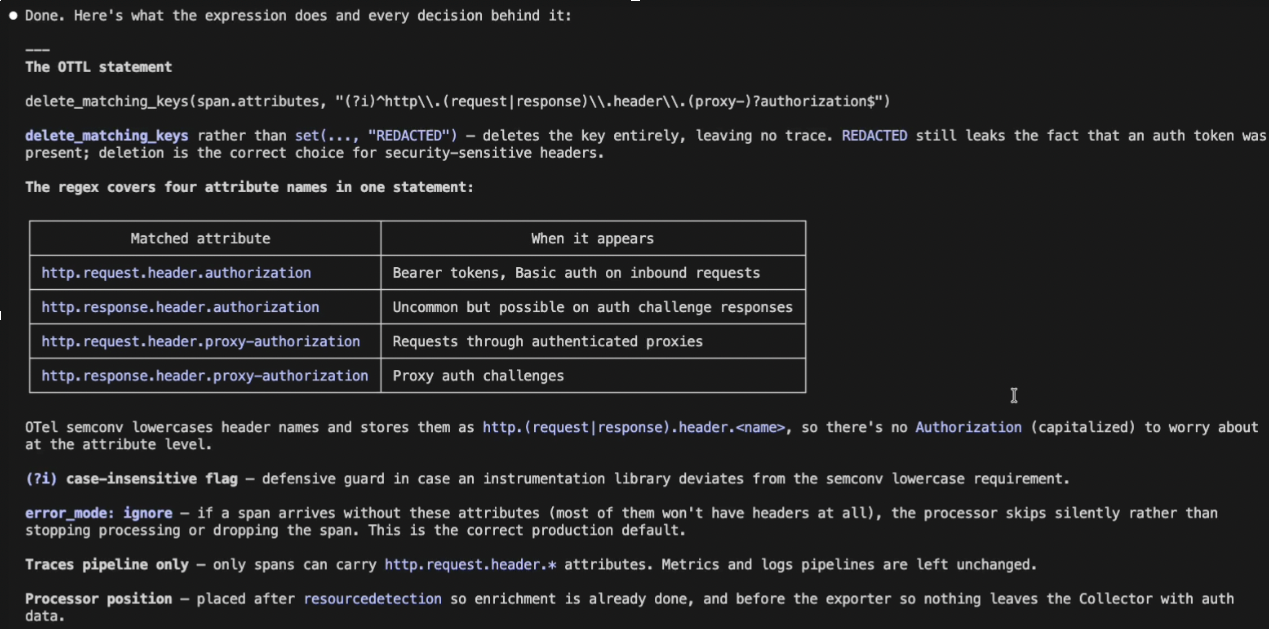
With this in place, your traces reach Dash0 clean regardless of which service generated them.
Some common OTel mistakes the skills prevent
Beyond the specific issues covered in the workflow above, the skills prevent a class of mistakes that come up consistently in AI-generated instrumentation.
Emitting unstructured logs: Plain text log lines like console.log("payment failed for user 123") cannot be queried, filtered, or correlated with traces in Dash0. The skill teaches the agent to emit structured logs with named fields using the OTel Logs API or a logging library bridged into OpenTelemetry. Structured logs are queryable, filterable, and automatically correlated with the trace context of the request that generated them.
Using span events instead of log records: Agents trained on older documentation tend to reach for span.addEvent() for everything. OpenTelemetry is deprecating the Span Event API in favor of a simpler model where events are logs emitted via the Logs API and correlated with traces through context. The skill follows the current guidance and directs the agent to emit events through the Logs API instead of attaching them directly to spans.
Missing trace context on logs: Logs without trace_id and span_id cannot be correlated with traces in Dash0. You can see that a request failed and that an error was logged, but you cannot connect the two. The skill ensures the agent configures logging libraries to inject trace context automatically, so every log line is navigable from the trace that produced it.
Using the wrong metric instrument type: A histogram is the only instrument type that gives you percentiles. If you want p50, p95, or p99 on request duration, you need a histogram. A gauge measures a value at a point in time. A counter only goes up. Neither can produce percentile data. The otel-instrumentation skill teaches the agent to choose the right type for each measurement.
Putting user IDs on metrics: A user_id label on a metric creates one time series per user. At any meaningful scale that is enough to destabilise a metrics backend and generate unexpected costs. User context belongs on spans, where each value is attached to a specific trace and does not create cardinality at the metric level.
Mixing signals in a single Collector pipeline. The Collector requires separate pipelines for traces, metrics, and logs. Putting all three signals into one pipeline causes a runtime error. The otel-collector skill always generates three distinct pipelines.
Inventing attribute names that already exist. The OpenTelemetry Attribute Registry defines standard names for hundreds of common attributes. When agents invent names like request_user_id instead of enduser.id, or http_method instead of http.request.method, the result is telemetry that does not work with Dash0 derived attributes, built-in dashboards, or cross-service queries. The otel-semantic-conventions skill teaches the agent to search the Attribute Registry before choosing a name, which significantly reduces the chance of inventing something that already has a standard equivalent.
Prompts reference
Once the skills are installed, you can use plain language to describe what you need. Here are some prompts to get you started across common observability tasks.
Fixing instrumentation problems
-
My spans are missing the parent trace ID so they show up as disconnected in Dash0. Find where context propagation is being lost and fix it.
-
My service is instrumented but I am not seeing any spans in Dash0. Help me debug why telemetry is not reaching the backend.
-
The span names in my traces are all showing as the route pattern instead of a meaningful operation name. Fix the span naming to follow OpenTelemetry conventions.
-
I added OpenTelemetry to this service but the traces are incomplete. Some spans are missing and the waterfall has gaps. Review the instrumentation and fix what is wrong.
-
This service makes outbound HTTP calls but those calls do not appear as child spans in the trace. Fix the outbound request instrumentation.
-
The duration on my spans looks wrong. The root span is shorter than its children. Find the timing issue and fix it.
Improving telemetry quality
-
Look at the attributes on my spans and tell me which ones have cardinality problems and how to fix them.
-
My error rate in Dash0 looks wrong. Review how span status codes are being set in this service and correct any mistakes.
-
This service is missing resource attributes. Add service.name, service.version, and deployment.environment using environment variables.
-
This service emits logs but they are not correlated with traces. Add trace context to the logs so I can jump from a trace to the related log entries in Dash0.
-
Review the metric names in this service and check them against OpenTelemetry naming conventions. Rename anything that does not follow the standard.
-
This service has no metrics at all. Add the standard HTTP server metrics following OpenTelemetry semantic conventions.
Collector and pipeline
-
Add tail sampling to this Collector config so that slow requests and errors are always kept but fast successful requests are sampled at 10 percent.
-
This Collector config sends all telemetry to a single backend. Update it to fan out traces to both Dash0 and a local Jaeger instance for debugging.
-
Add a batch processor to this Collector config and explain the tradeoffs between timeout and batch size for our traffic volume.
-
This Collector config has no queue or retry configuration. Add persistent queue and retry settings so telemetry is not lost if Dash0 is temporarily unreachable.
-
Review this Collector config and tell me what will happen when memory usage spikes. Add the processors needed to prevent an OOM crash.
-
Add a filter processor to this Collector config to drop debug-level logs before they reach Dash0 but keep everything else.
Security and compliance
-
Write an OTTL expression to drop all spans from the health check endpoint before they leave the Collector.
-
Write an OTTL expression to hash the user email address in log bodies before export rather than dropping it entirely.
-
Add an OTTL filter to drop any metric datapoints where the service.name attribute is missing so incomplete telemetry does not reach Dash0.
-
This service logs SQL queries and some of them contain user data. Write an OTTL expression to redact anything that looks like a personal email address from log bodies before export.
Kubernetes
-
This service runs on Kubernetes. Add the pod name, namespace, node name, and container name to all telemetry using the Downward API.
-
Configure the OpenTelemetry Collector as a DaemonSet that collects host metrics from every node and forwards them to Dash0.
-
This service is deployed on Kubernetes but the traces in Dash0 do not show which pod or node each request came from. Add the missing Kubernetes resource attributes using the OpenTelemetry Operator.
-
My Collector is deployed as a gateway but I need it to also run as a DaemonSet agent on each node. Help me split the config into agent and gateway deployment patterns.
Automating instrumentation reviews in CI with Claude Code
This section applies to teams using Claude Code. Other agents support similar headless workflows through their own configuration mechanisms.
When you use Claude Code, the skills do not just work interactively in your terminal. You can run Claude Code non-interactively in a CI pipeline so that every pull request gets an automatic instrumentation review without a human having to look at it. For platform and SRE teams managing multiple services and multiple developers, this is the difference between enforcing observability standards and hoping people follow them.
The setup relies on a CLAUDE.md file in your repository root and the claude -p command, both of which you can find in the Dash0 Agent Skills repository along with a complete GitHub Actions workflow. The CLAUDE.md tells Claude Code which skills to use for which tasks. Without it the agent still has access to the skills but has no explicit instruction on when to activate them. The claude -p command runs Claude Code non-interactively. It takes a prompt, does the work, and exits. No terminal session required. Point it at any pull request and it will review the instrumentation changes against the same skill rules your agent used to write them.
Final thoughts
In this guide you installed Dash0 Agent Skills and walked through a complete observability workflow: instrumenting a Node.js service, auditing the result for semantic convention compliance, generating a production-ready Collector pipeline, and redacting sensitive data before it leaves your infrastructure. You also saw the class of mistakes the skills prevent by default and a reference of prompts you can use across any language or framework.
As your team ships more AI-generated code, the observability gap only gets more expensive to close. Try it yourself and see how much one command improves your observability!