Last updated: January 9, 2026
Website Monitoring with OpenTelemetry and Dash0
Website monitoring is the most direct way to understand how real people experience your product in production, on real devices, across real networks, with real browsing habits.
This guide describes how Dash0 Website Monitoring works, how it is instrumented, and how the resulting data can be used across frontend, backend, SRE, product, and marketing workflows. Each section includes a short video that demonstrates the concepts in practice and shows how to apply them in real scenarios.
Who this guide is for
This guide is intended for teams responsible for the behavior, performance, and reliability of web applications in production, including:
-
Frontend engineers instrumenting client-side applications and optimizing real user performance
-
Backend engineers correlating frontend activity with distributed traces
-
SRE and platform teams managing observability, reliability, and cost
-
Product and marketing teams analyzing user journeys, drop-offs, and conversion behavior.
1. What Is Website Monitoring?
Website monitoring, often called Real User Monitoring (RUM), answers a simple question: what did users actually experience?
Instead of synthetic tests or averaged metrics, Website Monitoring operates on real user sessions across real browsers, devices, locations, and navigation patterns. Performance metrics, errors, and interactions are captured in the context of individual sessions, making it possible to understand impact and root cause directly.
Dash0 Website Monitoring is built on OpenTelemetry standards:
-
Web SDK instruments browser APIs (Navigation Timing, Resource Timing, Performance Observer)
-
Telemetry data follows OpenTelemetry semantic conventions
-
OTLP protocol encodes and transmits spans to Dash0’s ingestion endpoint
-
Correlation via trace context propagation links frontend and backend spans
2. Installation & Initialization
Dash0 Website Monitoring is designed to be simple to deploy and safe to run in production environments. Instrumentation is performed by installing the Dash0 Web SDK and initializing it once at application startup.
The SDK is fully open source and built on OpenTelemetry. This provides a vendor-neutral data model and allows frontend telemetry to integrate cleanly with existing observability infrastructure.
Detailed setup instructions and code examples are available in the documentation.
Once deployed, telemetry begins flowing automatically. Sessions, page views, and spans become visible in the Dash0 Website Monitoring interface in near real time, allowing teams to verify instrumentation immediately and start analyzing real user behavior.
3. Core Web Vitals & Real Performance
Dash0 automatically captures Core Web Vitals for real user sessions:
-
Largest Contentful Paint (LCP): Time to render the largest visible element.
-
Interaction to Next Paint (INP): Responsiveness to user interactions.
-
Cumulative Layout Shift (CLS): Visual stability during page load.
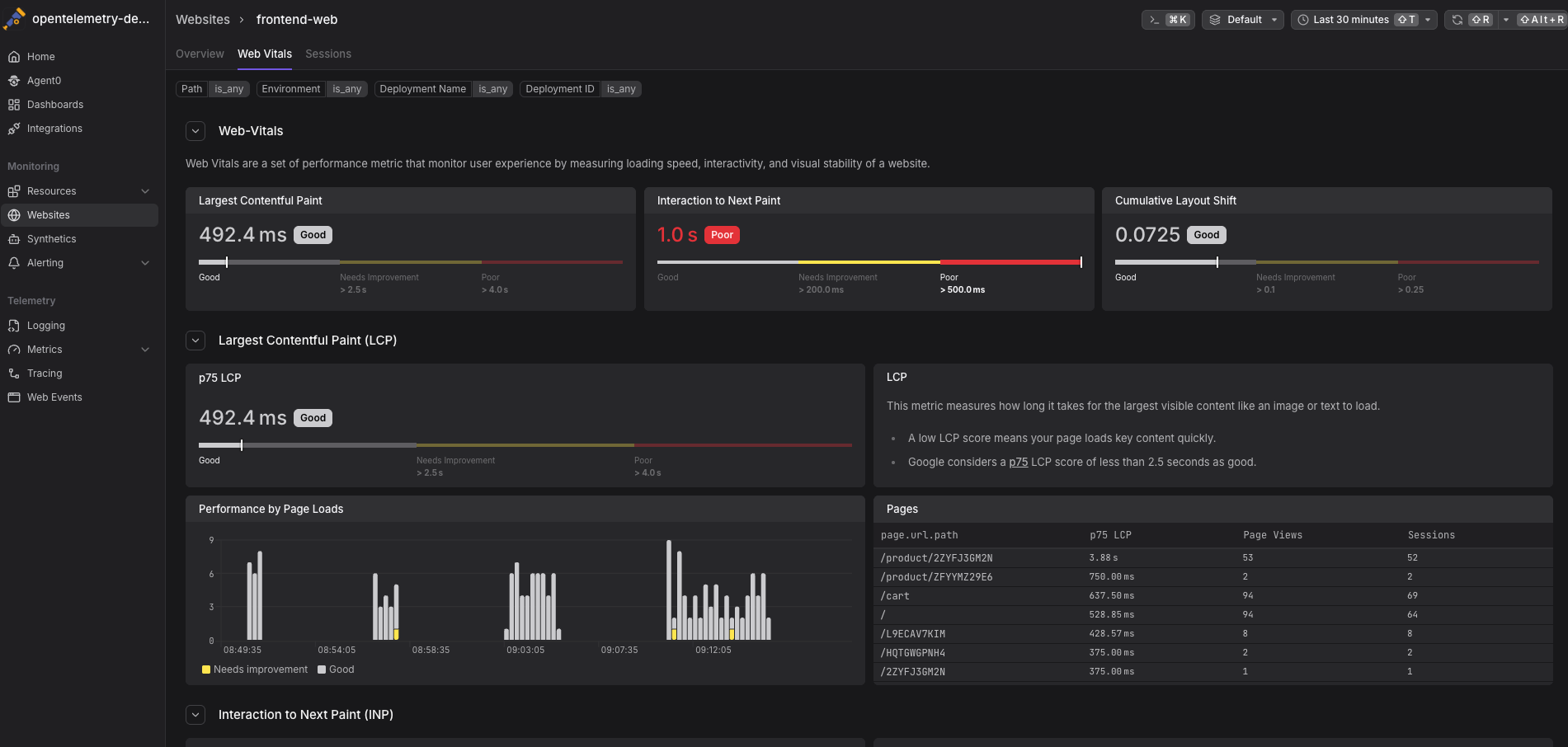
These metrics are collected per session and tagged with contextual attributes such as browser, operating system, device type, geographic location, page URL, and referrer.
Percentiles highlight performance issues affecting slower users while avoiding skew from extreme outliers. Google uses the 75th percentile of Web Vitals as a ranking signal, making P75 especially relevant for real-world user experience and SEO. From an aggregated metric, it is possible to drill directly into the individual sessions that contributed to poor scores and inspect detailed timing information.
4. Sessions, Tabs and User Journey Analysis
Users do not navigate applications in linear paths. They open multiple tabs, switch between them, skim content, encounter errors, and continue browsing.
Dash0 captures complete user sessions, including:
-
Multiple page views within the same session
-
Browser tab creation, focus and visibility changes
-
Navigation timing for each page load
-
Errors and exceptions in their full context
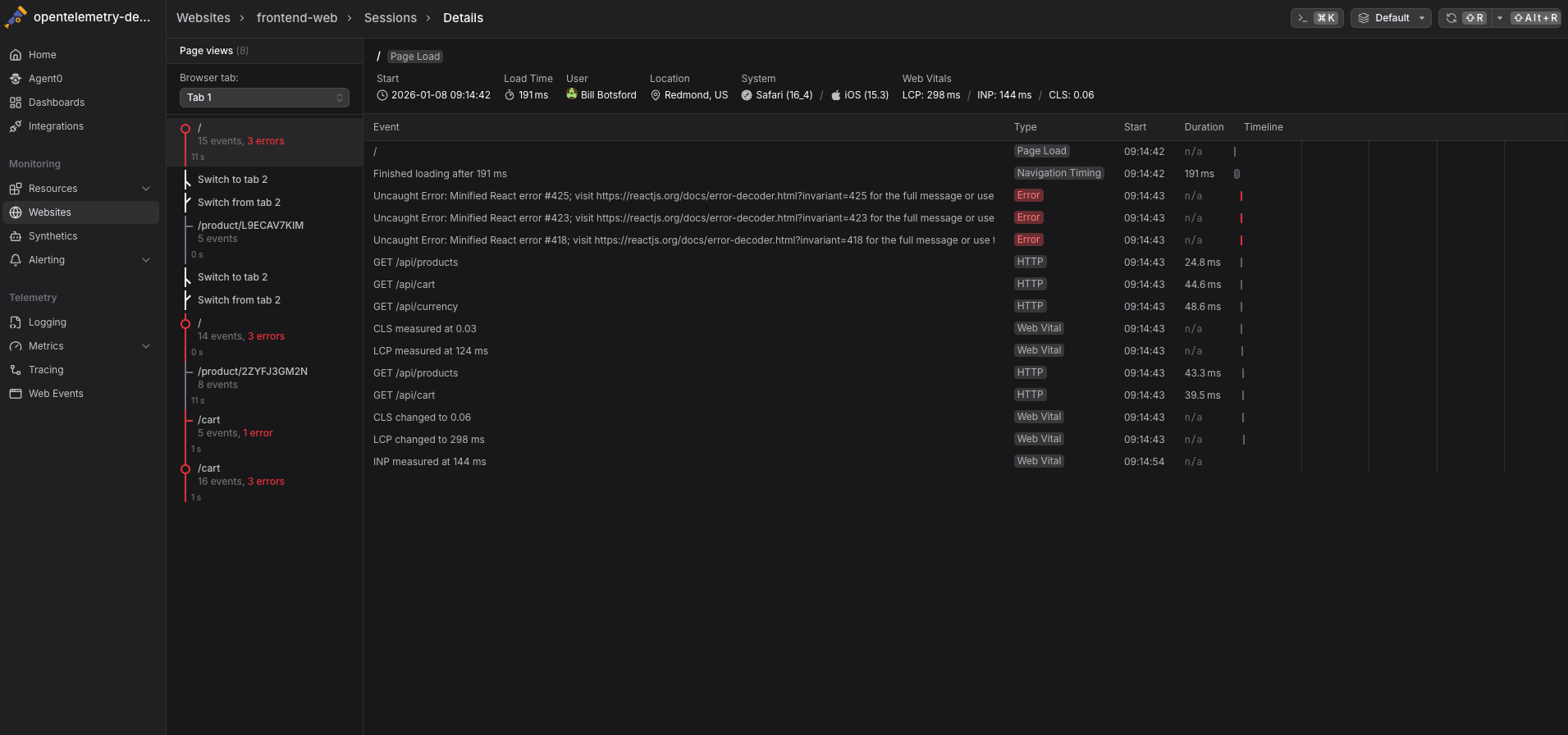
For every page view, waterfall timelines break down where time is spent across document loading, resource fetching, backend requests, and user interactions. This makes it possible to understand not just that a page was slow or unstable, but why it happened and which part of the system was responsible.
5. Frontend-to-Backend Correlation
Website Monitoring in Dash0 extends beyond the browser. Frontend telemetry is automatically linked to backend distributed traces through OpenTelemetry trace context propagation, creating a continuous view from user interaction to backend execution.
This correlation makes it possible to:
-
See which backend requests were triggered by a specific user action or session
-
Trace user-perceived latency back to the exact service, API, or dependency responsible
-
Jump directly from a frontend session to the backend trace it generated
-
Navigate from a backend trace back to the real user session that initiated it
Trace waterfalls visualize how time is spent across frontend and backend components, helping teams quickly distinguish between client-side delays and backend bottlenecks. Instead of treating frontend and backend issues as separate problems, teams can investigate them as a single, end-to-end workflow.
6. Product & Marketing Use Cases
Website monitoring data isn’t only for engineering teams. Product and marketing teams can use session-level telemetry to understand how real users experience the product across devices, locations, and journeys.
Common use cases include:
-
See how users navigate the site and identify the most visited pages
-
Understand multi-step journeys and pinpoint where users drop off
-
Analyze behavior by geography, browser, device, and operating system
-
Investigate errors and performance issues in the context of real user sessions, not isolated logs
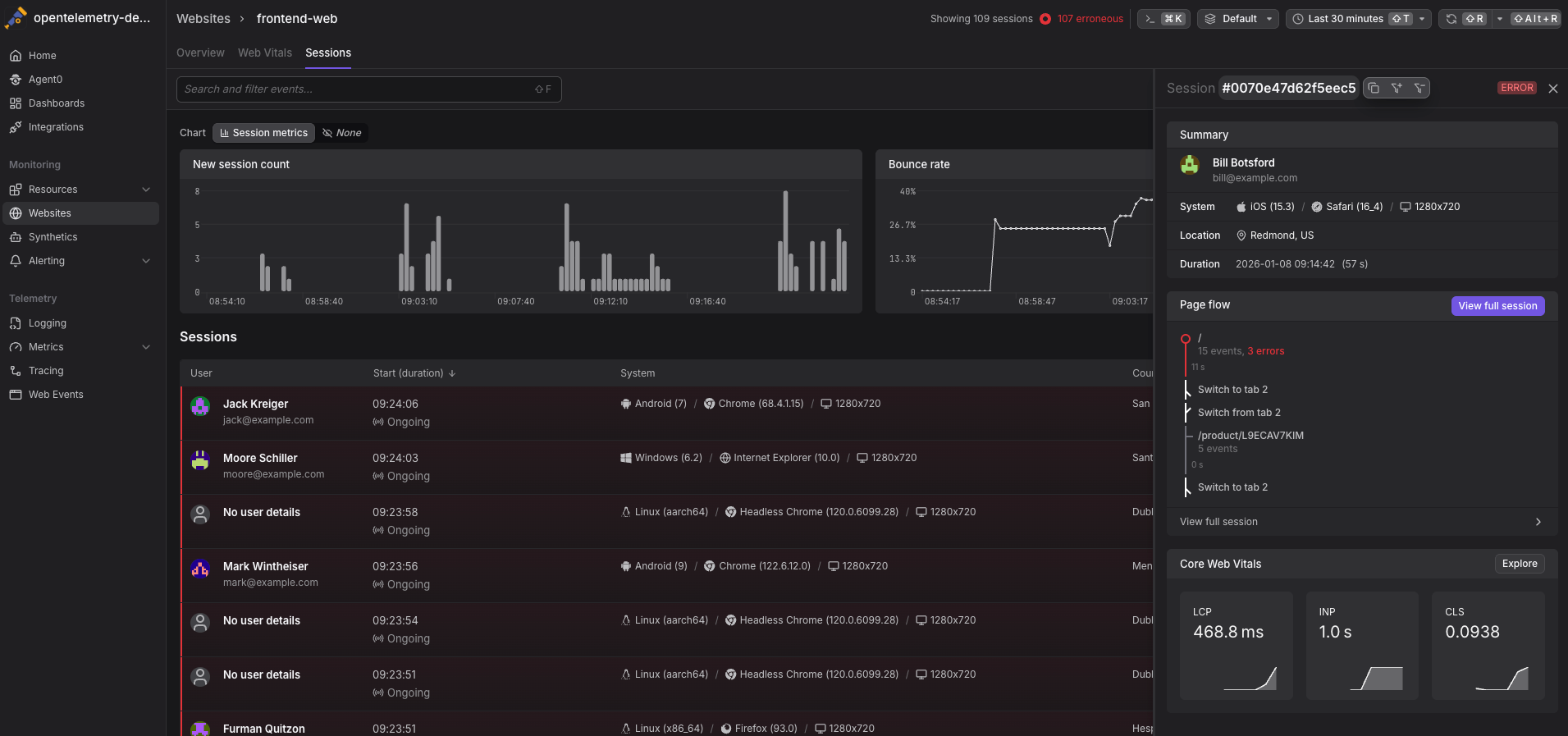
Because Dash0 follows OpenTelemetry semantic conventions, session attributes such as user agent, device, and location are captured in a structured and standardized way. This allows teams to slice and analyze user behavior consistently across dimensions, using the same underlying telemetry as engineering teams.
7. Privacy & Compliance
Dash0 is privacy-first by default. Users are anonymous unless you explicitly identify them, and you control exactly what data is collected. With filtering, redaction, and sampling, teams can meet compliance requirements while still retaining the data needed to understand performance and behavior in production.
Compliance Considerations
-
GDPR: Anonymous sessions are not considered personal data. User identification requires consent and a data processing agreement.
-
CCPA: If you identify users, provide mechanisms for data access and deletion requests.
-
Data residency: Dash0 supports region-specific ingestion endpoints.
8. Pricing & Cost Management
Dash0 uses event-based pricing rather than session-based pricing, so costs scale with the telemetry you actually send, not how long users stay connected.
An event represents a single unit of instrumented activity, such as a page load, user interaction, network request, or error. This model avoids cost inflation caused by long-lived or idle sessions and makes pricing more predictable as traffic grows.
To give teams even more control, Dash0 includes Sift, which intelligently filters and prioritizes high-value telemetry at ingest time. With Sift, you can reduce noisy or low-signal events while preserving critical data like errors, slow interactions, and performance regressions.
The result is lower observability costs without sacrificing visibility into user experience or application health.
9. Summary
Dash0 Website Monitoring provides end-to-end visibility into how users experience your application in production. Built on the standards-based OpenTelemetry Web SDK, it captures real user performance data, including Core Web Vitals, navigation timing, errors, and user interactions, without relying on synthetic tests or coarse averages.
Sessions, page flows, and waterfall timelines allow teams to understand performance and errors in context, while trace correlation connects frontend activity directly to backend distributed traces. This shared, consistent view supports frontend engineers, backend engineers, SREs, and product teams working from the same underlying data.
By bringing together real user behavior, performance metrics, and backend execution in a single platform, Dash0 shortens time to resolution and enables better decisions around user experience, reliability, and conversion. Instead of guessing where issues originate, teams can see exactly what happened, who was impacted, and where to focus next.
Get started with Website Monitoring today!