22 updates shipped to Dash0 in September 2026: Run Agent0 threads in parallel, Focus on your data with a quieter app layout, Choose who can edit your automations and more.
Agent0 threads keep running when you switch away, and the bottom bar shows which ones are still working and which have finished.
Agent0 threads, your conversations with Agent0, now keep running when you open another thread or leave the page. Until now, switching away meant losing sight of the thread Agent0 was still working on, so you waited or kept going back to check.
The bottom bar, along the bottom of the screen, lists your running and recently finished threads. A spinner marks a thread that is still working, and a dot marks one that finished while you were somewhere else. Select a thread, or press ⌘+Shift+9 (Mac) or Ctrl+Shift+9 (Windows/Linux) and use the arrow keys, to return to its answer. While the page stays open, the prompt you had not sent and any follow-up you queued are still there. Removing a thread from the bar does not stop it. See Run Threads in Parallel.
The Dash0 app has a new layout that puts your data first. Your content now sits on its own panel, the navigation around it is darker and calmer, and most separator lines are gone.
As Dash0 grew, borders, panels and navigation started to compete with your dashboards, traces and logs for attention. The new layout uses spacing and surface levels instead of lines to group elements, so each page has less noise. Nothing has moved, so you don't need to relearn anything.
Automations are now editable only by admins and the members and teams you share them with, and every team and member page lists the automations shared with them.
Until now, anyone who could read a dataset could change or delete every automation in it.
Now only admins and the people you share an automation with can edit or delete it, and everyone who can read the dataset can still read it. Select Share on an automation's page to give edit access to a member, a team, or every member. In Settings, each team and member page has a new Automations tab that lists the automations shared with them directly.
If you edited automations that someone else created, you can now only read them until someone shares edit access with you. The creator of an automation and admins keep their edit access.
New organizations can store their telemetry in AWS us-east-1 (N. Virginia), so US customers can hold their data on the east coast.
When you create an organization, the data storage region picker now offers AWS us-east-1 (N. Virginia) next to Oregon, Ireland, and the Netherlands. US customers had asked for an east-coast region.
Each region is a card showing the cloud it runs on, the place, and the cloud's own region ID. Dash0 stores that organization's telemetry in the region you pick, and you cannot change the region once the organization exists. Organizations that already exist keep the region they were created in.
See Organizations for the full region list and what the choice affects.
Admins can now import Agent0 custom skills from GitHub and GitLab, pick the ones they want, and pull in changes with one click.
If your team keeps runbooks and agent skills in Git, next to the code they describe, Agent0 couldn't use them directly. Until now, bringing them to Agent0 meant copying each one into Dash0 by hand, and the copies drifted as soon as someone changed the original.
Now an admin can import them. In Organization Settings > Agent0 > Skills, select Import from Git. Scan any public GitHub or GitLab repository, or a private GitHub repository through the GitHub integration. Dash0 finds every SKILL.md, including skills with supporting files, and imports the ones you select. When a skill changes in the repository, select Update and Dash0 reads it again from the branch or tag you imported from.
A new dataset setting masks payment card numbers and replaces verification codes, PIN blocks, and track data in logs, spans, web events, and metrics before Dash0 stores them.
Telemetry from payment paths can carry cardholder data, such as a card number in a logged request body, a query string, or an exception message. Filtering it at the source is the strongest control, but a new service or a forgotten rule can still let one through.
Turn on Redact cardholder data for a dataset, and Dash0 detects likely card numbers in logs, spans, web events, and metrics before it stores them. Card numbers keep their first six and last four digits, such as 411111******1111. Verification codes, PIN blocks, and track data become <REDACTED>. Dash0 never drops a record, so traces and log searches keep working. Detection is pattern-based, so it does not catch encoded, encrypted, or split card numbers.
Two metrics, dash0.redaction.values_scanned and dash0.redaction.values_redacted, show what Dash0 scanned and what it redacted. See Redact Cardholder Data for what gets redacted, the limitations, and how to turn it on.
A new Forecast tab projects your spend for a full billing cycle, priced against your real tiers, right on the Billing & Plans page.
The new Forecast tab projects what you'll spend for a full billing cycle, based on your recent usage rate. Pick a baseline window and Dash0 scales that window's usage rate to a full cycle, then prices it against your org's real pricing tiers and any custom prices, the same way your invoice is calculated, broken down by SKU and dataset.
This is now the recommended way to estimate spend. See Forecast Your Spend to get started.
Automations now trigger on GitHub Actions workflow runs, jobs, manual dispatches, check runs and check suites, filtered by conclusion, status, branch or workflow name.
A failed CI run is usually the first sign that something is broken, but acting on it still takes a person.
Someone has to notice the red build, open the logs, and work out what changed before anything gets fixed.
Automations now trigger on five GitHub Actions events: workflow runs, workflow jobs, manual workflow dispatches, check runs and check suites.
Scope any of them by organization, repository, branch or workflow name, and filter by conclusion or status, so an automation starts on the failures you care about and stays quiet for everything else.
From there the automation picks up the failed run, works out why it broke, and can push a fix so the workflow runs again.
See the documentation to set one up.
Uptime tells you your servers are fine. Service level objectives tell you your customers are, on any signal you already send to Dash0.
Most teams know, deep down, that they should have service level objectives. Far fewer actually do, because getting there is a whole project. You have to agree on what to measure, write the queries behind it, tune the thresholds, and hope you picked the right ones.
Dash0 now paves for you the road to SLOs. Find SLOs under Alerting, point one at any signal you already send, and you get two numbers: how much failure you can still afford this month, and how fast you are using it up. Agent0 drafts the definition if you are not sure what to measure. One click turns the SLO into an alert, so you find out before the month is gone.
Define your SLOs in Dash0, or keep them in your repository and apply them with the CLI or Terraform (and soon the Operator for Kubernetes). True to our commitment to open standards, we use OpenSLO as the serialization format, the same way we use OpenTelemetry for telemetry, Perses for dashboards, and PromQL for queries. This enables you to define your service levels with zero vendor lock-in.
Install the operator in OpenShift via Helm and start sending your telemetry to Dash0.
Starting with version 0.155.0, the Dash0 Operator is compatible with OpenShift and can be installed via Helm as usual.
To do this, set operator.openShift.enabled to true. The operator will then deploy the required SecurityContextConstraints resource, allowing its components to run with the privileges they need to function correctly.
The new sync-assets action keeps your dashboards and check rules in sync with your repo, right from CI.
When you're doing GitOps and you're deleting a dashboard, check rule, or any other asset from your repo, it should disappear from Dash0, too.
Wiring that kind of cleanup into a GitHub Actions workflow took a significant effort, since the right way to do it changes depending on what triggered the CI run.
The new sync-assets action handles that for you.
Add it to a workflow (see the documentation), and it keeps assets in sync on every push, manual run, and scheduled run, with no additional tooling or state management needed.
Anyone with read access to a dataset can now create, edit, and delete Agent0 automations in it, the same way they already can with dashboards. Setting up an automation no longer needs an administrator.
Agent0 automations now follow the same permission model as dashboards. Anyone with read access to a dataset can create automations in it, and can edit and delete the automations created there, including ones somebody else made.
Automations managed as code through the API or Terraform stay read-only in Dash0. Update those at their source and apply again. Everyone can still read them, and administrators can delete them. To narrow or extend access on a single automation, use the Permissions section of its general settings.
Agent0 now runs on the model you choose. Pick a level per thread, per automation, or as your default for Chat, Automations, Slack, and MCP, and trade credits for capability where it matters.
Not every question deserves the same model. Reading one service's error logs is cheap work. Chasing a symptom across four services during an incident is not, and answering it with a model that cannot hold the whole picture wastes more than credits. Until now Agent0 made that call for you, on every run, with no way to change it.
Agent0 now offers four levels, Light, Standard, Advanced, and Premium, plus a reasoning effort that controls how long the model thinks before it answers. Pick one in the Chat prompt toolbar, store one on an automation, name one on an MCP runTask call, or set your own default for each of those under Settings → Agent0. Slack answers say which level and effort they ran with and link to the Slack default in settings. A level names a capability step rather than a model, so Dash0 keeps the model behind each one current and your setting keeps meaning what you chose. Credits are charged on what a turn consumed, priced at the model that served it, so the cost of a level is the cost of the run and not a flat surcharge. Each answer reports the level and effort it ran with. See Model Selection.
One thing to know before your next invoice. Agent0's default level is now Advanced, up from the single model every run used before. It answers harder questions on the first pass, and it uses more credits per turn than the old default did. If your work is mostly routine triage, set your Agent0 Chat and Automations defaults to Light or Standard under Settings → Agent0 and keep the old cost profile. Every run shows its real credit cost, and a monthly credit budget still caps the total.
Not every level runs in every region. A level Dash0 cannot serve for your organization is disabled in the picker with the reason.
AI Coding Insights becomes AI SDLC Insights. One page shows what your coding agents cost, who has adopted them, which tools and skills they lean on, and how AI-assisted pull requests move from first prompt to merge.
Most engineering organizations can say what they spend on coding agents. Fewer can say what that spend buys. Do AI-assisted pull requests merge faster than the rest, or do they pile up waiting for review? Which teams and repositories have picked the agents up, and which tools, MCP servers, and skills do those agents lean on? The answers sit between agent telemetry and your pull requests, and they are hard to read together.
AI SDLC Insights is the reworked successor to AI Coding Insights, and it reads them together. The Overview leads with total spend, active users, cycle time, average cost per user, and the share of assisted pull requests. Flow through the pipeline shows where merged pull requests slow down between coding, review, and merge, and Assisted vs non-assisted cycle time compares the two at the percentile you choose. Cost, Adoption, Productivity, and Tools and skills each go deeper, with pull request metrics such as time to first review, pull requests awaiting first review, and review depth per merge. Every entry in Sessions opens a details page with its prompts, tools, and conversation. Links into AI Coding Insights redirect to the new page.
HTTP semantic-convention attributes on Lambda handler spans used to depend on your runtime — now the extension extracts them itself, for every language.
HTTP semantic-convention attributes on a Lambda handler span — http.request.method, http.route, http.response.status_code — used to depend on which language you deployed in. Python's auto-instrumentation extracted them from the API Gateway event; Node.js got nothing.
The Dash0 extension now does this parsing itself, independent of any runtime SDK. It reads the raw Lambda invocation and response payloads directly, so it works the same way for every supported runtime. If no runtime SDK is loaded to create the handler span, the extension creates that span itself and sets the attributes on it.
Covered triggers: REST API (v1) and HTTP API (v2) proxy integrations, and Lambda Function URLs. Each handler span gets http.request.method, url.path, url.scheme, http.route, server.address, server.port, client.address, network.protocol.version, and http.response.status_code attached automatically — no code changes required.
Because these are ordinary span attributes, you can filter and group on them right away, both in the Trace Explorer and in the invocations view of a Lambda function. Filter by http.response.status_code to pull up only the failed invocations, or group by http.route to see which endpoint is responsible for them. This makes triage faster: a noisy function narrows down to one endpoint and one status code without you touching any code.
In order to use this new feature, upgrade to the dash0 lambda extension version 23 or higher.
Teach Agent0 the procedures only your team knows. An admin can now write custom skills for your organization, and anyone can call one in a chat with /, or let Agent0 pick the right skill on its own.
Agent0 already knows how to query spans, build a PromQL query, or create a dashboard. What it could not know is how your team works: the runbook you follow when checkout latency climbs, how your environments and datasets are named, what to check first for a problem you have seen before. Until now that context lived in your head, and you retyped it every time.
Now an admin can write it down once. In Organization Settings > Agent0 > Skills, add a custom skill with a name, a description of when Agent0 should use it, and the instructions to follow. Everyone in your organization can then invoke it by typing / in a chat, and Agent0 also reaches for a skill on its own when its description matches the request.
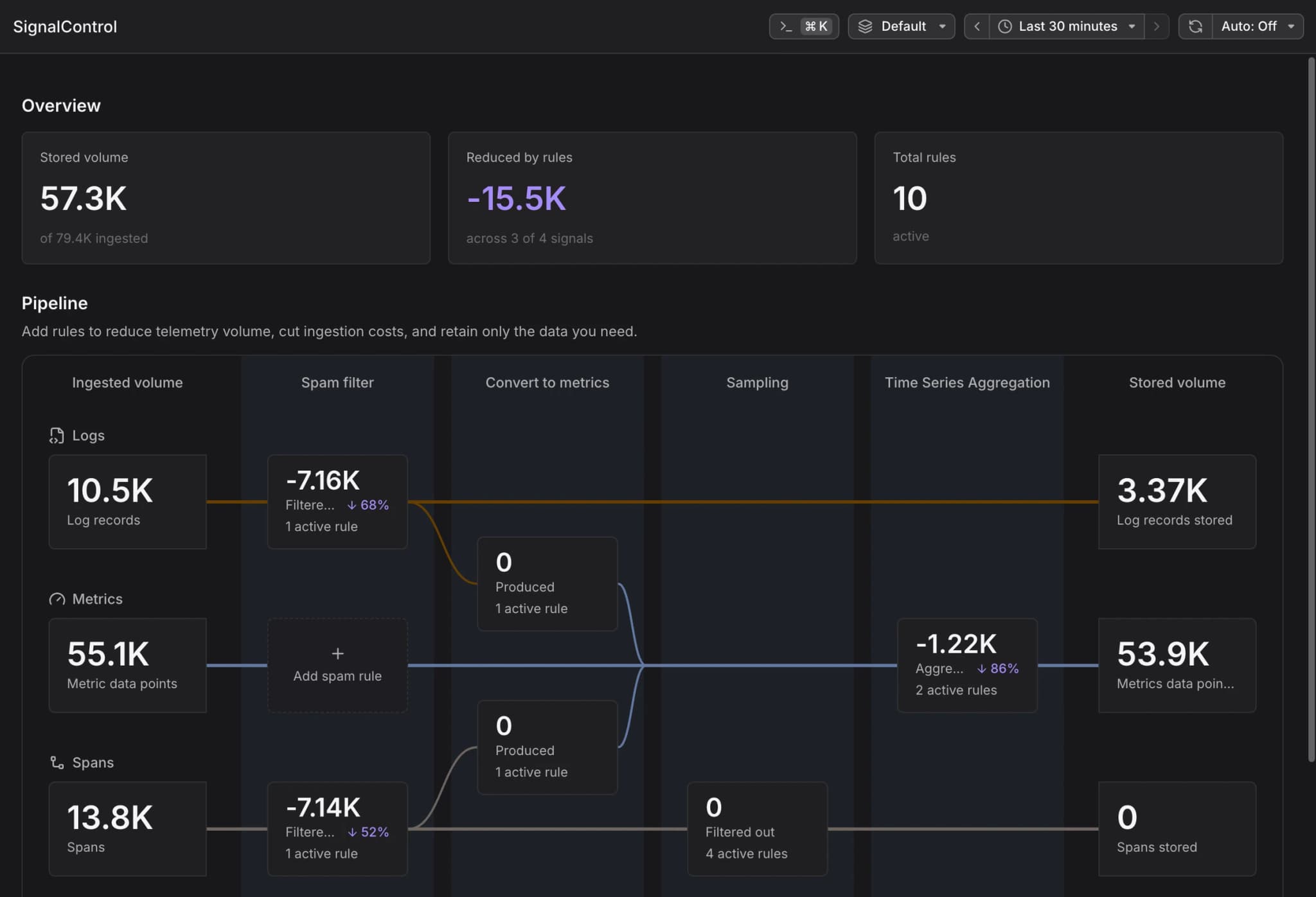
SignalControl, now in every Dash0 account, filters, samples, and aggregates telemetry before anything is stored, so storage is billed only on what you keep.
At real scale, most telemetry is never looked at, but it all gets stored and paid for anyway. SignalControl is Dash0’s ingestion pipeline: it filters, samples, and aggregates telemetry the moment it arrives, before anything is stored, so you keep the signal and stop storing the noise. It is included with every account from today. There is nothing to buy or enable, and until you create a rule, everything passes through untouched.
Spam filters. Drop known noise at ingestion, for every signal type. Each filter charts exactly what it catches over time, so you always know which rules are earning their keep.
Distributed tail sampling. You choose what to keep and what to sample out, and the decision is made only after the whole trace is visible. What makes Dash0’s version different is that it works no matter where the trace’s spans land: different collectors, even different clusters. Tail sampling normally requires every span of a trace to pass through the same collector so it can be judged as a whole, which means re-plumbing your pipeline and makes that collector the bottleneck at exactly the scale where sampling matters most. Dash0 separates the sampling decision from the collectors themselves, so a whole fleet reaches one consistent keep-or-drop decision per trace, whatever your topology. The typical setup keeps every error, outlier, and slow request and samples out routine successes, but the rules are yours, and changes apply live with no collector restart.
RED metrics before sampling. Rate, error, and duration metrics are computed from 100% of spans before sampling drops anything, whether sampling runs at the Edge or in Dash0's cloud. If metrics came only from the traces you keep, dashboards would show the exceptions, not the truth. Sampling changes which traces you keep, never what your dashboards say.
Signal to metrics. Convert chosen attributes of spans and logs into metric series: filter the signals you care about, pick the attributes to carry through, and get latency histograms from spans and counters from logs. Computed before sampling, so the metrics reflect all traffic.
Time series aggregation. Aggregate metrics temporally (downsample 15-second scrapes to the resolution you actually chart) or spatially (collapse per-pod series into one per-service series), with the aggregate staying exact. Runs in Dash0’s cloud after ingestion, where metrics from every source converge.
Everything SignalControl drops is visible as kept versus dropped, per rule, so reduction is something you verify rather than trust.
SignalControl Managed runs in Dash0’s cloud. Send telemetry as you do today; nothing to deploy.
SignalControl Edge runs in your own Kubernetes cluster, as a gateway behind your existing central collector. Telemetry is enriched, filtered, measured, and sampled before it leaves your network, which also cuts egress. Nothing upstream of it changes, and your existing destinations keep receiving exactly what they receive today.
Either way, rules are managed in Dash0, in the UI or as code, and changes apply live with no restarts.
With the new ingestion and storage pricing, signals pay a small ingestion fee and storage prices apply only to what you keep, so what SignalControl drops never hits the storage line of your bill. Existing accounts move to the new pricing at the start of a billing period, never mid-period; see the pricing page for rates.
See the documentation to get started with SignalControl.
Dash0’s Google Cloud integration now lets you filter the resources to monitor and select individual metrics to collect. Coverage also expands to Google Kubernetes Engine, Memorystore for Redis, and Compute Engine VMs.
Monitoring a cloud service should not mean collecting every metric from every resource. You can now narrow collection to the resources you care about, down to a single service, and choose metrics one by one. Dash0 scrapes only what you select, giving you more control over metric volume and collection costs.
Choose your resource. Pick your metrics.
In your GCP integration’s Metrics tab, add filter conditions to choose which resources to monitor, then select the metrics to collect. The resource counts show how many resources are included and excluded before you save.
The same controls apply to the newly supported services: select the services you need, scope the resources, and collect the metrics that matter.
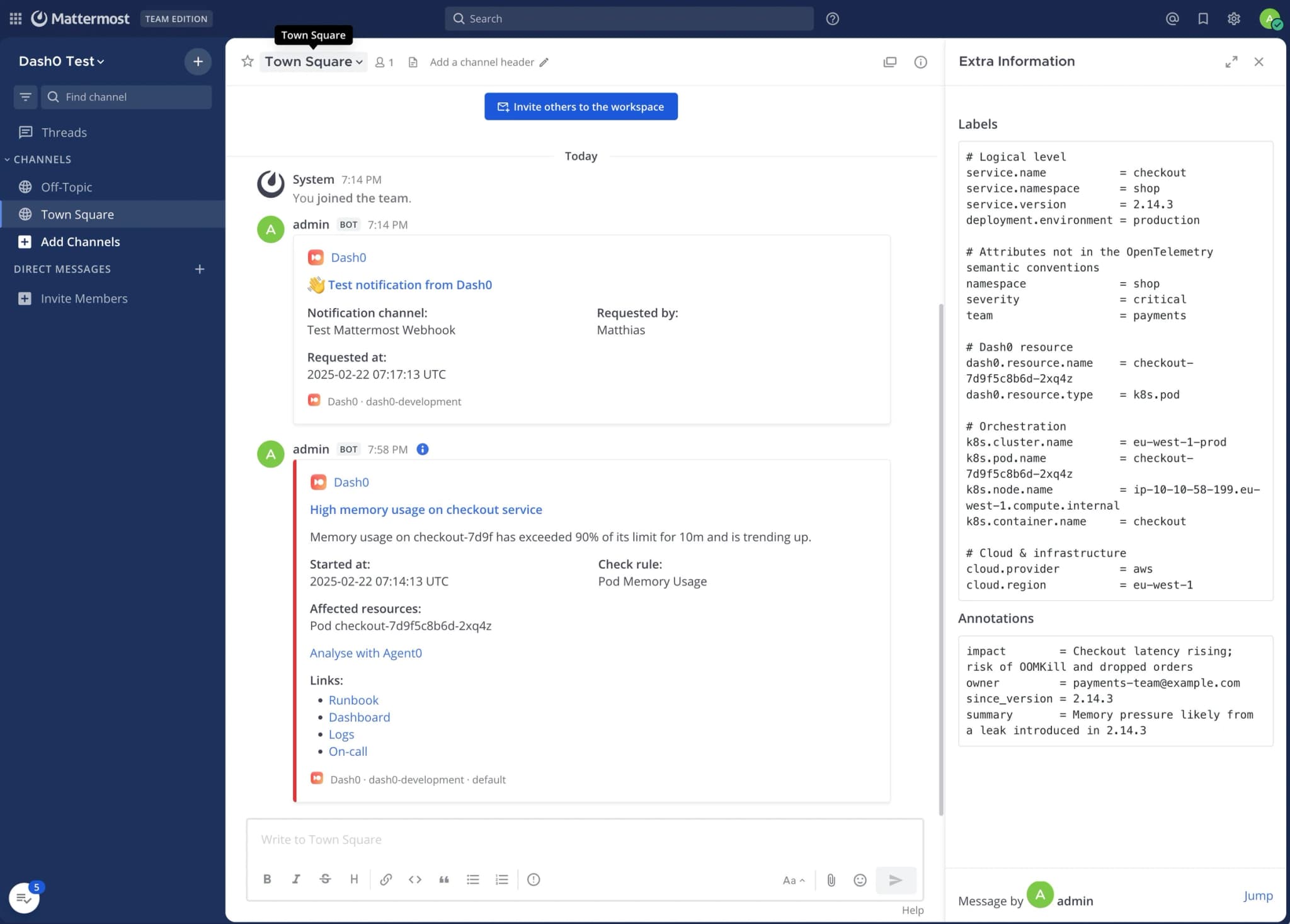
Labels and annotations go into the collapsed info panel, so the post stays readable and the detail is still one click away. Alerts carry an Analyse with Agent0 link that opens the failed check in Agent0 with its time range already set.
More details on how to set up the integrations can be found in our integration hub.
Available Dash0 plugins for Coding Harnesses (Claude Code, Cursor, Codex, GitHub Copilot CLI) are now available for Windows.
Few engineering teams all use the same operating system. If part of your team works on Windows, their AI coding sessions never reached Dash0. That gap is now closed.
The Dash0 agent plugins now ship Windows binaries for amd64 and arm64, for all four agents.
More details on how to set up AI Coding Insights can be found in the Integrations Hub.
Message @dash0 directly to chat with Agent0 in a private thread. Your DMs carry their own organization and dataset, so you can ask about data your teammates do not work in without posting it in a shared channel.
Not every question belongs in a channel. You want to check a service before you raise it with the team, or work in a dataset nobody else touches, and the choice was to post it where everyone reads it or leave Slack for the Dash0 UI. So the quick question does not get asked.
Agent0 now answers direct messages. Message @Dash0 a question, no tag needed, and the answer lands in a thread only you can read. The first time, it asks which organization and dataset to use, and that choice is yours alone: a channel's applies to everyone in it, so two people in the same workspace can point their DMs at different datasets. Every answer carries the pair it used, next to a Change organization / dataset button. Agent0 answers as you, using your Dash0 account, so it reads exactly the data you can read.
Cardinality is now a metric. dash0.metrics.timeseries reports your distinct series count, so you can chart it, alert on it, and group it by metric name or by any resource attribute.
Cardinality is now a metric. dash0.metrics.timeseries reports your distinct series count as a time series, so it works anywhere a metric works: a dashboard panel, a PromQL query, an alert check. dash0.metrics.timeseries is synthetic, computed from metric data you already sent, so there is nothing to turn on and no extra charge. Like every synthetic metric it carries no attributes of its own. You pick the dimensions by grouping in PromQL (or via the Query Builder):
promql
topk(10, sum by (otel_metric_name) ({otel_metric_name="dash0.metrics.timeseries"} offset 5m))
That gives you your ten largest metrics by series count.
otel_metric_name appears twice, and that is deliberate. The first matcher selects the synthetic metric. The second filters the data points underneath by their own metric name, so you can pin a single metric:
Use an offset between five and ten minutes. Dash0 syncs the underlying metric metadata with a short delay, and without the offset the last few minutes of the chart trail off toward zero.
Grouping by a resource attribute answers the other question, where the series come from rather than which metric they belong to. sum by (k8s_namespace_name) finds the namespace, sum by (service_name) finds the service.