
Last updated:
Model Selection
Agent0 runs on a language model, and not every question needs the same one. A quick "what broke in checkout?" is cheap to answer. A live incident that spans four services is worth a more capable model and more thinking time.
Model selection lets you make that trade. You pick a model level and a reasoning effort, and Agent0 runs the turn with them.
Model levels
A model level is a capability step, not a model name. Dash0 maps each level to a specific model and keeps that mapping current, so a level stays meaningful as models are released and retired.
| Level | Use it for | Credits |
|---|---|---|
| Light | Routine triage noise you look at fifty times a day. | Cheapest per run |
| Standard | A normal triage pass: read a service's error logs, summarize what broke. | Baseline |
| Advanced | Following a symptom across service boundaries when one signal does not explain the failure. | More per turn than Standard |
| Premium | Live incidents and postmortems, where a wrong answer costs more than the credits. | The most per turn |
The model behind a level changes over time. Dash0 moves a level to a newer model when that model is a better fit for the level, and the level name in your settings does not change. What a given answer actually ran on is reported on that answer, so you can always see the level and effort a turn used.
Levels your organization can use
Not every level runs in every region. A level Dash0 cannot serve for you is disabled in the picker with the reason:
- Not available in your region — the region your organization runs in does not offer this level.
- Temporarily suspended by the model provider — the upstream provider has suspended access.
- Suspended pending regulatory review — a regulatory restriction blocks the level in your jurisdiction.
A level your region does not offer at all is simply absent from the picker.
Reasoning effort
Reasoning effort controls how long the model thinks before it answers. Higher effort means more thorough responses, but takes longer and uses more credits.
- Default — the level runs at its own reasoning depth. This is what you get when you set nothing.
- Low, Medium, High, Extra high, Max — increasing amounts of thinking.
Levels differ in which efforts they accept, and the picker only offers the ones the selected level supports. Light runs at a fixed depth, so its effort menu is disabled entirely. The more capable levels start higher up the scale, so stepping up to one can move you off the effort you had chosen. The picker keeps your effort where the new level supports it, and otherwise falls back to that level's default effort.
If a stored effort is one the resolved level does not support, Agent0 runs the turn at that level's own default rather than failing.
Where model selection is set
Four things can supply a model level and a reasoning effort. The most specific one wins:
- The request — a level named on the call itself, which today means an MCP
runTaskargument. - The thread or automation — what you picked for this conversation, or what this automation stores.
- Your own default — your per-surface default in settings.
- The Dash0 default — what your region runs when nothing above applies.
Level and effort resolve independently. Setting only a level leaves the effort resolving from the next step down, so the pair that finally runs is always a combination the resolved level actually serves.
Your own defaults
Set your defaults at Settings → Agent0, under Default model. The table has one row per Agent0 surface:
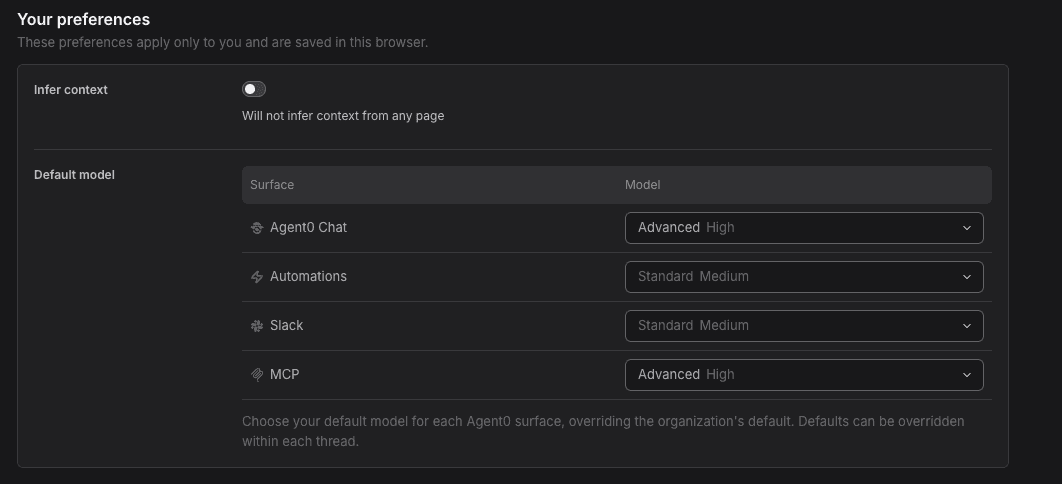
| Surface | What it covers |
|---|---|
| Agent0 Chat | The Agent0 page and the docked chat panel. |
| Automations | Automation runs that do not store a model of their own. |
| Slack | Mentioning Agent0 from Slack. |
| MCP | Investigations delegated over the Dash0 MCP Server. |
A row left on Default follows the Dash0 default rather than pinning the value it currently resolves to, so a later change to that default reaches you. The picker marks which level a row on Default resolves to today.
Per thread in Chat
Chat carries the model picker as a chip in the prompt toolbar, next to the +. You can switch mid-thread, and reopening a saved thread shows the model that thread ran with rather than your own default.
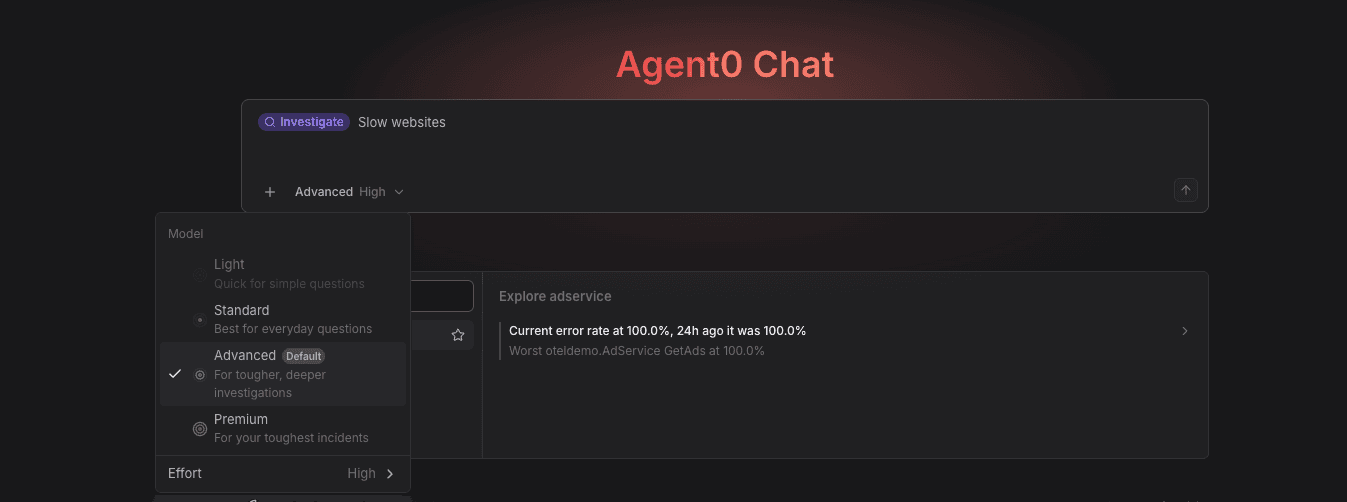
What a pick does depends on what you pick:
- Premium, or Max effort applies to that chat only. The menu says so, and the pick is never written to your settings, so its cost cannot outlive the conversation.
- Everything else is saved as your Agent0 Chat default, so the next new chat starts there too.
Per automation
An automation stores its own level and effort, resolved to the current model on every run. Set them in the Agent section of the automation form, under Model. See Configure General Settings.
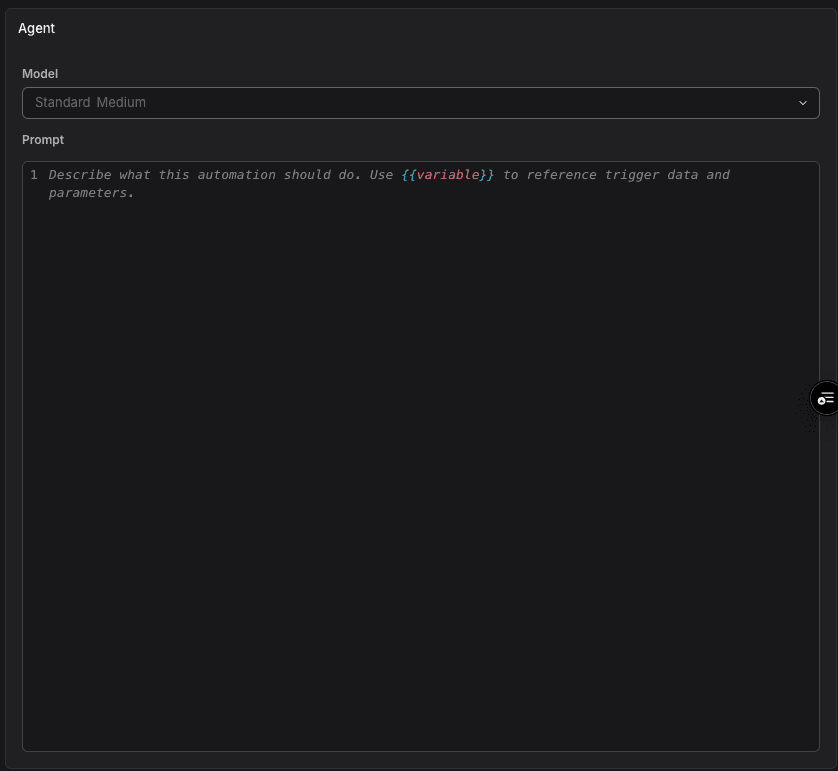
An automation that stores nothing runs on the Automations default. A scheduled automation pays its level on every run, so the choice compounds in a way a one-off chat does not.
Over MCP
An investigation delegated through the Dash0 MCP Server can name a modelClass and a reasoningEffort on the runTask call. Without one it runs the MCP default, and the connection tells your AI assistant on connect which level that is and which others it may ask for.
One limit: an MCP connection authenticated by a machine token has no Dash0 user behind it, so no per-user default applies and it runs the Dash0 default. See Delegate to Agent0 via MCP.
From Slack
Mentioning Agent0 in Slack runs the Slack default of the person who tagged it. There is no picker in Slack itself. Instead, the footer under each answer names the level and effort it ran with, for example Standard model, high effort, and its change model link opens Settings → Agent0 where the Slack row sets the default for your next mention.
Other integrations
A run triggered by the GitHub, GitLab, or Linear integration has no surface of its own and no per-user default. It runs the Dash0 default.
Credits
Credits are charged on what a turn actually consumed, priced at the model that served it. A level is a guide to what a run will cost, not a billing formula: a short Premium answer can cost fewer credits than a long Standard investigation that clones a repository.
Two consequences follow:
- Raising a default raises the credit burn on every run that inherits it, including automations that fire on a schedule.
- The credit figure shown for a run is the real cost of that run, so use it rather than the level to judge what a level costs you.
- To see how your organization's credits split across levels, group your Agent0 credits by model level on Billing & Plans.
To cap spend, set a monthly credit budget. See Monthly budget.
Further Reading
- Key Concepts — Agent0 terminology and mental model
- AI Settings — Every Agent0 setting in one place
- Investigation Cost More Than Expected — Why a run consumed more credits than typical
- Delegate to Agent0 via MCP — Handing investigations to Agent0 from an AI assistant