
Last updated: September 25, 2026
Redact Cardholder Data
Telemetry from payment paths can carry cardholder data: a card number in a logged request body, a query string, an exception message, or a metric label. Cardholder data redaction is an opt-in dataset setting. When it is on, Dash0 detects likely payment card numbers and related sensitive data in logs, spans, web events, and metrics. It masks or replaces them before it stores anything.
Ingestion redaction is a second line of defense for telemetry that your own filtering missed. Source redaction is the stronger guarantee, because your pipeline never transmits the content. Use the OpenTelemetry Collector Contrib redaction processor in your own collector or in SignalControl Edge. For browser telemetry, use the Web SDK's urlAttributeScrubber and ignoreUrls configuration options. Neither one makes a dataset PCI compliant on its own.
Enable Cardholder Data Redaction
Redaction is off by default. You configure it per dataset under Settings → Datasets. To edit dataset settings, you need the Maintainer role on the dataset. Admin members always have it.
- Open Settings → Datasets.
- Select the dataset.
- On the Overview tab, find the Cardholder data redaction section.
- Enable Redact cardholder data.
- Save the dataset.
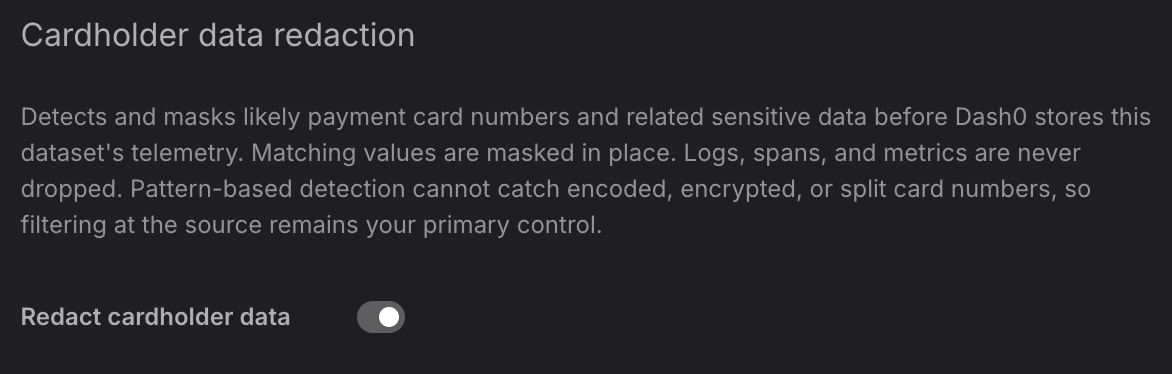
Dash0 redacts telemetry that arrives after you save. It does not go back over telemetry it already stored. To stop redaction, disable Redact cardholder data. Values that Dash0 already masked stay masked.
Enable redaction on test and staging datasets too, not only on production. Those environments often log full request payloads, and a test card number is still a card number to an assessor.
What Gets Redacted
Dash0 scans these parts of each signal in a dataset with the setting enabled:
- Logs: Log bodies (plain strings, nested maps, and lists), log record attributes, and scope attributes.
- Spans: Span names, span attributes, span event names, span event attributes, span link attributes, and scope attributes. This includes spans sent by the Web SDK.
- Web events: Web event bodies, web event attributes, and scope attributes, including web events that carry stack traces.
- Metrics: Data point attributes on every metric type, and scope attributes. Dash0 never inspects metric data point values.
- Resource attributes: Checked by attribute key only, on every scanned signal. Dash0 redacts a resource attribute whose key names a card field.
Dash0 masks card numbers and replaces everything else it detects:
| Data | How Dash0 detects it | What Dash0 stores |
|---|---|---|
| Card number (PAN) | By value: a run of 13 to 19 digits that passes the Luhn check and has a payment-network shape. Also by key: card_number, cardnumber, card_no. | The first six and last four digits, with the digits between them masked. For example 411111******1111. |
| Track 1 / Track 2 data | By value: a magnetic-stripe record (%B…^… or ;…=…) with an embedded Luhn-valid card number, at any position in the string. Also by key: track1, track2, track_1, track_2. | <REDACTED> in place of the whole value. |
| Card verification code (CVV, CVC, CAV2) | By key only: any attribute or log body key that contains cvv, cvc, or cav2, such as payment.card.cvv. | <REDACTED> in place of the whole value. |
| PIN block | By key only: any key that contains pin_block or pinblock. | <REDACTED> in place of the whole value. |
Dash0 masks a card number instead of removing it, so the record stays useful for troubleshooting. PCI DSS forbids storing verification codes, PIN blocks, and track data in any form, so Dash0 replaces the whole value with <REDACTED>. Key matching redacts the value without reading it. If a field named card_number holds a token or an already-masked value, Dash0 still replaces it with <REDACTED>. Redaction never removes an attribute or body field. Dash0 stores an integer attribute that held a card number as the masked string.
Dash0 skips keys that cannot hold cardholder data: keys starting with dash0., k8s., service., telemetry.sdk., or otel., the keys trace.id and span.id, and any key ending in .timestamp.
Dash0 changes only the values it detects as card data. Everything else stays as it was, including timestamps, service and resource identity, span structure, and metric values. Dashboards, traces, and log searches keep working on redacted data.
Limitations
When you describe this control internally or to an assessor, state these boundaries:
- It never drops telemetry. Dash0 forwards every log record, span, web event, and metric data point, with the sensitive value rewritten. To drop telemetry by rule, use spam filters.
- It is not a compliance guarantee. Redaction is a defense-in-depth control with the gaps listed here. It reduces exposure but does not certify a dataset as free of cardholder data.
- It does not detect card numbers that are not literally present. Dash0 does not detect base64 or hex encoded, encrypted, tokenized, hashed, or JSON-escaped numbers. It also does not detect numbers split across several attributes.
- It does not detect cardholder names, expiry dates, or service codes. These have no recognizable shape. A field name such as
cardholder_iddoes not reliably indicate card data. - It does not detect bank account numbers, IBANs, or routing numbers. Those are not payment card data.
- It does not scan session recordings, metric values, or profiles. Dash0 stores Web SDK session recordings without redaction. Spans and web events from the Web SDK are scanned.
- It does not inspect resource attribute values. Dash0 derives resource identity from those values, so rewriting one would move the telemetry to a different resource.
Redaction can also produce false positives. Dash0 masks any 13 to 19 digit identifier that passes the Luhn check and starts with a digit in the payment-network range. It also redacts any field whose name contains cvv or cvc, whatever the field holds. A false positive costs you one masked value, and it shows up in the redaction metrics.
Monitor Redaction
Dash0 records two metrics in the dataset so you can prove the control ran and see what it did. Both are counters, so query them with increase() or rate():
dash0.redaction.values_scanned: The number of values Dash0 inspected. Without it, a redaction count of zero could mean clean data or a control that never ran.dash0.redaction.values_redacted: The number of values Dash0 masked or replaced.
Both metrics carry the attributes dash0.redaction.signal (logs, spans, or metrics) and dash0.redaction.surface (log_body, record_attribute, span_name, span_event_attribute, datapoint_attribute, and so on). Web events count under logs. dash0.redaction.values_redacted also carries:
dash0.redaction.match_kind: What Dash0 detected:pan,track_data,cvv, orpin_block.dash0.redaction.detection_method: How Dash0 detected it.valuemeans the content itself validated as a card number or track record.keymeans the field name matched and Dash0 redacted the value without reading it.
Further Reading
- About SignalControl Edge — Process telemetry inside your own network before it leaves, where you can add source-side redaction.
- Access Control — Roles and dataset permissions, including who can edit dataset settings.
- Datasets — How datasets separate telemetry and how to route data into them.
- Filter Out Spam — Drop telemetry by explicit rule when you want a signal gone rather than masked.
- Understand Web SDK and Data Privacy — Source-side filtering and IP anonymization for browser telemetry.