
Last updated:
Extract Values
An Extract step reads a text attribute or field with a pattern and writes each part you mark into a new attribute. Use it to turn unstructured text into attributes you can filter and group by, for example the method and path in a log body, or an ID in a URL.
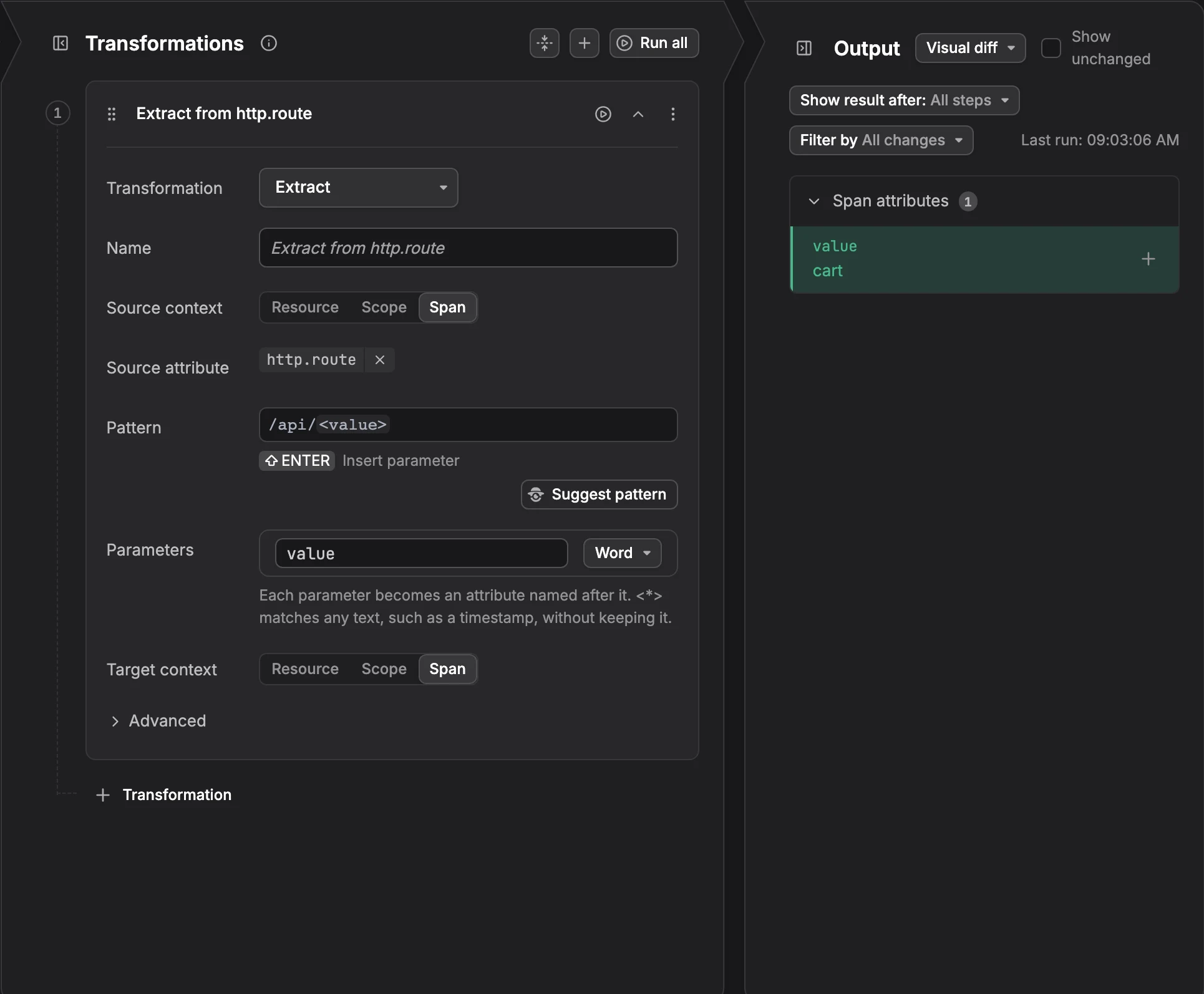
Add an Extract Step
- In the rule editor, start the step in one of these ways:
- Select text: In Input sample data, select the part of a value you want, then click Extract. The pattern is filled in from the selection. Select another part of the same value to add a second parameter.
- Use the whole value: Hover the attribute, click Add a transformation step, and pick Extract. Agent0 suggests a pattern right away from the attribute's values in your sample data. See Suggest a Pattern.
- Start empty: Click + Transformation and set Transformation to Extract.
- Fill in the fields:
- Source context: Where the text is: Resource, Scope, or the record, such as Span or Log record.
- Source attribute: The text to read, for example
http.routeorotel.log.body. - Pattern: The shape of the text, with a parameter in angle brackets for each part to keep. Write it yourself, as in Write a Pattern, or click Suggest pattern to let Agent0 write it, as in Suggest a Pattern.
- Parameters: One row per parameter. Edit the name, which becomes the attribute key, and pick what the parameter matches.
- Target context: Where to write the new attributes.
- Check the Output panel: each parameter shows as an added attribute.
Write a Pattern
Copy the text into Pattern and replace each part you want with a name in angle brackets. Each parameter becomes an attribute named after it. <*> matches any text, such as a timestamp, without keeping it.
For example, the pattern <*> <http.request.method> <url.path> applied to the log body 2026-11-09T07:00:00Z GET /api/orders sets http.request.method to GET and url.path to /api/orders.
Under Parameters, pick what each parameter matches:
- Word: Letters, digits, and underscores.
- Text without spaces: Any text up to the next space.
- Integer: A whole number, stored as a number.
- Number: A number with or without decimals, stored as a number.
- ISO 8601 timestamp: A timestamp such as
2026-11-09T07:00:00Z. - Any text, shortest: Any text, up to the next part of the pattern.
- Any text, to the end: Any text, up to the end of the value.
Parameter names can hold only letters, digits, underscores and dots, and each parameter needs its own name. To match a literal <, write <<.
Suggest a Pattern
Click Suggest pattern to let Agent0 write the pattern. It reads up to 10 values of the source attribute from your sample data and proposes a pattern that matches all of them. Picking Extract from an attribute's menu asks for a suggestion right away. Click Undo to restore the pattern the suggestion replaced. If no pattern fits every sample, write the pattern by hand or try again.
Suggest pattern is not shown when Agent0 is turned off for your organization.
Example
Extracting from the span name with the pattern GET /users/<user_id>?v=<version>, with user_id as Integer and version as Number, writes this OpenTelemetry Transformation Language (OTTL) statement:
merge_maps(attributes, ExtractGrokPatterns(span.name, "GET /users/%{INT:user_id:int}\\?v=%{NUMBER:version:float}", true), "upsert")Limits
- Text only: Only text values can be extracted. Numbers, booleans, and fields such as
otel.span.kindcan't. - Overwrites existing attributes: If the target already has an attribute with a parameter's name, the extracted value replaces it.
- No match, no change: If the pattern doesn't match a record's value, the step adds nothing to that record.
Further Reading
-
About Signal Transformation. Add a transform rule and learn the parts of the rule editor.
-
Check the Output. See the attributes your pattern produces before you save the rule.
-
Mask Values. Hide the parts of a value a pattern matches instead of extracting them.