
Last updated:
Filter Out Spam
Filtering out spam is the first stage every signal passes through. Spam filter rules permanently drop noisy, low-value telemetry before it costs anything downstream. Because they run before conversion, sampling, and aggregation, dropping a record here removes it from every later stage and from your stored volume entirely.
Spam filters apply to logs, metrics, spans, and web events. You manage them per signal type from the SignalControl pipeline by opening the Spam filter stage for the signal you want to reduce.
How a Rule Works
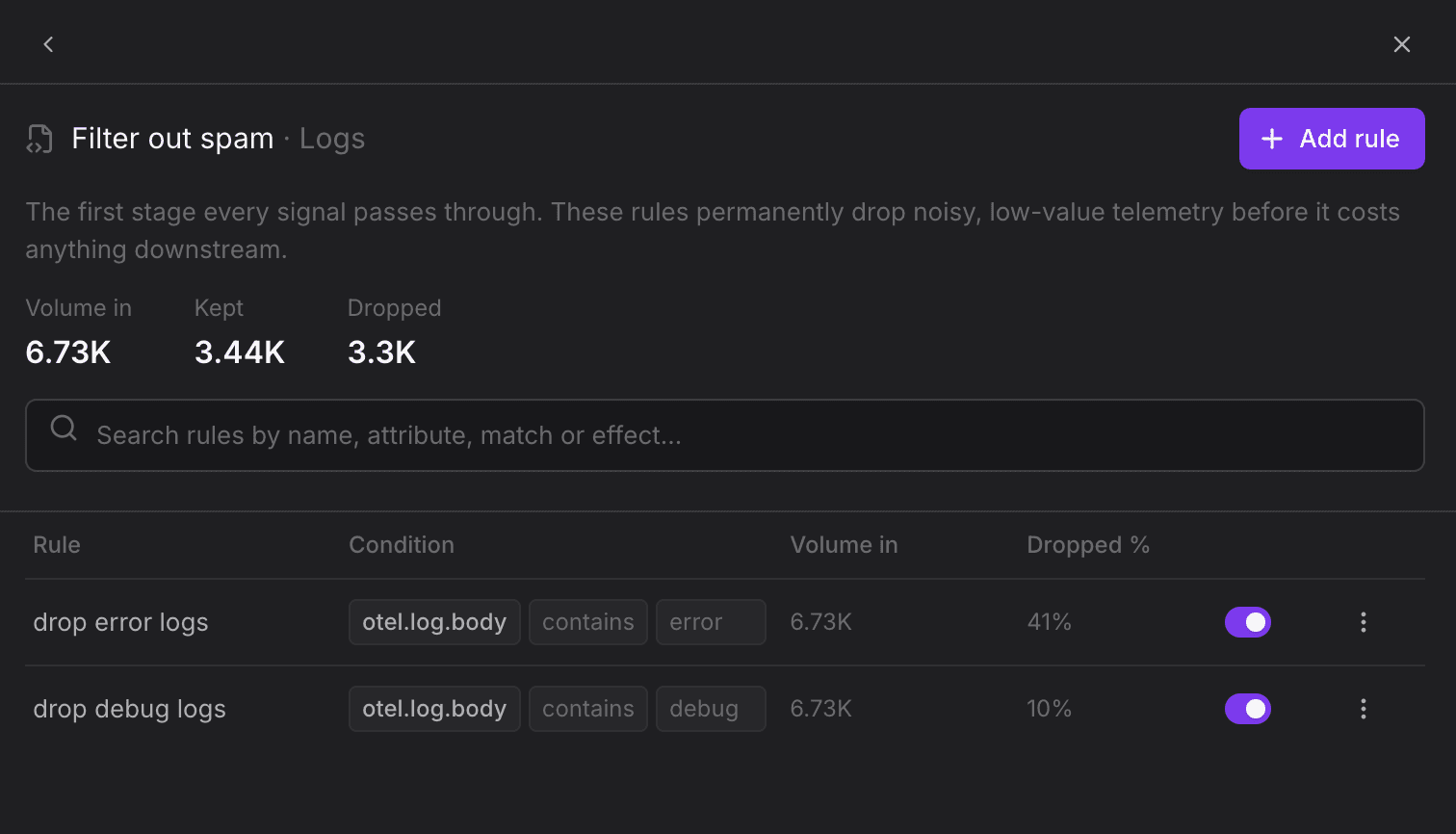
Each spam filter rule matches telemetry by a set of conditions and drops everything that matches. A rule can have several conditions, which are combined with a logical AND, so telemetry must satisfy all of them to be dropped. In the example above, two rules act on the otel.log.body attribute:
- drop error logs: Matches log records whose body contains
error. - drop debug logs: Matches log records whose body contains
debug.
The panel header summarizes the rule set for the selected signal:
- Volume in: The volume entering the spam filter stage.
- Kept: The volume that passes through after all rules are applied.
- Dropped: The volume removed by the rules.
Each row shows the rule name, its match conditions, the volume it evaluated, the percentage it dropped, and a toggle to enable or disable it without deleting it. Every rule evaluates all telemetry entering the stage, so the volume in for each rule is always the same as the stage's Volume in.
Add a Rule
- Open the Spam filter stage for the signal type you want to reduce (Logs, Metrics, Spans, or Web Events).
- Click Add rule.
- Define one or more match conditions, each using an attribute, an operator such as contains, and a value. When a rule has several conditions, they are combined with a logical AND, so telemetry must satisfy all of them.
- Enable the rule to activate it.
Use the search box to find existing rules by name, attributes, match, or effect.
Data dropped by a spam filter cannot be recovered. Test your match condition carefully before enabling a rule, especially in production datasets.
Relationship to Cost Control Spam Filters
SignalControl's spam filter stage is the same spam-filtering capability described in Spam Filters under Cost Control, surfaced inside the pipeline alongside the other reduction stages. You can also manage spam filters as code.
Filtering on the Edge
When you run SignalControl Edge, the dash0filter processor drops noisy telemetry per dataset before it leaves your network. Rules are authored through the API as spam filters and delivered to the collector by the settings extension. This section covers the standalone edge deployment.
Authoring Rules via the API
Send API requests to your region's API endpoint from the endpoint table, with an Authorization: Bearer <token> header. See Dash0 API for the general conventions.
Create a filter with POST /api/spam-filters?dataset=<dataset>. Each filter names one context and a filter of attribute criteria (see Filter Operators) that the server compiles into an OTTL condition; matching records are dropped. The context selects the signal type and maps to the UI as follows:
log: Logs.datapoint: Metrics. A filter drops individual metric data points.span: Spans.web_event: Web Events.
Drop debug logs from a noisy component:
{
  "apiVersion": "v1alpha2",
  "kind": "Dash0SpamFilter",
  "metadata": {
    "name": "drop-debug-logs"
  },
  "spec": {
    "context": "log",
    "filter": [
      {
        "key": "otel.log.severity.text",
        "operator": "is",
        "value": "DEBUG"
      },
      {
        "key": "service.name",
        "operator": "is",
        "value": "chatty-service"
      }
    ]
  }
}
Processor Configuration
dash0filter handles traces, logs, and metrics, so the same processor instance can sit in all three pipelines. Its knobs:
| YAML key | Default | Description |
|---|---|---|
apply_positive_filters_only | false | When true, rules containing negative operators (is_not, does_not_contain, and so on) are skipped. Set true at the edge so an over-broad negative rule cannot silently drop everything. |
cache_expiration | 60s | How long compiled filter expressions are cached; edits take effect within this window without a restart. Range 10s–1h. |
Further Reading
-
About SignalControl. Overview of the full reduction pipeline and how the stages compose.
-
Convert Signals to Metrics. Summarize high-volume logs and spans into compact metric data points.
-
Manage Spam Filters as Code. Define and version spam filters declaratively.
-
Sample Traces. Reduce trace volume while keeping errors and slow traces.
-
Spam Filters. The Cost Control view of spam filtering, including how dropped volume is tracked.