
Last updated: September 18, 2026
Deeplink URLs
Deeplink URLs provide direct access to specific Dash0 views with pre-configured parameters. Any view can be shared as a URL that automatically applies filters, time ranges, and other settings when opened.
Create URLs
Deeplink URLs can be created using different workflows:
- Press
CMD+SHIFT+Dfrom any feature - Open the command palette with
CMD+Kand search forCreate URL with query parameters
All methods open the URL preview, allowing verification of the parameters included in the Deeplink URL. The supported parameters for each feature are prefilled with the app's current state to help bridge the gap from the information shown in Dash0's UI to the URL.
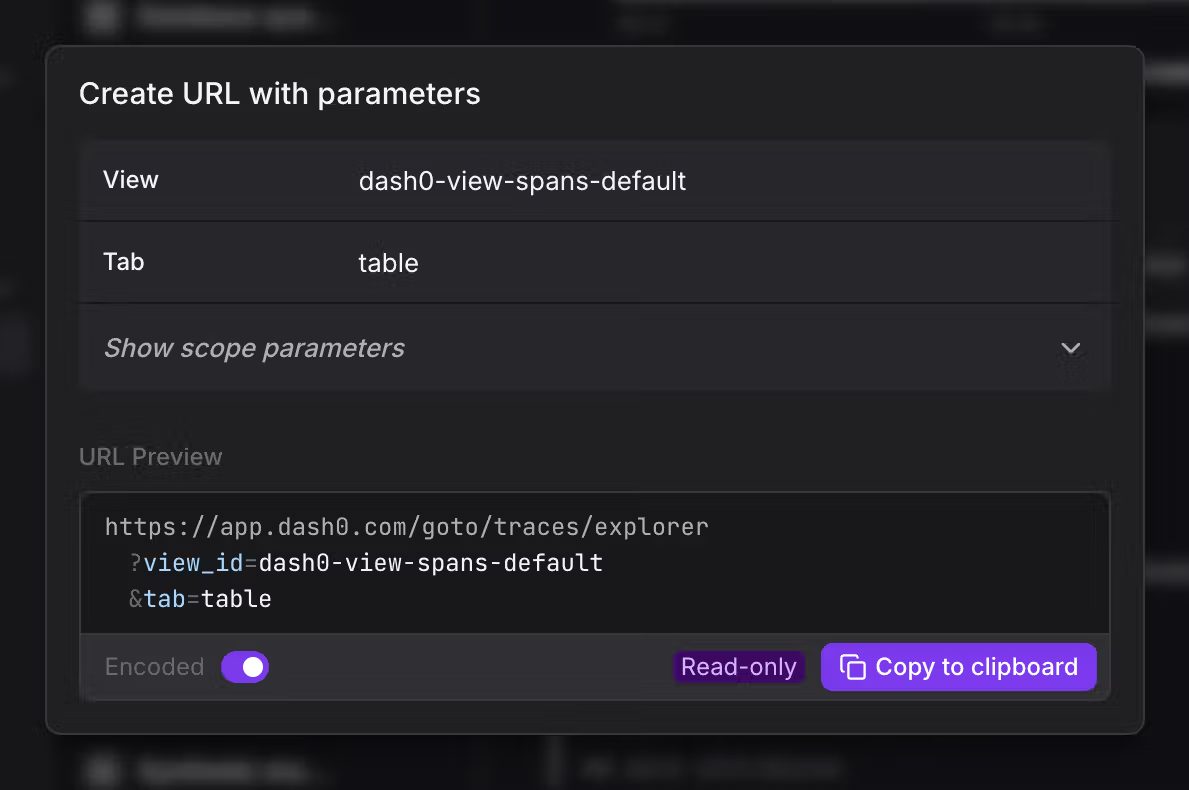
The Deeplink URLs have the following structure:
1https://app.dash0.com/goto/{feature}?parameter1=value1¶meter2=value2
All parameters are optional unless specified otherwise.
Type of parameters
Time Range
Uses the same time picker syntax:
1from=now-30m&to=now
Absolute timestamps are also supported:
1from=2025-12-08T15:26:44.000Z&to=2025-12-08T15:56:44.000Z
Filters
Filters use the same filtering syntax as Dash0, formatted as JSON with multiple filters:
1filter=[{"key":"service.name","operator":"is","value":"checkout"}, {"key":"otel.span.status.code","operator":"is","value":"ERROR"}]
All supported operators by the UI are supported as URL parameters for Deeplinks.
Supported operators: is, is_not, contains, does_not_contain, matches, does_not_match, starts_with, does_not_start_with, ends_with, does_not_end_with, gt, lt, gte, lte, is_set, is_not_set, is_one_of, is_not_one_of
Dashboard Variables
Dashboards are filtered through their variables, not through a top-level filter parameter. To open a dashboard with a pre-filled selection, pass the variables parameter keyed by variable name. A text variable takes a string, and a list variable takes an array of values:
1variables={"text_var":"text","list_var":["value1","value2"]}
To get the exact encoding for a specific dashboard, including its filter variables, open the dashboard and use the URL builder (CMD+SHIFT+D). It prefills every supported parameter from the dashboard's current state, so you don't have to construct the variables value by hand.
Tabs
Many features support tab navigation:
1tab=triage&analysis_method=status-code
Note: Some tabs require additional parameters. For example, the triage tab accepts analysis_method (attribute-values or status-code), and the groups tab requires group_by. Use the URL builder to ensure all required parameters are included.
Other common tabs: table, groups, patterns, overview, web-vitals, sessions
Other parameters
Each individual feature has a specific subset of features to access a specific view, asset (dashboards, check rules), or resources. As we constantly extend this list of parameters, check each feature in Dash0 directly to find out what parameters are available. The URL builder shows all available parameters for the active feature.
Feature Paths & Parameters
All features support global parameters: from, to, dataset, org, sampling
Data Explorers
These features support: filter, view_id, tab, group_by, analysis_method
| Feature | Path | Additional Parameters |
|---|---|---|
| Traces Explorer | /goto/traces/explorer | trace_id, span_id, visualization |
| Logs Explorer | /goto/logs | |
| Web Events | /goto/web-events/explorer |
Metrics
| Feature | Path | Parameters |
|---|---|---|
| Metric Explorer | /goto/metrics/explorer | filter, metric_name, metric_type, tab_mode |
| Metric Query Builder | /goto/metrics/query-builder |
Dashboards
| Feature | Path | Parameters |
|---|---|---|
| Dashboards | /goto/dashboards | dashboard_id (required), version, variables |
Dashboards do not accept a top-level filter parameter. Use variables to apply a pre-filled selection, as described in Dashboard Variables.
Services & Resources
| Feature | Path | Parameters |
|---|---|---|
| Services Map | /goto/services/map | filter, fit_to |
| Services Catalog | /goto/services/catalog | |
| Service Details | /goto/services/details | service_name, service_namespace, tab, filter |
| Resources Map | /goto/resources/map | filter, fit_to |
| Resources Table | /goto/resources/table | filter, view_id, variables |
Websites
| Feature | Path | Parameters |
|---|---|---|
| Websites | /goto/websites | website, tab, filter, session_id, variables |
Alerting
| Feature | Path | Parameters |
|---|---|---|
| Synthetics | /goto/alerting/synthetics | check_id |
| Check Rules | /goto/alerting/check-rules | check_rule_id |
| Failed Checks | /goto/alerting/failed-checks | filter, check_id |
Agent0
| Feature | Path | Parameters |
|---|---|---|
| Agent0 | /goto/agent0 | thread_id, initial_prompt, auto_submit |
Settings
| Feature | Path | Parameters |
|---|---|---|
| Members | /goto/settings/members | search |
| Teams | /goto/settings/teams | team_id |
| Auth Tokens | /goto/settings/auth-tokens | auth_token_id |
| Datasets | /goto/settings/datasets | dataset_slug |
| Notifications | /goto/settings/notifications | channel_id |
| Endpoints | /goto/settings/endpoints | endpoint_type |
| Billing | /goto/settings/billing | |
| Audit Logs | /goto/settings/audit-logs |
Examples
Filter traces by service name
1https://app.dash0.com/goto/traces/explorer?filter=[{"key":"service.name","operator":"is","value":"checkout"}]&from=now-1h&to=now
Filter logs by level and service
1https://app.dash0.com/goto/logs?filter=[{"key":"log.level","operator":"is","value":"ERROR"},{"key":"service.name","operator":"is","value":"api"}]
Open a specific trace
1https://app.dash0.com/goto/traces/explorer?traceid=abc123def456&span_id=xyz
Open a dashboard with variables
1https://app.dash0.com/goto/dashboards?dashboard_id=95a1dddc-8837-469f-87d3-782aa4db9690&variables={"environment":"production"}
Group logs by service name
1https://app.dash0.com/goto/logs?tab=groups&group_by=["service.name"]
Focus on a service in the map
1https://app.dash0.com/goto/services/map?fit_to={"service.name":"api-gateway","service.namespace":"production"}
Error Handling
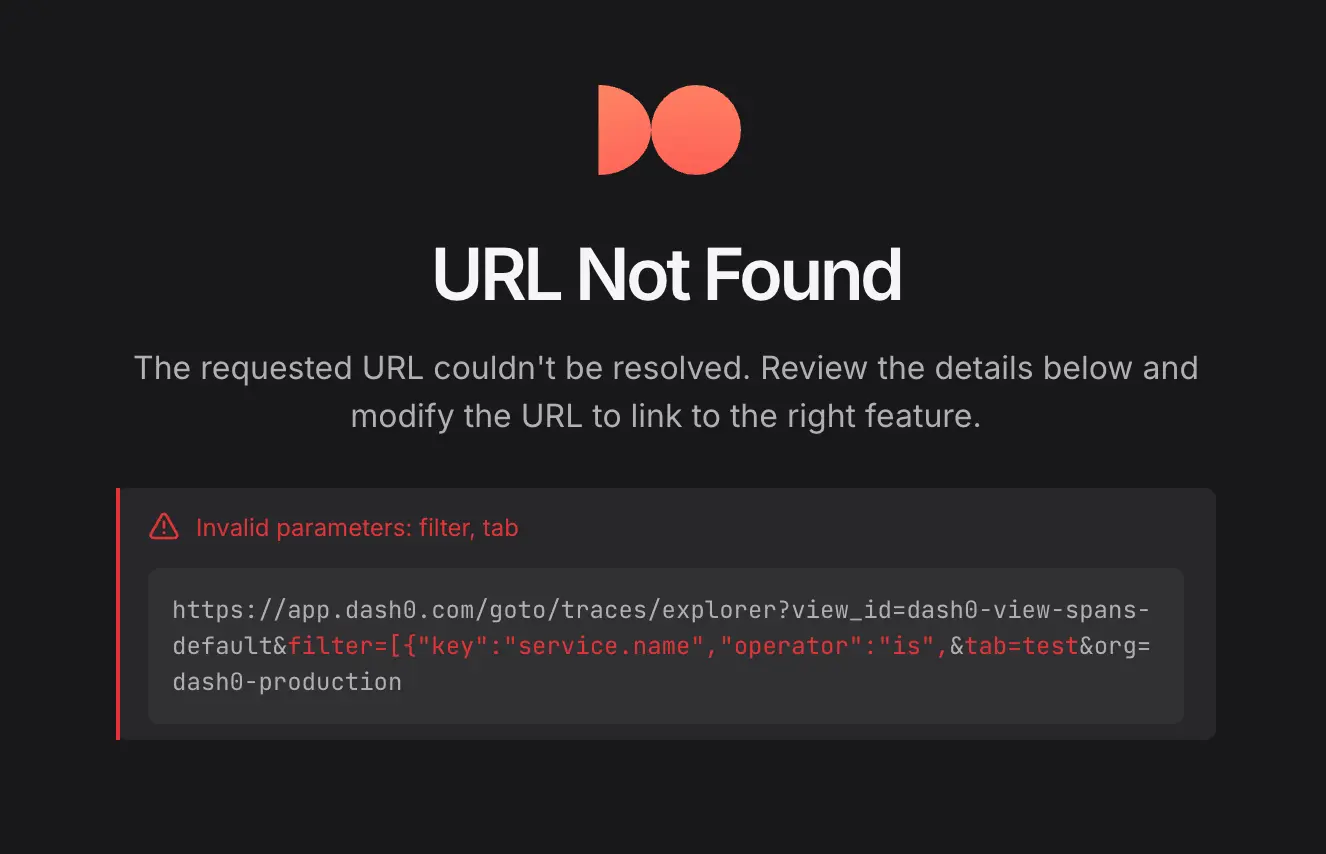
Invalid or inaccessible deeplinks renders a detailed error, which displays:
- List of URL parameters and their values.
- Identification of invalid parameters.
Common errors include invalid parameter values, missing required parameters, or insufficient permissions.
URL Encoding
The URL builder provides encoded and unencoded formats via the Encoded toggle. Both formats are accepted – most modern browsers automatically encode unencoded URLs when accessed.
FAQs
Why aren't filters validated in error handling?
Filters that result in no data aren't considered an error, as a filter could throw no results for a combination of valid values with a time range without underlying telemetry. To resolve these issues, modify the filter values in the feature and fix the Deeplink URL to avoid future problems.
Further Reading
- Command Menu: Navigate Dash0 quickly using keyboard-driven commands
- Filtering: Use flexible attribute-based filters to access relevant telemetry
- Time Picker: Select time ranges to focus on specific periods
- Views: Saved queries for logs, traces, metrics, and other signal types