
Last updated:
Linear Triggers
Linear triggers start an automation when something changes in your connected Linear workspace. Each trigger type listens for one kind of Linear object:
| Trigger type | Group in the dropdown | Fires when |
|---|---|---|
| Mention | Linear: Comments | Dash0 is @mentioned or delegated on an issue and the comment contains your keyword |
| Issue | Linear: Issues | An issue is created, changed, or removed |
| Issue Comment | Linear: Comments | A comment on an issue is posted, edited, or deleted |
| Issue Attachment | Linear: Issues | An attachment is added to, changed on, or removed from an issue |
| Comment Reaction | Linear: Comments | A reaction is added to or removed from a comment |
| Project | Linear: Projects | A project is created, changed, or removed |
| Project Update | Linear: Projects | A project update is posted, edited, or removed |
| Initiative | Linear: Initiatives | An initiative is created, changed, or removed |
| Initiative Update | Linear: Initiatives | An initiative update is posted, edited, or removed |
| Release | Linear: Releases | A release is created, changed, or removed |
| Release Note | Linear: Releases | A release note is created, edited, or removed |
Type Linear in the Trigger type search to list only the Linear trigger types.
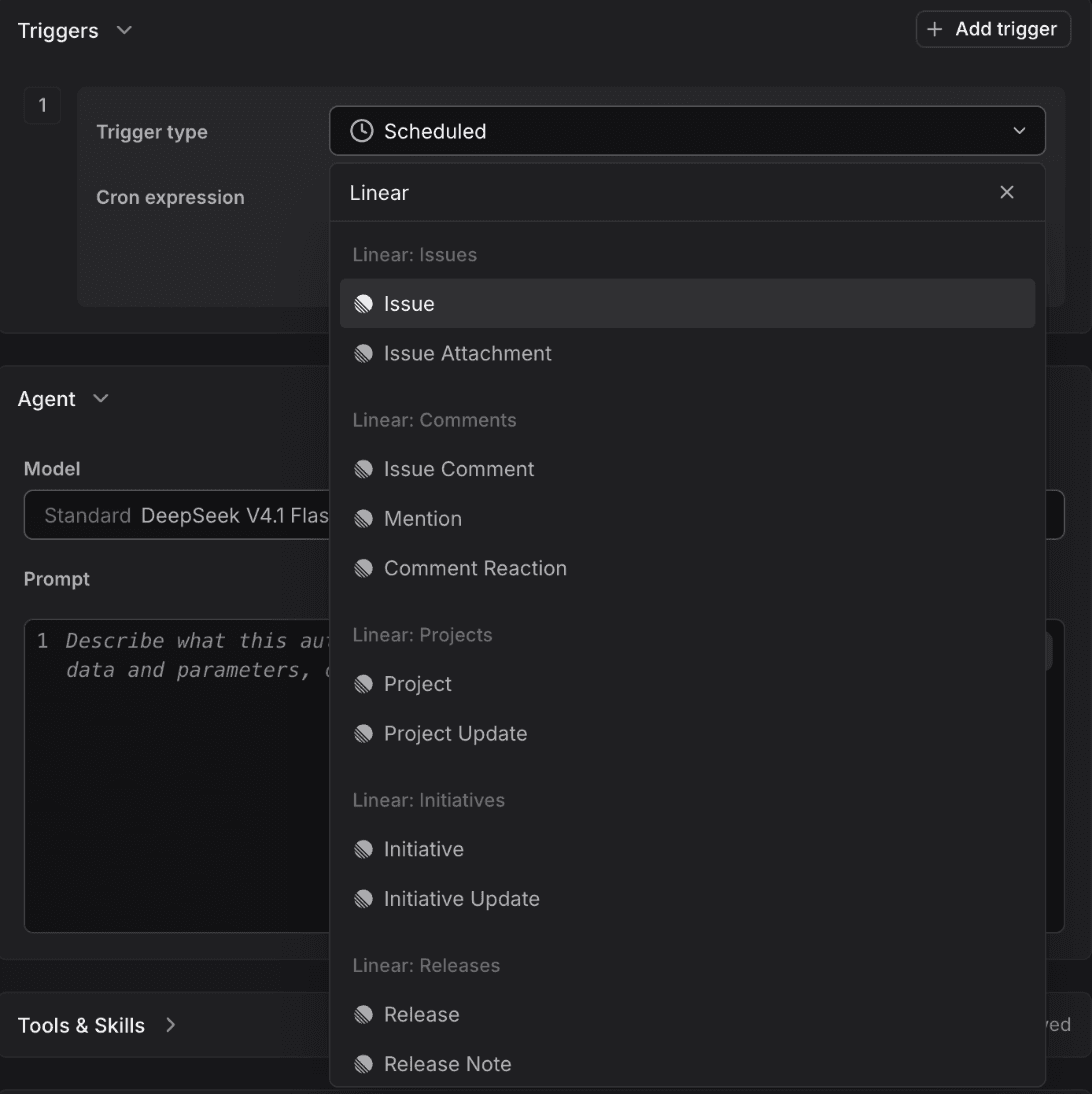
Every trigger except Mention has an Actions filter with the values create, update, and remove (Comment Reaction offers create and remove). Leave it empty to match any action. The action that fired is available as {{linear.action}}.
Match by Name or Regular Expression
Most filters accept either an exact selection or a regular expression. A regular expression must match the entire value, is case-sensitive, and becomes case-insensitive when the pattern starts with (?i). For example, (?i)release-.* matches the project name "Release-2026". Filters you leave empty match everything.
The Linear filters that take names or regular expressions are team, project, label, status, release stage and pipeline, and the author and sender filters. Enter users by email address or Linear user ID.
Start an Automation on a Status Change
The Issue, Project, and Initiative triggers have a Statuses filter. The automation starts only when an update changes the status to one of the statuses you list. Creating an item in a listed status does not fire the trigger.
- Add a trigger, type
Linearin Trigger type, and select Issue, Project, or Initiative. - Set Actions to
update. - Open Statuses and choose one or more statuses. The list shows the statuses defined in your connected Linear workspace. Select Regex instead to match the new status name with a regular expression.
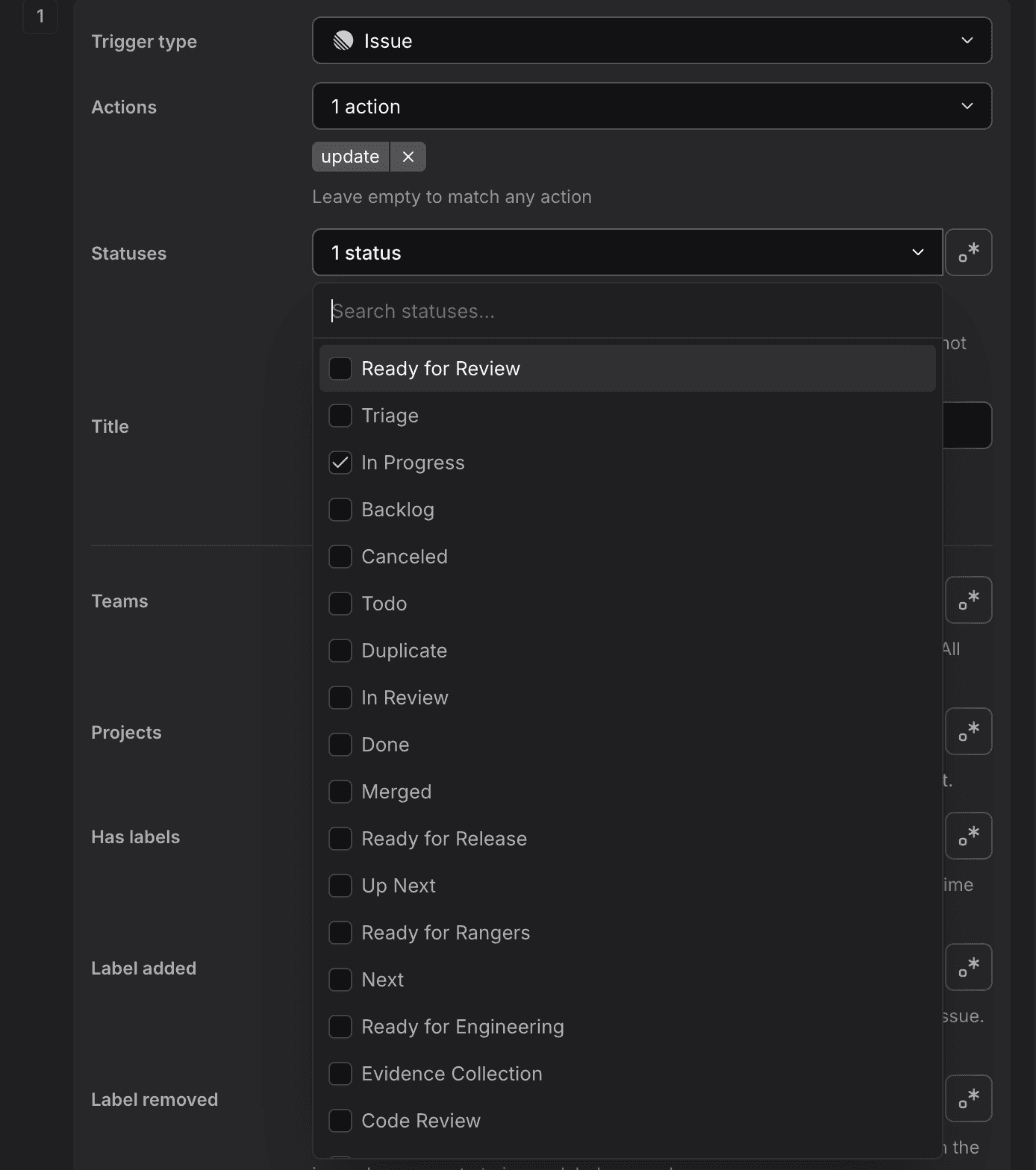
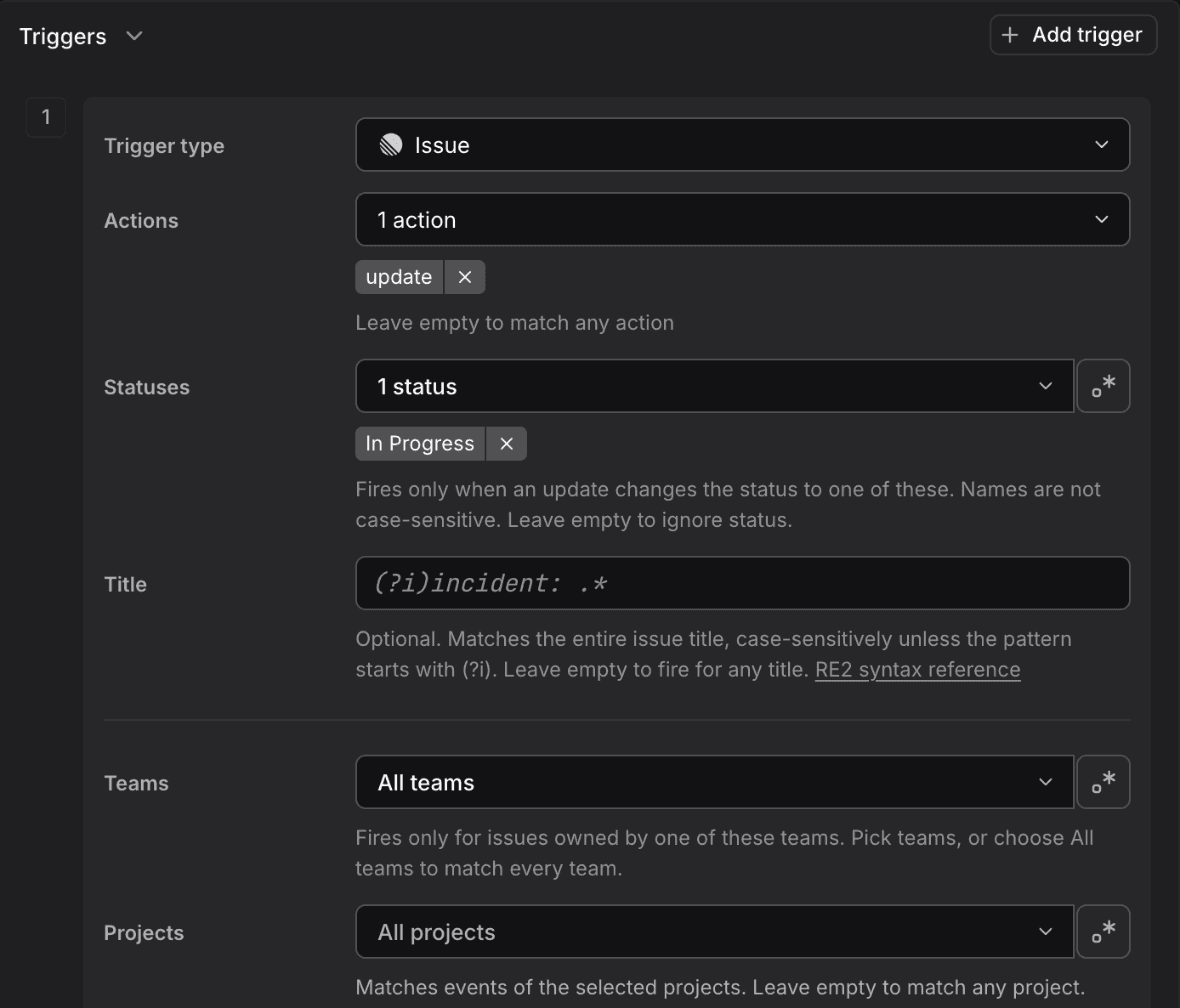
Status names are matched case-insensitively. Leave Statuses empty to ignore status. The new status is available as {{linear.issue.state}}, {{linear.project.status}}, or {{linear.initiative.status}}.
For example, an Issue trigger with Actions set to update, Statuses set to In Progress, and Teams set to your engineering team starts Agent0 on every issue that team picks up:
{{linear.issue.id}} "{{linear.issue.title}}" moved to {{linear.issue.state}}.

{{linear.issue.description}}

Investigate the issue in Dash0. If it describes a bug you can fix, open a pull request.
If it asks for visibility into a service, create a dashboard. Post your findings to #eng-oncall.
Authors and Triggered By
Linear triggers can filter on who created something and on who caused the event:
- Creator or author: The person who created the issue, attachment, project, initiative, release, or who wrote the comment, update, or release note. Issues and attachments created by an integration never match.
- Triggered by: The Linear user who made the change. Use it to react to changes made by a specific person.
The two filters can be combined. The form shows what the combination means for the selected actions.
Linear Mention Trigger
Fires when Dash0 is @mentioned or delegated on a Linear issue AND the comment contains a specific keyword. A mention that does not match runs the Linear Agent conversation instead.
Configuration Fields
- Keyword: Required. Text that must appear as whole words, case-insensitively. For example,
reviewmatches "Please review this" but not "preview" or "review-agent". Select Regex to match the entire comment with a regular expression.
Available Variables
- {{linear.issue.title}}: Issue title
- {{linear.issue.id}}: Issue ID (e.g.,
ENG-123) - {{linear.issue.url}}: Direct link to the issue
- {{linear.comment.body}}: Comment text
- {{linear.comment.user}}: Who added the comment
Example Prompt
Comment added to Linear issue "{{linear.issue.title}}".

The comment contains the keyword indicating investigation is needed. Query the mentioned service's health in Dash0 and summarize your findings.
Linear Issue Trigger
Fires when an issue is created, changed, or removed. An update covers any change, including state, labels, and assignee.
Configuration Fields
- Actions: Optional.
create,update,remove. Leave empty for any action. - Statuses: Optional. Fires only when an update changes the status to one of these. Exact names or a regular expression.
- Title: Optional. Regular expression that must match the entire issue title.
- Teams: Optional. Teams that own the issue, selected by name, key, or a regular expression, or All teams.
- Projects: Optional. Project names or a regular expression. An issue without a project never matches.
- Has labels: Optional. Fires only when the issue carries at least one of these labels at the time of the event.
- Label added and Label removed: Optional. Fires only when the event added or removed one of these labels.
- Issue creator and Triggered by: Optional. Users by email or Linear user ID, or a regular expression.
Available Variables
- {{linear.action}}:
create,update, orremove - {{linear.actor.name}}: Who made the change, when known
- {{linear.issue.id}}, {{linear.issue.title}}, {{linear.issue.url}}, {{linear.issue.description}}: Issue identity and Markdown description
- {{linear.issue.state}}: Workflow state name (e.g.,
In Progress) - {{linear.issue.priority}}: Priority label (e.g.,
Urgent) - {{linear.issue.team_key}}, {{linear.issue.team_name}}, {{linear.issue.team_id}}: Owning team
- {{linear.issue.label_names}}, {{linear.issue.added_label_names}}, {{linear.issue.removed_label_names}}: Comma-separated label names (the matching
..._idsvariables hold UUIDs)
Example Prompt
{{linear.actor.name}} moved {{linear.issue.id}} "{{linear.issue.title}}" to {{linear.issue.state}}.

If the issue describes a production problem, query Dash0 for the affected service and add the findings to the thread.
Linear Issue Comment, Attachment, and Reaction Triggers
- Issue Comment fires on comment activity on issues. Filter by Keyword (whole word, or a regular expression matching the entire comment), team, comment author, and Triggered by. Variables:
{{linear.comment.id}},{{linear.comment.body}},{{linear.comment.url}},{{linear.comment.user}}, plus the issue variables{{linear.issue.id}},{{linear.issue.title}},{{linear.issue.url}}, and the team variables. - Issue Attachment fires when an attachment such as a GitHub pull request or a Sentry issue is linked to an issue. Filter by Sources (for example
githuborsentry), team, attachment creator, and Triggered by. Variables:{{linear.attachment.id}},{{linear.attachment.title}},{{linear.attachment.subtitle}},{{linear.attachment.url}},{{linear.attachment.source_type}}, plus the issue variables. - Comment Reaction fires when a reaction is added to or removed from a comment. Filter by Emojis (names without colons, such as
eyes), team, the author of the reacted-to comment, and Triggered by. Variables:{{linear.reaction.emoji}},{{linear.comment.id}},{{linear.comment.body}}(empty when the comment exceeds 10,000 characters), plus the issue variables.
Linear Project Trigger
Fires when a project is created, changed, or removed. An update covers changes such as status, health, and description.
Configuration Fields
- Actions, Statuses, and Name: Optional. Name is a regular expression that must match the entire project name.
- Teams: Optional. Matches projects of the selected teams. Leave empty for any team.
- Project creator and Triggered by: Optional.
Available Variables
- {{linear.action}}, {{linear.actor.name}}
- {{linear.project.id}}, {{linear.project.name}}, {{linear.project.url}}, {{linear.project.description}}
- {{linear.project.status}}: Status name (e.g.,
In Progress) - {{linear.project.health}}:
onTrack,atRisk, oroffTrack, when set
Project Updates
The Project Update trigger fires on updates posted to a project. Filter by project, Update author, and Triggered by. Variables: {{linear.project_update.id}}, {{linear.project_update.body}}, {{linear.project_update.url}}, {{linear.project_update.health}}, and the project variables {{linear.project.id}}, {{linear.project.name}}, {{linear.project.url}}.
Linear Initiative Trigger
Fires when an initiative is created, changed, or removed. It has the same Actions, Statuses, Name, Initiative creator, and Triggered by filters as the Project trigger. Initiative statuses are Planned, Active, and Completed.
Variables: {{linear.initiative.id}}, {{linear.initiative.name}}, {{linear.initiative.url}}, {{linear.initiative.description}}, {{linear.initiative.status}}, {{linear.initiative.health}}, plus {{linear.action}} and {{linear.actor.name}}.
The Initiative Update trigger fires on updates posted to an initiative. Variables: {{linear.initiative_update.id}}, {{linear.initiative_update.body}}, {{linear.initiative_update.url}}, {{linear.initiative_update.health}}, and the initiative variables {{linear.initiative.id}}, {{linear.initiative.name}}, {{linear.initiative.url}}.
Linear Release Trigger
Fires when a release is created, changed, or removed. The Release Note trigger fires on the notes of a release.
Configuration Fields
- Name: Optional. Regular expression that must match the entire release name (Release) or note title (Release Note).
- Stages: Release only. Stage names, or a regular expression matching the entire stage name. Stage names are case-sensitive.
- Pipelines: Release and Release Note. Release pipeline names, or a regular expression. Pipeline names are case-sensitive.
- Release creator or Release note author, and Triggered by: Optional.
Available Variables
- Release:
{{linear.release.id}},{{linear.release.name}},{{linear.release.url}},{{linear.release.description}},{{linear.release.version}},{{linear.release.stage}},{{linear.release.pipeline_id}},{{linear.release.pipeline_name}} - Release Note:
{{linear.release_note.id}},{{linear.release_note.title}},{{linear.release_note.url}},{{linear.release_note.content}},{{linear.release_note.pipeline_id}},{{linear.release_note.pipeline_name}},{{linear.release_note.release_ids}} - Both:
{{linear.action}},{{linear.actor.name}}
Linear triggers require the Linear integration. Which Linear trigger types you can select depends on what is enabled for your organization. Linear issue and comment write tools are available only when enabled for your organization and permitted by the automation's guardrails. Otherwise, post results to Slack or another connected integration.