
Last updated:
GitHub Triggers
GitHub triggers start an automation from activity in your connected GitHub repositories. The Trigger type dropdown groups them into GitHub: Reviews, GitHub: CI, and GitHub: CD.
GitHub Pull Request Trigger
Fires when pull requests are opened, updated, or closed in your connected GitHub repositories.
Configuration Fields
- Actions: Optional. Which PR events to match (e.g.,
opened,ready_for_review,synchronize). Leave empty to match all actions. - Organizations: Optional. Match events from these GitHub organizations across their repositories.
- Repositories: Optional. Only match specific repositories (format:
owner/repo). - Title pattern: Optional. Match the entire pull request title with an RE2 regular expression. Matching is case-sensitive unless the pattern starts with
(?i). - Labels: Optional. Match pull requests carrying at least one selected label. Label names are case-sensitive.
- Head branches: Optional. Match the branch the pull request comes from, not its target branch. When this filter is set, pull requests from forks do not match.
- Pull request author: Optional. Filter by the GitHub login that opened the pull request.
- Triggered by: Optional. Filter by the account, bot, or app that performed the action.
The organization and repository selectors are alternatives: an event matching either selection is in scope. Choose All organizations or All repositories to include organizations or repositories connected later.
Available Variables
- {{github.repository}}: Full repository name (e.g.,
dash0hq/dash0) - {{github.action}}: What happened (e.g.,
opened,synchronize) - {{github.account}}: GitHub account or organization name
Example Prompt
Pull request {{github.action}} in {{github.repository}}.

Review the changes for services that might be affected. Query Dash0 for:
- Error rates over the last 7 days
- Latency trends
- Active check failures

If you find concerning patterns, summarize your analysis.Requires the GitHub integration to be connected. For GitHub PR comments, use gh CLI via bash with Trusted hosts only or Full Network and repository write access. Each Dash0 organization can connect multiple GitHub installations. Verify that the installation covering the target repository is connected and grants the necessary access.
GitHub Push Trigger
Fires when commits are pushed to a branch or a tag is pushed in your connected GitHub repositories.
Configuration Fields
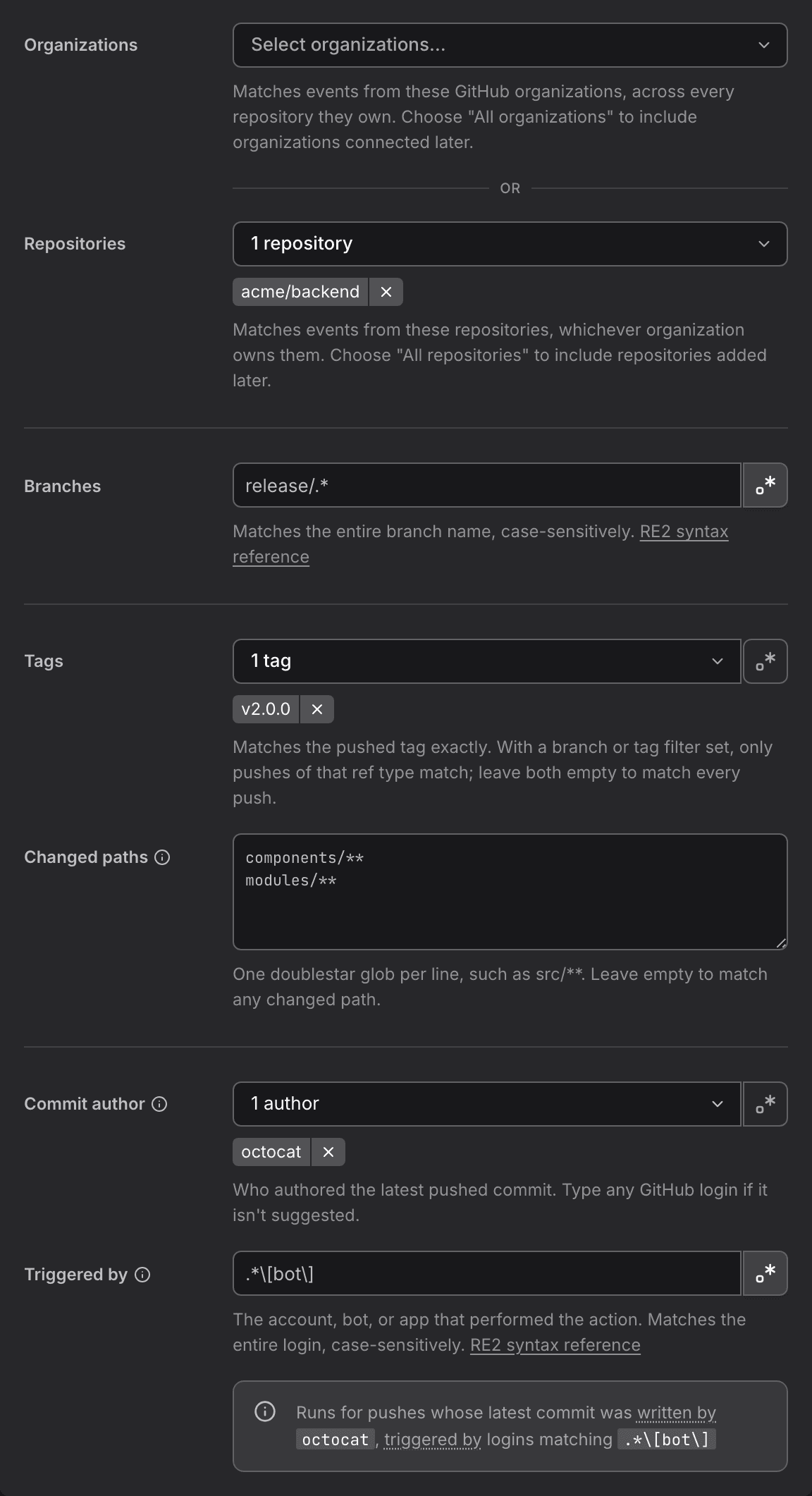
- Organizations: Optional. Match pushes from these GitHub organizations across their repositories.
- Repositories: Optional. Only match specific repositories (format:
owner/repo). - Branches: Optional. Match the pushed branch by exact name or regular expression. Leave empty to match any branch.
- Tags: Optional. Match the pushed tag by exact name or regular expression, for example
v[0-9]+\.[0-9]+\.[0-9]+. With a branch or tag filter set, only pushes of that ref type match. Leave both empty to match every push. - Changed paths: Optional. One glob per line, such as
src/**. Patterns apply in order and the last match decides. A leading!excludes a path, so keep at least one pattern without!. Tag pushes ignore changed paths. - Commit author: Optional. Filter by the GitHub account of the author of the latest pushed commit. This stays empty when the commit email is not linked to a GitHub account.
- Triggered by: Optional. Filter by the account, bot, or app that pushed.
Available Variables
- {{github.repository}}: Full repository name (e.g.,
dash0hq/dash0) - {{github.push.branch}}: The pushed branch name, without the
refs/heads/prefix - {{github.push.tag}}: The pushed tag name, without the
refs/tags/prefix - {{github.push.commit.sha}}: The SHA of the head commit of the push
- {{github.push.commit.message}}: The message of the head commit of the push
- {{github.push.changed_files}}: A JSON-encoded array of the paths added, modified, or removed by the push
Example Prompt
Someone pushed commit {{github.push.commit.sha}} to the {{github.push.branch}} branch of {{github.repository}}. It changed these files: {{github.push.changed_files}}

Check whether these changes rename or remove span names, metric names, or attributes. If they do, find the Dash0 dashboards, check rules, and SLOs that query them, and post the list of affected assets to #observability.
GitHub Workflow Run TriggerRelease historyThis feature was introduced by Trigger automations from GitHub Actions workflows on September 21, 2026.
Fires on GitHub Actions workflow run lifecycle events: requested, in progress, or completed.
Configuration Fields
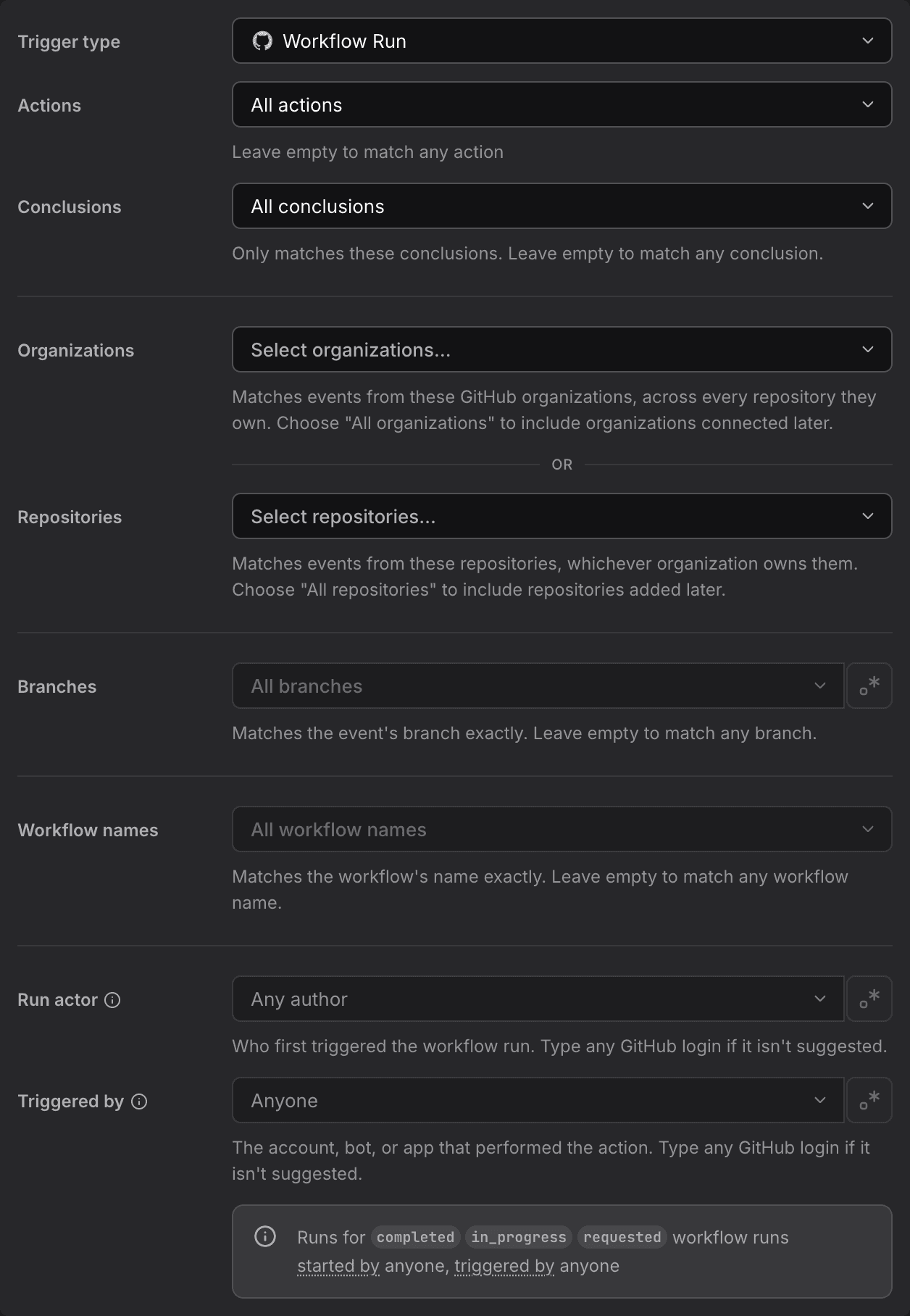
- Actions: Optional. Which workflow run events to match:
requested,in_progress,completed. Leave empty to match all actions. - Conclusions: Optional. Only match completed runs with these conclusions (e.g.
success,failure,cancelled). Leave empty to match any conclusion. - Organizations: Optional. Only match repositories from these GitHub organizations.
- Repositories: Optional. Only match specific repositories (format:
owner/repo). - Branches: Optional. Only match runs on these branches. Leave empty to match any branch.
- Workflow names: Optional. Only match these workflows by their display name (e.g.
CI). Leave empty to match any workflow. - Run actor: Optional. Filter by the GitHub login that first triggered the workflow run.
- Triggered by: Optional. Filter by the account, bot, or app that performed the action. You can enter a GitHub login even if it is not suggested.
Available Variables
- {{github.repository}}: Full repository name (e.g.,
dash0hq/dash0) - {{github.workflow_run.id}}: The workflow run ID
- {{github.workflow_run.name}}: The name of the workflow, e.g.
CI - {{github.workflow_run.head_branch}}: The branch the workflow ran on
- {{github.workflow_run.conclusion}}: The conclusion of the run, e.g.
success,failure(empty unless the run has completed) - {{github.workflow_run.url}}: Direct link to the workflow run
Example Prompt
Workflow "{{github.workflow_run.name}}" {{github.action}} on {{github.workflow_run.head_branch}} in {{github.repository}}.

If the conclusion is "failure", query Dash0 for recent deploys and error rates on the affected service, and post a summary to #ci-alerts.
GitHub Workflow Job Trigger
Fires on individual job lifecycle events within a workflow run: queued, waiting, in progress, or completed.
Configuration Fields
Same Organizations, Repositories, and Branches fields as the Workflow Run trigger, plus:
- Actions: Optional. Which job events to match:
queued,waiting,in_progress,completed. Leave empty to match all actions. - Conclusions: Optional. Only match completed jobs with these conclusions (e.g.
success,failure,cancelled). Leave empty to match any conclusion. - Workflow names: Optional. Only match jobs belonging to these workflows by display name (e.g.
CI) — this matches the job's parent workflow, not the job's own name. Leave empty to match any workflow.
Available Variables
- {{github.workflow_job.id}}: The job ID
- {{github.workflow_job.name}}: The job's own name, e.g.
test (3.9) - {{github.workflow_job.workflow_name}}: The name of the workflow the job belongs to, e.g.
CI - {{github.workflow_job.head_branch}}: The branch the job ran on
- {{github.workflow_job.conclusion}}: The conclusion of the job, e.g.
success,failure(empty unless the job has completed) - {{github.workflow_job.url}}: Direct link to the workflow job
Example Prompt
Job "{{github.workflow_job.name}}" in workflow "{{github.workflow_job.workflow_name}}" {{github.action}}.

If it failed, summarize the likely cause from recent commits on {{github.workflow_job.head_branch}} and post to #ci-alerts.
GitHub Workflow Dispatch Trigger
Fires when a workflow is manually or programmatically dispatched (GitHub's "Run workflow" button, or the workflow_dispatch API).
Configuration Fields
- Organizations: Optional. Only match repositories from these GitHub organizations.
- Repositories: Optional. Only match specific repositories (format:
owner/repo). - Branches: Optional. Only match dispatches against these branches or tags. Leave empty to match any.
- Workflow names: Optional. Only match these workflow files by path (e.g.
.github/workflows/ci.yml), not display name. Leave empty to match any workflow file. - Triggered by: Optional. Filter by the account, bot, or app that performed the action. You can enter a GitHub login even if it is not suggested.
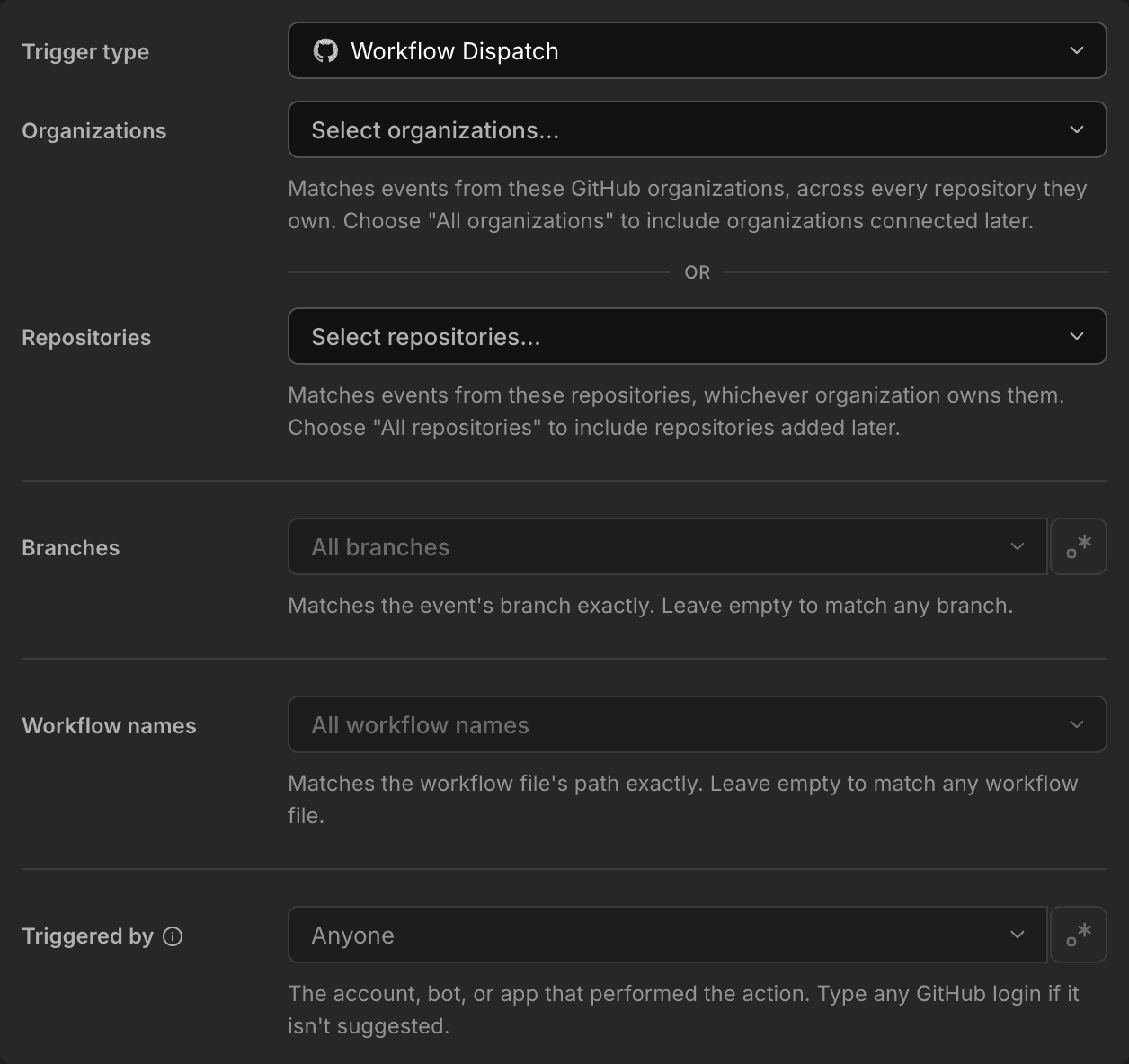
Unlike the other GitHub workflow triggers, Workflow Dispatch has no Actions or Conclusions field — there's only one dispatch event, and no completion state to filter on.
Available Variables
- {{github.repository}}: Full repository name (e.g.,
dash0hq/dash0) - {{github.workflow_dispatch.ref}}: The branch or tag ref the workflow was dispatched against
- {{github.workflow_dispatch.workflow}}: The dispatched workflow's file path, e.g.
.github/workflows/ci.yml - {{github.workflow_dispatch.inputs}}: The inputs provided to the manual dispatch, as JSON
Example Prompt
Workflow {{github.workflow_dispatch.workflow}} was manually dispatched against {{github.workflow_dispatch.ref}} in {{github.repository}}.

Query Dash0 for the last successful deploy to compare against, and post a summary to #deploys.
GitHub Check Run Trigger
Fires on individual check run lifecycle events — the checks GitHub Apps (including third-party CI tools) report on a commit.
Configuration Fields
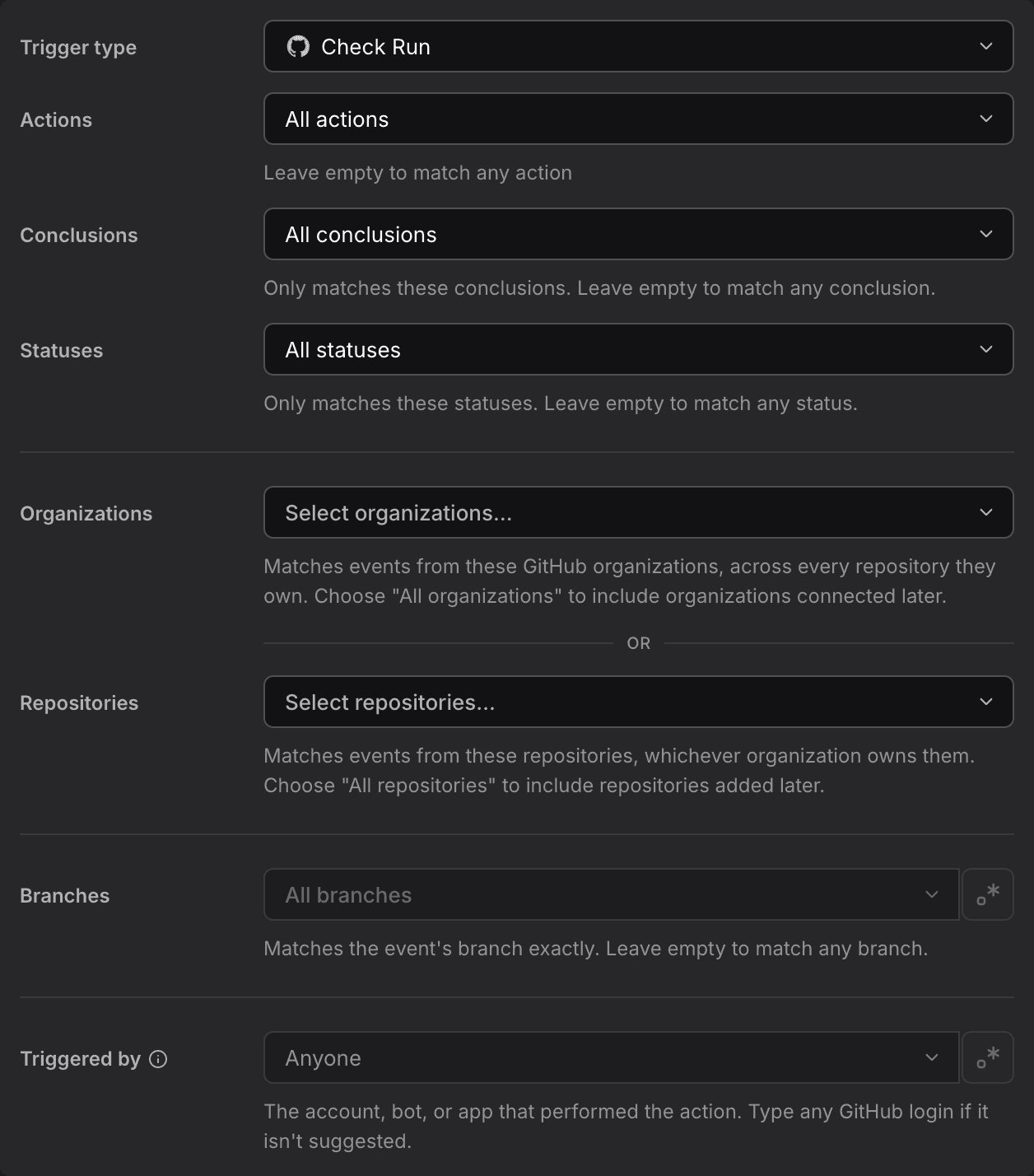
- Actions: Optional. Which check run events to match:
created,rerequested,requested_action,completed. Leave empty to match all actions. - Conclusions: Optional. Only match completed check runs with these conclusions (e.g.
success,failure,neutral). Leave empty to match any conclusion. - Statuses: Optional. Only match check runs with these statuses:
queued,in_progress,completed,pending. Leave empty to match any status. - Organizations: Optional. Only match repositories from these GitHub organizations.
- Repositories: Optional. Only match specific repositories (format:
owner/repo). - Branches: Optional. Only match check runs on these branches. Leave empty to match any branch.
- Triggered by: Optional. Filter by the account, bot, or app that performed the action. You can enter a GitHub login even if it is not suggested.
Available Variables
- {{github.check_run.id}}: The check run ID
- {{github.check_run.name}}: The name of the check run, e.g.
lint - {{github.check_run.head_branch}}: The branch the check run's commit is on
- {{github.check_run.status}}: The check run's status, e.g.
in_progress,completed - {{github.check_run.conclusion}}: The conclusion of the check run, e.g.
success,failure(empty unless completed) - {{github.check_run.url}}: Direct link to the check run
Example Prompt
Check run "{{github.check_run.name}}" {{github.action}} on {{github.check_run.head_branch}}.

If the conclusion is "failure", query Dash0 for the affected service's recent error rate and post findings to #ci-alerts.
GitHub Check Suite Trigger
Fires on check suite lifecycle events — the aggregate of every check run GitHub groups together for one commit.
Configuration Fields
Same Organizations, Repositories, and Branches fields as the Check Run trigger, plus:
- Actions: Optional. Which check suite events to match:
requested,rerequested,completed. Leave empty to match all actions. - Conclusions: Optional. Only match completed check suites with these conclusions (e.g.
success,failure,neutral). Leave empty to match any conclusion. - Statuses: Optional. Only match check suites with these statuses:
requested,queued,in_progress,completed,pending. Leave empty to match any status.
Available Variables
- {{github.check_suite.id}}: The check suite ID
- {{github.check_suite.head_branch}}: The branch the check suite's commit is on
- {{github.check_suite.conclusion}}: The conclusion of the check suite, e.g.
success,failure(empty unless completed) - {{github.check_suite.status}}: The check suite status, e.g.
completed,in_progress
Example Prompt
Check suite {{github.action}} on {{github.check_suite.head_branch}}, status {{github.check_suite.status}}.

If the conclusion is "failure", summarize which checks failed and post to #ci-alerts.
GitHub Filters: Exact Values or Regular Expressions
The Branches, Tags, Triggered by, and author filters on GitHub triggers accept either exact values or a regular expression. Switch a filter to regular expression mode to match many values with one pattern, such as main|release/.* for branches or dependabot\[bot\]|octocat for accounts.
- A regular expression must match the entire value.
release/.*matchesrelease/1.2, butreleasealone does not. - Matching is case-sensitive.
- Patterns use RE2 syntax.
- A filter takes either exact values or a regular expression, not both.
The Title pattern filter on pull request triggers works the same way, and is case-sensitive unless the pattern starts with (?i).
Other GitHub Triggers
Dash0 supports additional GitHub trigger types:
- Deployment: Fires when deployments are created or updated
- Deployment Status: Fires when deployment status changes
- Pull Request Review: Fires when reviews are submitted
- Pull Request Review Comment: Fires on review comments
- Release: Fires when releases are published
The available filters and event variables depend on the selected trigger type. Review the fields and available variables in the editor rather than assuming they match a pull request trigger.