Last updated: May 20, 2026
Amazon EventBridge: An In-Depth Look
What is AWS EventBridge?
Amazon EventBridge is a serverless event bus that was built on top of the existing AWS CloudWatch Events API.
AWS CloudWatch Events enables developers to integrate many of the AWS services through events. For example, if there is a change in the state of an EC2 instance, a CloudWatch Event can trigger an event to AWS Lambda to take an action. EventBridge extends this functionality beyond the AWS ecosystem, letting you bring together your own (legacy) applications, SaaS (Software-as-a-Service), and AWS services. It can stream real-time data from various event sources like PagerDuty and Symantec, and route them to various targets (AWS services) like SQS, Lambda, and others.
At launch, EventBridge arrived offering support for 10 SaaS application partners, more than 90 AWS services as event sources, and 17 AWS services as targets.
Benefits of AWS EventBridge
AWS EventBridge offers several benefits for building event-driven architectures:
- Scalability: As a serverless service, EventBridge can automatically scale with the number of events, accommodating both low and high event volumes without the need for manual intervention.
- Simplified integration: EventBridge facilitates seamless integration between various AWS services, SaaS applications, and custom applications, reducing the complexity of connecting multiple services.
- Decoupling: Event producers and consumers are decoupled, allowing for independent development, deployment, and scaling of each component, which improves overall system resilience and maintainability.
- Event filtering and transformation: EventBridge supports filtering and transformation of events, allowing you to control which events are sent to specific targets, reducing the amount of processing required by the target services.
- Real-time processing: Event-driven architectures built with EventBridge can respond to events in real-time, enabling the creation of responsive and efficient systems.
- Security: EventBridge provides built-in security features such as AWS Identity and Access Management (IAM) for access control and AWS Key Management Service (KMS) for encrypting sensitive data.
- Cost-effective: With a pay-as-you-go pricing model, you only pay for the events processed by EventBridge, eliminating the need for upfront investments or capacity planning.
- Simplified monitoring and observability: EventBridge integrates with AWS monitoring services like Amazon CloudWatch and AWS X-Ray, making it easier to monitor, troubleshoot, and analyze the performance of your event-driven architecture.
How is EventBridge Different from Other AWS Services?
Let's take a look at the other options available in AWS for event routing and see how they compare with EventBridge. There are four main AWS-native options for event routing: CloudWatch Events, SNS, EventBridge, and Kinesis.
CloudWatch Events vs. EventBridge
CloudWatch Events can support only AWS services as event sources. It uses only the default event bus, which accepts events from AWS services, PutEvents API calls, and other authorized accounts. You can manage permissions on the default event bus to authorize other accounts.
EventBridge provides an option to create custom event buses and SaaS event buses on top of the default bus. The custom event bus is used to handle custom events raised by using PutEvents APIs. The SaaS event bus is used to channel through events triggered by SaaS platforms.
For the default bus, EventBridge leverages the CloudWatch Events API, so CloudWatch Events users can access their existing default bus, rules, and events in the new EventBridge console, as well as in the CloudWatch Events console.
SNS vs. EventBridge
SNS is a well-known event-sourcing service. It really shines when the throughput is very high, up into the millions of TPS. EventBridge, meanwhile, supports 400 requests per second only.
However, the number of targets supported by SNS is limited compared to EventBridge.
For example, if an event needs to trigger Step Functions, it cannot do so directly as it is not available as a target. It needs to call a Lambda function, which can then trigger Step Functions. On the other hand, EventBridge supports 17 targets as of now. But each rule in EventBridge can configure a maximum of 5 targets.
SNS scales practically infinitely, but filtering is limited to attributes, not event content. SNS doesn't give any guarantee as to the ordering of the messages.
Kinesis vs. EventBridge
Kinesis can be used for event routing as well as event storing. This is an ideal solution for processing real-time data at large scales. It can fan out to multiple consumers; however, there is a limit on the number of consumers that can connect to a single stream. Each individual consumer would carry some responsibility for filtering out any messages that they weren't potentially interested in.
Kinesis also provides ordering guarantees. However, it doesn't have an entirely usage-based pricing model. It doesn't automatically scale to demand.
On the other hand, EventBridge cannot buffer the events. It needs SQS or Kinesis integration for event storage.
AWS EventBridge Key Features
Before we go deep into how EventBridge works, let us first understand the components this service contains:
Events – An event is a real-time change in a system, data, or environment. This change can be either in your application or in an AWS service or a SaaS partner service.
Event sources – An event source is used to ingest events from a SaaS partner — or your own app — to an AWS customer account.
Event buses – To receive an event from event sources, you need to configure an event bus in an AWS account. These event buses can be of several types:
- Default event bus – Created by default and receives events from any AWS service.
- Custom event bus – Receives events from custom applications you create and must be created manually.
- Partner event bus – Receives events from SaaS partner applications and must be created manually.
Rules – A rule is created and associated with an event bus from which it will scan the events to be matched. When incoming events match with the rule, it routes them to targets for processing. You can enable parallel processing by routing to multiple targets. A rule can also parse the JSON and filter/customize it to send only certain parts of the JSON or overwrite the text.
Targets – A target processes events. It supports JSON format for events. Targets can include several AWS services such as Amazon EC2 instances, Lambda functions, Kinesis streams, Amazon ECS tasks, Step Functions, Amazon SNS topics, and Amazon SQS.
How EventBridge Works
In simple terms, Amazon EventBridge is a serverless event bus that supports the publish/subscribe model. SaaS applications publish events to this event bus and it fans out the events to one or multiple AWS target services.
The first step is to create a rule. A rule has to be created in the same region where the target is. A rule requires an event pattern. It uses the pattern to match the incoming events. Below is an example that processes all EC2 instance-termination events:
1234567{"source": ["aws.ec2"],"detail-type": ["EC2 Instance State-change Notification"],"detail": {"state": ["terminated"]}}
Each rule has to be associated with an event bus. You can select one of the event buses based on your requirements discussed above. Now, select a target to which the events will be routed once matched with the event pattern by the rule.
The next step is to create an event bus. Every AWS account creates one default event bus, which receives events emitted by AWS services. You can also configure your custom applications to send events to the default event bus. If you need to integrate with a SaaS partner application, you can create a partner event bus.
Once the basic flow is set up, you can enable additional features such as content-based event filtering, transforming target inputs, schema registry, and so on.
Content-based Event Filtering
Content-based event filtering is used to write complex rules that allow events to be processed when filtering conditions are met.
For instance, you might want to pass the event only if it is missing a specific field or if events are coming from a specific IP address.
It supports the following types of pattern matching:
- Prefix Matching
- Anything-but Matching
- Numeric Matching
- IP Address Matching
- Exists Matching
- Complex Example with Multiple Matching
Transforming Target Inputs
In specific use cases, you might want to customize the text of event fields before passing them to a target so that these fields provide more meaningful information to process them further.
Let's assume this is the event being processed:
12345678910111213141516{"version": "0","id": "6bf42112-1422-2cf3-a730-92db853d1542","detail-type": "EC2 Instance State-change Notification","source": "aws.ec2","account": "91204489383","time": "2021-02-05T11:13:14Z","region": "ap-southeast-1","resources": ["arn:aws:ec2:ap-southeast-1:91204489383:instance/i-zysa0111"],"detail": {"instance": "i-999999999","state": "RUNNING"}}
When you create a rule, you can select the Input Transformer option under Configure input. It provides two text boxes: one for the Input Path and one for the Input Template.
The Input Path can be defined with the variables instance and state:
1{ "instance" : "$.detail.instance", "state" : "$.detail.state" }
The Input Template is used to transform the information to pass to your target. You can create a template that passes either a string or JSON to the target. For example:
Template
"instance <instance> is in <state>"
Output
"instance i-999999999 is in RUNNING"
EventBridge Schema Registry
So far we have seen that events get published and consumed by targets. But now, from a developer perspective, if you need to read these events at the target end and process them, you need to manually write code matching up with the event structure being received.
To solve this problem, AWS launched Schema Registry to centralize and share the event structure, which can be downloaded as objects with popular programming languages such as Java and Python. You can generate events from these schemas or generate code bindings for these schemas.
Additional Points to Remember
Here are additional points to consider as you implement EventBridge for your serverless applications:
- Pricing for EventBridge is the same as for CloudWatch Events, at $1 per 1 million events published to the event bus.
- EventBridge will ensure successful delivery to targets. If failure happens, it will retry for 24 hours only before marking it as failed. In the case of Lambda, what successful delivery means from the EventBridge perspective is that it was able to asynchronously invoke your function. As long as EventBridge is getting a 200 response, from its perspective it is a successful transaction. If there is any failure in Lambda execution, it has to rely on the Lambda retry policy. EventBridge cannot apply its retry policies.
- EventBridge makes connections seamless for an AWS service from one AWS account to another AWS service in a different account. It has a target option as "event bus from another account".
- EventBridge needs SQS to bring resiliency, but Kinesis has that feature built in.
EventBridge Use Cases
Let's take a couple of use cases and compare how they would be implemented using SNS and EventBridge.
Use Case 1: Say you want to build a system where if an EC2 instance is down, it should reboot and then trigger a Lambda function to store the incident in a DynamoDB table.
If you build it using SNS as an event-routing service, it would need to use SQS as well, as it cannot be subscribed by EC2 directly. Here is the design for this solution:
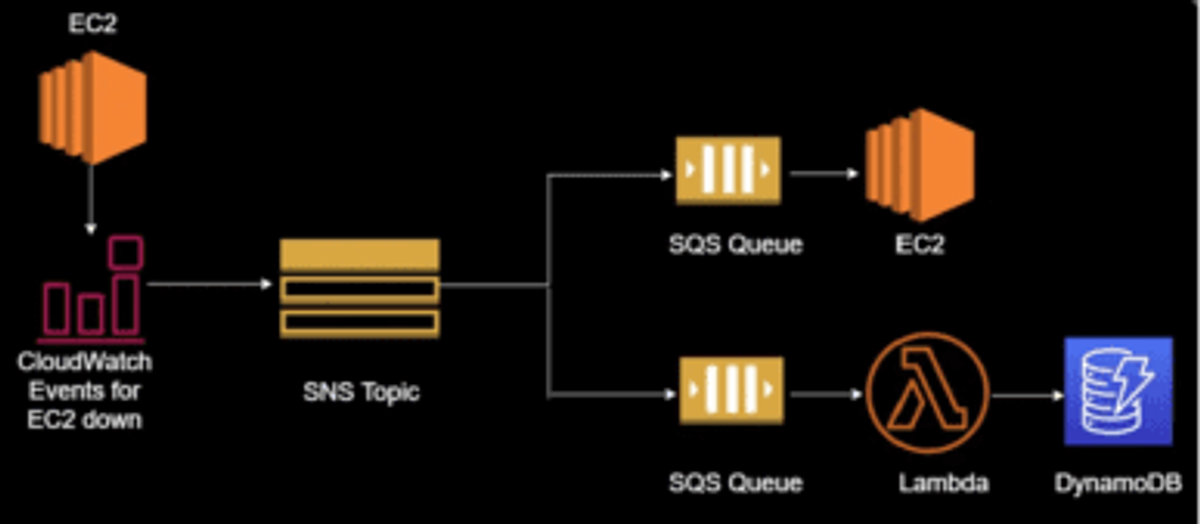
If we implement the same use case using EventBridge, the design will look like this:
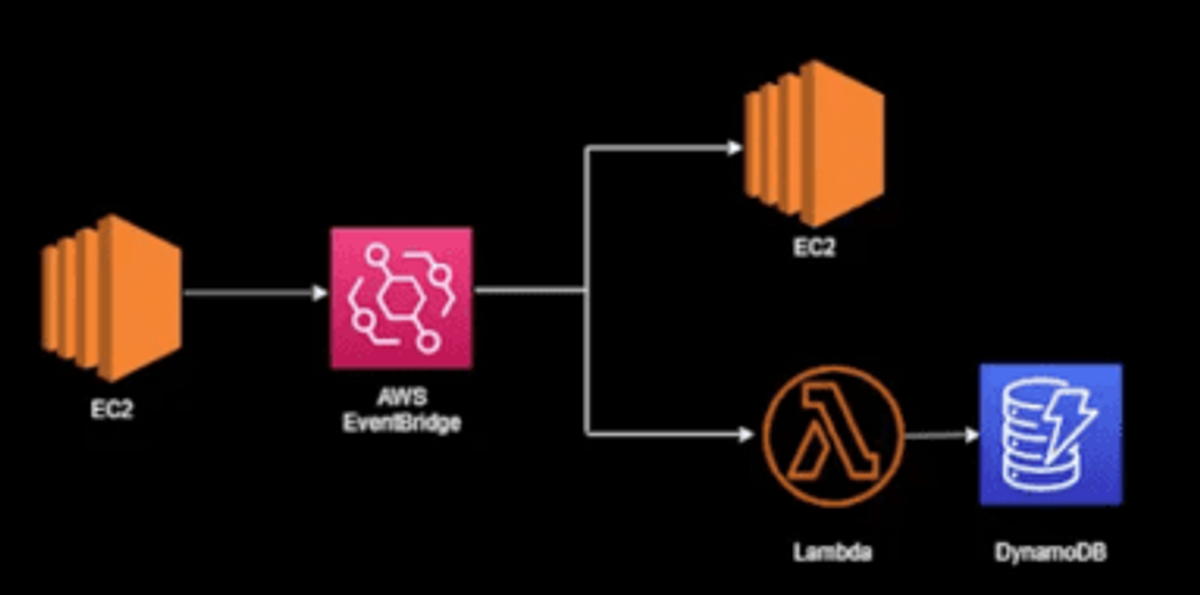
With EventBridge the design is much simpler. We can implement our solution using fewer services.
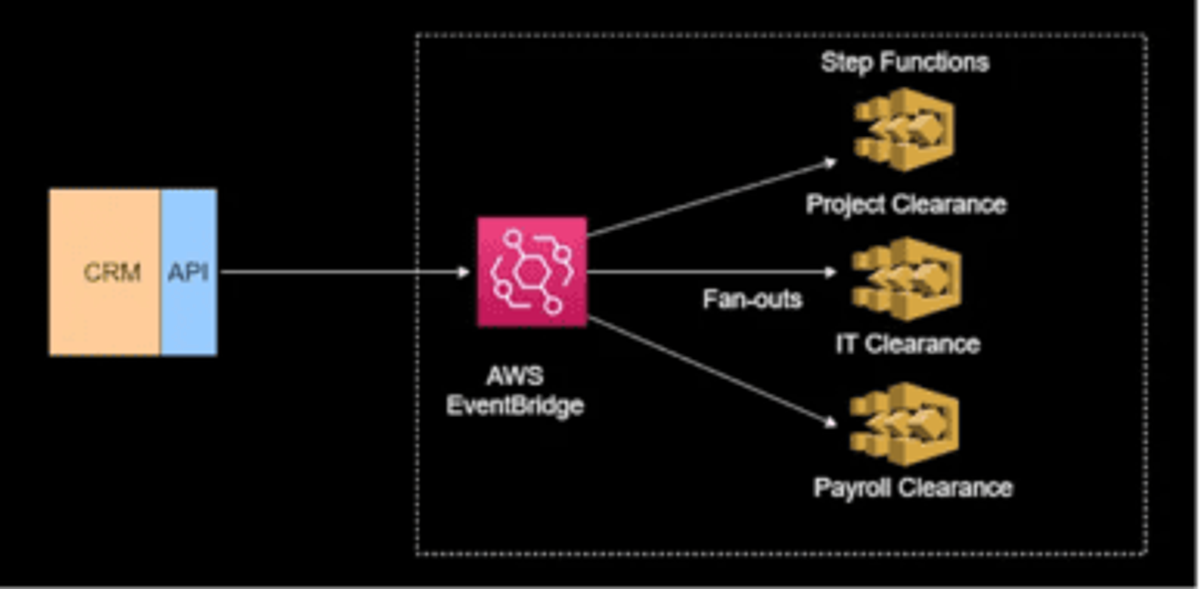
Use Case 2: An employee resigns from an organization and their record is updated in the CRM tool. It needs to trigger different workflows for all approvals as part of an exit checklist.
If we implement this use case using SNS, the design will look something like this:
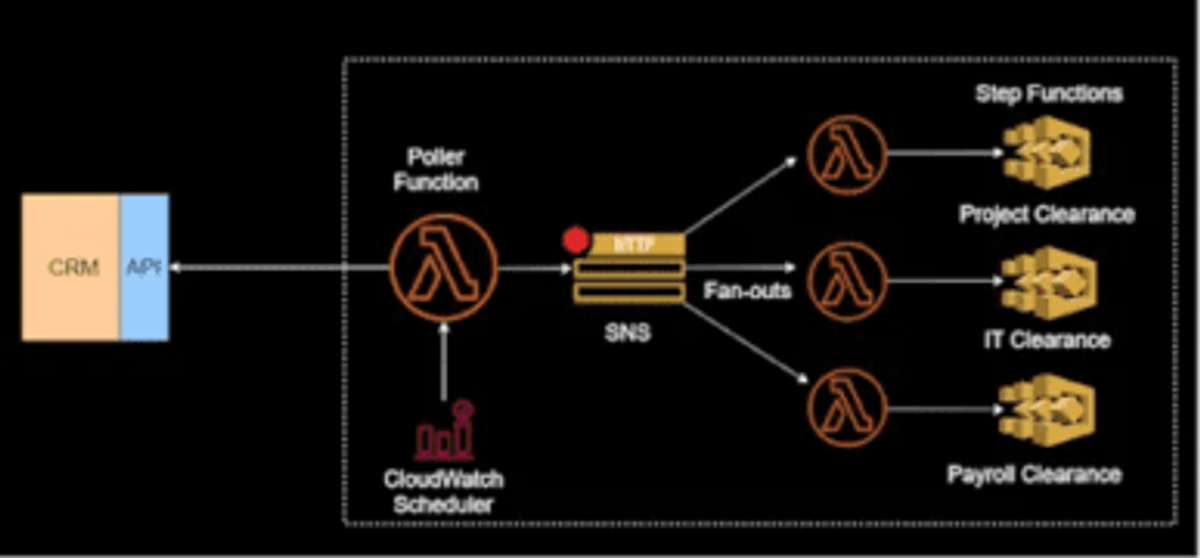
If we use EventBridge, the design will be much simpler. It doesn't need polling, CloudWatch Scheduler, or Lambda functions. The design will look more like this:
A Brief History: What Came Before EventBridge?
EventBridge has been introduced mainly to address the problems of SaaS platform integration with AWS services.
This is critical, because in the current cloud world, SaaS platforms like CRMs, identity providers, and so on, have become key partners. They generate a large amount of data and need to pass it to AWS platforms for business processing. Before EventBridge, there were two main solutions for sending event data to AWS:
Polling
With this solution, we generally set up a cron job or CloudWatch Scheduler to go out and call the SaaS APIs. It will check if there has been any change in data and then pull the data. Polling frequency can be minutes to hours depending on the use case and the capacity of the particular SaaS platform to bear the load. A typical flow might look like this:
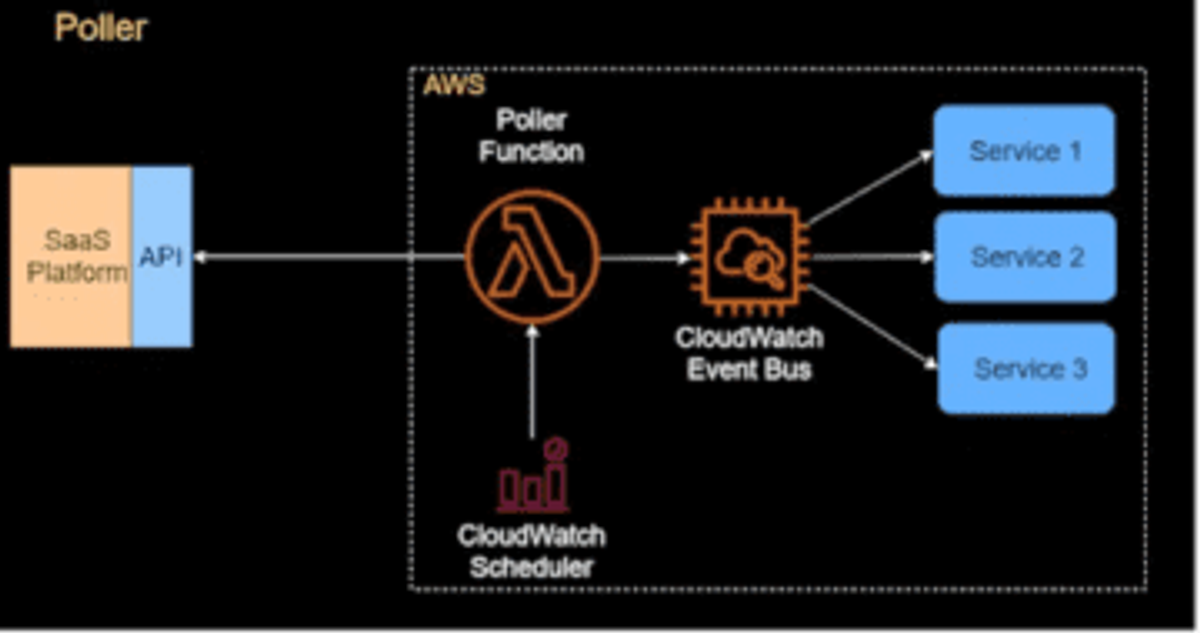
This solution seems simple but it raises two major issues:
- Data freshness issue – The scheduler will be calling the API at set intervals, maybe every few minutes or perhaps only once per hour. So, it will never get real-time data. There will always be a gap, which might not be suitable for some business scenarios.
- Cost and performance issues – To alleviate the data freshness issue we could choose to reduce the interval of polling, but that will increase costs as call frequency will be increased. Additionally, more resources will be consumed on the SaaS platform side. This may cause throttling and slow down performance.
So, the overall recommendation is to avoid the polling mechanism if you can.
SaaS Webhooks
This technique eliminates the data freshness issue. Here, we find an HTTP endpoint of the AWS-hosted application which the SaaS platform can call to send event data. The SaaS platform will set up the webhooks and send real-time data when records change.
Here's an example of a typical use case:
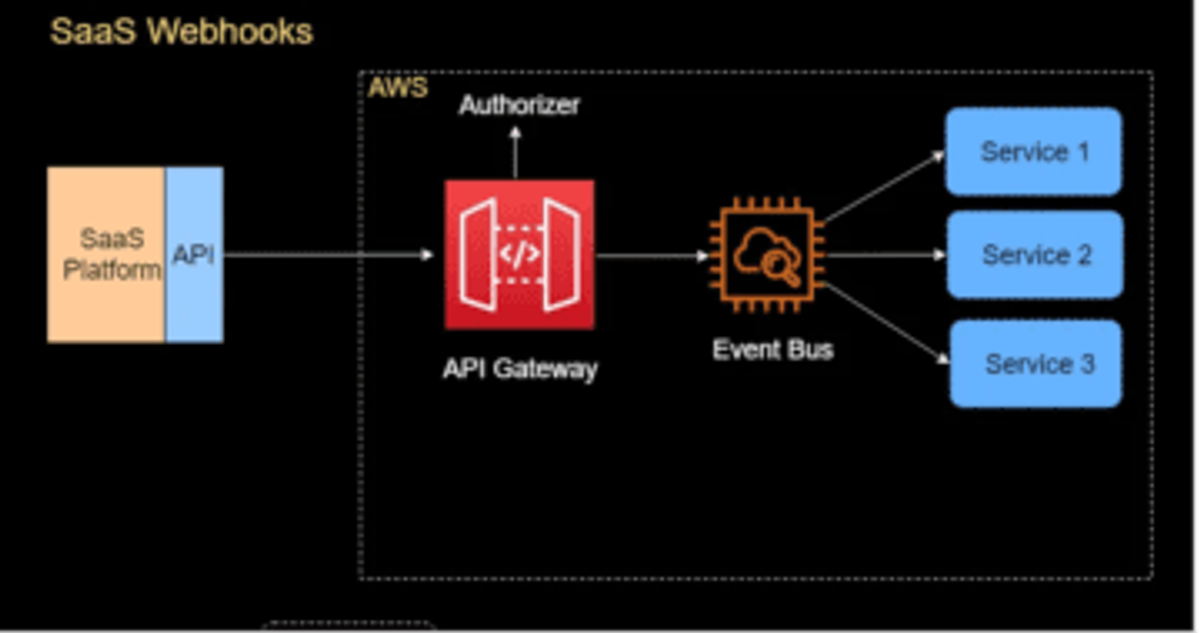
In this flow, we still need to manage the public endpoint of the application for handling security/DDoS attacks. It will also require authentication handling. In AWS, this is usually done through API Gateway or WAF/ALB. We would also need to write the code to handle the events.
So, in light of the shortcomings inherent in the existing techniques, AWS introduced EventBridge, which enables SaaS platforms to create a native event source on the AWS side and establish a secure connection just by sharing Account ID and region with platforms.
It not only solves the issue of real-time data processing but also takes care of event ingestion and delivery, security, authorization, and error handling for you.
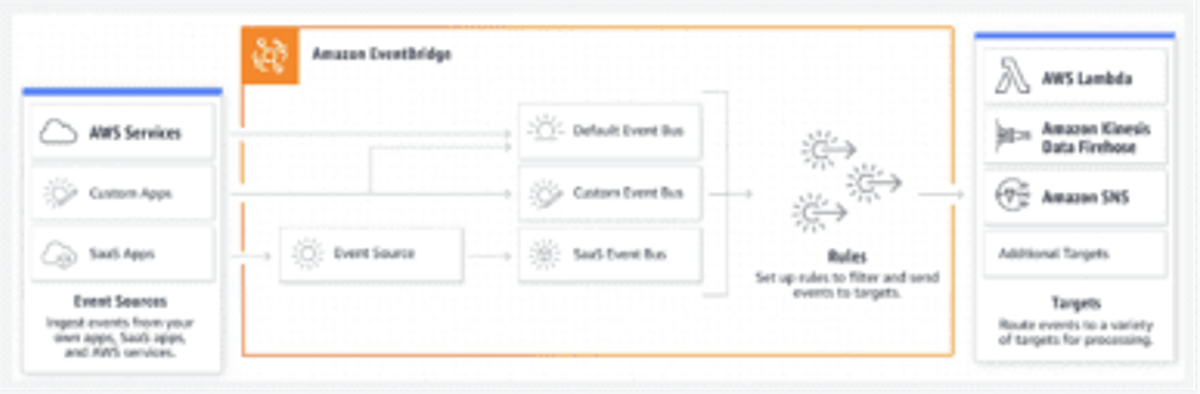
Image source: AWS
Summary
The introduction of EventBridge helps to solve some of the big issues around SaaS platform integration with AWS services. Also, for existing AWS services, integration has become much simpler and smoother. When comparing it to similar AWS services, it's clear that while CloudWatch Events, SNS, and Kinesis each offer certain advantages, EventBridge has the potential to be a key ingredient in a modern, highly distributed microservices architecture.