Last updated: January 31, 2026
Java Log Levels: How to Use Them in Practice
Java has no shortage of logging frameworks, but long before Log4j, Logback, or
SLF4J entered the picture, the JDK itself shipped with a logging API:
java.util.logging, often shortened to JUL.
It's not flashy, and it's not especially ergonomic, but it is everywhere. If you've ever debugged a JVM in production, you've most certainly encountered JUL logs, either directly or as the lowest layer under another framework.
Understanding Java log levels at this level is still worth your time. JUL’s model shaped how logging works across the Java ecosystem, and many abstractions still map back to it under the hood.
This article explains Java log levels as defined by java.util.logging, how
they behave at runtime, and how to use them in a way that keeps logs useful
instead of noisy.
Java log levels in order
java.util.logging defines a fixed set of log levels, each represented by a
Level object with an associated numeric value. They're ordered from least to
most severe:
| Level | Value | Typical use case |
|---|---|---|
FINEST | 300 | Step by step execution detail such as loop iterations, branch paths, |
| or method entry and exit. | ||
FINER | 400 | Intermediate state and derived values used to make decisions. |
FINE | 500 | High level diagnostic context explaining why the system behaved a |
| certain way. | ||
CONFIG | 700 | Configuration and startup related information. |
INFO | 800 | Normal, expected application behavior or significant business events |
WARNING | 900 | An unusual situation that may require attention if it continues. |
SEVERE | 1000 | A failure that prevented an operation from completing successfully. |
There are also two special levels, but these are not used in application code. They exist only to configure logging behavior:
ALL: Enables every log messageOFF: Disables logging entirely
In practice, most applications use a smaller subset: FINE, INFO, WARNING,
and SEVERE. They cover the majority of real world needs, with the other levels
reserved only for specialized use cases.
Setting the log level for an event
In JUL, you obtain a Logger by name, usually the fully qualified class name,
and log messages at a chosen level through the corresponding level method:
1234567891011121314151617import java.util.logging.Logger;import java.util.logging.Level;public class OrderService {private static final Logger logger =Logger.getLogger(OrderService.class.getName());public void placeOrder(String orderId) {logger.finest("Entered placeOrder() method, initializing local variables");logger.finer("Parsed request headers and extracted correlationId=abc123");logger.fine("Calculated order total=149.99 after discounts");logger.config("Loaded payment provider configuration from environment");logger.info("Order submitted successfully orderId=" + orderId);logger.warning("Retrying payment request after transient timeout orderId=" + orderId);logger.severe("Payment processing failed permanently orderId=" + orderId);}}
You can also use the log() method with a Level constant. This is required
when you need to attach a Throwable, for example:
12345try {throw new IllegalArgumentException("Order ID must not be null");} catch (Exception ex) {logger.log(Level.SEVERE, "Failed to process order", ex);}
logger.severe() will not work here because it does not have an overload that
accepts a Throwable.
How to choose log levels in Java
JUL’s level names are more granular than many modern frameworks, which can make them feel abstract. A useful way to reason about them is by intent, not by name:
-
FINEST,FINER,FINE: Use these to surface internal details that help you understand system behavior when actively troubleshooting an issue. They should never be enabled by default in production. -
CONFIG: Use this for configuration and startup details like environment values, feature flags, and related decisions. -
INFO: Use this for routine, expected, or significant events that describe normal operation of your services. -
WARNING: This is like a check engine light for your services. It signals a significant issue that hasn't caused a failure yet, but likely will if it continues. -
SEVERE: Covers both "error" and "fatal" style events where an operation failed or the system entered an unrecoverable state.
The level you choose should answer a simple operational question: how serious is this, and who should care if it shows up?
This way, your logs stay quiet during normal operation and surface the right signals immediately when something goes wrong.
Customizing the default log level behavior
Out of the box, the JDK configures the default level of the root logger at
INFO. This means:
INFO,WARNING, andSEVEREare logged.CONFIG,FINE,FINER, andFINESTare suppressed.
You can see this behavior immediately from the previous example:
123456Jan 30, 2026 2:25:25 PM OrderService placeOrderINFO: Order submitted successfully orderId=ORD-123Jan 30, 2026 2:25:25 PM OrderService placeOrderWARNING: Retrying payment request after transient timeout orderId=ORD-123Jan 30, 2026 2:25:25 PM OrderService placeOrderSEVERE: Payment processing failed permanently orderId=ORD-123
JUL is configured using a logging.properties file, typically located at
$JAVA_HOME/conf/logging.properties or provided via the
-Djava.util.logging.config.file:
A minimal configuration that sets the global level looks like this:
1.level = INFO
To enable debug style logging globally:
1.level = FINE
Handlers also have their own levels. If a handler is more restrictive than the logger, it will still filter messages out.
123handlers = java.util.logging.ConsoleHandler.level = FINEjava.util.logging.ConsoleHandler.level = INFO
In this setup, FINE logs are created but only INFO logs and above are sent
to the console.
Overriding levels for specific packages and classes
One of the most important features of java.util.logging is per logger
configuration. It allows you to increase verbosity for a narrow slice of your
codebase without flooding the rest of the system with noise.
In practice, that means you can override levels for packages, individual classes, or any custom logger name you define. For example:
123.level = INFOcom.myapp.payments.level = FINEcom.myapp.payments.OrderService.level = FINE
With this configuration:
- All code under
com.myapp.paymentscan emitFINElogs, OrderServicecan emitFINElogs even if its package does not,- Everything else remains at
INFO
Note that a more specific name always overrides a less specific one, making it easy to increase verbosity for a single subsystem or class during an investigation.
Avoiding performance pitfalls with verbose logging
Like most logging systems, JUL drops log records below the active level. What it cannot avoid is the work done before the log call itself.
This matters in hot paths such as request handlers, tight loops, or high-throughput operations:
1logger.fine("Computed result: " + expensiveComputation());
Even when FINE is disabled, expensiveComputation() still executes and the
string is still built. In performance-sensitive code, guard these calls
explicitly:
123if (logger.isLoggable(Level.FINE)) {logger.fine("Computed result: " + expensiveComputation());}
You do not need this everywhere; only use it where log volume and computation cost actually matter.
Logging exceptions correctly
JUL supports logging exceptions directly, but always pass the throwable instead of stringifying it yourself.
12345try {throw new IllegalArgumentException("Order ID must not be null");} catch (Exception ex) {logger.log(Level.SEVERE, "Failed to process order " + order.getId(), ex);}
This preserves the full stack trace and associates it with the log record, instead of burying it in a string where tools cannot reliably parse it:
12345Jan 30, 2026 3:42:27 PM OrderService placeOrderSEVERE: Failed to process orderjava.lang.IllegalArgumentException: Order ID must not be nullat OrderService.placeOrder(OrderService.java:26)at OrderService.main(OrderService.java:35)
As a rule of thumb:
- Use
WARNINGwhen an error occurred but the system recovered - Use
SEVEREwhen an operation failed or data was put at risk
If you would page someone for it, it should not be logged below SEVERE.
How Java log levels map to OpenTelemetry
When JUL logs are exported through an OpenTelemetry pipeline, their levels are normalized into OpenTelemetry’s standard severity model to ensure consistent behavior across diverse logging systems.
A typical mapping looks like this:
java.util.logging | SeverityText | SeverityNumber |
|---|---|---|
FINEST | TRACE | 1–4 |
FINER | TRACE | 1–4 |
FINE | DEBUG | 5–8 |
CONFIG | INFO | 9–12 |
INFO | INFO | 9–12 |
WARNING | WARN | 13–16 |
SEVERE | ERROR | 17–20 |
SEVERE | FATAL | 21–24 |
This normalization matters in distributed systems, where logs from various language ecosystems must be analyzed side by side in a universally understandable way.
Making Java log levels actionable with Dash0
In production, you rarely start an investigation by reading every log line.
A spike in SEVERE usually means something failed outright, while a gradual
increase in WARNING often points to a component drifting toward failure.
INFO provides operational context, and the FINE levels are only used when
you need to understand how the code behaved for a specific execution.
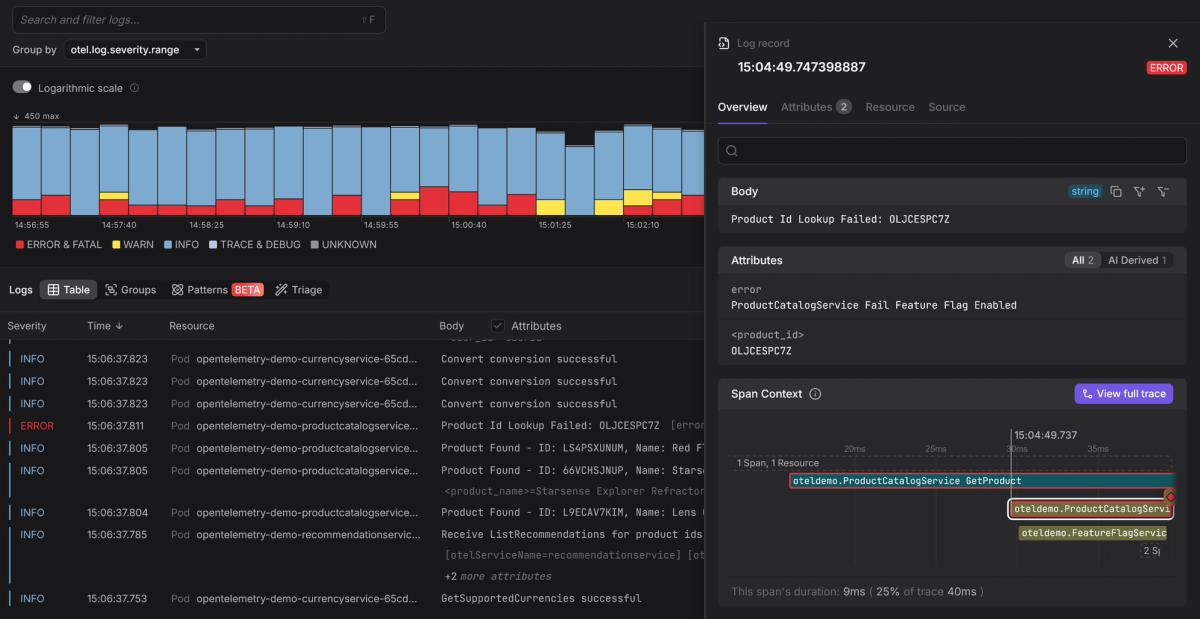
Dash0 treats these levels as a first-class signal, not just a filter. Higher severity events naturally rise to the surface, so you can focus on what failed first, then expand outward without drowning in noise.
Because Dash0 is
OpenTelemetry-native,
Java logs keep their severity semantics and can be
correlated with traces.
You can move from a SEVERE log to the exact request that produced it, then
pull in lower-level detail only for that execution.
The outcome is simple: you begin with a small set of high-severity events, follow the execution path they belong to, and surface additional detail on demand without turning on verbose logging everywhere.
Final thoughts
java.util.logging is not the most pleasant API, but its level model is solid
and still underpins much of the Java ecosystem.
When levels are used deliberately, routine behavior fades into the background, warnings draw attention, and failures are unmistakable. More detail can be surfaced instantly when needed, without increasing noise or cost.
Treat log levels as part of your system design, even when working at the lowest level of the stack. When things go wrong, that discipline pays off fast.
Try Dash0 today to see Java logs in the context they were produced and make log levels work the way they were intended.