
Last updated: September 14, 2026
Organize and Save Log Views
Organize and save log views with favorites, built-in perspectives, and custom filters.
The left-hand navigation panel organizes saved log views into three sections: Favorites, Built-in, and Custom.
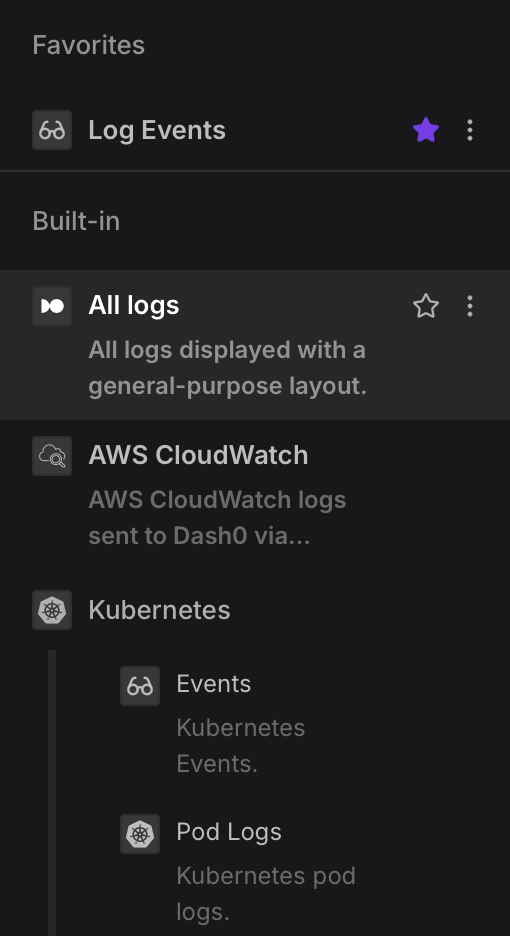
Favorites
The Favorites section appears at the top of the panel and contains views you have pinned for quick access.
- Any built-in or custom view can be added to Favorites by clicking the star icon that appears when hovering over a view entry.
- To manage a view — such as duplicating or deleting it — use the ⋯ context menu icon that appears on hover.
Built-in
Built-in views are provided by Dash0 and cover the most common log sources.
They cannot be deleted, but can be favorited or used as the basis for custom views.
The following built-in views are available:
- All logs — Displays all log records using a general-purpose layout, giving a broad overview of activity across every service and source.
- AWS CloudWatch — Scoped to logs received via the CloudWatch Logs integration.
- Kubernetes
- Events — Filtered to Kubernetes event logs.
- Pod Logs — Scoped to logs from Kubernetes pods.
- Log Events — Displays log events, as defined in Understand Log Events.
- Vercel — Displays function logs sent via the Vercel log drain.
Custom
The Custom section lists views you have created yourself, typically by modifying a built-in view and saving it under a new name.
Custom views support the same star (favorite) and context menu (three-dot) controls as built-in views, and can be renamed, duplicated, or deleted via the context menu.