
Last updated: July 24, 2026
Organize and Save Span Views
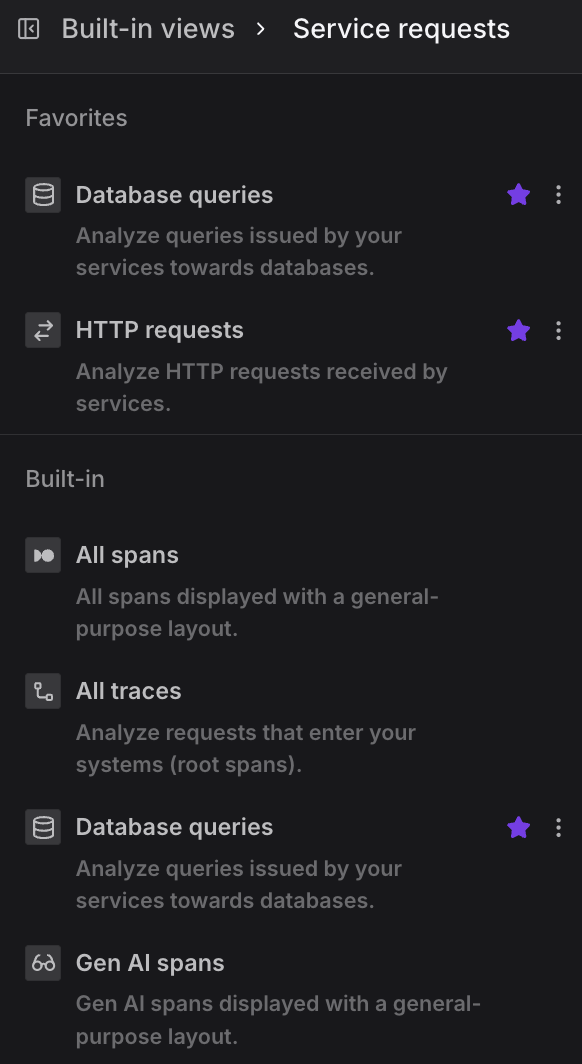
The left-hand navigation panel organizes saved span views into three sections: Favorites, Built-in, and Custom.
Favorites
The Favorites section appears at the top of the panel and contains views you have pinned for quick access.
- Any built-in or custom view can be added to Favorites by clicking the star icon that appears when hovering over a view entry.
- To manage a view — such as duplicating or deleting it — use the ⋯ context menu icon that appears on hover.
Built-in
Built-in views are provided by Dash0 and cover the most common investigation starting points.
They cannot be deleted, but can be favorited or used as the basis for custom views.
The following built-in views are available:
- All spans — Displays all spans using a general-purpose layout, giving a broad overview of activity across every service and operation.
- All traces — Scoped to root spans only, this view lets you analyze requests as they enter your systems.
- Database queries — Filtered to spans representing queries issued by your services towards databases.
- Gen AI spans — Displays spans related to generative AI operations using a general-purpose layout.
- gRPC requests — Scoped to gRPC requests received by services.
- HTTP requests — Scoped to HTTP requests received by services.
- Service requests — Displays all requests received by services, regardless of protocol.
- Synthetic monitoring traces — Shows spans generated by synthetic monitoring, displayed with a general-purpose layout.
- Web monitoring traces — Shows spans originating from web monitoring, displayed with a general-purpose layout.
Custom
The Custom section lists views you have created yourself, typically by modifying a built-in view and saving it under a new name.
Custom views support the same star (favorite) and context menu (three-dot) controls as built-in views, and can be renamed, duplicated, or deleted via the context menu.