
Last updated:
How Log AI Processes Logs
Log AI is Dash0's built-in intelligence for unstructured logs. It performs two tasks in a single pass during ingestion: inferring severity levels and extracting patterns.
Log AI does not modify structured logs (such as JSON logs); these are handled separately by JSON log processing.
Severity Inference
Dash0 analyzes unstructured log messages to identify and infer severity levels for consistent classification across your application ecosystem.
How It Works
During ingestion, Log AI analyzes log message structure using language models and semantic heuristics, extracts severity-related text from the message content, and infers the appropriate severity level. The log is then tagged with the inferred severity for filtering and analysis.
When a log record already has a severity level specified via otel.log.severity.range, Log AI will not override this value. Explicitly defined severities are always respected.
Accessing Logs with Inferred Severity
To find log messages with AI-inferred severity levels, navigate to the logging view and apply the filter:
dash0.log.ai.severity_inferred=trueClick any log record in the filtered results to see the AI Inferred label next to the Severity Indicator in the top right corner of the Log Sidebar.
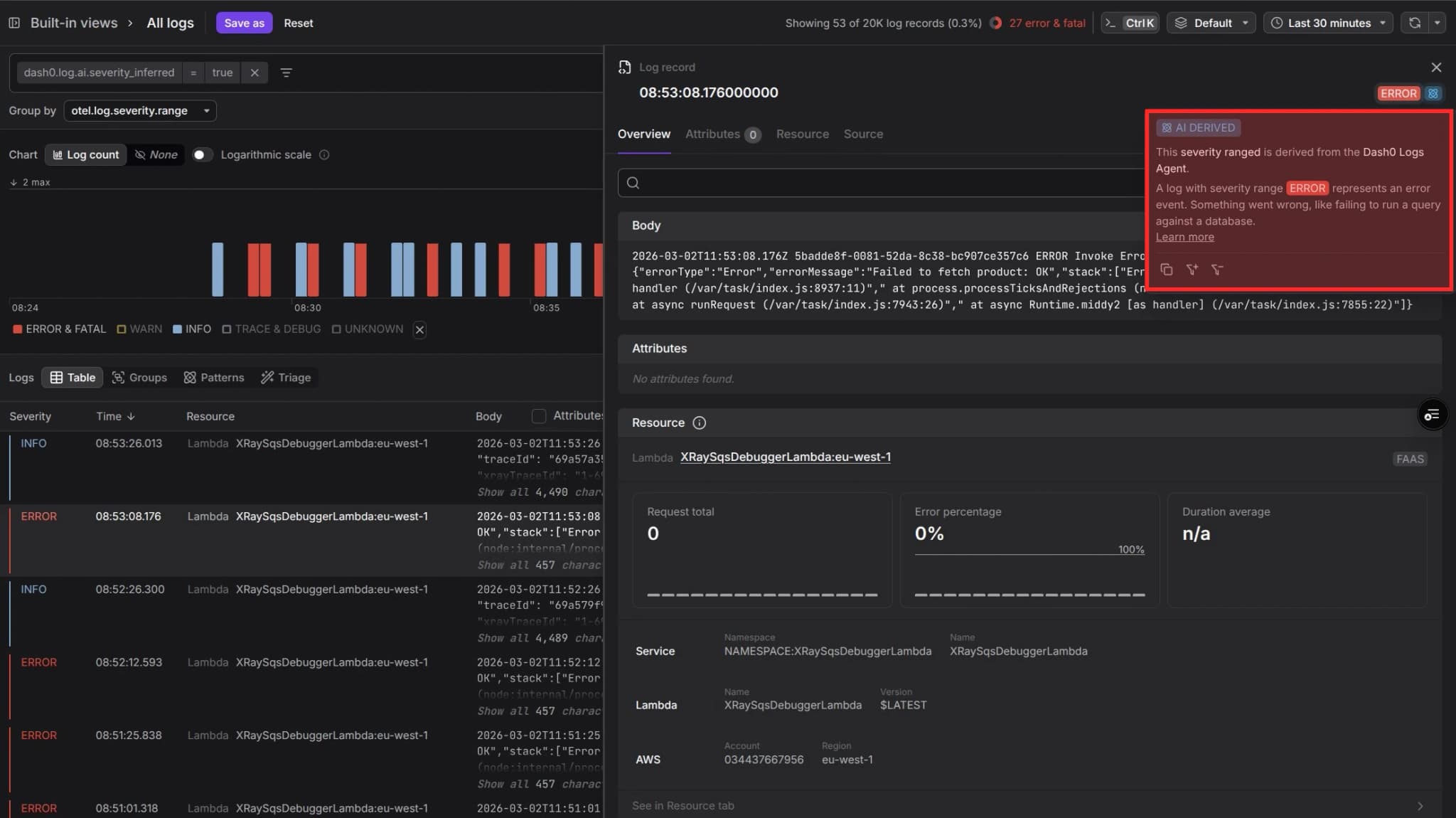
Dash0 tracks severity inference quality continuously, both through offline evaluation before each release and by monitoring model behavior at ingestion time. To ensure the quality of severity extraction, every new release is evaluated on a combination of public log datasets and Dash0's own logs. At ingestion time, Dash0 continuously monitors how often the model succeeds in identifying a matching log format.
| Metric | Description | Evaluation | At Ingestion Time |
|---|---|---|---|
| Success Rate | How often the log format is identified | 98% | ~90% |
| Accuracy | When a log format is identified, how often the extracted severity is correct | 100% | (no ground truth) |
Pattern Extraction
Dash0 uses AI to identify recurring patterns in your log messages and extract the variable portions as type-safe, named attributes.
These attributes can be used in queries, filters, grouping, and triage across any context in Dash0.
How It Works
As logs are ingested, Log AI identifies recurring patterns across similar log messages and extracts the variable portions as named attributes, which can be strings, numerics (floating point), or booleans.
Both the pattern and extracted attributes are made available for querying.
For example, log messages like:
User alice123 logged in from 192.168.1.100User bob456 logged in from 10.0.0.25
Would be recognized as following the pattern: User <username> logged in from <ip_address>
The extracted attributes would be:
username:alice123orbob456ip_address:192.168.1.100or10.0.0.25
Using Log Patterns
Extracted patterns and attributes are available throughout Dash0 — in the dedicated Patterns tab, in the log record detail panel, in queries and filters, and in check rules.
In the Patterns Tab
Navigate to the Log Explorer and click on the Patterns tab.
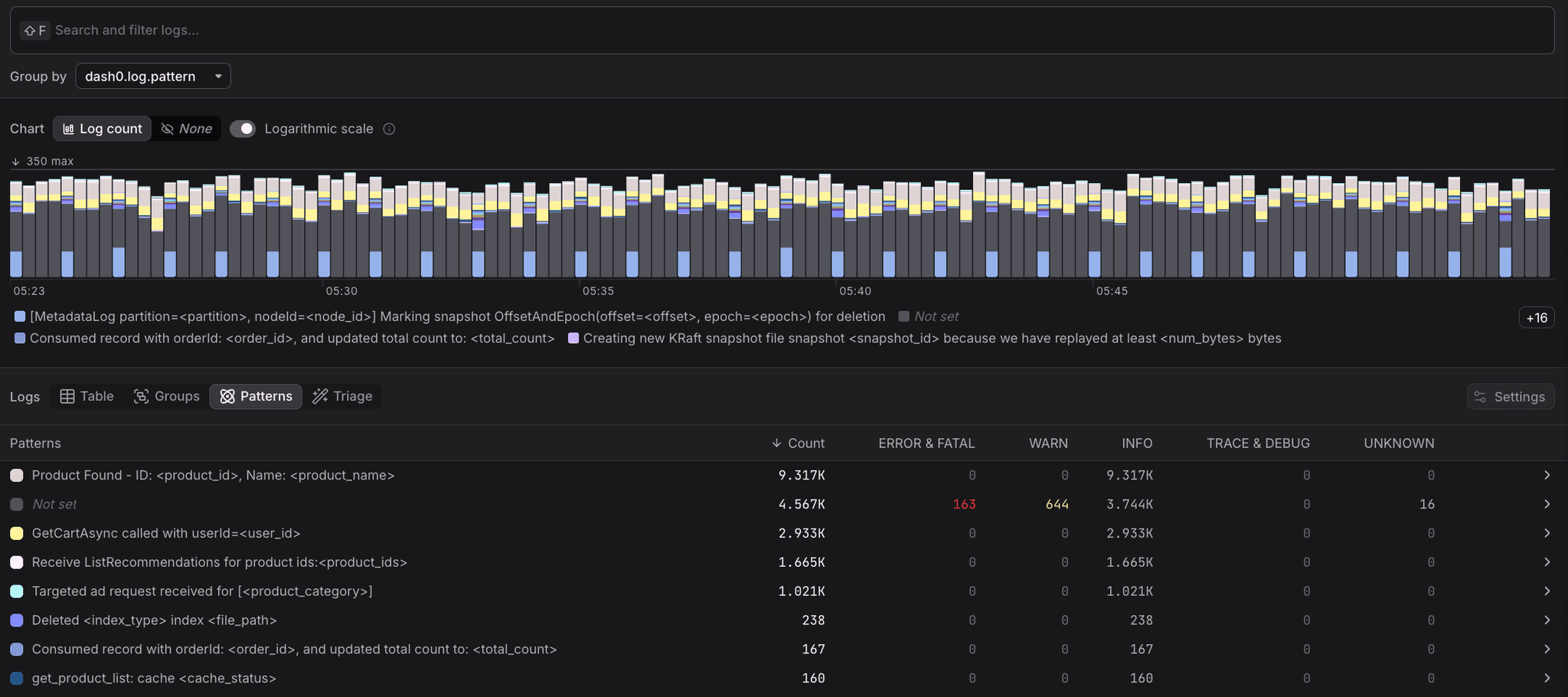
Patterns mode shows a count of matching logs by pattern, with a breakdown by severity. The counts reflect the selected timeframe and filters. Hover over a pattern and click +/- to filter for logs that match or don't match that pattern.
In the Log Record Panel
Click on a log record to open its Log Sidebar.
When hovering over the log body, a popup shows whether it matches a pattern and which one. Click +/- to filter by that pattern.
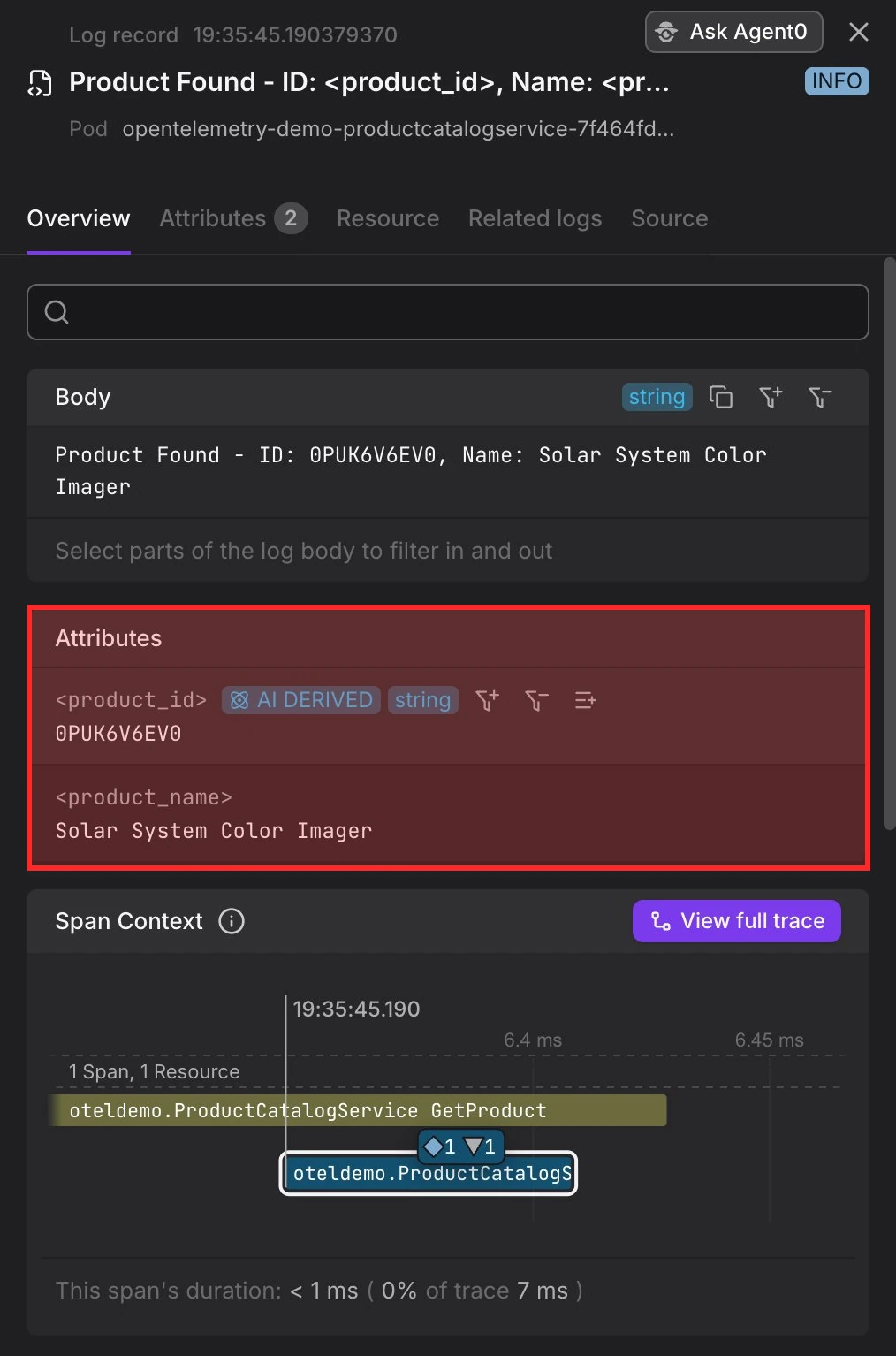
In the Attributes section, variables extracted via log patterns are listed under the AI Derived tab. You can click +/- to filter by any of those attributes.
In Queries and Filters
Use the attribute dash0.log.pattern to filter or group logs by pattern. Use attributes like dash0.log.attributes.<key> to filter or group logs by an extracted attribute.
Example PromQL query grouping logs by an extracted attribute:
sum(increase(
    dash0_logs_total{
        dash0_log_pattern = "Requesting ad for <ad_category>"
    }[10m]
))
by(dash0_log_attribute_ad_category)
In Check Rules
Patterns and extracted attributes can be referenced in the query builder, as well as in the check rule summary and description.
Limitations
Log AI is designed for unstructured logs and depends on resource attributes being present. There are also practical constraints around how many patterns can be tracked per workload and how quickly new patterns are picked up.
JSON Logs
Log AI focuses on unstructured logs. Logs with a structured body, such as JSON logs, are not modified by Log AI. See How Dash0 processes JSON logs for how structured logs are handled.
Resource Attribute Dependency
Both severity inference and pattern extraction rely on resource attributes as defined in the OpenTelemetry semantic conventions to properly contextualize log messages. Without sufficient resource attributes, these features may not work.
For Kubernetes workloads, verify that the k8sattributesprocessor is correctly configured in your OpenTelemetry collector. This processor adds Kubernetes metadata to spans, metrics, and logs as resource attributes, which improves inference accuracy. See also the Dash0 Operator for Kubernetes guide.
For non-Kubernetes resources, the Dash0 team is actively working to improve inference coverage.
Pattern Selection
For performance reasons, Dash0 limits the number of patterns per instrumented workload, selecting the ones that the model considers most relevant at the moment of ingestion. If a pattern doesn't appear to be captured, it may have been deprioritized in favor of patterns assigned higher relevance for that log source.
Pattern Updates
If the logging behavior of your workloads changes, it may take a couple of hours until new patterns are identified. Dash0 also limits the amount of weekly pattern inferences per organization, so workloads with many recent changes to logging behavior may experience slightly longer delays.
Troubleshooting
If severity inference or pattern extraction is not working as expected, the most common cause is missing or insufficient resource attributes. The section below explains how Dash0 uses those attributes to identify the workload a log record belongs to.
Log Contextualization with Resource Attributes
Dash0 applies a set of predefined rules to extract workload identifiers from resources, with the first matching rule determining the context of a log message. This approach is similar to Dash0's resource equality determination.
The following rules are applied in order:
1. Vercel Deployments
For Vercel deployments, Dash0 extracts the vercel.project_id and, if available, the service.name.
2. Containers
For container resources, Dash0 uses the container.image.name.
3. Kubernetes Resources
For Kubernetes workloads, Dash0 constructs an identifier using the Kubernetes namespace name (k8s.namespace.name, with simple numeric suffixes removed), the name of the Kubernetes resource (with numeric and random ID suffixes removed), and the container name if available (k8s.container.name).
The Kubernetes resource can be any of the following: k8s.daemonset.name, k8s.deployment.name, k8s.statefulset.name, k8s.replicaset.name, k8s.cronjob.name, k8s.job.name, k8s.object.name, or k8s.pod.name.
To ensure consistent identification, Dash0 removes numeric or randomly generated string suffixes often used in ephemeral resource names (for example, catalogservice-6ddf6f4749-rd6m5 becomes catalogservice).
If none of the above rules match, Dash0 falls back to using the UID of the Kubernetes resource as the workload identifier (k8s.daemonset.uid, k8s.deployment.uid, k8s.statefulset.uid, k8s.replicaset.uid, k8s.cronjob.uid, k8s.job.uid, k8s.object.uid, or k8s.pod.uid).
4. Host Resources
For host resources, Dash0 uses os.type as the identifier, but only if none of the process-related attributes are present (such as process.command or process.executable.name). The host.name attribute can also be used, as long as it is not too volatile (for example, an IP address or generic EC2 instance hostname).
5. Services
For service resources, Dash0 constructs an identifier using the service namespace (service.namespace, if available) and the service name (service.name).