
Last updated: July 28, 2026
Use Text Variables
A text variable holds a single piece of text that is defined once and reused across every panel in the dashboard. It behaves like an input field: users type or edit a value, and that value is substituted into any query that references it. Text variables are the simplest variable type and are best used as a fallback when neither a filter variable nor a list variable fits.
Text variables are a last-resort choice. They give the dashboard user no guidance: there is no attribute pinned to the value, no set of options to choose from, and no validation on what they type. The user has to know exactly what to enter for the query to return meaningful data — a plain typo, a wrong case, or an unescaped regex character silently produces an empty panel. Reach for a text variable only after ruling out a filter variable and a list variable.
When to Use a Text Variable
Use a text variable when:
- You need a free-form value, such as a threshold, a label fragment, or a search term, that isn't drawn from a fixed list or an attribute.
- You want to define a value once and reference it in several panels, so you only update it in one place.
- You want a constant or hidden value that queries reference internally rather than exposing to users.
For attribute-based filtering, prefer a filter variable. For a curated set of options, prefer a list variable.
Reference a Text Variable in a Query
A text variable interpolates as a simple text replacement wherever you reference it:
1{otel_metric_name="dash0.spans", my_label="$variable_name"}
The value is substituted verbatim, so the surrounding label key and operator come from the query. In a PromQL query you can use either = (literal match) or =~ (regex match); a visual Query Builder panel always uses =. For the trade-offs — and the pitfalls of regex mode — see Bind a Text Variable.
A text variable bound with =~ in a PromQL query gives the dashboard user no way to know that their input is being treated as a regex. The operator lives inside the query and is never surfaced to the toolbar, and unlike a list variable there are no options to hint at the expected format. Someone who types 1.2.3 expecting a literal match will silently also match 1x2y3. If regex mode is genuinely required, say so in the variable's Description (which is shown in the tooltip) and pick a default value that demonstrates the syntax.
Configure a Text Variable
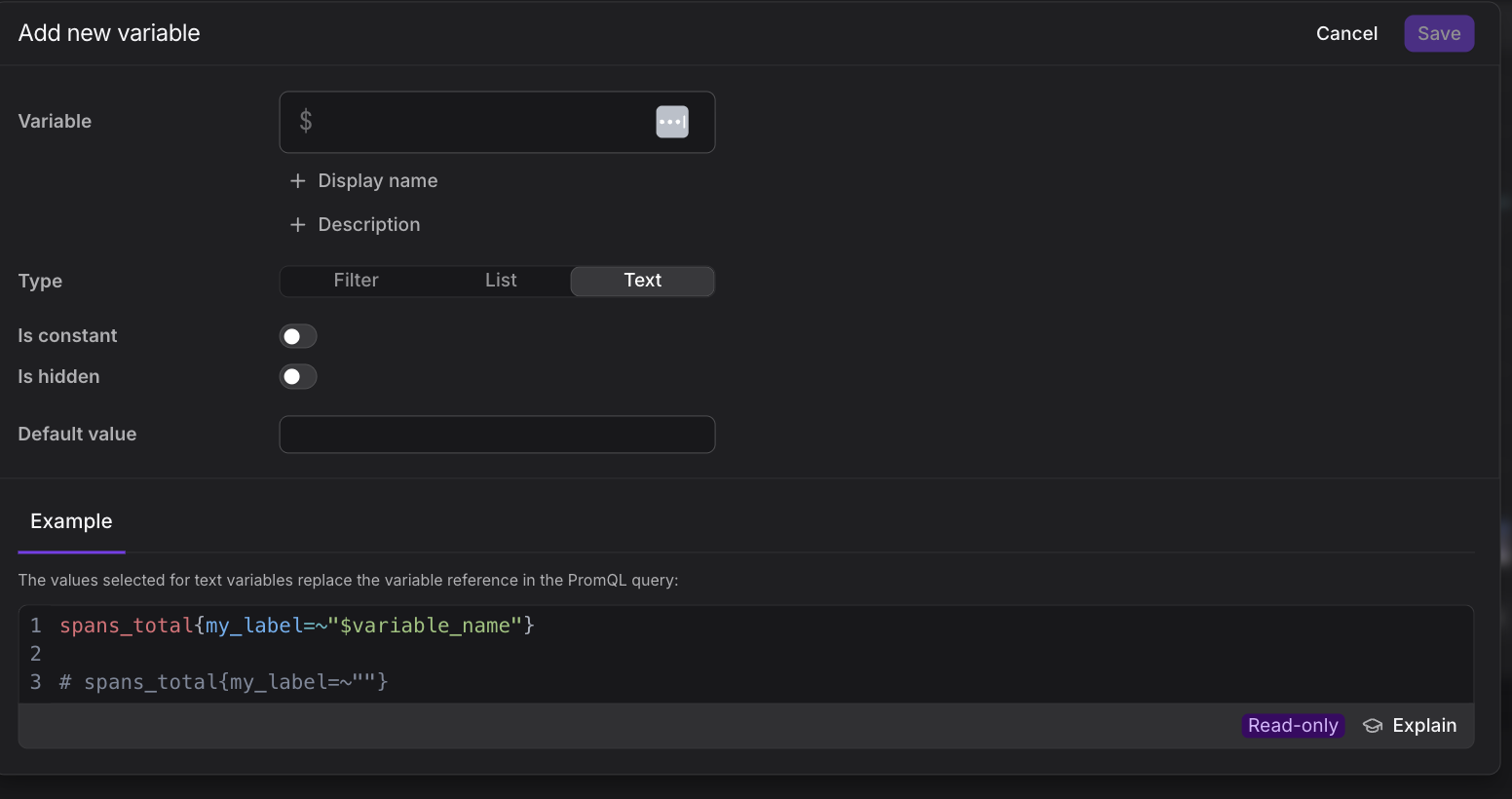
The text variable dialog exposes the following fields:
- Name: The identifier you reference in queries as
$variable_name. - Display name: The human-readable label shown in the variable selector. Optional.
- Description: Optional notes about the variable's purpose. The text is shown to dashboard users in the variable's tooltip, so use it to tell users what to type, including whether regex syntax applies to the value.
- Type: Set to Text.
- Default value: The initial text applied when the dashboard first loads and no value is supplied in the URL.
- Constant: When enabled, the value is fixed and users cannot change it from the toolbar. Use this for a value that should stay the same across the dashboard.
- Hidden: When enabled, the variable does not appear in the toolbar. Use this for values you reference internally in queries but don't want users to edit.
Further Reading
- About Adding Variables — Overview and preferential order of variable types
- Bind a Text Variable — Wire a text variable into a panel query in Query Builder or PromQL mode
- Build Queries — Write the PromQL that references your variables
- Use Filter Variables — Create attribute-based filters with automatic dependencies
- Use List Variables — Offer a fixed or query-driven list of values