Dash0 acquires Polar Signals

Changelog

Recent changes and improvements to Dash0

Join us on a journey through Observability and OpenTelemetry as we improve our product. Stay connected with our Newsletter or RSS for fresh updates.

Introducing Light Mode

Tailor your workspace with the new Light Mode theme.

Observability is a marathon, not a sprint. While our default dark interface is a favorite for many, we know that lighting conditions and personal preferences vary throughout the day. To give you more flexibility in how you monitor your systems, we’re introducing a Light Mode option for the entire Dash0 UI.

Designed for clarity We’ve carefully adapted our interface to ensure that the transition to a lighter palette feels natural. Every component—from the Service Map to complex trace views—has been refined to maintain the visual hierarchy you're used to. Whether you’re working in a sunlit room or simply prefer a paper-like aesthetic, the new theme provides a clean, focused environment for your data.

Screenshot of Dash0s Service Map showcasing the new light mode.

What’s new:

  • Visual Flexibility — Easily switch between Light and Dark modes to match your surroundings or personal workflow.

  • Consistent Semantics — We’ve tuned our color palette so that critical status indicators and OTel metrics remain clear and recognizable against the lighter background.

  • Automatic Switching — Set Dash0 to "System" mode to have the UI automatically sync with your OS theme as the day turns into night.

How to switch The fastest way to change your theme is via the Command Menu:

  1. Press CMD+K (or CTRL+K) to open the menu.

  2. Type "Theme" and select your preferred mode.

Alternatively, you can click on your profile avatar in the sidebar to find the theme selector under your account settings.

Read more

Monthly Budget

Set a hard monthly spending cap on your Dash0 organization to make sure you never pay more than you expect.

The monthly budget limits the total amount due on your invoice across all signal types — spans, logs, metric data points, web events, and synthetic API checks.

Key features

  • Advance warnings - Dash0 notifies you at 75% and 90% of your budget via in-app banners and emails to organization admins.

  • 4-day grace period - When your budget is reached, telemetry continues to be ingested for 4 days at no additional charge, giving you time to react.

  • No data loss - After the grace period, ingestion is paused automatically. Historical data and configuration remain fully accessible.

  • Full flexibility - Modify or remove your budget at any time from Settings > Billing & Plans.

Prerequisites

You must have the Admin role in your organization. Members without the Admin role cannot view or modify the monthly budget.


To set a monthly budget, navigate to Settings > Billing & Plans and click Set monthly budget in the Next invoice card.

You can find more details in the monthly budget documentation.

Read more

Dash0 Command Line Interface is GA

We're excited to announce the general availability of the Dash0 CLI — a command-line interface that brings Dash0 asset management to your terminal, CI/CD pipelines, and automation workflows.

The Dash0 CLI enables you to manage your observability assets programmatically, making it easy to version control dashboards, implement GitOps workflows, and automate your observability infrastructure from shell, scripts and agentic AI.

Key features

  • GitOps-Ready Asset Management — Create, update, and delete dashboards, check rules, synthetic checks, and views using declarative YAML files. Use the apply command to sync your assets from version control, with support for dry-run validation before making changes.\
  • Multi-Environment Profiles — Configure multiple profiles for different environments (dev, staging, production) and switch between them seamlessly. Environment variables provide additional flexibility for CI/CD integration.\
  • Flexible Output Formats — Export assets in table, wide, JSON, or YAML formats for easy scripting, reporting, and backup workflows.

Quick start

sh
# Install via Homebrew
brew tap dash0hq/dash0-cli https://github.com/dash0hq/dash0-cli && brew install dash0hq/dash0-cli/dash0
sh
# Configure your profile
dash0 config profiles create prod \
--api-url https://api.eu-west-1.aws.dash0.com \
--auth-token auth_xxx
sh
# Apply your assets
dash0 apply -f dashboards/

Try it out

The Dash0 CLI is open source and available on https://github.com/dash0hq/dash0-cli. We welcome contributions and feedback from the community.

Let us know which additional features you would like to see!

Read more

The Lookout Agent is Now Available

The Lookout Agent brings AI-powered web analytics and frontend performance monitoring to Agent0, helping you investigate issues and understand user experience through natural language conversations.

What's New

lookout-agent

Natural Language Web Analytics: Ask questions about your website's performance, errors, and user behavior in plain English. No need to write PromQL queries or navigate complex dashboards—just have a conversation.

Specialized Web Performance Knowledge: The Lookout Agent understands Core Web Vitals (CLS, INP, LCP), frontend performance patterns, common error scenarios, and user behavior analytics. It provides context-aware insights specifically for web monitoring.

Complete Web Telemetry Access: Query and analyze all your web data including:

  • JavaScript errors and error patterns

  • Page views and user sessions

  • Frontend HTTP request performance

  • Core Web Vitals measurements (CLS, INP, ICP)

  • User behavior metrics (bounce rates, session duration, navigation patterns)

Frontend-Backend Correlation: The Lookout Agent helps you connect the dots between user experience and backend issues. Ask questions like "Do slow API requests correlate with poor Web Vitals?" and get data-backed answers with specific examples.

Context-Aware Conversations: Ask follow-up questions naturally. The Lookout Agent maintains conversation history, so you can drill deeper without repeating context—from broad questions to specific session investigations.

Session Journey Reconstruction: Investigate individual user sessions in detail. Ask "Show me sessions that abandoned checkout" or "What were users doing before that error?" and get complete session timelines with events, errors, and performance data.

Smart Error Analysis: Identify error patterns quickly with questions like "What are the top errors affecting users today?" The Lookout Agent surfaces the most impactful issues, shows which pages are affected, and helps correlate errors with other telemetry signals.

Real-Time Investigation: Access to live data means you can investigate issues as they happen. From performance regressions after deployments to sudden error spikes, get answers in seconds.

How to Access

The Lookout Agent is available now through Agent0 in the Dash0 interface. Simply start a conversation with Agent0 and ask questions about web performance, web events, or user sessions. Agent0 will automatically engage the Lookout Agent when your questions relate to web analytics and frontend monitoring.

What You Can Ask

  • "What are the top JavaScript errors on example.com today?"

  • "Which pages have poor Largest Contentful Paint scores?"

  • "Show me sessions with high bounce rates on mobile devices"

  • "Find correlations between slow backend requests and frontend performance"

  • "What changed in our Web Vitals after the 2pm deployment?"

  • "Show me user sessions that experienced errors in the checkout flow"

Start exploring your web performance data in a whole new way with the Lookout Agent.

Read more

Turn any Dash0 feature into a composable link with parameters for maximum flexibility.

Press CMD+SHIFT+D to copy to your clipboard a shareable URL with all applied (and supported) feature modifiers. For more flexibility, the chainlink button in the header opens the possibility to configure the URL with the exact parameters you need to bring elsewhere:

deep link creation modal

Bringing Dash0 closer to where your teams are

Developers work across multiple tools to do their daily work. With Shareable URLs, Dash0 can be integrated with the tools developers are already using, such as internal developer platforms, runbooks, documentation, and communication platforms.

Quick human-readable references to specific Dash0 features have never been simpler.

Help reason through the state of your system and resolve issues faster without needing to hit the browser bookmark. Creating Deeplink URLs for trace and log explorers with custom views, filtered services feature. You can make the developer experience of navigating to a specific setup effortless.

You can find more details in the deeplink's documentation

Read more

Extended Retention for Synthetic API Check Runs

We've increased the retention period for synthetic API check runs from 30 days to 13 months at no extra cost. This change applies to all check runs executed from January 19, 2026 onwards. Existing check runs will continue to follow the previous 30-day retention policy.

We've increased the retention period for synthetic API check runs from 30 days to 13 months at no extra cost. This change applies to all check runs executed from January 19, 2026 onwards. Existing check runs will continue to follow the previous 30-day retention policy.

Read more

Kubernetes Operator: per-namespace export and API sync

Telemetry export and API sync now support per-namespace configuration to enable more flexible routing.

Starting with version 0.99 of the Dash0 Kubernetes Operator, you can define per-namespace settings for exporting telemetry and syncing custom resources (Dash0View, Dash0SyntheticCheck, PrometheusRule, PersesDashboard) to different backends and/or datasets.

The configuration in the Dash0OperatorConfiguration serves as a default that can be overridden by providing an alternative configuration in a namespace's Dash0Monitoring resource.

You can find more details in the operator's documentation.

Read more

New AI Integrations: OpenCode, LangChain, kagent, OpenLIT and Kiro

Build smarter and monitor better with 5 new AI integrations. Connect AI tools to your telemetry for context-aware coding, or track LLM performance, costs, and agent behavior in production.

We've added five new AI integrations to help you build and monitor intelligent applications:

dashboard showing new AI integrations

AI Coding Assistants (connect to your Dash0 telemetry):

  • OpenCode - Terminal AI coding agent that uses your telemetry data to identify issues and correlate incidents with code changes.

  • Kiro - Agentic IDE with spec-driven development that leverages your observability data for telemetry-aware coding and root-cause analysis.

OpenTelemetry Monitoring (observe your AI applications):

  • kagent - Kubernetes-native platform for building and deploying AI agents that can connect to MCP servers (including Dash0). Monitor your agents' LLM calls, tool executions, and orchestration flows with built-in OpenTelemetry support.

**LLM Application Monitoring **(observe your AI applications):

  • LangChain - Monitor LLM call performance, token usage, and chain execution flows in your LangChain applications.

  • OpenLIT - OpenTelemetry-native observability for LLM applications with automatic instrumentation and GPU monitoring.

These integrations enable you to build AI-powered tools that understand your system's behavior through telemetry, and monitor the performance and costs of your AI applications in production.

Read more

Organize assets with folders

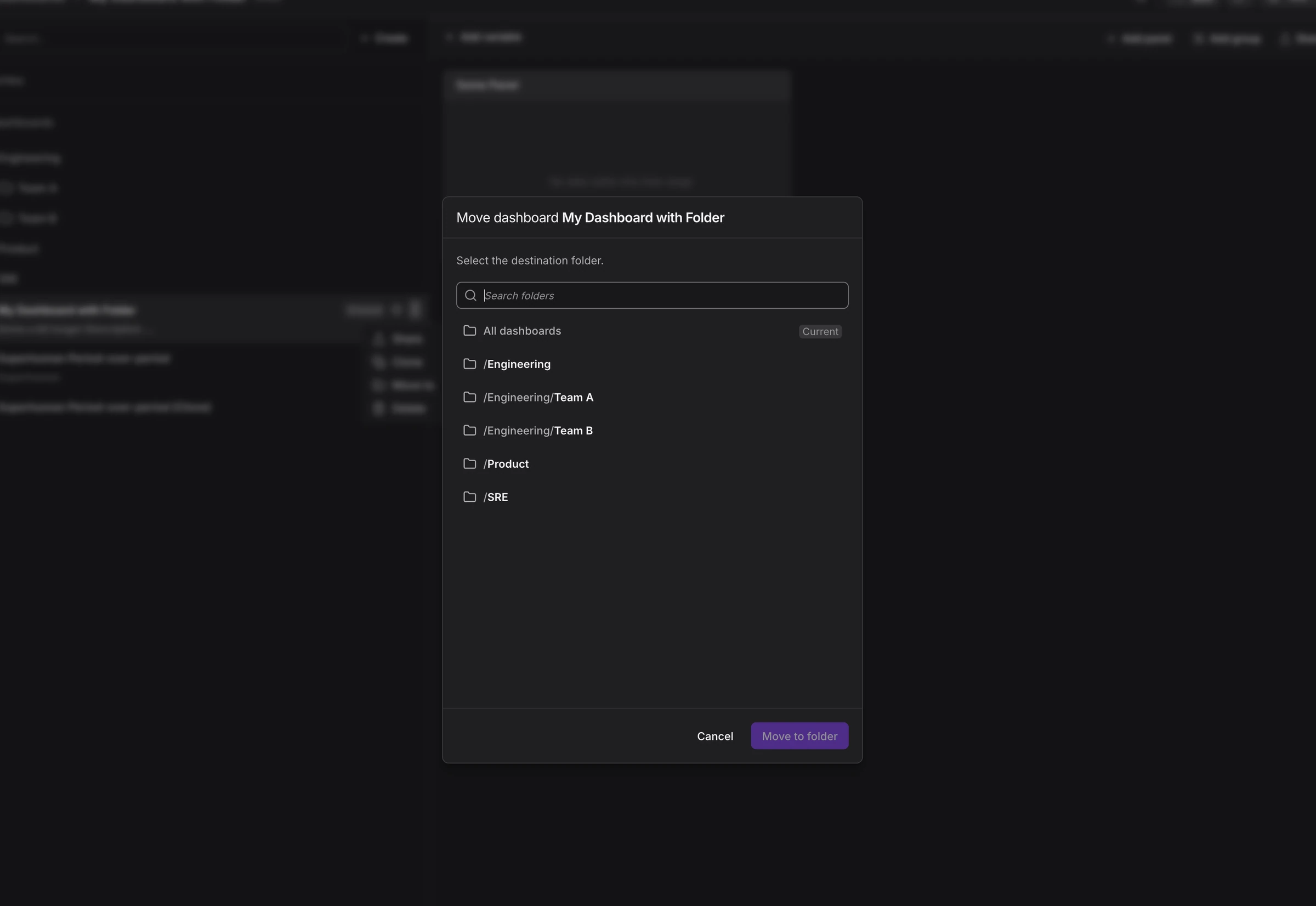
As observability grows, dashboards and alerts quickly pile up. Without structure, it becomes difficult to navigate and maintain clarity. That’s why Dash0 now introduces Folders.

Dash0 Folders let you organize assets by service, environment, or business domain, reflecting how your team actually works. This makes it easier to find the right dashboard and keeps your workspace organized as your system evolves.

Dashboard list with folders"Move to" dialog

Folders are built for scale. You can manage them through Infrastructure as Code, keeping your organizational structure consistent across development, staging, and production. Teams can also define which folders appear by default, giving everyone a clean and intentional starting point.

In short: Folders reduce clutter and bring structure to growing observability environments, so Dash0 remains as organized as the systems you monitor.

Read more

Service Views and a new Service Map

Today, we’re launching Dash0 Services in Beta. We’ve turned your OpenTelemetry data into a real-time, living map of your entire system. No proprietary agents, no manual configuration - just the payoff for the instrumentation work you’ve already done.

📊 Service Catalogue

Get a bird’s-eye view of your system health or dive deep into specific code paths.

  • The Command Center: A high-level list of every service.

  • Infrastructure Resources: See "Failed Checks" on Resources alongside your APM metrics.

Endpoint-Level Granularity: Use the **Operations Tab **to see which specific operation is failing, even when the rest of the service looks healthy.

🗺️ Service Map

We had a Service Map before so what's new?

  • Customizable Views: Save your preferred filters to quickly see the services most relevant to your work by default.

  • Dynamic Traffic Visualization: Easily discover traffic flows and paths within your service topology with overlaid particles.

  • Grouped External Services: Explore external services organized by similarity, reducing clutter and complexity compared to the full internal map.

We use OpenTelemetry semantic conventions to automatically draw the connection between your services.

  • Automatic Discovery: Connections are derived live from your tracing data.

  • Visualize the Blast Radius: RED metrics (Requests, Errors, Duration) are overlaid on every connection so you can see exactly where a failure starts and where it spreads.

Read more

Meta Check Rules

Check rules can now query Dash0's own check metrics (dash0.check.*, dash0.issues.*, dash0.synthetic_check.*), enabling higher-level alerts based on the status of other checks.

Check rules can now query Dash0's own check metrics (dash0.check.*, dash0.issues.*, dash0.synthetic_check.*), enabling higher-level alerts based on the status of other checks.

Use this to:

  • Aggregate check failures and group multiple related checks into a single alert, reducing alert fatigue by consolidating notifications.

  • Monitor synthetic check execution and latency metrics: dash0.synthetic_check.runs* and *dash0.synthetic_check.http.timing.*

Find out more in Meta Check Rules

Read more

Improvements in sorting data in dashboard charts

You can now sort by Query name across all supported chart types, making it easier to organize multi-query panels exactly how you want them.

We've expanded the sorting options available in dashboard panels. You can now sort chart data by the Query name, giving you a new way to organize panels that contain multiple queries. This works across all chart types that support sorting, including Time Series Tables, Pie Charts, Hierarchy Maps, and more.

For Time Series Tables, the "Auto" sort option now sorts by value, surfacing your most significant data points first.

We've also tidied up the sorting dropdown itself: options like Value and Query name are now properly capitalized, and the Hierarchy Map's "sort groups by" field now shows inline help text instead of a tooltip.

sort by drop down
Sort-by dropdown options
Read more