7 updates shipped to Dash0 in June 2026: Web events on the GeoMap, Google Cloud infrastructure monitoring - Cloud SQL Monitoring, Dash0 CLI: OAuth support, OTLP proxy, and more! and more.
Your web event annotations now appear as pins right on the GeoMap, so you can see where in the world your users are hitting errors, not just that they are. Plus a new city reference layer and trackpad pinch-to-zoom.
Until now, the GeoMap could color countries by value, but the events behind those numbers (a spike of web errors, a burst of failed requests) lived in a separate timeline with no sense of place. You could see that something happened, but not where your users actually were when it did.
Now your web event annotations show up as pins on the map. They render with the same markers, tooltips, and severity colors you know from the event timeline, placed by the geographic data Dash0 already enriches onto web events. Turn them on from the panel's annotation settings, exactly like you would on a time-series chart, and a regional error pattern that used to be buried in a timeline becomes obvious at a glance.
As you zoom out, nearby pins cluster into a single bubble that grows with the count and takes on the most severe color in the group; zoom back in and they split apart again. Hold Alt/Option to pin a tooltip open so you can click straight through to the underlying events.
The map also reads exact coordinates and locality when your telemetry carries them, so if you instrument other signals (logs, Kubernetes, or service events) with geo data of your own, those land on the map too. The pins resolve from the standard OpenTelemetry geo attributes: https://opentelemetry.io/docs/specs/semconv/registry/attributes/geo/
We shipped two extras alongside it. A new "Show Cities" toggle overlays reference points for major cities and towns, giving you orientation as you pan and zoom below the country level. And on macOS, trackpad pinch-to-zoom now works directly on the map instead of zooming the whole page.
Dash0 now collects metrics for your Cloud SQL instances automatically. Connect a GCP project and see CPU, memory, and disk utilization, connection activity, and engine-specific performance for PostgreSQL, MySQL, and SQL Server, with no dashboards to build.
Automatic metric collection across connected projects. Every Cloud SQL instance in your connected GCP projects appears under Infrastructure > Google Cloud > Cloud SQL. The overview lists each instance with its database engine and version, region and project, CPU, memory, and disk utilization, network throughput, and any open issues raised by failed check rules.
Detailed instance views. Click any instance to drill into time-series charts organized into three sections. Resource utilization covers CPU, memory, and disk gauges, network ingress and egress, disk read and write operations, and storage by data type. Connections and activity tracks connection counts and query throughput. Performance and cache surfaces hit ratios, transaction throughput, and engine health indicators.
Engine-aware metrics. Dash0 detects the database engine from each instance's version and maps it to the OpenTelemetry db.system.name attribute. The connection and performance sections then adapt to that engine: backends, statements, and transaction ID utilization for PostgreSQL; threads, slow queries, and InnoDB buffer pool, row locks, and deadlocks for MySQL; login attempts, blocked processes, deadlocks, buffer cache hit ratio, and page life expectancy for SQL Server.
Query and alert with PromQL. Metrics are stored under their GCP Cloud Monitoring type names and queryable with otel_metric_name in the Query Builder. Build custom dashboards, then create check rules to catch high utilization, disk approaching quota, connection saturation, slow queries, deadlocks, and falling cache hit ratios.
Correlation with application telemetry. Pivot from instance utilization to the traces and logs from the services hitting that instance. When database clients are instrumented with OpenTelemetry, Dash0 correlates their db.system.name and db.namespace spans with Cloud SQL infrastructure metrics so you can tie database pressure to user-facing latency.
To get started, set up the [Google Cloud integration] and open Infrastructure > Google Cloud > Cloud SQL.
Browser-based OAuth login, a local OTLP forwarder for in-loop development, precision-mode queries for exact lookups, and a one-command Homebrew install — all in one release.
OAuth support was the most requested (by a wide margin!) feature request for the dash0 CLI.
dash0 login opens your browser, completes the OAuth 2.0 + PKCE flow, and stores the resulting access and refresh tokens in your profile. Access tokens refresh transparently before they expire. Static auth_* tokens still work, although when you change a profile to use OAuth, the previous access token gets overwritten.
dash0 config show annotates the auth state, so you always see whether a token is static, OAuth-active (with remaining lifetime), or OAuth-empty:
sh
Profile:    prod
API URL:    https://api.eu-west-1.aws.dash0.com
Auth Token: ...1234567    (OAuth, expires in 14m20)
The dash0 CLI will refresh the authentication token when it expires, using the refresh token, so the actual expiration and refresh of auth tokens will be invisible for you.
When you're done, revoke the refresh token and clear the profile with:
sh
dash0 logout --profile prod
Safe by default for AI agents: When Claude Code, Cursor, or another coding agent invokes the CLI, dash0 login refuses to open a browser and dash0 logout requires explicit --force — so an agent cannot silently rotate or revoke a profile's OAuth session. Errors point agents at the recovery paths instead:
sh
$ dash0 logs query
Error: profile "prod" is OAuth-typed but not authenticated.
Hint: set DASH0_AUTH_TOKEN to a static `auth_*` token, or convert the profile with
      `dash0 config profiles update prod --oauth=false --auth-token auth_<...> --force`.
If you have worked with OpenTelemetry for a long time, you probably have some sort of local OpenTelemetry Collector setup working. But what if we could make it dead simple to send telemetry to Dash0 from your local apps? Enter dash0 otlp proxy.
dash0 -X otlp proxy runs a foreground forwarder on 127.0.0.1:4318 (OTLP/HTTP) and 127.0.0.1:4317 (OTLP/gRPC) — the OpenTelemetry SDK defaults — and ships the telemetry it receives to Dash0 with your active profile's credentials. An SDK at default endpoint configuration connects with zero environment-variable changes.
Just run it:
sh
dash0 otlp proxy listening — http://127.0.0.1:4318 (OTLP/HTTP), 127.0.0.1:4317 (OTLP/gRPC) — profile: dev (dataset: default)
   logs:    42/s ▁▂▄▆▇ 1234 total
  spans:    18/s ▁▂▃▄▅  540 total
metrics:     0/s ▁▁▁▁▁    0 total
You will also see the rate at which you are sending data and how much you have sent in total. This should reduce your FUD when trying to get your OTel setup going!
You can also tag forwarded traffic so individual developers can filter their telemetry on a shared backend:
Or watch every forwarded record in the same style as the Collector's debug exporter while you iterate on instrumentation:
sh
dash0 -X otlp proxy --tail
Note: The proxy is a local-dev shortcut, not a replacement for the OpenTelemetry Collector — see the docs for the agent-mode event schema and failure-mode classification.
By default the Dash0 API applies adaptive sampling to log and span queries — fast on large datasets, statistically representative for exploration. For narrow lookups that must return every match (a specific trace.id, a test.id from CI, a request ID), pass --precision disabled:
sh
dash0 logs query --precision disabled --filter "test.id is 7a3f…"
dash0 spans query --precision disabled --filter "trace.id is 0af7651916cd43dd8448eb211c80319c"
traces get always runs in Precision mode, so a retrieved trace is never missing spans regardless of the query window.
The CLI's Homebrew distribution has moved to a dedicated tap (dash0hq/homebrew-dash0-cli) and switched from a formula to a cask, which is Homebrew's recommended mechanism for pre-built CLI binaries.
New users install with a single command — no brew tap, no brew trust (introduced with Homebrew 6.0):
sh
brew install --cask dash0hq/dash0-cli/dash0
Existing users see a deprecation warning on brew upgrade dash0 pointing at the new path. The migration is a one-time three-step procedure:
Note: We plan to keep supporting the legacy tap as well, but you will need trust to it via Homebrew. Casks are a better way to get your latest dash0 CLI.
See the full migration guide for context on the Homebrew 6.0 tap-trust changes that motivated the move.
All this is available now in Dash0 CLI 1.14.0. Upgrade via Homebrew with brew upgrade --cask dash0 (after migrating from the legacy formula), pull the latest container with docker pull ghcr.io/dash0hq/cli:latest, or download a binary directly from the GitHub release.
OAuth for MCP servers: Connect Agent0 to MCP servers using OAuth instead of manually managing access tokens. Authorize once and Dash0 handles the rest — securely obtaining and storing the credentials Agent0 needs to access the server's tools.
One-click authorization: Starting the OAuth flow is a single click from the MCP server's settings page. Dash0 opens the provider's authorization screen, and once you approve, the connection is established and the server's tools become available to Agent0 — no copying, pasting, or rotating tokens by hand.
Secure by design: OAuth credentials are stored separately from any custom headers you configure, and Dash0 manages the authorization token on your behalf. You can still add custom headers to an OAuth-connected server when a provider requires them, without affecting the OAuth connection.
Works across providers: OAuth support follows the standard MCP authorization spec, so it works with any MCP server that implements it — Dash0 automatically discovers each server's authorization endpoints and registers itself, with no per-server client setup required.
Available now for all Dash0 organizations. Set it up in Organization Settings → Integrations → Add → MCP, choose OAuth as the authentication type, and click Connect.
MCP catalogue in the Integrations Hub: Browse a curated catalogue of Model Context Protocol (MCP) servers directly in Dash0. Switch to the Agent0 MCPs tab in the Integrations Hub to discover servers grouped by category — observability, cloud, incident response, productivity, and more — so Agent0 can tap into the tools your team already relies on.
One-click connect with OAuth: Connect to MCP servers that support OAuth without leaving Dash0. From an MCP's detail page, Connect starts the OAuth flow in place — authorize once and Agent0 gets access to the server's tools, no manual token handling required.
Guided setup for every server: For servers that use bearer tokens or other credentials, Connect drops you into a settings form pre-filled with the server's name, URL, and authentication type, so you only need to supply your credentials. Servers with multiple regional endpoints let you pick the right one up front.
Unified search: The Hub search now spans both Dash0 platform integrations and MCP servers, so you can find what you need in one place.
We’ve replaced the fixed 10/30/60-second refresh picker with a single toggle, so Dash0 now keeps every chart and table fresh at the right cadence on its own.
Refresh showcase (3x speed)
Keeping a view live used to mean picking a refresh interval (10, 30, or 60 seconds) and hoping it was the right one. Too fast and you hammered the backend on charts that only change by the hour. Too slow and your live data lagged behind reality. And a refresh could yank rows out from under you mid-scroll or talk over a long-running query.
Adaptive auto-refresh replaces all of that with a single Auto toggle. Flip it on, and Dash0 picks the right pace for each view: charts refresh in step with their own resolution, so a high-resolution live chart updates frequently while an hour-wide one updates calmly. Explorer tables (logs, traces, metrics, resources, and more) quietly pause refreshing while you’re scrolled into the data and pick back up when you return to the top, so rows never jump around while you’re reading them.
It also knows when not to refresh. Switch to another browser tab and polling pauses until you come back. Lock your time range to a fixed window and auto-refresh steps aside entirely, since there’s no future data to fetch. The result: fresher dashboards and explorers with less noise, fewer wasted queries, and nothing shifting under your cursor.
Agent0 is now Generally Available (GA) inside Dash0. The old assistant has been replaced by an autonomous production AI built on a new execution runtime, with continuous environment scanning, full-loop investigation, and pull request generation against your codebase.
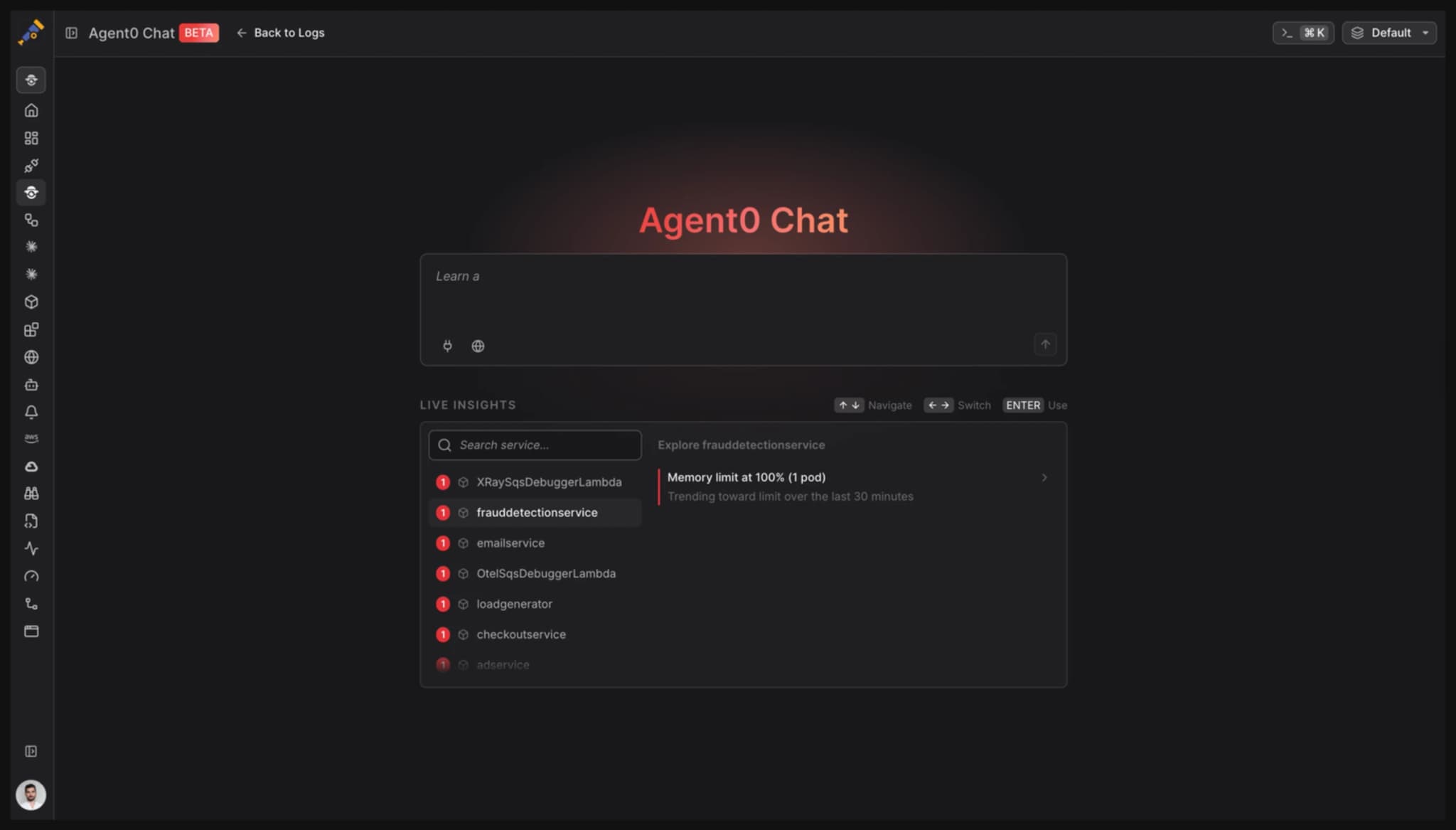
Continuous environment scanning. Agent0 scans your environment and surfaces what matters on the Dash0 landing view, including services that are failing with no alert coverage, infrastructure under memory or CPU pressure, and recent deployments correlated with health regressions.
Live Insights in the Agent0 Chat
**Integrated experience.
**Ask Agent0 directly from the features you are seeing. Contextual suggestions appear as you navigate through Dash0 features and change selections.
Capabilities running in parallel.
Continuous environment scanning. Natural-language Q&A across telemetry and codebase. Multi-signal correlation across logs, traces, metrics, and deployments. Asset generation (dashboards, alerts, runbooks, pull requests) validated against live telemetry before they ship. Frontend performance and user experience (Core Web Vitals, JavaScript errors, session behavior) correlated with backend telemetry.
Execution runtime, not a prompt chain.
Agent0 now runs on a sandboxed environment that can clone repositories, execute commands, and iterate until each generated asset is validated against your actual telemetry. Same execution model as Claude Code and Codex.
Full-loop incident response.
Agent0 investigates, identifies root cause down to the offending commit, and drafts a pull request on a new branch. Investigations include a visible hypothesis tree with evidence citations.
Validated dashboards and alerts.
Generated dashboards use proper grid layouts with P50/P90/P95/P99 breakdowns when relevant. Every panel becomes an alert with one prompt. Every alert is validated against live telemetry before it ships.
Native integrations and tools.
GitHub (code, PRs, CI status, fix generation), Linear (issue creation), Confluence and any MCP-compatible knowledge base, SQL, Bash, and any MCP server.
Updated chat view.
Service-centric, surfaces what needs attention, with "Ask Agent0" contextual to whatever surface you're on.
New pricing.
Task-based credits. No per-seat AI charges. No per-investigation fees.