6 updates shipped to Dash0 in May 2026: Web events as chart annotations, Broadening the support for Kubernetes semantic conventions and k8sobjectsreceiver, Database Query Widget and Query Parameter Support and more.
Correlate spikes and dips in your time-series charts with what real users were doing. Web events from RUM can now be overlaid as annotations, alongside the existing log, Kubernetes, and service event sources.
Chart showing log and web events living together
Time-series widgets on dashboards already support annotations from logs, Kubernetes events, and service events. Today, web events join the party.
Add a Web Events annotation to any time-series widget, filter it the way you would in the Web Events Explorer, and the matching events appear as markers on the chart's timeline. When markers cluster, they collapse into a single pill grouped per kind, so a burst of page loads stays visually distinct from, say, a deployment marker sitting right next to it. The chart legend now has its own "Web events" row too, counting them separately from logs.
Each marker comes with a tooltip showing the event's attributes and a one-click link straight to the Web Events Explorer — with the same filter applied and the event already selected — so you can go from "what happened around 14:32?" to the exact session event without losing your place.
The OpenTelemetry K8s SIG has introduced new semantic conventions for replication controllers, horizontal pod autoscalers, persistent volumes and their claims, resource quotas and more. We added support for them in Dash0, alongside first-class support for the k8sobjectsrecevier and its (non semconv-compliant...) output.
We added new resource types and the associated resource equality, typing and naming rules: k8s.replicationcontroller, k8s.service, k8s.persistentvolume, k8s.persistentvolumeclaim, k8s.hpa, and k8s.resourcequota. We also added a new, generic k8s.object resource type for all Kubernetes resource types (including CRDs) that do not currently have semantic conventions, which is necessary to improve the experience with the k8sobjectsreceiver of the OpenTelemetry Collector.
The k8sobjectsreceiver sends one log record for each Kubernetes API state change it observes (object created, modified, or deleted), or a periodic snapshot in pull mode. Taking some liberties with the encoding (thankfully, OTLP/YAML is not a thing):
Since the only resource attribute is k8s.namespace.name, this log used to be associated with a k8s.namespace resource, alongside all others representing new versions of resources in the same namespace. Instead, we now extract from the body of the log additional k8s.* resource attributes:
yaml
what-you-find-in-dash0.yamlResourceLogs:
  Resource:
    k8s.namespace.name: dash0-validation            # from regarding.namespace
    k8s.pod.name:       bad-image                   # per-Kind promotion
    k8s.pod.uid:        91551565-71f9-4d88-9711-3bef7607a7a7
    k8s.node.name:      node-3                      # from reportingInstance / source.host
    # (k8s.object.* generic keys removed: Pod has dedicated semconv)
  ScopeLogs:
    scope.name: github.com/dash0hq/dash0-opentelemetry-collector/processor/dash0k8sobjectprocessor
    LogRecords:
      event_name: k8s.object                        # this makes the log available for Annotations!
      # The rest is the same
That is, you are going now to find your new versions of Pods and Deployments when you filters for those pods and deployments.
Additionally, since we replace the bogus event_name field with k8s.object, you can use these logs for dashboard annotations, and can overlay how your Kubernetes resources change to your telemetry!
We also added support to normalizing the format for Kubernetes events as reported by k8sobjectsreceiver to the format we already supported of k8seventsreceiver (because, for Kubernetes, events are resources the way a pod or a deployment are), which means you can standardsize of k8sobjectsreceiver rather than using additionally k8seventsreceiver.
Last but not least, we papered over a papercut in k8seventsreceiver, which set timestamps based on the timezone where the collector is deployed in. Now it will all be consistently UTC.
When troubleshooting slow or failing database queries, knowing which query ran is the first thing you need, but finding it buried in the Attributes tab is painful. Now it's front and center in the span sidebar, syntax-highlighted, with prepared statement parameters already filled in.
We added a dedicated query widget to the span sidebar. If your span is a database span — meaning it carries either the db.query.text or the legacy db.statement attribute — the query now appears front and center, with the same syntax highlighting already available in the Attributes tab. No more hunting.
Several OpenTelemetry instrumentations for Java, .NET, and Python collect prepared statement parameters and expose them as db.query.parameter.<id_or_key> span attributes. When we detect those attributes, we interpolate the values directly into the query so you can read it as it actually ran — no blanks to fill in manually.
The interpolated parameters are interactive: you can filter them in or out, inspect individual values, copy them to the clipboard, or pin them as a column in your span table.
Starting with Operator v0.141.0, the Dash0 Operator for Kubernetes supports capturing query parameters by setting instrumentWorkloads.captureSqlQueryParameters: true in your Dash0Monitoring resource. This opts you in to query parameter collection for all injected Java and .NET instrumentations (see the Operator documentation for details). As of this time, Python requires configuring the instrumentation in code, and for languages without automated instrumentation that emits query parameters (like Node.js) we did something else. Read on.
We updated the Agent Skills to help you set the collection of database query parameters for your Java, .NET and Python apps. It will also help you collect database query parameters for languages that do not have built-in support, using custom instrumentations.
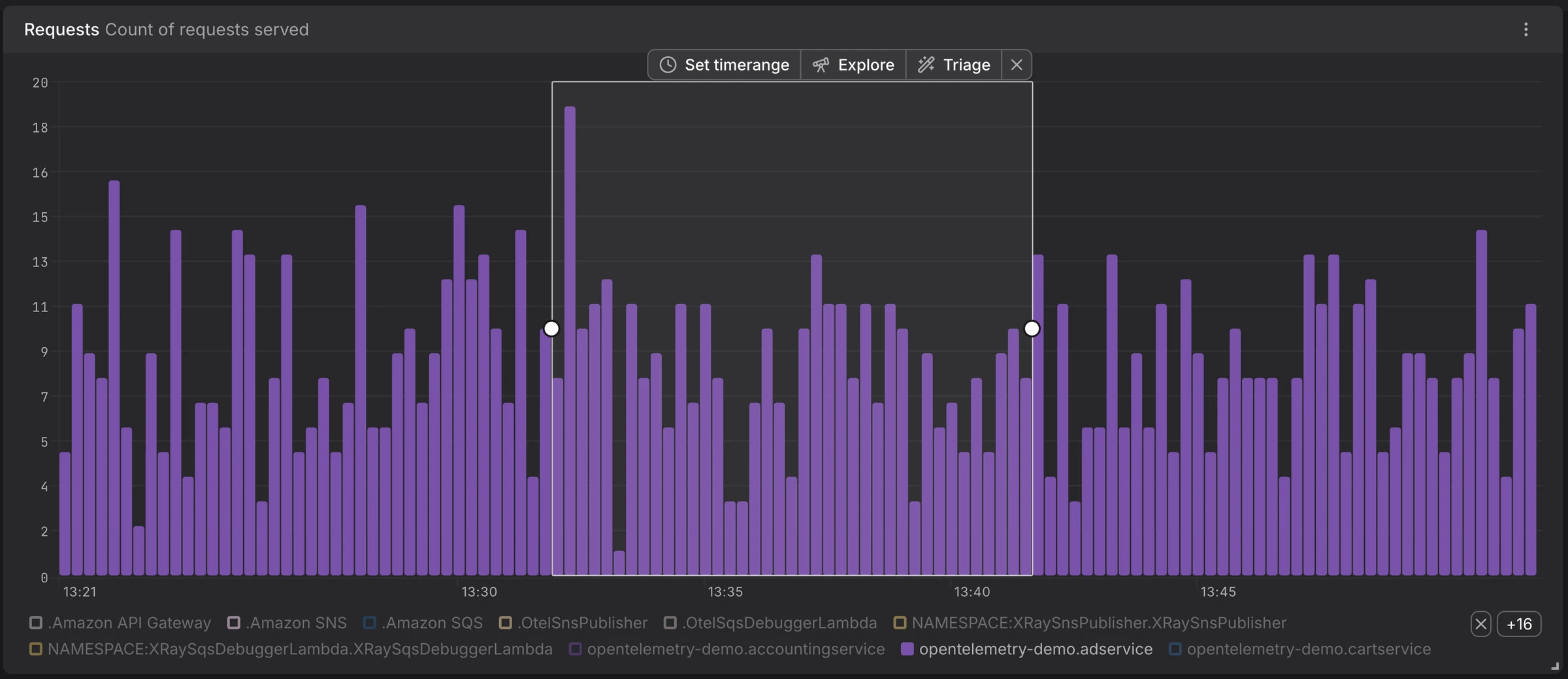
When you spot something unusual in a chart — a sudden spike in a logs chart, a latency outlier, an error rate climbing on one service — the next question is always the same: which records actually caused this? Dash0 now gives you a direct way of answering this question. Select a time range or on a chart, click a pie segment, or click a stat value, and an action bar appears with Explore and Triage actions that take you straight into the matching signal explorer with filters and time scope already applied.
Select a time range on any chart and the drilldown action bar appears — Explore opens the matching signal explorer, Triage opens it in comparative analysis mode, with filters and time scope already applied.
**Inline drilldown from any chart **— Time-series, pie, gauge, stat, and tree-map charts now drill straight into the records behind them.
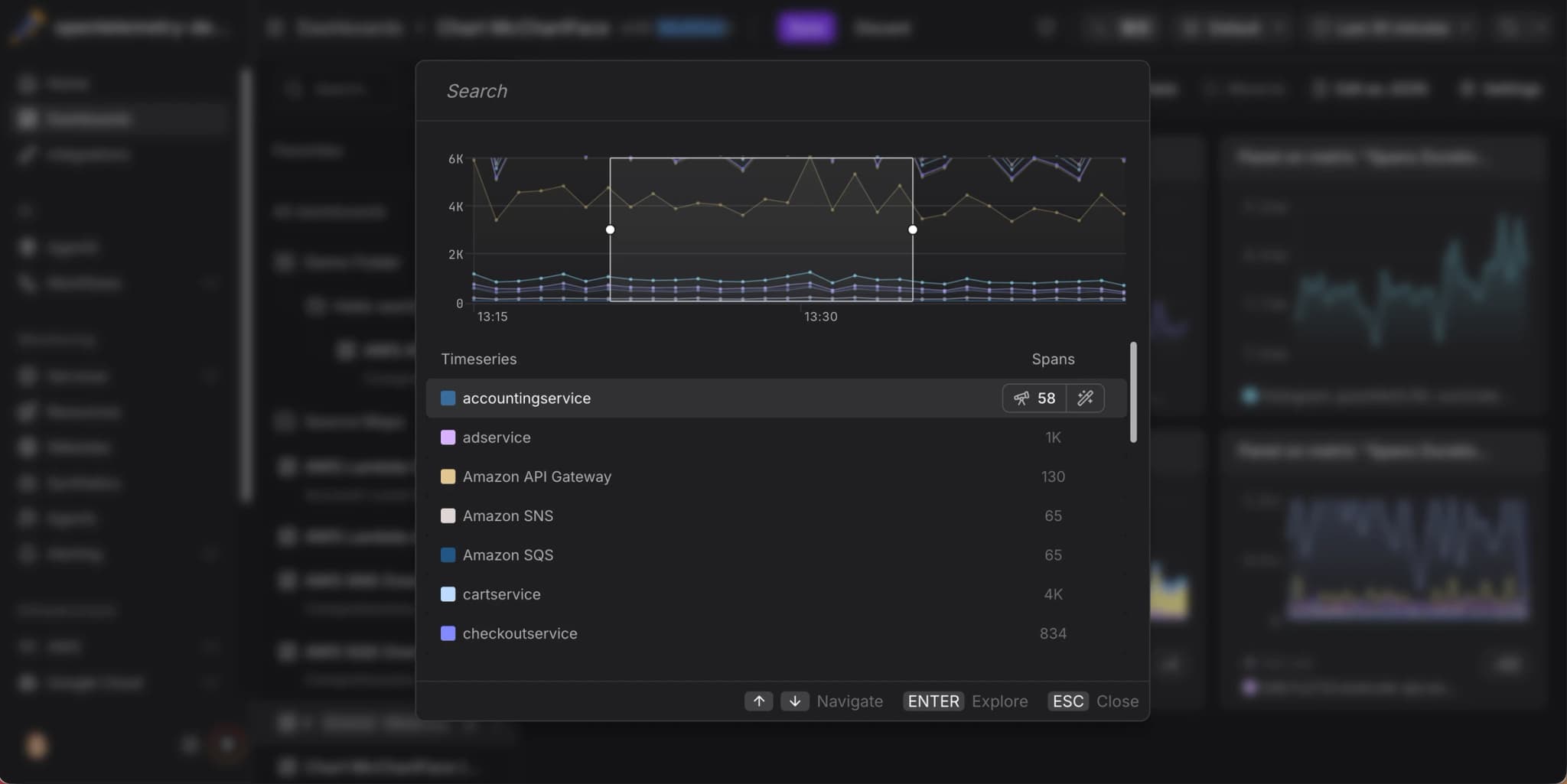
**Searchable picker for multi-time-series charts **— Charts with many series open a dialog with live counts of matching records per series and full keyboard navigation.
**Per-(series × signal) drilldowns **— Multi-series and multi-signal charts produce independent drilldowns, each scoped to its row's labels and its signal's filters.
**Explore and Triage modes **— Read records with Explore, or surface what differentiates them with Triage. Available for spans, logs, and web events.
**Filter and time-range carry-over **— Filters from PromQL and series labels and your selected time range follow you into the destination explorer with no manual setup.
For charts with many series, drilldown opens a searchable picker. Each row is its own drilldown, with live counts of matching spans, logs, and web events.
Explore data behind a chart used to mean hopping between a dashboard, the spans explorer, the logs explorer, and a metric drilldown — copying filter values and time ranges across each step. Drilldown collapses that sequence into a single click. You can spot a misbehaving series, drill straight into its underlying data, and keep visual context throughout, without any manual filter setup.
Open any dashboard, select a time range on one of your charts, and pick **Explore **or Triage in the action bar. For pie, gauge, stat, and tree map panels, click a segment instead.
The Drill Down from Charts documentation covers every entry point per chart type, keyboard shortcuts, the Explore vs. Triage decision, and the filter translation rules.
The logic to decide which telemetry is used in a PromQL query has been devised together with Julius Volz, one of the founders of Prometheus and the mind behind PromLabs. If you want to learn Prometheus, we cannot recommend the self-paced courses enough, they are effectively a rite of passage at Dash0.
The Integrations Hub now ships 101 curated check rules like Kubernetes, Vercel, AWS RDS, Istio, Argo CD, Cilium, the OpenTelemetry Collector, and many more.
Setting up alerting for a new technology has always been the slow part of getting full coverage. You know which metrics matter, but you still have to write the PromQL, decide on thresholds, and pick severities. Now we do that for you.
pre-built check rules for k8s
Every integration in the Hub has a Check Rules section listing the alerts most worth running for that technology. Browse them on the public Integrations Hub at dash0.com/hub before you sign up, or open them from the in-app integration page and install with one click; already configured with sensible thresholds and severities.
Each rule card is transparent about what it does and what it needs. You can see which of its metrics are already flowing into your organization and get a clear pointer if a dependency integration isn't set up yet; added rules are also disabled by default so you don’t need to worry about them spamming you immediately before you make modifications.
Once added, these rules behave like any check rule you authored yourself; you can edit, route to notification channels, adjust thresholds. The Hub is a curated starting point, not a black box.
Spam filters in Dash0 let you drop unwanted logs, spans, and metrics before they reach storage by matching on structured attribute conditions.
You can now manage spam filters as code using the Dash0 CLI, Terraform provider, and Kubernetes operator, so your data-hygiene rules live right alongside the rest of your infrastructure.
Every spam filter is expressed as a YAML document with kind: Dash0SpamFilter. The Dash0 CLI, Terraform provider and Kubernetes operator all accept the same YAML document that you can download from the Dataset configurations:
The spam-filters command is currently experimental and requires the --experimental (or -X) flag:
sh
spams-filters.sh# Create a spam filter from a YAML file
dash0 spam-filters create -X --dataset default -f drop-health-checks.yaml

# List all spam filters in a dataset
dash0 spam-filters list -X --dataset default

# Get a single spam filter as YAML
dash0 spam-filters get -X --dataset default <id>

# Update an existing spam filter
dash0 spam-filters update -X --dataset default <id> -f drop-health-checks.yaml

# Delete a spam filter
dash0 spam-filters delete -X --dataset default <id>
We have reworked the Spam Filters UI under Datasets so that you can name your spam filters (which of course works also via Infrastructure as Code), and download both the SpamFilters CRD to use with the Terraform provider for Dash0, the CLI and the Kubernetes operator.