
Last updated:
Analyze Tools and Skills
The Tools and skills tab shows what the agents actually reach for during sessions, and whether those things work.
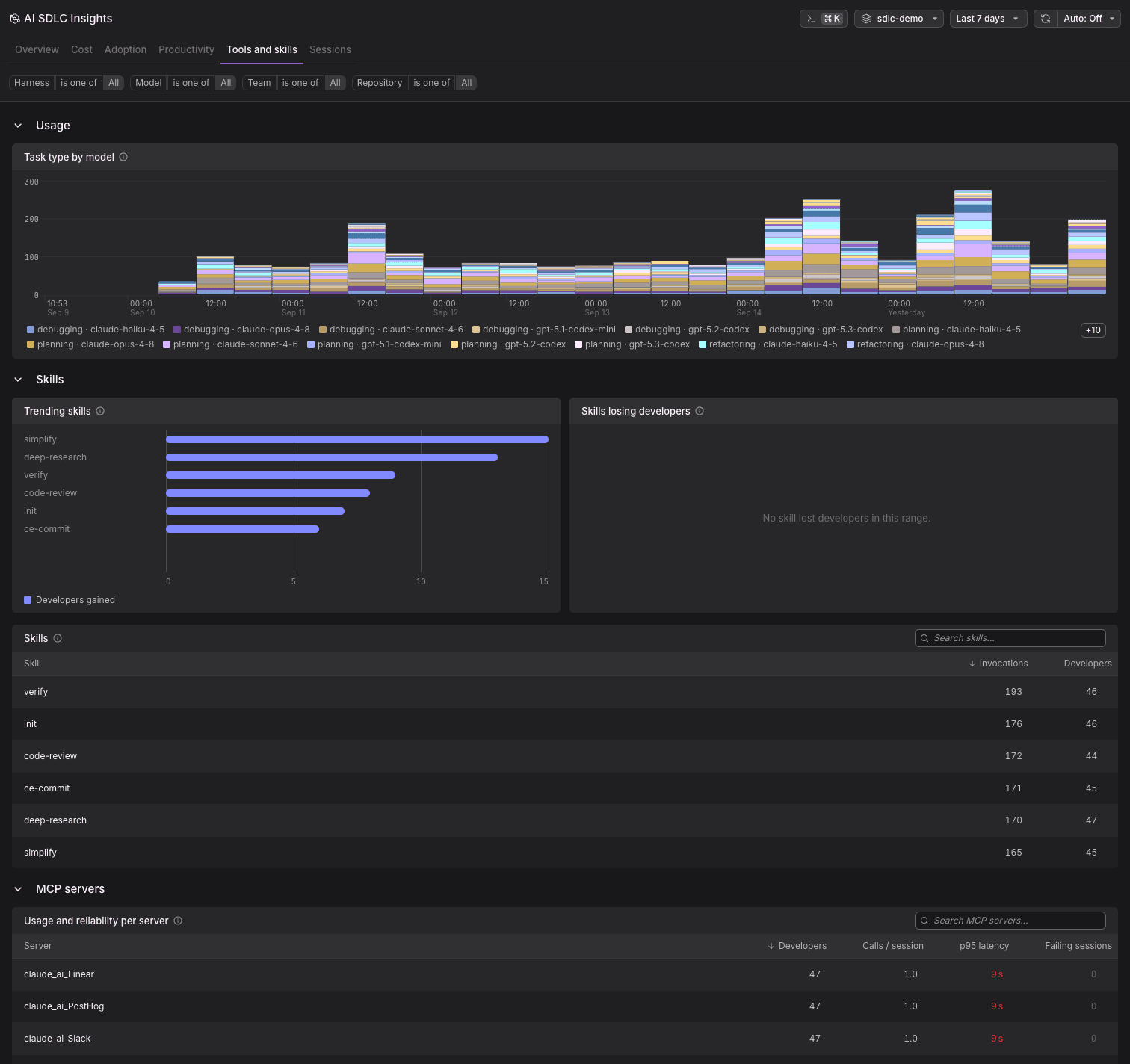
The tab has three collapsible sections: Usage, Skills, and MCP servers.
Usage
Task type by model is a stacked time series of sessions keyed by activity and model together, for example debugging · claude-opus-4-8 or planning · gpt-5.2-codex. Use it to see whether a model is being reached for on a particular kind of work, and whether that changed.
Because activity comes from an evaluation Dash0 runs over sampled sessions, this chart describes the sample rather than every session.
Skills
- Trending skills: Skills that gained developers in the range, ranked by how many.
- Skills losing developers: The same measurement in reverse. An empty panel here is good news, and says so explicitly.
- Skills: A searchable table of every skill, with Invocations and the number of Developers who used it.
The distinction between invocations and developers is the useful one. A skill with many invocations from few developers is somebody's personal workflow. A skill with fewer invocations spread across many developers has actually landed.
MCP Servers
Usage and reliability per server is a searchable table with, for each MCP server:
- Developers: How many people used it.
- Calls / session: How heavily it is used when it is used.
- p95 latency: How slow the server is at the tail. A slow MCP server costs tokens and wall-clock time on every session that touches it.
- Failing sessions: Sessions where a call to this server failed.
How to Use Analyze Tools and Skills
Find the servers that cost you silently. Sort by p95 latency. A server that every developer uses and that answers slowly is a tax on every session, and it will not show up anywhere else on the page.
Fix broken integrations. Failing sessions point at misconfiguration, missing permissions, or unstable external services. A server with high adoption and a non-zero failure count is the highest-value fix available.
Spread what works. Trending skills tell you which encoded workflows are catching on. Pair a rising skill with the team it came from and document it before the knowledge stays local.
Investigate what is fading. A skill losing developers is either solved by something better or quietly broken. The Skills table's invocation count tells you which.
Further Reading
- Explore Sessions: Drill into individual sessions to see tool calls in context.
- Key Concepts: Definitions for skills, tool calls, and activity.
- Troubleshoot AI SDLC Insights: Solutions for common tool and MCP server issues.