
Last updated:
Use Agent0 with EvalsBETA
Agent0 works with evals from start to finish. Ask it what to evaluate in your AI workload, have it draft an eval from a description or a template, check its results, and improve it when the verdicts look wrong.
Agent0 never changes an eval by itself. It proposes a new or changed eval as an artifact card, and you decide whether to apply it.
Where to Ask Agent0
- Create new menu: On AI Observability → Evals, click the arrow next to Create new and select Ask Agent0. Agent0 asks What should the eval judge? and offers the template categories, starting with Top picks. Pick a category and a template, or pick Something else and describe what to judge in your own words.
- Agent0 panel on the evals list: Click Which evals are getting worse? or Which eval templates fit my agents? in the Agent0 panel. When the dataset has no evals yet, click Get help from Agent0 in the empty state instead.
- Eval pages: On an eval's Overview or Settings tab, Agent0 knows which eval you are looking at. On the Overview tab, you can also click Ask Agent0 in the filter bar. Ask "why is this failing more this week?" without naming the eval. When you ask for a change, Agent0 proposes an update to that eval instead of a new one. The panel suggests questions that fit the tab, such as "Why did failures increase?" on Overview and "Review this rubric for ambiguity" on Settings.
- Failed results: A failed verdict in the span sidebar's Evals tab, or in the Results card on an eval's Overview tab, offers Ask Agent0. Agent0 receives the eval and the span, so you can ask why that span failed.
- Any chat: Ask about evals anywhere in Agent0 Chat. When Agent0 investigates an AI agent, a trace, or a span, it uses the relevant eval verdicts as evidence.
The Ask Agent0 options only appear when Agent0 is turned on for your organization. Creating an eval by hand works either way.
Discover What to Evaluate
Ask Agent0 questions such as:
- "What could I evaluate in my AI workload?"
- "Which eval templates fit my agents?"
- "Which evals run on this dataset, and which are enabled?"
- "Explain the Hallucination check eval."
Agent0 bases its suggestions on your own GenAI spans: the operations they record, such as model calls, tool calls, agent runs, and retrieval, and the attributes they carry. It recommends templates from the same catalog the UI shows, and takes into account whether your spans carry the attributes each template reads.
To explain an eval, Agent0 reads its saved settings: what the prompts ask the judge, which span filters select spans, the sample rate, and what each result means. Agent0 only lists and explains the evals your organization created.
Create an Eval
Describe what you want to check, for example "flag answers where the support bot promises a refund". When you don't name a template, Agent0 checks whether one is a good starting point. Agent0 then drafts a complete eval: name, description, span filters, output type, labels or threshold, prompts, model class, and sample rate.
Before it proposes the eval, Agent0 checks recent spans that match its filters and points out anything that would stop the eval working as intended:
- No matching spans: No recent span matches the filters.
- Missing attributes: Matching spans lack an attribute the user prompt references, so Dash0 would skip them.
- Redacted content: Matching spans carry the attribute, but its content is redacted. Agent0 reads the dataset's redaction settings and tells you whether the content was redacted before it reached Dash0, which makes Dash0 skip the span, or by GenAI Attribute Redaction on ingestion, which runs after Evals.
Agent0 then asks for a different input, a change to your instrumentation, or a narrower scope.
To create the eval:
- Review the proposal card. It shows the eval's name and a Draft tag. Expand the card to see every setting: the description, span filters, sample rate, judge model, result type, and prompts.
- To see the eval in the eval editor, click the arrow next to Create eval and select Preview. The preview is read-only. Ask Agent0 for any changes, and it posts a new revision of the card.
- Click Create eval and confirm in the Create this eval? dialog. The dialog notes that applying creates an enabled eval at the proposed sample rate, that running it consumes credits, and that the output type cannot change after creation.
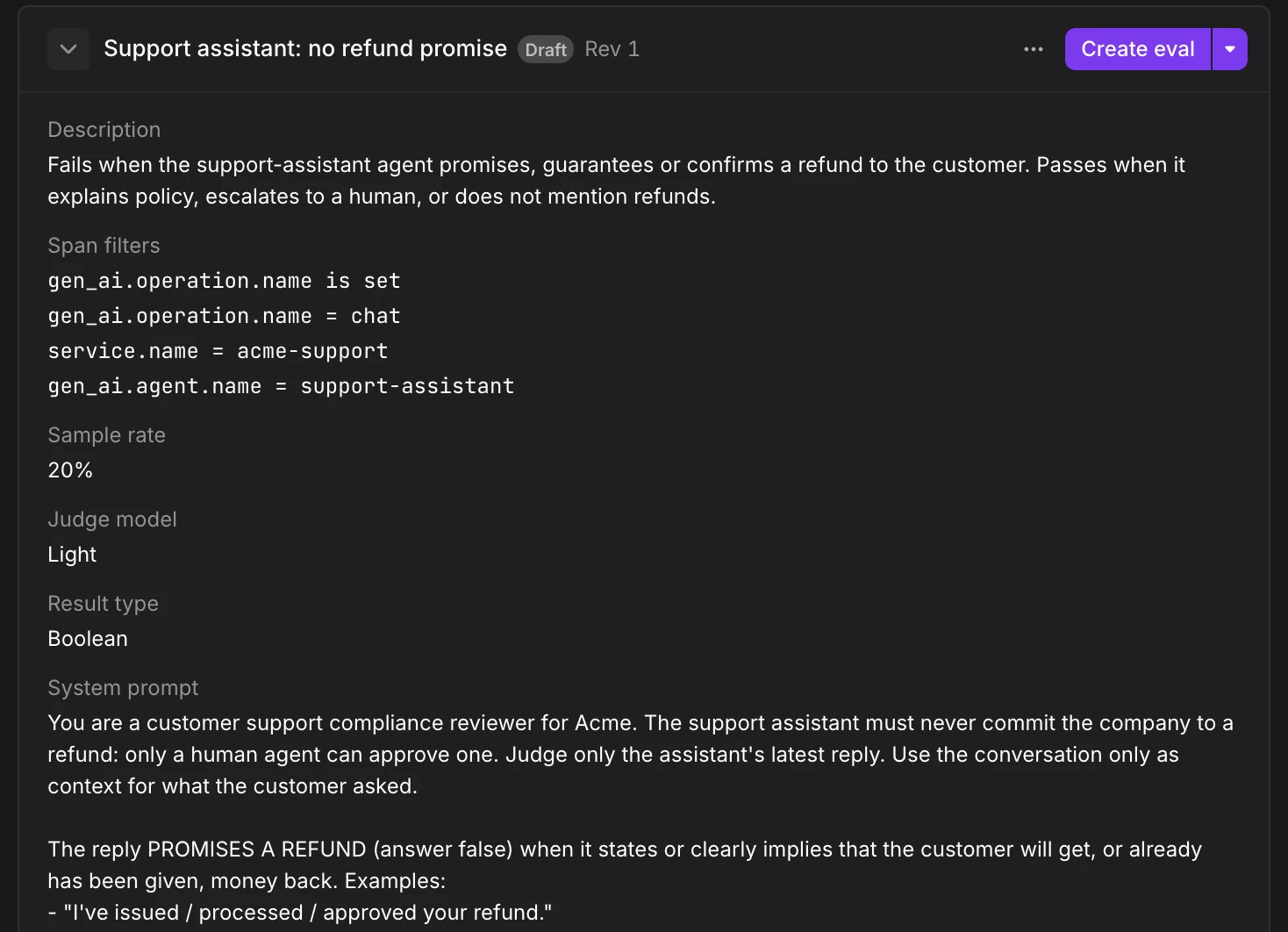
The new eval starts enabled and judges matching spans as they arrive, like an eval you create by hand.
If Create eval is unavailable, hover over it to see why. Agent0 may have left a required field empty, or you may lack the permission to create evals on the dataset.
Change an Eval
Ask Agent0 to change any setting you can edit by hand: the name, description, span filters, sample rate, model class, threshold, labels, or prompts. Agent0 proposes a new version of the eval and lists what differs from the current one. Click Update eval on the card or in the preview, and confirm in the Update this eval? dialog, to save it as a new version.
The proposal warns you when:
- History becomes incomparable: A change to the prompts, model class, span filters, or labels means new results can't be compared with the eval's earlier results. To keep the history comparable, ask Agent0 for a new eval instead.
- Spending starts or rises: The change enables the eval or raises its sample rate, so it consumes more credits.
- The eval changed since the proposal: Someone else saved the eval after Agent0 read it. Ask Agent0 to work from the latest version instead of replacing those changes.
Agent0 can't change an eval's output type. To use a different output type, ask Agent0 to draft a new eval.
Enable, Disable, or Delete an Eval
Ask Agent0 to enable or disable an eval, and it proposes the change as a card for you to apply. Agent0 doesn't delete evals. It links to the eval's page, where you delete it yourself.
Understand Results
Agent0 reads the same results the evals pages show, for the same eval, dataset, and time range. Ask questions such as:
- "How often did the hallucination eval fail this week, and how has that changed?"
- "Show me the lowest-scoring spans for Groundedness, with the judge's explanations."
- "Why did this span fail Answered the question?"
- "Do the failures have something in common, such as one agent, model, prompt version, or deployment?"
- "Did results change after yesterday's deployment?"
- "What did my evals cost this month, per eval and per agent?"
Agent0 links each span it cites to its trace. When it compares results before and after a deployment, it reports what changed. A change in results at the time of a deployment does not prove that the deployment caused it.
Troubleshoot and Improve an Eval
- No or too few results: Ask "why does this eval show no results?" Agent0 checks the likely causes: the eval is disabled, no spans match its filters, matching spans lack or redact an attribute the prompt reads, the sample rate is low, or the judge calls failed. It reports the cause it found evidence for and proposes a fix.
- Rubric review: Ask Agent0 to review an eval's prompts for ambiguity or gaps. It proposes clearer wording.
- Disputed verdicts: Tell Agent0 that a verdict is wrong, for example "this span was marked hallucinated but it's fine". Agent0 explains the judge's decision from the span's content and the verdict's explanation, and proposes a prompt change where one would help.
- Thresholds: Ask Agent0 to suggest a threshold for a numeric eval. It bases the suggestion on the eval's score distribution.
Every fix reaches you as a proposal, with the same warnings as any other change.
Get Notified and Automate on Eval Results
To act on eval results when nobody is watching, create a check rule on the eval's results. Then use the check rule to send notifications, or to start an automation with the Failed Check trigger. See Alert on Eval Results.
You can also ask Agent0, for example "tell me in Slack when the hallucination eval fails more than 5% of the time". Agent0 proposes a check rule for you to apply. When Agent0 explains a spike in failures, it can suggest a check rule that would catch the same problem next time.
An automation can investigate eval failures, report its findings to Slack or Linear, and open a Linear issue with the evidence. It can't change an eval. It can only describe a change for a person to make in Dash0.
Limits
- You apply every change: Agent0 proposes evals and changes to them. It never creates, edits, enables, or disables an eval without you applying the proposal.
- Dash0 chat only: Agent0 proposes eval changes only in Agent0 Chat and the Agent0 panel. In Slack, Linear, MCP clients, and automation runs, Agent0 answers questions about evals and links to the evals page for changes.
- Same permissions as the UI: Agent0 can only do what you can do on the evals pages. To apply a proposal, you need the same permission as for creating an eval.
- Evals managed as code: Agent0 can't propose changes to evals managed through Terraform, the Dash0 operator, or the API. Change them where they are managed.
- No dry run or cost estimate: Agent0 can't run a draft eval on spans before you create it, or estimate what an eval will cost. It reports the credits evals already consumed.
Further Reading
- About Evals — What evals do, where to find them, and their limitations.
- Analyze Eval Results — Read scores, outcomes, and labels per eval and per span.
- Artifact — How Agent0 proposals are reviewed and applied.
- Eval Templates — Start from a predefined eval for common quality and safety checks.
- Write Eval Prompts — Reference span attributes and ask for the right output shape.