
Last updated:
Collect AWS CloudWatch Logs
Choose which CloudWatch logs to collect by selecting individual log groups, defining a tag-based policy, or combining both in the same AWS integration. Dash0 configures the subscription filters for you. The filters forward new log events through the integration's regional Amazon Data Firehose to its destination dataset in Dash0.
Prerequisites
- A connected AWS integration with the source account, destination dataset, and AWS regions you want to collect from.
- AWS Resource Explorer enabled with an aggregator index and a default view for resource discovery.
- A CloudFormation template that supports Log-group instrumentation, with
EnableLogGroupInstrumentationset totrue. This feature was added in template v4. Older stacks need a compatible template upgrade, not just a refreshed Dash0 application. - The integration's instrumentation role must allow subscription inspection, creation, and deletion. Each selected region needs the integration's logs Firehose and a separate CloudWatch Logs delivery role. The instrumentation role needs permission to pass that delivery role to CloudWatch Logs. The compatible template provisions these resources and reports them to Dash0.
- For tag policies, the integration's read-only role must also allow
logs:ListTagsForResource. A reported instrumentation capability alone does not prove that tag reads work. - An organization administrator with access to the integration's dataset to save forwarding choices. Other users can view the list but cannot change it.
If your stack has no log-group instrumentation parameter, or Dash0 reports the capability as unavailable, check the template offered for your integration with Dash0 support before upgrading. Do not add subscriptions manually as a prerequisite for this feature, and do not assume a metrics-scraping-only integration has write permissions.
Automatic subscription-filter setup does not remove the need to deploy the AWS integration's CloudFormation stack and grant its IAM permissions. Enabling log-group instrumentation in the template does not select log groups or activate forwarding by itself. Lambda integration and metrics scraping are separate features.
Choose how to select groups
| Option | Use it when | What happens to newly discovered groups |
|---|---|---|
| Manual selection | You want to choose specific groups individually or in bulk. | They remain off unless you select them or a policy matches them. |
| Tag-based policy | You want collection to follow tags on the log groups themselves. | Eligible matches are selected during a successful policy evaluation. |
| Both together | You need a policy for a set of groups and individual selections alongside it. | Policy matches join automatically; independent manual choices are preserved. |
Both methods use the same managed subscription and delivery path for a group. Selecting a group both ways does not create two Dash0-managed subscriptions.
Select individual groups
- Open Settings > Integrations and select your AWS integration.
- Open the Logs tab. Dash0 lists discovered log groups in the integration's selected AWS regions.
- Search for the groups you need and select them in the Collect column. You can select individual groups or use the bulk selection control. Each save supports up to 1,000 changes.
- Click Save. Dash0 saves your choices and configures the subscriptions asynchronously.
- Follow each group's configuration status. If an operation fails, read its failure reason, correct the problem, and click Retry. Save or discard outstanding edits before retrying.
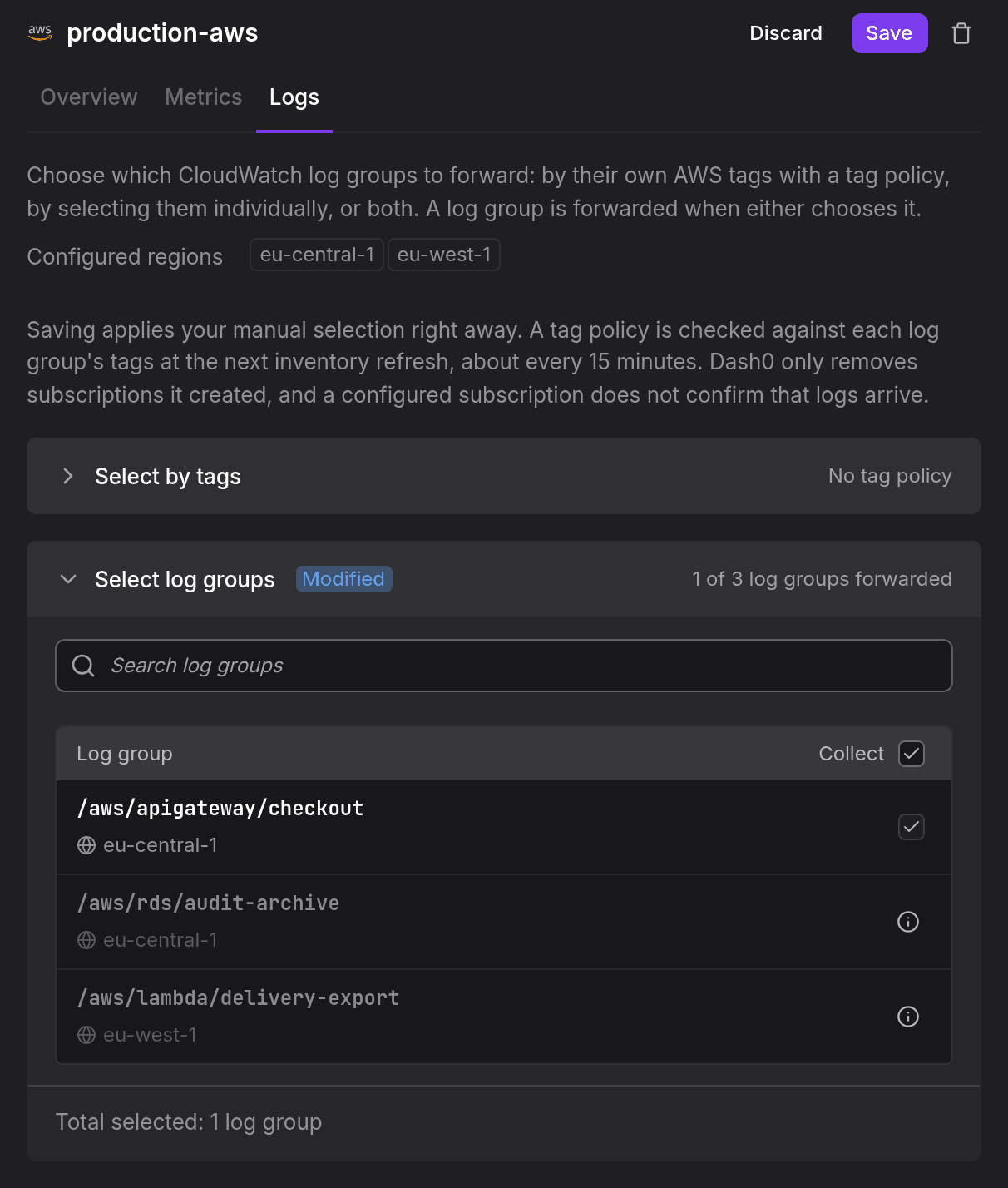
Manual-selection example using synthetic log groups, not the tag-policy editor.
Only present, Standard-class log groups are eligible for enabling forwarding. Infrequent Access log groups are not supported. Dash0 excludes the integration Firehose's own diagnostic log group to prevent recursive forwarding.
Discovery runs every 15 minutes. A newly created group may not appear immediately. Without a matching policy, discovery does not select it for forwarding. Groups no longer present in AWS are hidden from the list.
Match tags with a policy
Each AWS integration supports one optional policy with multiple rules. The policy matches only tags on the CloudWatch log group itself. Tags on its Lambda function or another producer are not inherited.
- Conditions within one rule are combined with AND.
- Separate rules are combined with OR.
- Matching is case-sensitive and literal. Regex, exclusions, and non-tag conditions such as
cloud.regionare not supported.
- Expand Select by tags in the Logs tab.
- Add a rule and its tag conditions. Add another rule for an alternative match.
- Choose Keep forwarding or Stop forwarding for groups that stop matching.
- Click Save in the page header, review the affected groups, then click Save policy.
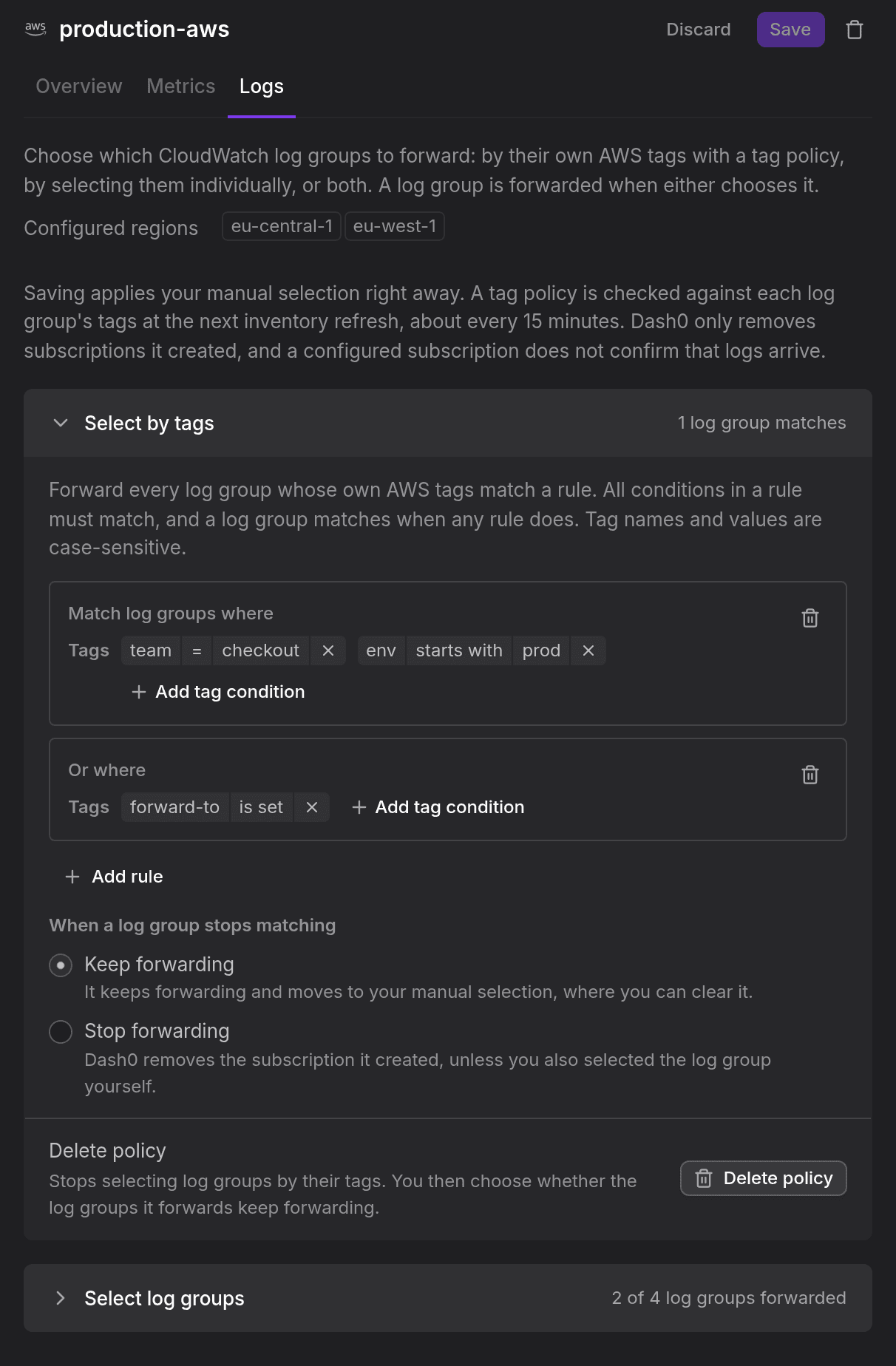
Policy example using synthetic log groups. The first rule requires both team=checkout and an env value starting with prod; the second matches a present forward-to tag.
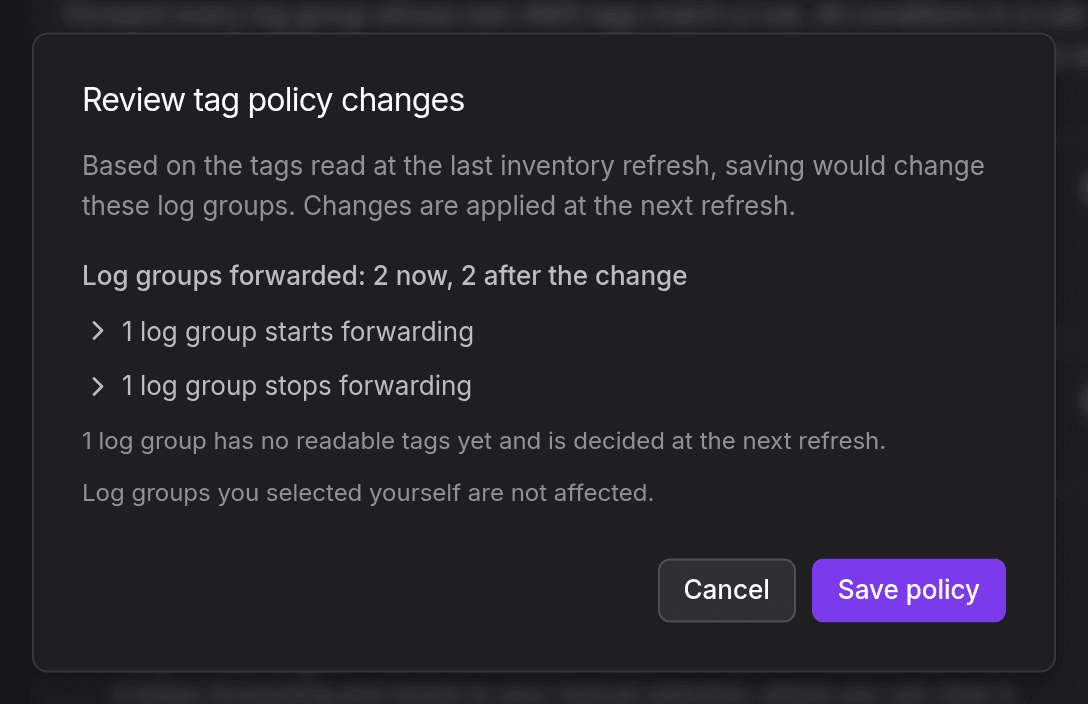
The review uses the last inventory refresh. This synthetic example includes a group without readable tags; independent manual selections are not affected.
For an API example, a policy can match groups with team=platform and env=prod, or groups with a collect tag. In the API contract, tag keys use dash0.cloud.tags.<tag name>:
{
  "onNoLongerMatching": "keep",
  "rules": [
    {
      "conditions": [
        {"key": "dash0.cloud.tags.team", "operator": "is", "value": "platform"},
        {"key": "dash0.cloud.tags.env", "operator": "is", "value": "prod"}
      ]
    },
    {
      "conditions": [
        {"key": "dash0.cloud.tags.collect", "operator": "is_set"}
      ]
    }
  ]
}
This example is the policy's spec, not a complete API request. Supported operators are is, is_one_of, is_set, starts_with, ends_with, and contains. Use value for single-value operators, values for is_one_of, and neither for is_set. Bare tag keys are not accepted by the policy API. A missing tag never matches; a present empty tag matches is_set or explicit empty equality.
Saving a policy stores rules. A later successful discovery evaluation reads AWS tags and requests subscription configuration for matching eligible groups, including newly discovered matches. Scan duration, AWS throttling, and retries can extend this beyond the 15-minute schedule. It is not a completion or delivery guarantee.
An impact preview uses stored inventory and tag observations, not a fresh AWS scan. Failed or missing tag observations are uncertain. Review affected groups and the Keep/Remove behavior before saving a change; preview results do not prove that AWS changes will succeed.
Combine manual and policy selection
Manual choices and policy matches are independent. You can use a policy for your platform team's tagged groups and manually select another group for an investigation.
| Group state | Behavior |
|---|---|
| Independently selected manually | Remains enabled when a policy stops matching or is deleted. |
| Currently matches the policy | Remains enabled; manual uncheck cannot override the match. |
| Policy-only group stops matching, Keep | Forwarding continues; the retained group can be manually unchecked. |
| Policy-only group stops matching, Remove | Managed-subscription removal is requested after a fresh successful non-match. |
Keep is the default. Removing a matching tag does not necessarily stop forwarding. Changing Keep to Remove also applies to previously retained policy-only groups after fresh checks. Failed tag reads do not count as a non-match and do not authorize removal. A future positive match selects a manually unchecked retained group again; manual OFF is not a permanent exclusion.
Deleting a policy requires an explicit Keep or Remove choice. Keep retains policy-managed forwarding and makes those selections editable. Remove authorizes cleanup of policy-controlled groups while preserving independent manual selections. There is no policy pause switch.
Tag-based automation also changes who can affect collection: anyone with permission to edit the matching AWS tags can indirectly change ingestion and its costs.
What Dash0 configures
For each selected group, Dash0 creates or reconciles a filter named dash0-<integration-id> targeting the integration's regional logs Firehose, using its CloudWatch Logs delivery role.
The subscription uses an empty filter pattern to forward all new log events. It requests original, untransformed events rather than log-transformer output. It does not backfill historical events already stored in CloudWatch, and this UI does not offer a custom subscription filter pattern.
Dash0 preserves other subscription filters. If a filter with the managed name points to a different destination or role, Dash0 reports a conflict instead of overwriting it. If AWS subscription capacity is exhausted, Dash0 reports a failure rather than evicting another consumer.
If a Lambda extension, collector, or another subscription already sends these logs to Dash0, enabling another path can cause duplicate ingestion. Review existing forwarding before selecting the same groups here.
Verify log delivery
Configured means Dash0 verified the subscription configuration in AWS. It does not confirm that any event has reached Dash0.
- Generate a new event in the source log group after configuration completes.
- Open the integration's destination dataset in Dash0 and search for that event in the relevant time range.
- If the event does not arrive, inspect the regional Firehose's delivery errors and destination configuration in AWS. Check the CloudWatch Logs delivery role and the integration's IAM permissions as well.
Configuration and delivery are asynchronous. AWS quotas, throttling, permissions, and Firehose delivery failures can affect collection. CloudWatch Logs and Firehose usage can incur AWS charges.
Stop forwarding and remove resources safely
For a manual-only group, clear its Collect selection and click Save. Wait for removal to complete. Dash0 removes the subscription owned by this integration, not other filters, the log group, or logs already stored in AWS or Dash0.
For groups controlled by a policy, review both sources of selection. A current match cannot be overridden by unchecking. To remove policy-only forwarding, use the policy's Remove behavior with a successful non-match, or delete the policy with an explicit Remove disposition. Independent manual selections must be cleared separately. Keep retains forwarding and its associated costs.
When only manual selection is in use, clear all listed eligible groups from a mixed selection by clicking the Collect header checkbox twice, then Save. This is not a way to override matching policy selections. Unchecking changes the draft only; forwarding remains enabled until you save and subscription removal completes.
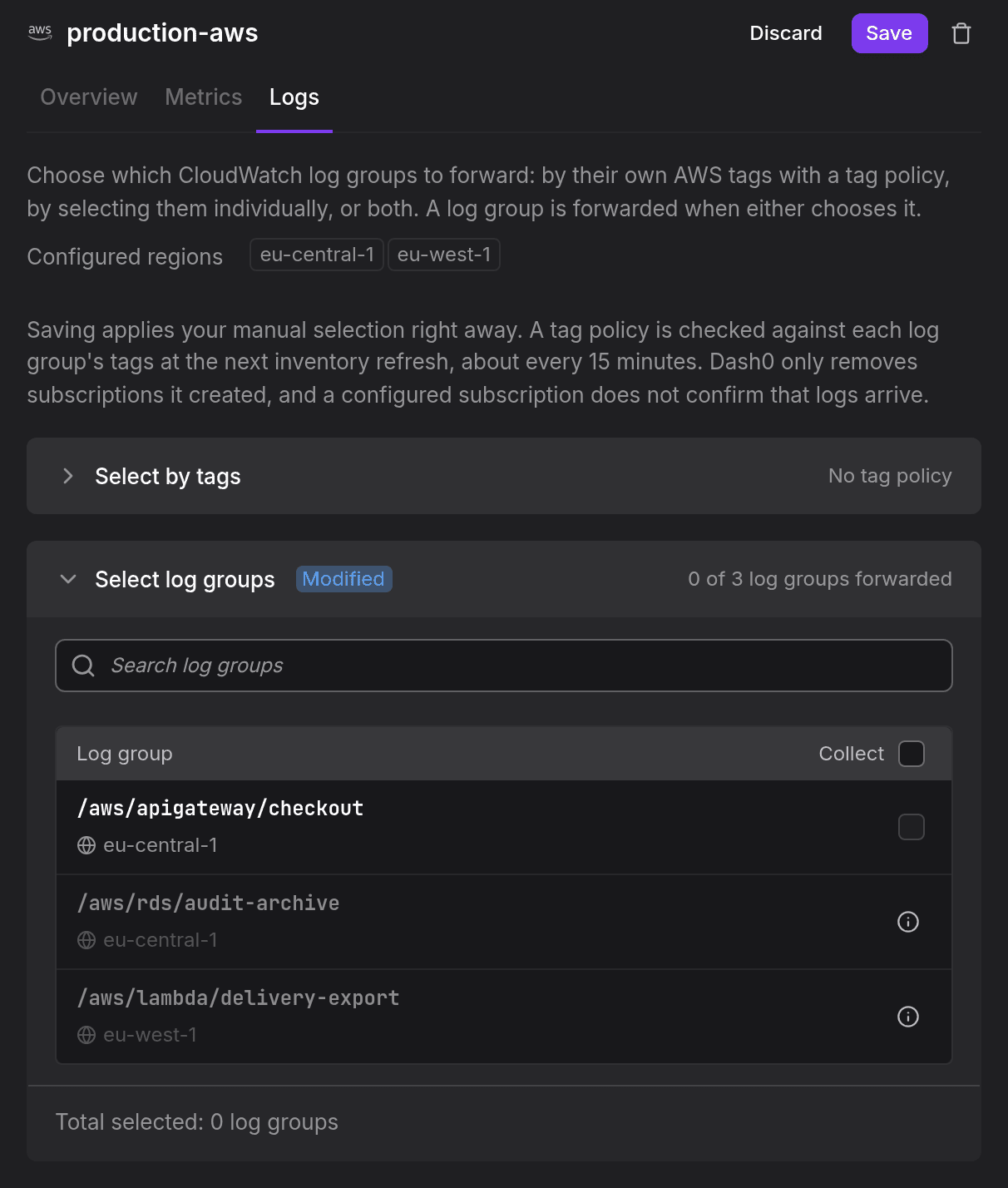
Manual-only example using synthetic log groups. Clearing the selection is a draft change until you click Save; it does not override a matching policy.
Stop forwarding before removing a region from the integration, disabling log-group instrumentation in CloudFormation, or deleting the integration or its delivery resources. The Logs tab only manages groups in the currently selected regions. Disabling the template feature removes roles and permissions, not existing subscriptions. Integration teardown does not automatically clean up these subscriptions.
Troubleshooting
Forwarding cannot be enabled
Check that the stack supports log-group instrumentation and has the feature enabled. Wait for regional deployment and integration reporting to complete. A reported capability allows you to request configuration, but does not prove that IAM or delivery works. Check that the group is Standard-class and in a selected region.
A save fails or a group stays pending
Refresh the list to check which choices were saved. Some dispatch failures occur after the choices have been stored. Once you have corrected the reported problem, retry the affected group. Discovery does not guarantee recovery of manual-selection dispatch failures. Policy evaluation can redispatch unfinished policy-managed work, but this is not a guarantee of completion or delivery.
If someone else changed a group's choices, Dash0 refreshes the list instead of overwriting their changes. Review your remaining edits before saving again.
AWS denies access or reports a subscription limit
Review the failure reason and the integration's roles. Subscription management requires more than read-only access. Ensure the delivery role and Firehose belong to the integration in that region. If AWS reports a subscription limit, review existing filters and account quotas. Dash0 does not delete another consumer's subscription to free capacity.
A deleted group reappears
Dash0 hides absent groups and removes their inventory records after more than one hour continuously absent, on a successful complete discovery scan. This inventory cleanup does not remove AWS subscriptions. A group that reappears before cleanup retains its saved choices. Manual dispatch failures can require Retry; policy-managed work can be revisited by policy evaluation. After cleanup, the old manual selection is lost. A rediscovered group can be selected manually again or by a subsequent successful policy match.