Dash0 acquires Polar Signals

Dash0 updates from September 2025

8 updates shipped to Dash0 in September 2025: AWS X-Ray support for Website monitoring, Introducing Audit Logs, Introducing Teams for Access Control and more.

AWS X-Ray support for Website monitoring

The Dash0 Web SDK for Website monitoring now supports AWS X-Ray trace propagation, enabling seamless end-to-end tracing for applications using AWS managed infrastructure.

Dash0’s Website monitoring gives you complete visibility into your application's performance from frontend to backend. By correlating web vitals with backend API calls, you can easily identify customer issues and understand the full user journey.

End to end trace from Frontend until Database call

OpenTelemetry provides well-defined interfaces for end-to-end tracing from client to the backend up until the database using context propagation headers. However, some key AWS services do not make use of this out of the box because of implementation details, specifically the format they use for trace context propagation (see our guide on distributed tracing for more details). Amazon API Gateway, Application Load Balancer and others don't use the W3C TraceContext specification, which OpenTelemetry uses by default: instead, the trace data they generate, which you can get into Dash0 using the Amazon CloudWatch Transaction Search integration, relies on you perform tracing via the AWS X-Ray headers. The outcome is that you may not get the full picture of your application's performance.

Trace without AWS X-Ray propagation

To prevent these issues, we've added X-Ray propagation support to our Web SDK, automatically bridging the gap between your frontend and AWS backend services. Now you can trace user interactions seamlessly through your entire AWS-powered application stack, giving you the complete observability you need to deliver exceptional user experiences.

Trace with AWS X-Ray propagation and Amazon CloudWatch transaction search
Read more

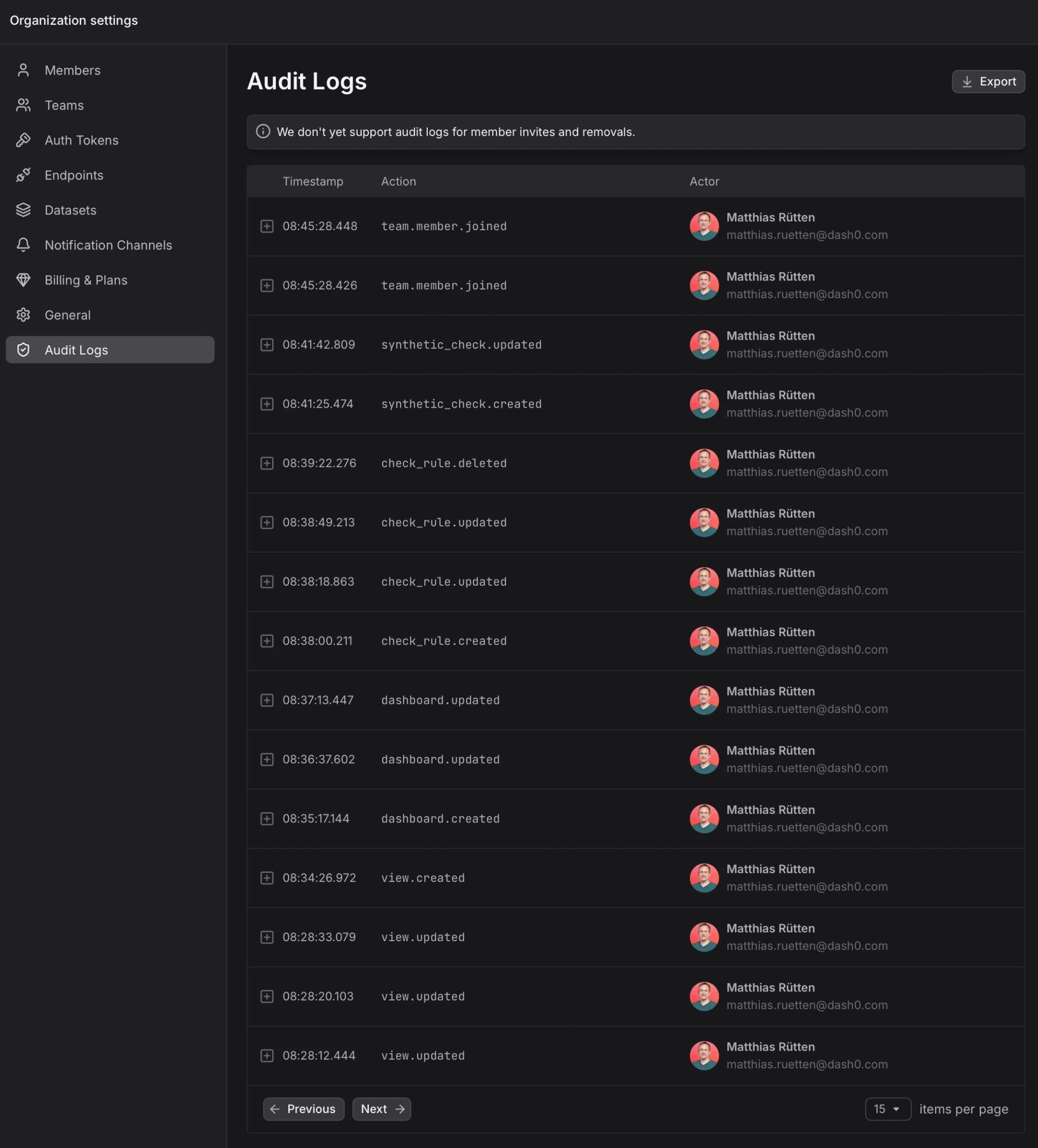
Introducing Audit Logs

We are thrilled to announce the launch of our new Audit Logs feature. This powerful tool provides a chronological record of activities.

Audit logs are essential for security, compliance, accountability, and cyber forensics. They help in detecting unauthorized activities and providing accountability for personnel. They track user actions, system changes, and events, which is crucial for identifying anomalous behavior, ensuring regulatory compliance, and providing actionable insights for investigations.

Key Benefits

  • Enhanced Visibility: It provides a chronological record of activities. This helps in understanding the intent behind activities.

  • Security and Compliance: Audit logs are essential for security, compliance, accountability, and cyber forensics. They help in detecting unauthorized activities and providing accountability for personnel. They track user actions, system changes, and events, which is crucial for identifying anomalous behavior, ensuring regulatory compliance and providing actionable insights for investigations.

You can find the new Audit Logs feature in your organization settings.

Read more

Introducing Teams for Access Control

We’ve added the ability to create Teams in Dash0, making it easier to manage permissions and share assets across groups of users.

What’s New

  • 👥 Team Management: Maintaining Teams within your organization.

  • ➕ User Management: Add or remove users from Teams.

  • 📊 Asset Sharing: Share Dashboards and Views with entire Teams, roles or individual users.

  • 🔎 Visibility Controls: Check which assets are shared with Teams and Users directly in the sharing sidebar.

🔑 Simplified Collaboration: Manage access once per Team instead of assigning permissions user by user.

This is the first step in bringing granular Access Control to Dash0, with more granular permissions coming soon.

Read more

New Synthetic Monitoring Locations

We’ve expanded our global synthetic monitoring network with three new locations, giving you more flexibility and accuracy when testing your applications worldwide.

What’s New

  • 🇬🇧 London (UK) – monitor performance closer to your users in the United Kingdom.

  • 🇩🇪 Frankfurt (DE) – gain insight into response times within central Europe.

  • 🇺🇸 North Virginia (US) – measure latency from one of the key internet hubs in the United States.

Why This Matters

Synthetic monitoring from more regions helps you better understand your application’s performance where your users are. With these additions, you can pinpoint regional bottlenecks, improve reliability, and deliver faster digital experiences.

Read more

Manage views and check rules with the Dash0 Terraform provider

Expand your observability infrastructure as code capabilities with declarative management of check rules and custom views.

The latest version of the Dash0 Terraform Provider introduces the ability to manage check rules and views directly through Terraform, enabling you to deploy monitoring resources as code. You can now define alerting rules and custom views declaratively within your Terraform configurations. The provider automatically synchronizes these resources with your Dash0 organization, simplifying setup and maintenance of observability resources through infrastructure as code. This enhancement streamlines monitoring workflows and improves automation for users managing multiple environments.

Read more

Manage synthetic checks with the Dash0 Kubernetes Operator

The Dash0 operator now supports managing synthetic checks as infrastructure as code.

We recently released synthetic monitoring and now you can also manage your synthetic checks declaratively with the Dash0 operator.

The latest version of the operator introduces the ability to manage Dash0 synthetic monitoring checks directly through Kubernetes, enabling you to deploy checks as code. You can now define synthetic monitoring checks declaratively within a Kubernetes cluster. The operator automatically synchronizes these resources with your Dash0 organization, simplifying setup and maintenance of synthetic checks through infrastructure as code. This enhancement streamlines monitoring workflows and improves automation for users managing multiple environments.

Read more

Improved Alert Routing

Dash0 now supports routing of failed check notifications via labels to Slack, Email, and all of our other notification channels.

This allows you to leverage standardized key/value pairs to simplify your notification configuration.

For example, you can route all failed checks labeled with priority=p1 to your on-call solution, and those with priority=p2 and priority=p3 to Slack.

The notification channel configuration dialog in Dash0
Add one or more filters to notification channels to define how to route failed checks to notification channels.

As labels, you can use hard-coded labels existing on check rules, as well as dynamic attributes coming from the execution of the check rule queries.

The failed check sidebar in Dash0
The key/value pairs usable for notification routing are also visible in the failed check sidebar.
Read more