
Last updated:
Define Synthetic Check Success Criteria
Assertions define the conditions that a synthetic check must satisfy.
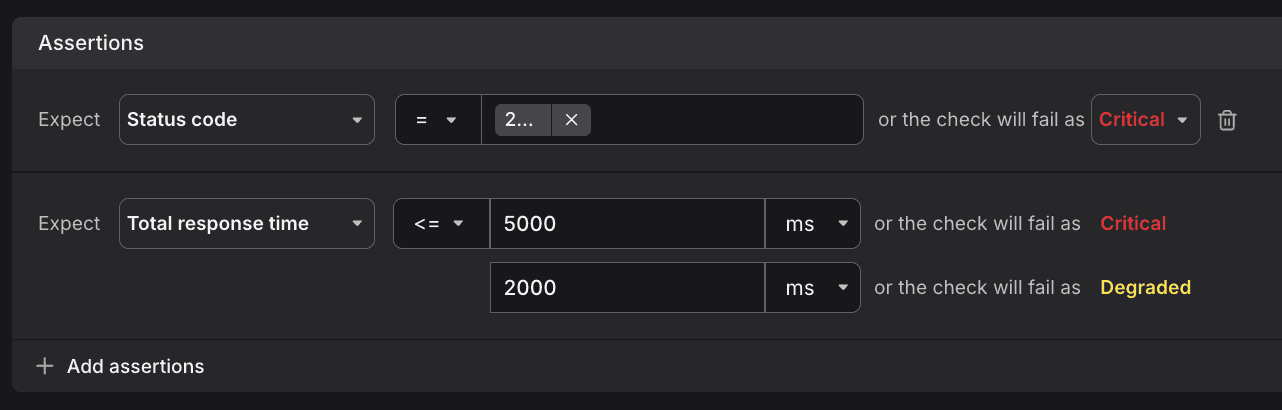
If any assertion fails, the check is marked as Critical or Degraded, depending on the severity you configure.
This allows you to enforce correctness (status codes, response data) as well as performance (latency, timing) requirements.
Available Assertions
Choose from multiple assertion types to validate status codes, performance thresholds, and response content.
Validate Status Codes
Validate the HTTP response status code.
Example: = 200 → the request must return 200 OK or the check will fail.
Set Timing Thresholds
Define latency thresholds for each phase of the HTTP request lifecycle.
You can add performance thresholds for different stages of the HTTP request lifecycle:
- Response – total response time
- Request – time to send the request
- SSL – time for the TLS handshake
- Connection – TCP connection establishment time
- DNS – DNS resolution time
- Total – end-to-end time
Example: Response < 5000 ms (Critical), Response < 2000 ms (Degraded)
This lets you distinguish between slow and failing services.
Match Error Types
Specify which network or protocol errors should trigger check failures.
Define which error types should cause a failure:
- DNS – failures resolving the hostname
- Connection – TCP connection could not be established
- SSL – TLS handshake failure
- Timeout – request exceeded maximum duration
- Unknown – uncategorized errors
Verify SSL Certificate Validity
Enforce that the target server's TLS certificate remains valid for a minimum number of days.
Example: SSL certificate validity > 30 days → ensures certificates are rotated in time.
Check Response Headers
Verify that expected headers are present and contain the correct values.
Validate the presence or value of a specific response header.
Example: x-auth-token = Bearer example-token
Assert JSON Body Content
Use JSONPath expressions to validate specific fields and values within JSON responses.
Validate the structure or values in a JSON response using JSONPath. Use JSON Body assertions to validate fields inside a JSON response with JSONPath. This ensures your checks go beyond status codes and verify the actual API response content.
Examples:
| JSONPath Expression | Passes For |
|---|---|
$.status = 200 | { "status": 200 } |
$.user.name = "Alice" | { "user": { "name": "Alice" } } |
$.items[0].id = 123 | { "items": [ { "id": 123 } ] } |
$.features.beta = true | { "features": { "beta": true } } |
Match Text Body
Validate plain-text response content against expected strings.
Check if the plain-text body matches a value.
Example: Response body = "OK"
Configure Severity Levels
Assign severity levels to each assertion to distinguish between complete failures and performance degradation.
- Critical – indicates the check has failed completely (e.g., wrong status code, timeout, certificate expired).
- Degraded – indicates the check succeeded but with performance or quality below expectations (e.g., slower than target latency).