
Last updated: October 10, 2026
Generate Check Rules with Agent0
Agent0 generates check rules from natural language descriptions. Describe what you want to monitor, and Agent0 creates the PromQL query, sets thresholds, configures grace periods, and suggests notification channels.
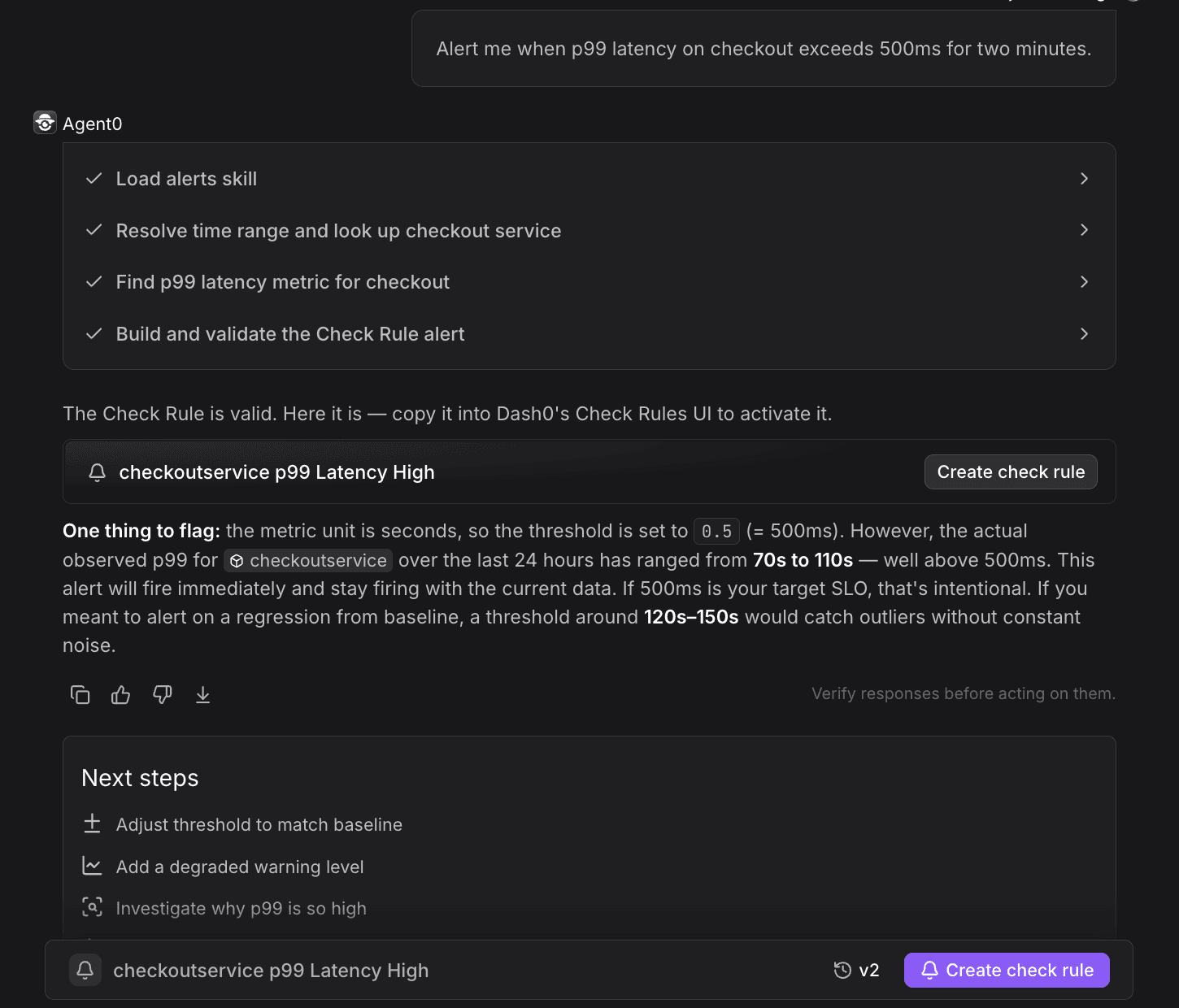
Creating check rules requires Admin privileges or a Maintainer role in the dataset. See About Alert Monitoring for details on access restrictions.
How It Works
Agent0 analyzes your natural language description and automatically:
- Generates valid PromQL queries based on your telemetry
- Sets reasonable thresholds based on the metric type
- Configures appropriate grace periods to prevent noise
- Suggests notification channels and severity levels
- Creates summary and description templates with variables
- Validates that the query returns real data before creating the check rule
Open Agent0
Access Agent0 from:
- Agent0 Chat page — https://app.dash0.com/agent0
- Command palette — Press
⌘K(Mac) orCtrl+K(Windows/Linux) from any page - In-page buttons — Look for Agent0 buttons in explorers and chart views
Select Dashboards & alerts → Creating an alert to start with a focused prompt.
Describe What You Want to Monitor
Be specific about:
- The service or component you're monitoring
- The metric type (latency, error rate, resource usage, etc.)
- The threshold value
- Optional: notification preferences
Example prompts:
- "Alert me when frontend latency exceeds 500ms"
- "Monitor error rate for payment-service and notify me when it's above 5%"
- "Create a check for database connection pool exhaustion"
- "Alert when the checkout endpoint P99 latency is over 2 seconds"
- "Monitor log errors in the auth service and send to Slack"
- "Track when CPU usage on backend services exceeds 80%"
- "Alert if any service's request rate drops below 10 requests per minute"
The more specific your prompt, the better Agent0 can configure the check rule. Include service names, metric types, thresholds, and notification preferences for optimal results.
Review the Generated Configuration
Agent0 generates a complete check rule configuration:
- Query — The PromQL expression that monitors your telemetry
- Thresholds — Critical and degraded values
- Grace periods — Evaluation frequency and trigger delays
- Summary and description — Alert message templates with variables
- Notification channels — Suggested channels (if mentioned in prompt)
Example generated query:
1234# For "Alert me when frontend latency exceeds 500ms"histogram_quantile(0.99,sum by (le) (rate(d.span_durations{service_name="frontend"}[5m]))) * 1000
Generated thresholds:
- Critical: 500 (based on your prompt)
- Degraded: 350 (70% of critical, automatically calculated)
Generated summary:
1Frontend P99 latency is {{ $value }}ms (threshold: {{ $__threshold }}ms)
Refine the Configuration
If the generated check rule needs adjustments, iterate with Agent0:
- "Change the critical threshold to 1000ms"
- "Add degraded threshold at 700ms"
- "Also send notifications to PagerDuty for critical alerts"
- "Change the grace period to 2 minutes"
- "Monitor all services, not just frontend"
Save the Check Rule
Once satisfied with the configuration, click Create check rule in the Agent0 response.
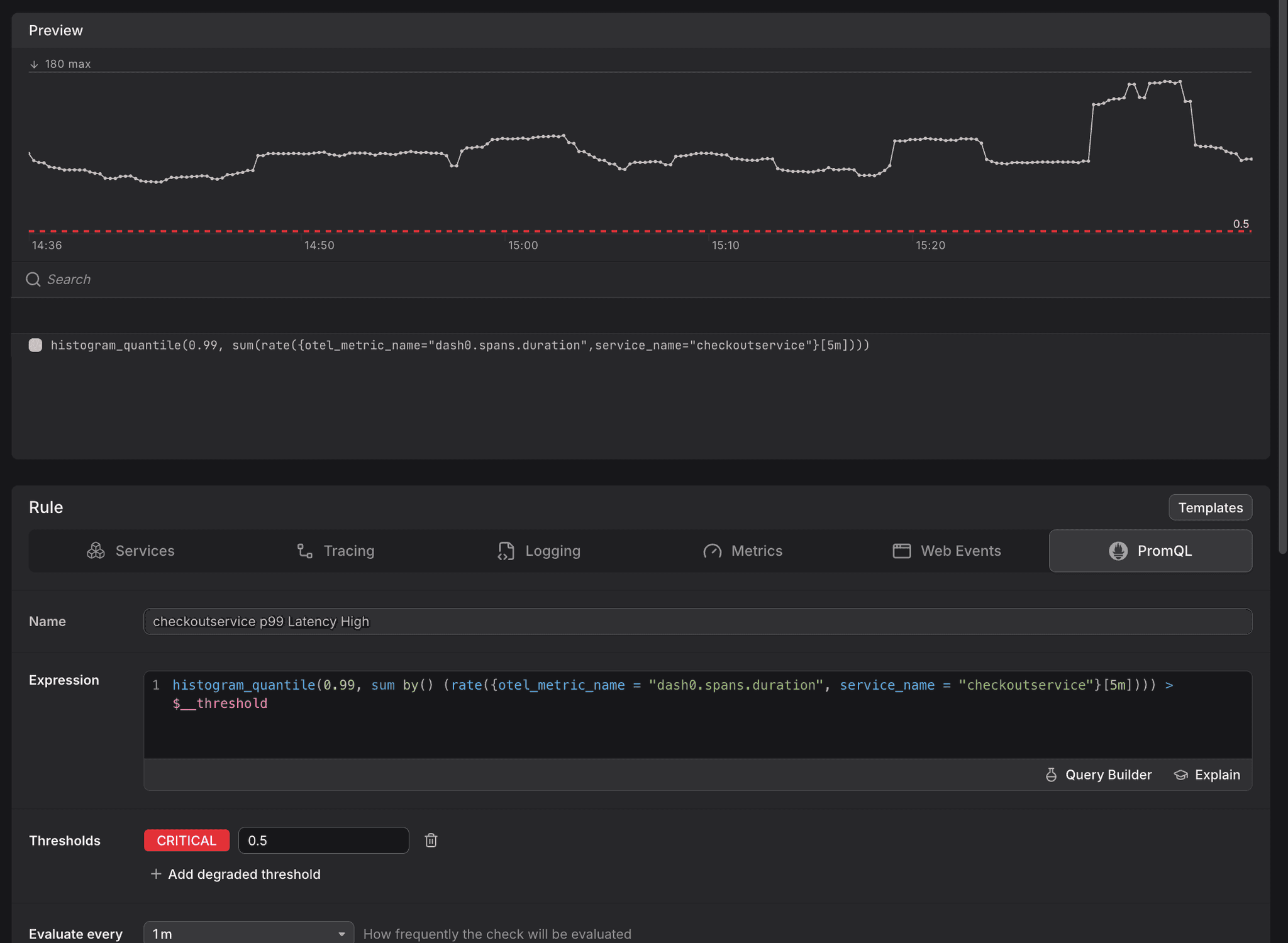
The check rule editor opens with the query, thresholds, and configuration pre-filled. Review the settings and click Save to activate the check rule.
The check rule becomes active immediately and begins evaluating at the configured interval.
Further Reading
- About Agent0 — Overview of the AI layer built into Dash0
- About Alert Monitoring — Overview of Dash0's alerting capabilities
- Create Check Rules — All methods for creating check rules
- Investigate Failed Checks — Troubleshoot failed checks