
Last updated: October 10, 2026
Export Spam Filters
Once you have created spam filters as defined in Set Spam Filters, do the following:
-
Navigate to Settings > Datasets in your organization.
-
Select your dataset and click the Spam filters tab.
-
Select your spam filter, name it, click Download, and download the YAML files of your choice.
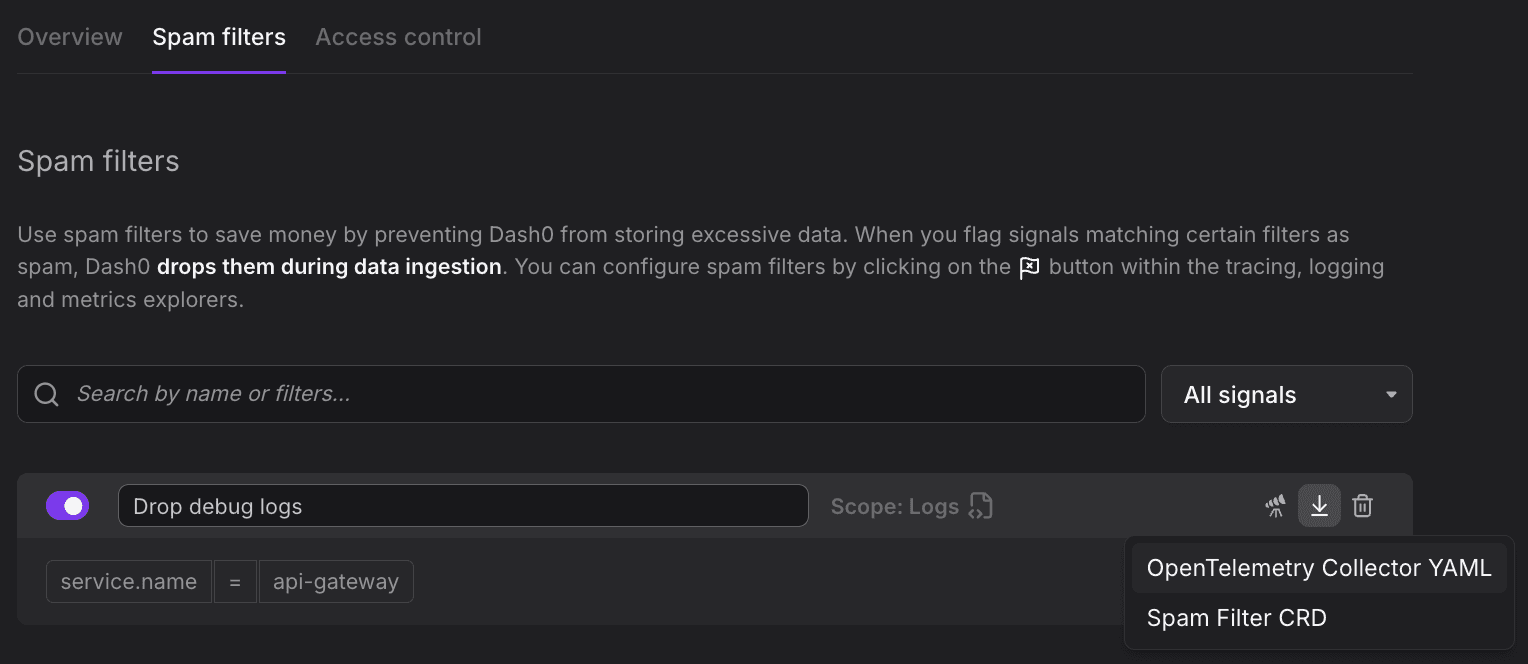
Understand the Export Formats
You can download one or both of the following formats, depending on where you want the filter to run.
OpenTelemetry Collector YAML
The low-level OTTL representation of your filter, ready to drop into your own OpenTelemetry Collector's processors section. Use this to filter telemetry directly in your infrastructure, before it leaves your environment.
12345678# This is a configuration snippet for the OpenTelemetry Collector filter processor.processors:filter/ottl:logs:log_record:- '((resource.attributes["service.name"] != nil and ConvertCase(String(resource.attributes["service.name"]), "lower") == "api-gateway") or (attributes["service.name"] != nil and ConvertCase(String(attributes["service.name"]), "lower") == "api-gateway") or (instrumentation_scope.attributes["service.name"] != nil and ConvertCase(String(instrumentation_scope.attributes["service.name"]), "lower") == "api-gateway"))'
Spam Filter CRD
The declarative Dash0SpamFilter custom resource, used to manage the filter as code via the Dash0 Operator for Kubernetes. Use this when you want Dash0 to enforce the filter and prefer to version and deploy it alongside your other Kubernetes manifests.
12345678910111213apiVersion: v1alpha2kind: Dash0SpamFiltermetadata:name: drop-health-checkslabels:dash0.com/id: 43f4ac1b-c9e3-4a5b-836f-4de4b449607ddash0.com/source: uispec:context: logfilter:- key: service.nameoperator: isvalue: health-check
Further Reading
- About Cost Control — Overview of Dash0's cost control features.
- Set Spam Filters — Create and manage spam filters in Dash0.
- Manage Spam Filters as Code — Deploy spam filters using the Dash0 Operator for Kubernetes, the Dash0 Terraform Provider, or the Dash0 CLI.