
Last updated:
Use Memories in Investigations
You do not need to open the main Memories page every time you investigate. Dash0 also shows memories alongside the chat, service, resource, or automation you are working with.
Tell Agent0 what to remember
Tell Agent0 about normal behavior your telemetry cannot explain on its own. For example:
Remember that checkout's error spike at midnight is expected during its nightly batch job.
Agent0 also saves useful findings without being asked. A memory is most useful when it records something a later investigation would otherwise need to rediscover, rather than a temporary observation that only applies to this incident.
If remembered knowledge is out of date, explain what changed and ask Agent0 to correct it. Agent0 checks current-state claims against live data. Treat a remembered explanation as a lead to verify, not proof that the same cause explains a new incident.
See the memories a chat used
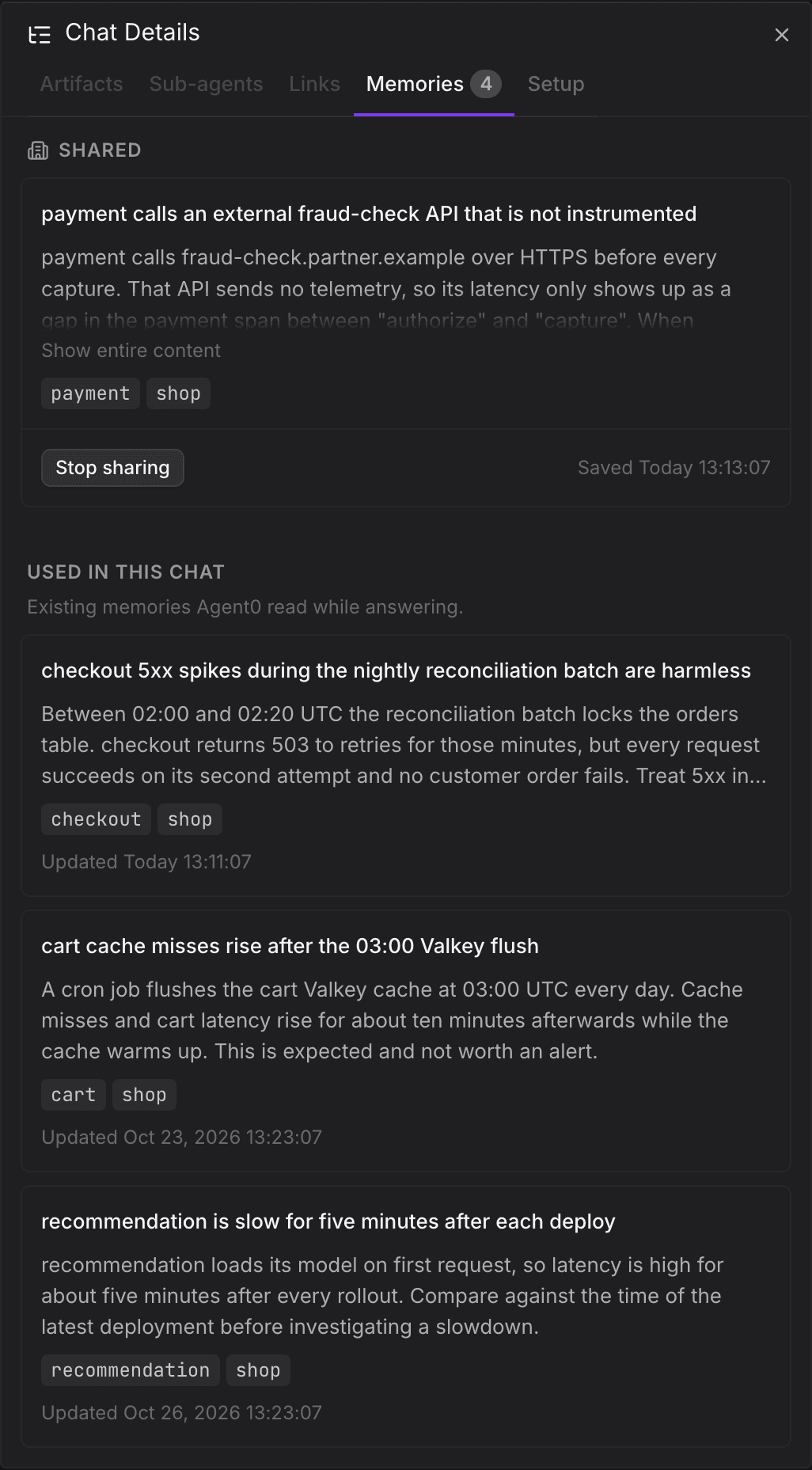
Open a thread's Chat Details and select Memories. The tab separates:
- Memories saved during the thread, grouped under Suggested for sharing, Not shared, and Shared.
- Existing memories Agent0 read while answering, under Used in this chat.
Read the content and scope to understand what earlier knowledge informed the investigation. You can act on sharing suggestions here without leaving the conversation. For the effects of each action, see Share or stop sharing a memory.
The used section records memories read during the chat, not every candidate that appeared in a memory search. The usage counters also distinguish listing a memory from reading its full content.
Find knowledge about a service or resource
Open Knowledge on a service's details page to see your memories and memories shared with you whose scope matches that service. Search, filter, and open them there as you would on the Memories page.
The resource sidebar also has a Knowledge tab with a preview of related memories. Opening a memory from this preview takes you to the Memories page with the resource scope applied and that memory open. You can remove the scope filter there to browse more broadly.
These lists match recorded scope attributes, not just words in the memory's content. A memory that mentions a service but has no matching scope might appear in a text search on the main Memories page without appearing in the service's Knowledge tab.
Scope tags in a memory's details can link back to the related service, automation, check rule, SLO, synthetic check, or dashboard. Use these links to compare the remembered finding with the entity's current state.
Review an automation's memories
Open the automation and select Memories. The list contains memories that the automation saved during its runs. They belong to the automation and persist across runs, even when different people start them.
People who can view the automation can review its memories. People with Edit access can delete them. You cannot manually edit these memories or share them with all users. For the full access rules, see Control Memory Sharing and Access.
An automation can also retrieve shared memories in its dataset. Those do not become owned by the automation and are not listed as its own memories on this tab.
If a memory is missing
Check the dataset first. Memories do not carry over between datasets. Then clear the search and filters on the main Memories page, or leave a service's scoped view to search more broadly.
A memory may belong to an automation rather than to you, or its owner may have stopped sharing it or deleted it. Check the automation's Memories tab for automation-owned knowledge. If a memory was shared with you, ask its owner whether its sharing changed.
A memory can also become unavailable when it expires or is removed after a period without use. Expiration and inactivity retention are separate policies; there is no single retention period to assume for every organization.
Further Reading
- About Memories — What Agent0 remembers and where it applies
- Control Memory Sharing and Access — Share knowledge without changing its owner
- Review and Manage Memories — Find and correct stored knowledge