
Last updated:
About Memory
Agent0 keeps a memory when it learns something worth knowing next time: the cause behind a recurring symptom, a dependency your telemetry does not show, a service that produces harmless error spikes during its nightly batch job, or the way you prefer to work. In a later session, Agent0 searches its memories and reads the ones that match, so an investigation starts from what it already knows instead of from scratch.
Memory is separate from skills. A skill is an instruction your organization writes. A memory is something Agent0 learned on its own.
Memory does not train a model. A memory is text that Dash0 stores for your organization and that Agent0 reads back into a later session.
How Agent0 Saves Memories
Agent0 decides on its own when something is worth remembering.
When a later finding contradicts a memory, Agent0 replaces the old memory with the corrected one instead of keeping both. When you ask Agent0 to forget something, it deletes the memory. Agent0 cannot delete a memory that is shared with all users. Only a person can do that, from the Memories page.
Each memory records:
- Summary and content: A one-line summary that Agent0 scans when it lists memories, and the full content it reads when the summary matches.
- Dataset: The dataset the session ran in. Agent0 uses a memory only in sessions in the same dataset.
- Source: Where it was saved: Dash0 (Chat), Slack, Linear, an automation, or MCP.
- Saved in: A link to the Agent0 thread or the automation run that saved it.
- Usage: How often Agent0 listed the memory, and how often it read the full content.
Which Surfaces Use Memory
Every Agent0 surface searches, reads, and saves memories: Chat, Automations, Slack, Linear, and MCP.
Who Owns a Memory
Every memory has one owner:
- You: Memories saved while Agent0 works for you, in Chat, in Slack, in Linear, or over MCP. Agent0 uses them only in your sessions, unless the memory is shared with all users.
- An automation: Memories saved during an automation's runs. Agent0 uses them only in later runs of the same automation. Anyone who can view the automation can review them on the automation's Memories tab, and anyone who can edit it can delete them. Automation memories are never shared with all users.
Share Memories with All Users
A shared memory is available to every Agent0 session in its dataset, for anyone in your organization who can read that dataset. Other users see it on their Memories page as Shared with you. Only you can edit it or change its sharing. You and organization admins can delete it.
Auto-Sharing
With Auto-share memories on, Agent0 shares a memory it saves in Chat when it judges the memory useful to your whole organization and free of anything private. Memories saved in Slack, Linear, or over MCP are not shared until you share them.
Auto-sharing is a personal setting, and it is on by default. Turn it off in Settings → Agent0 under Your preferences → Auto-share memories. With it off, Agent0 keeps every memory to you. The Memories page shows whether auto-sharing is on and links to the setting.
Share or Stop Sharing a Memory
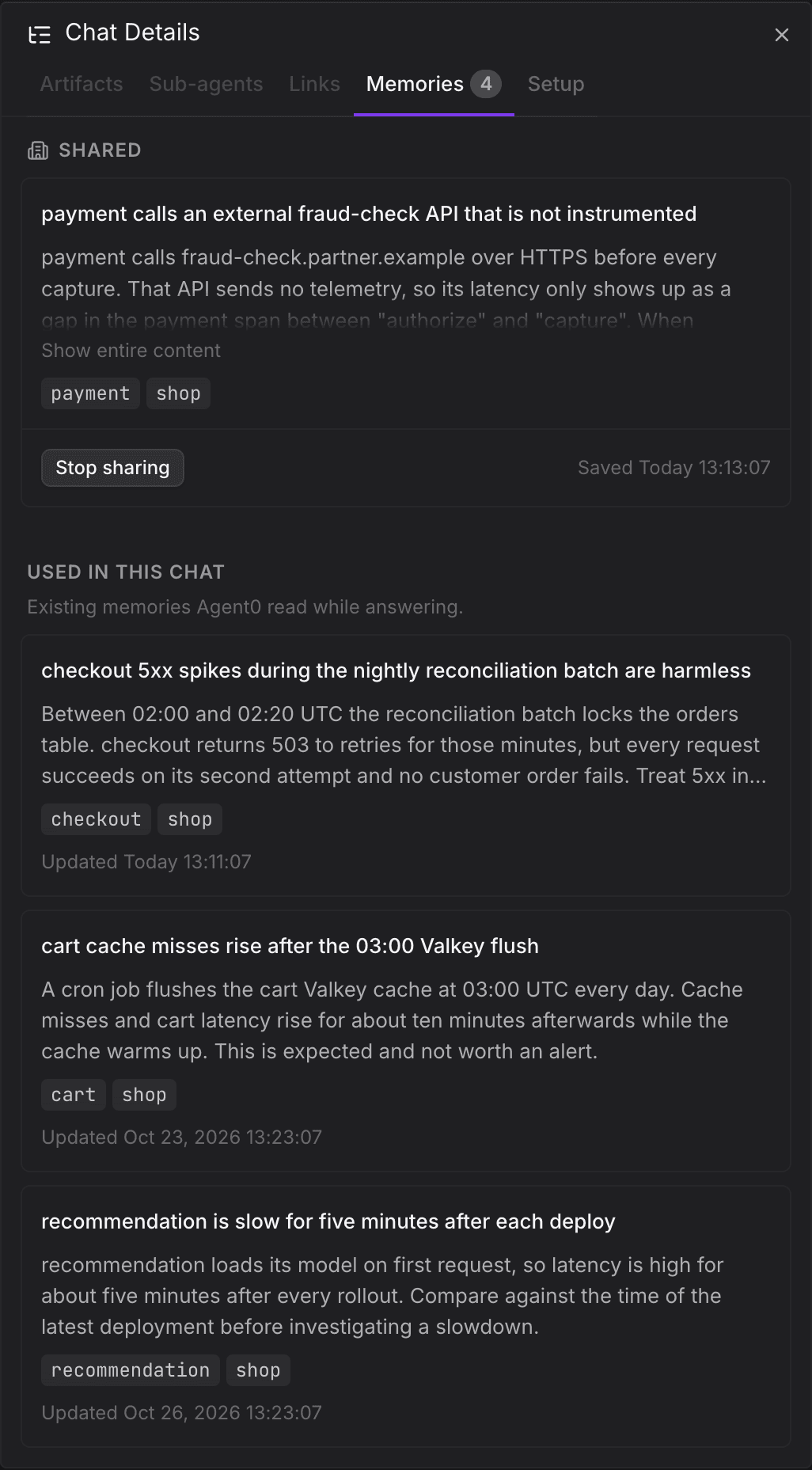
The sharing actions are in a memory's details, in the menu on its card on the Memories page, and in the Memories tab of a thread's Chat Details:
- Share: Share the memory with all users.
- Don't share: Keep a memory that Agent0 marked Sharing suggested to yourself. Agent0 does not suggest sharing it again.
- Stop sharing: Stop sharing a shared memory. It goes back to Not shared, and only you use it.
When Agent0 corrects a shared memory, the correction waits under Suggested for sharing until you share it. Until then, everyone else keeps using the shared version.
Review Your Memories
Go to Knowledge → Memories in the main navigation. The page lists your memories and the memories other users shared, as cards or as a table.

- Search the summaries and content.
- Filter by dataset, source, scope, or visibility. Under Visibility, select Not shared, Shared with all users, or Shared with you.
- Sort by when a memory was created or last read.
Select a memory to open its details. From there you can:
- Follow Saved in to the thread or automation run that saved it.
- Edit its summary and content. Agent0 uses the edited version from its next session on. Memories owned by an automation cannot be edited.
- Change its sharing.
- Delete it. Agent0 stops using it right away, for everyone if it was shared. You cannot undo a deletion.
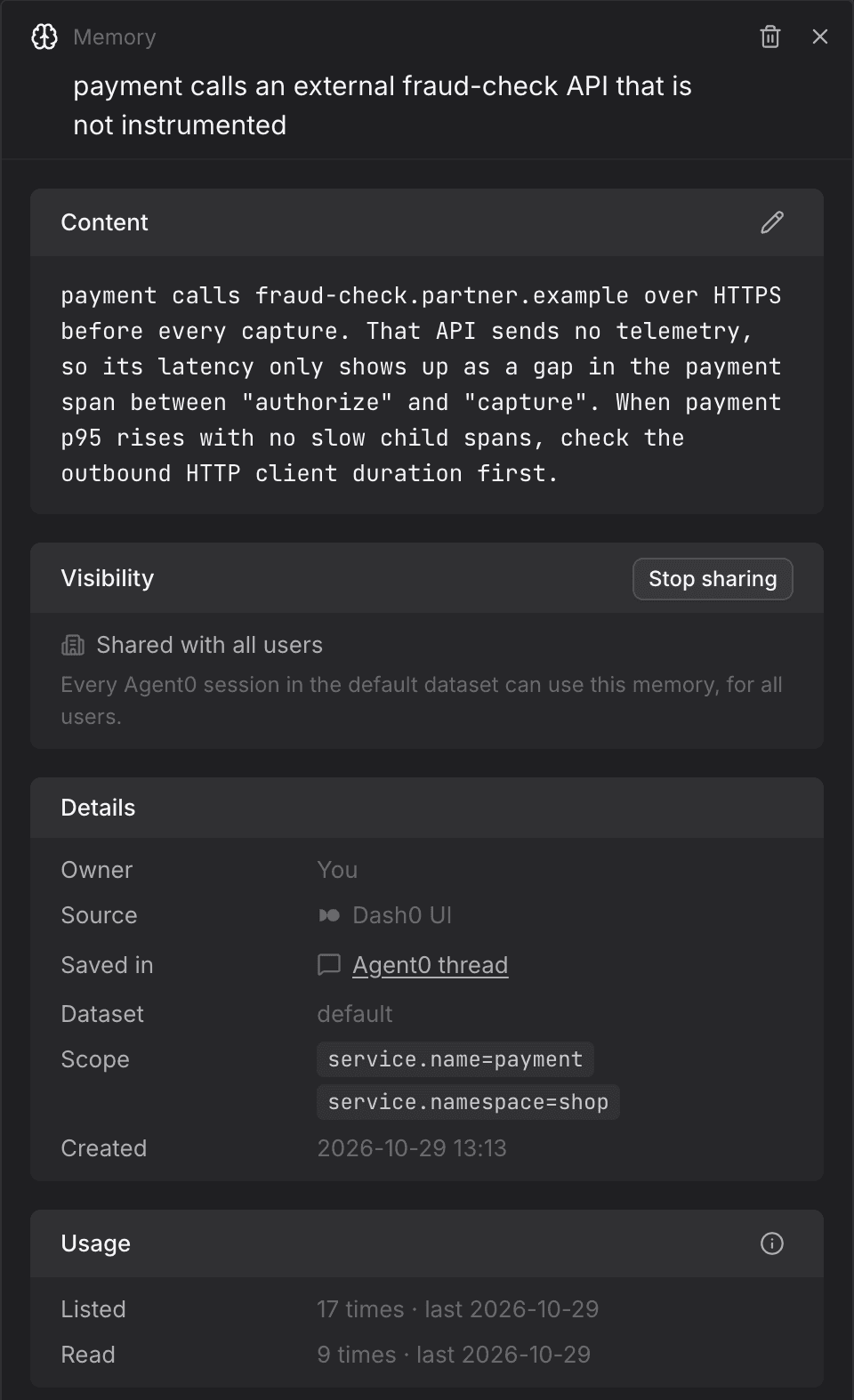
Organization admins also see Delete memory on memories that other users shared. Deleting one removes it for everyone, including its owner.
See Memories About a Service or Resource
Agent0 records what a memory is about, such as service.name=checkout, in its scope. The Knowledge
tab on a service's details page, and in the sidebar of a resource, lists your memories and the
memories shared with you about that service or resource.
See the Memories a Thread Used
The Memories tab in a thread's Chat Details lists the memories Agent0 saved in that thread, grouped into Suggested for sharing, Not shared, and Shared, and under Used in this chat the existing memories it read while answering.
Further Reading
- About Agent0 — What Agent0 is and how it investigates
- Key Concepts — How memory relates to skills, context, and tools
- About Skills — Instructions your organization writes for Agent0
- AI Settings — Turn auto-sharing on or off