Dash0 acquires Polar Signals

Ask Agent0 in a Slack thread, route alert notifications to a channel, and trigger automations from a message or a reaction.
Alerts arrive in a Slack channel and the thread under them fills up with context: what changed, who deployed, what somebody already ruled out. Mention @Dash0 in that thread and Agent0 reads it, queries your telemetry, and answers in the same thread, so anyone following along sees the findings and can pick it up with a follow-up.
Invite the app to a channel and mention it. This is the same agent that runs inside Dash0. It calls the MCP servers you have connected and reads your source code. With the GitHub connector set up, it can work up a fix and open a pull request for you to review. It answers as the person who tagged it, with that person's Dash0 permissions.
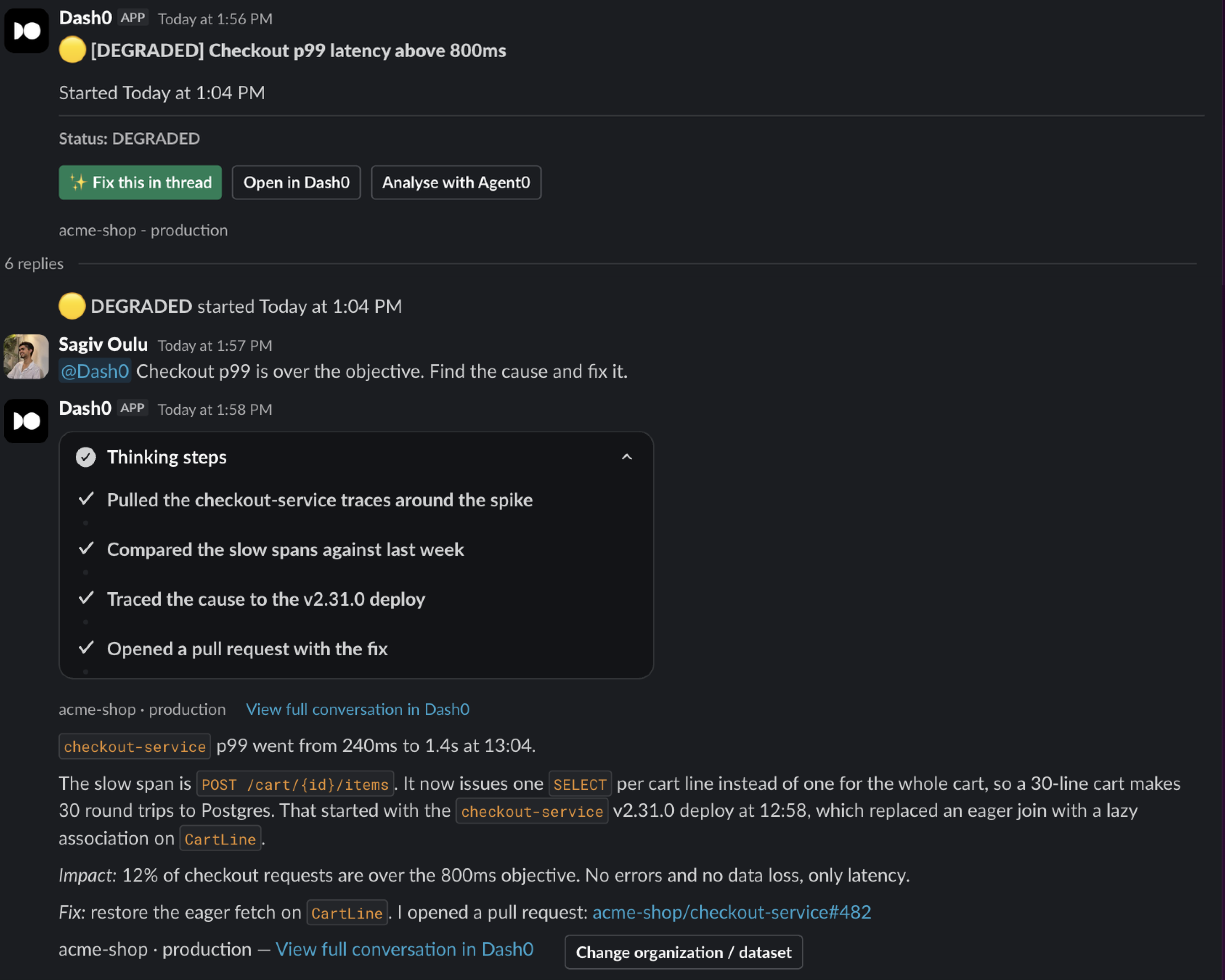
Incidents are the obvious case, but the same mention works for anything you would otherwise open Dash0 to answer:
@Dash0 why did checkout latency spike at 14:20?@Dash0 which services log the most errors this week?@Dash0 what changed in the payments service since Friday?@Dash0 is anything still sending data to the old collector endpoint?@Dash0 summarize this thread and open a PR for the fix we agreed onAdd a Slack notification channel and attach it to your check rules. A failing check posts to the channel with a chart of the failing signal, and that same message updates in place as the status changes, keeping the history in its thread. Alerts sent through the Slack Bot channel carry a Fix in thread button that mentions Agent0 for you, and a link back to the alert in Dash0. There is also a Slack Webhook channel if you would rather not install the app in your workspace.
An automation can start from Slack: a keyword in a message, an emoji reaction on any message the app can see, or a failed check the bot posted. The run acknowledges itself in the thread and posts its result there when it finishes. Automations can also notify a channel when a run succeeds, fails, or approaches its budget.
During a mention or an automation run, Agent0 can list channels, read a channel it has been invited to, fetch a message with its replies, post a message, and add a reaction. There is no workspace-wide search, and it cannot see a channel it is not a member of. Agent0 answers in channels, not in direct messages.
Actions that change something run straight away in Slack. Unlike the Agent0 chat in Dash0, there is no confirmation prompt.
Read the guide to mentioning Agent0 in Slack.
You connect the workspace once. Mentions and alerts are then set up separately, so take only the parts you want.
An organization admin has to do this. One connection covers alerts, Agent0 mentions, and automations.
One Slack workspace can be connected to several Dash0 organizations. They share a single Slack app install, so reconnecting in one organization changes what the others can do too.
If your workspace was connected before Agent0 in Slack shipped, alerts keep arriving but Agent0 stays silent and gives no error, and Slack-triggered automations do not run. The install is missing permissions that did not exist at the time, and they cannot be added in place. An organization admin has to reconnect Slack from Settings → Integrations. This applies whether you first connected there or through the Slack Bot notification channel. You do not need to change anything else, and your existing notification channels keep working.
Run /invite @Dash0 in each channel you want to use. Agent0 answers mentions only in channels the app has been invited to. Private channels always need the invite.
Then mention it. The first mention in a channel walks you through picking an organization and dataset, and through linking your Slack account to your Dash0 account.
Alerts are separate from mentions. You pick which channel receives them and which check rules use it.
See the Slack Bot page for the full walkthrough with screenshots, or the Slack Webhook page if you would rather not install the app.