
Last updated:
Manage CI/CD Observability as Code
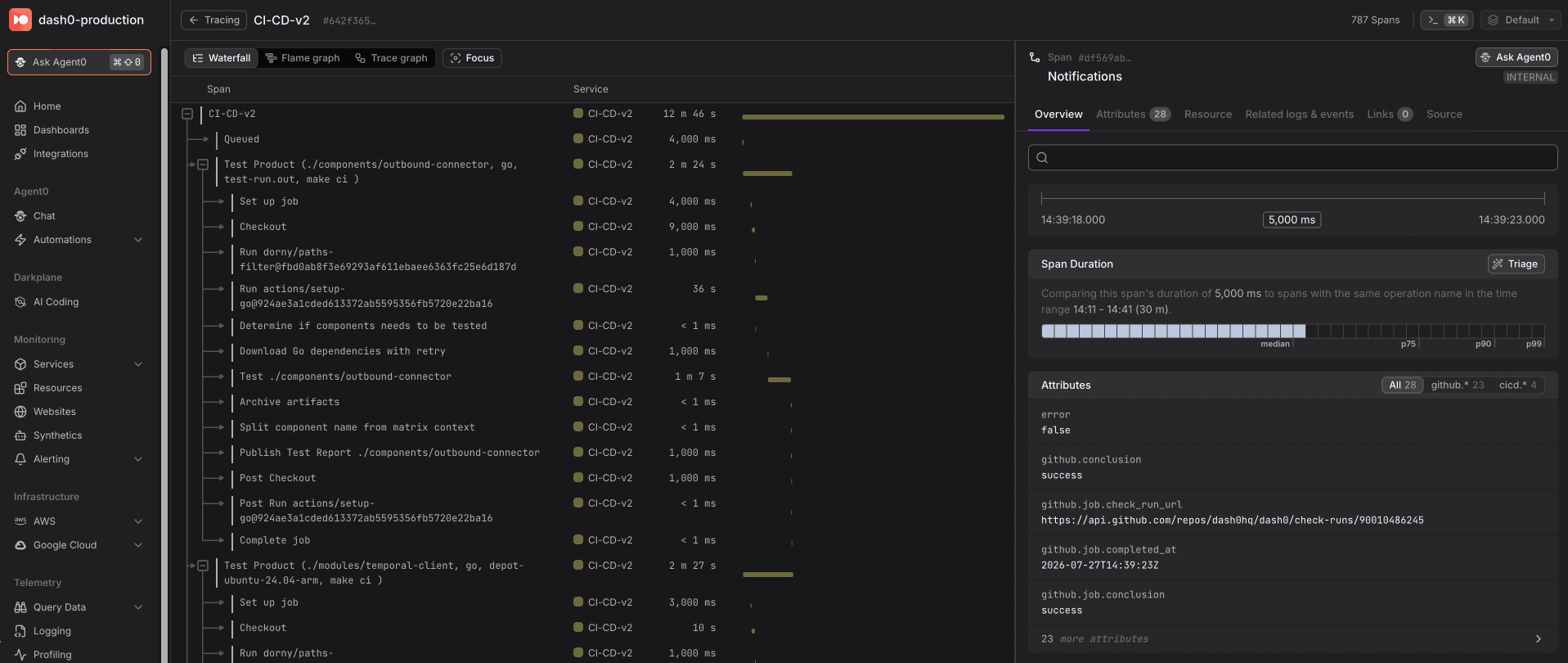
This GitHub Action automatically instruments your CI/CD pipelines with OpenTelemetry, sending traces and metrics to Dash0.
For other "as code" approaches, see the Manage as Code overview.
This action exports Github CI/CD workflows to any endpoint compatible with OpenTelemetry.
This is a fork of otel-export-trace-action with more features and better support. Originally created and maintained by Corentin Musard, now maintained by Dash0.
Compliant with OpenTelemetry CICD semconv. Look at Sample OpenTelemetry Output for the list of attributes and their values.
Usage
We provide sample code for popular platforms. If you feel one is missing, please open an issue.
| Code Sample | File |
|---|---|
| Inside an existing workflow | build.yml |
| From a private repository | private.yml |
| Dash0 | dash0.yml |
On workflow_run event
workflow_run github documentation
on:
  workflow_run:
    workflows:
      # The name of the workflow(s) that triggers the export
      - "Build"
    types: [completed]

jobs:
  otel-cicd-actions:
    runs-on: ubuntu-latest
    steps:
      - uses: dash0hq/otel-cicd-action@v4
        with:
          otlpEndpoint: grpc://ingress.eu-west-1.aws.dash0.com:4317
          otlpHeaders: ${{ secrets.OTLP_HEADERS }}
          githubToken: ${{ secrets.GITHUB_TOKEN }}
          runId: ${{ github.event.workflow_run.id }}
Inside an existing workflow
jobs:
  build:
    # ... existing code
  otel-cicd-action:
    if: always()
    name: OpenTelemetry Export Trace
    runs-on: ubuntu-latest
    needs: [build] # must run when all jobs are completed
    steps:
      - name: Export workflow
        uses: dash0hq/otel-cicd-action@v4
        with:
          otlpEndpoint: grpc://ingress.eu-west-1.aws.dash0.com:4317
          otlpHeaders: ${{ secrets.OTLP_HEADERS }}
          githubToken: ${{ secrets.GITHUB_TOKEN }}
On workflow_run event vs Inside an existing workflow
Both methods must be run when the workflow is completed, otherwise, the trace will be incomplete.
| Differences | On workflow_run event | Inside an existing workflow |
|---|---|---|
| Shows in PR page | No | Yes |
| Shows in Actions tab | Yes | Yes |
| Needs extra consideration to be run as the last job | No | Yes |
| Must be duplicated for multiple workflows | No | Yes |
Private Repository
If you are using a private repository, you need to set the following permissions in your workflow file. It can be done at the global level or at the job level.
permissions:
  contents: read # Required. To access the private repository
  actions: read # Required. To read workflow runs
  pull-requests: read # Optional. To read PR labels
  checks: read # Optional. To read run annotations
Adding arbitrary resource attributes
You can use extraAttributes to set any additional string resource attributes.
Attributes are splitted on , and then each key/value are splitted on the first =.
- name: Export workflow
  uses: dash0hq/otel-cicd-action@v4
  with:
    otlpEndpoint: "CHANGE ME"
    otlpHeaders: "CHANGE ME"
    githubToken: ${{ secrets.GITHUB_TOKEN }}
    extraAttributes: "extra.attribute=1,key2=value2"
Using a self-signed certificate
When an internal OTLP endpoint uses a self-signed certificate and its certificate authority cannot
be added to the runner's trust store, set otlpInsecureSkipVerify to true:
- name: Export workflow
  uses: dash0hq/otel-cicd-action@v4
  with:
    otlpEndpoint: grpc://otlp.example.com:4317
    otlpHeaders: "CHANGE ME"
    githubToken: ${{ secrets.GITHUB_TOKEN }}
    otlpInsecureSkipVerify: true
This disables certificate verification for the OTLP exporter connection and makes it vulnerable to man-in-the-middle attacks. Only use it with a trusted internal endpoint.
Action Inputs
| name | description | required | default | example |
|---|---|---|---|---|
| otlpEndpoint | The destination endpoint to export OpenTelemetry traces to. It supports https://, http:// and grpc:// endpoints. | true | https://ingress.eu-west-1.aws.dash0.com/v1/traces | |
| otlpHeaders | Headers to add to the OpenTelemetry exporter. | true | Authorization=Bearer YOUR_AUTH_TOKEN,Dash0-Dataset=YOUR_DATASET | |
| otelServiceName | OpenTelemetry service name | false | <The name of the exported workflow> | Build CI |
| githubToken | The repository token with Workflow permissions. Required for private repos | false | ${{ secrets.GITHUB_TOKEN }} | |
| runId | Workflow Run ID to Export | false | env.GITHUB_RUN_ID | ${{ github.event.workflow_run.id }} |
| extraAttributes | Extra resource attributes to add to each span | false | extra.attribute=1,key2=value2 | |
| otlpInsecureSkipVerify | Disable TLS certificate verification for the OTLP exporter. Only use this with trusted endpoints. | false | false | true |
Action Outputs
| name | description |
|---|---|
| traceId | The OpenTelemetry Trace ID of the root span |
What data is exported
The action exports the workflow run metadata returned by the GitHub API as span attributes, without redaction. There is currently no way to opt out of individual attributes, so make sure your telemetry backend is an acceptable place for this data. In particular, be aware that:
- Commit metadata is included: the full commit message, plus author and committer
names and email addresses (
github.head_commit.*). - Job annotations and PR metadata are included when the token has the optional
checks: readandpull-requests: readpermissions: annotation messages, PR numbers, branch names, and labels. service.instance.idis unique per run attempt (<repo>/<workflow id>/<run id>/<attempt>), so each workflow run appears as its own service instance. Backends that bill or aggregate by service instance will see one instance per run.
See the Sample OpenTelemetry Output for the full list of exported attributes and example values.