
Last updated:
ConversationsBETA
The Conversations view is gradually rolling out in beta. Behavior and UI may change.
The Conversations view lists every conversation that your AI agents report through GenAI spans in the selected dataset. Open a conversation to see its totals, the tools it called, and a transcript of its messages and tool calls.
Open AI Observability → Conversations in the Dash0 sidebar.

Prerequisites
- GenAI spans: Dash0 only reads spans that carry the
gen_ai.operation.nameattribute. See About GenAI Spans for how to send them. - Conversation ID: Set the
gen_ai.conversation.idattribute on the spans of each conversation. - Message content (for the transcript): The transcript shows prompts and responses only when your instrumentation captures them. See Capture Message Content.
If no conversation has reported yet, the page shows No conversations yet and a Send GenAI telemetry button.
Browse Conversations
Use Chart to pick what appears above the table:
- Quality: Stat cards for Conversations, Failed tools, p95 duration, Tokens, and Cost in the selected time range, each with a sparkline. This is the default.
- Agents: Line charts with one line per agent. Conversations counts the conversations each agent took part in, so a conversation with several agents counts once for each of them. Failed tool calls counts tool calls that ended with the status
ERROR. Prompt cache hit ratio shows cached input tokens as a share of all input tokens. - None: Hides the charts.
The Table lists one row per conversation, newest first:
- Conversation: The conversation ID.
- Agents: The agents that took part.
- Started: The time of the conversation's earliest span.
- Duration: The conversation's duration.
- Turns: The number of turns.
- Failed tools: The tools whose calls ended with the status
ERROR. - Tokens: Input and output tokens.
- Est. cost: The estimated cost.
Use Search and filter conversations to narrow the list. A conversation matches when, for each filter, at least one of its spans matches it. Different spans can match different filters. You can filter by gen_ai.agent.name, gen_ai.conversation.id, gen_ai.operation.name, gen_ai.tool.name, gen_ai.request.model, gen_ai.response.model, service.name, and otel.scope.name.
Group Conversations
Pick an attribute in Group by, or switch to Groups, to roll conversations up by attribute value. The default grouping is gen_ai.agent.name. Each group shows its Conversations, Turns, Errors, average and p95 Duration, and Est. cost. Errors is the share of the group's conversations with at least one span with the status ERROR.
A conversation with several values for the attribute, such as two agents, counts in each of their groups. Conversations without a value appear in a group shown as a dash. Click a group to filter the table to its conversations.
Inspect One Conversation
Click a row to open the conversation in a side panel on the Transcript tab. The Details tab shows its totals and the tools it called. The panel's title is the conversation's first user message, or its ID when there is none. Click Ask Agent0 to have Agent0 explain the conversation and its failed tool calls. Click View in Tracing to see the conversation's traces in Tracing.
If the conversation has no spans in the selected time range, the panel shows Not in this time range. Click Show last 7 days to widen the range.
Transcript Tab
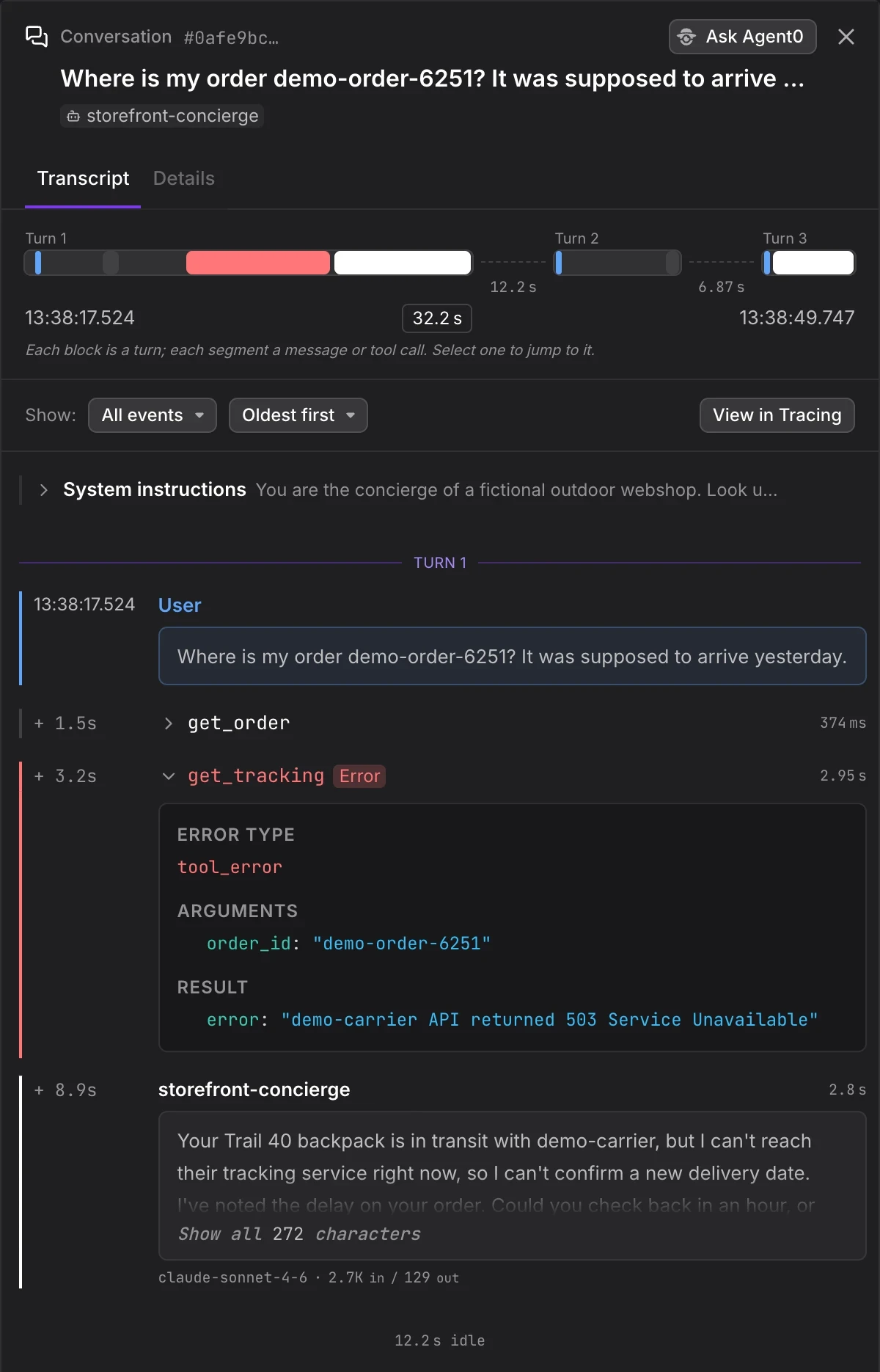
The transcript replays the conversation's user messages, system instructions, agent replies, and tool calls in order. Dash0 reads them from the gen_ai.input.messages, gen_ai.output.messages, and gen_ai.tool.* attributes.
- Timeline: The bar at the top draws each turn as a block and each message or tool call as a segment. Click a segment to jump to it.
- Show: Pick All events, Messages, Tool calls, or Errors (failed tool calls only), and sort by Oldest first or Newest first.
- Tool calls: Each call shows its Arguments and Result. Failed calls are tagged Error, with the error type and status message.
- Open a span: Each row links to its span in Tracing.
The transcript starts a new turn at each user message, so its turn numbers can differ from the Turns count, which counts agent runs. Content that was redacted shows as Message content redacted. If the spans carry no message content, the tab shows No message content recorded.
Details Tab
- Conversation: The Duration, Tokens, Cost, and number of turns, and the Outcomes of the turns. A turn is an error when its root span has the status
ERROR, and ok otherwise. - Tools used: Every tool in the transcript, most-called first. Expand a tool to preview each call's trace, and click Open call in Tracing to open it.
How Dash0 Builds Conversations
- Conversation: All GenAI spans that share a
gen_ai.conversation.id, across any number of traces. - Spans without an ID: A span without
gen_ai.conversation.idjoins the conversation of its turn, if exactly one conversation ID appears in that turn. Otherwise it belongs to no conversation. - Turn: One run of an agent, as defined on the Agents page.
- Agents: The agent names that appear on the conversation's spans.
- Duration: The time from the earliest span start to the latest span end.
- Tokens and cost: The sums of the input tokens, output tokens, and estimated cost of the conversation's spans. Cost is an estimate in US dollars, computed as described on the Agents page.
- Time range: A conversation appears when any of its spans falls in the selected time range. Its totals include spans up to 4 hours before or after the range.
Limitations
- Row limits: The table and the groups show at most 50 rows. Use filters or a shorter time range to find other conversations.
- Long transcripts: The transcript stops after 10,000 spans with messages, or about 4 MiB of message content, and shows only the earliest messages.
Further Reading
- About GenAI Spans — Send the spans that the Conversations view is built from.
- Agents — See the turns, tools, and cost of each agent.
- Data Privacy & Redaction — Control which GenAI content Dash0 stores.
- Evals — Score GenAI spans with an LLM judge.
- Tracing — Inspect the traces behind a conversation.