
Last updated: September 2, 2026
Data Privacy & Redaction
Coding-agent telemetry can carry sensitive content: prompt text, code in tool inputs and outputs, secrets pasted into a session, and system instructions. Dash0 gives you two independent layers of control over that content, and you can use either one or both together.
- Redact at the source: Strip content in the plugin so it never leaves the developer's machine.
- Redact on ingestion: Let content reach Dash0 so it can be processed on the way in, then replace the sensitive values with
<REDACTED>before anything is stored.
The two layers solve different problems. Source redaction is the strongest guarantee, because the content is never transmitted. Ingestion redaction keeps the content available to in-pipeline processing such as evaluations and classifiers, while still keeping raw prompts and tool I/O out of storage.
Two Layers of Control
| Concern | Redact at the source (plugin) | Redact on ingestion (dataset) |
|---|---|---|
| Where it runs | On the developer's machine, before export | In Dash0, during ingestion, before storage |
| What it covers | All prompt and tool input/output, and optionally user identity | Conversation content, tool-call arguments/results, and tool-call error messages, independently |
| Granularity | All-or-nothing per category | Per-dataset policy, per category |
| Content leaves the machine? | No | Yes, then replaced with <REDACTED> before storage |
| Available to evaluations and classifiers? | No | Yes, during ingestion, before the value is redacted |
| Configured by | Each developer or the rollout configuration | A dataset administrator, once per dataset |
Because the two layers are independent, source redaction always wins: if the plugin never sends a value, there is nothing for ingestion redaction to act on.
Redact at the Source
The Dash0 agent plugin strips content before it is exported, so sensitive data never leaves the developer's machine. This is the default and the strongest guarantee.
omit_io: Defaults totrue. Strips prompts and tool input/output from spans. Tool names, token counts, durations, model names, session structure, error status, and version-control repository and branch information are always captured regardless of this setting.omit_user_info: Defaults tofalse. When set totrue,user.nameis replaced with a SHA-256 hash,user.emailis omitted, and the working directory is redacted.
With omit_io at its default, the Conversation preview on the Sessions tab does not contain prompt or tool content. Your agent's entry in the Integration Hub documents where to set these options for that agent.
Source redaction is all-or-nothing per category. omit_io either strips all prompt and tool I/O or keeps all of it. Use ingestion redaction when you want content to reach Dash0 for processing but not be stored.
Redact on Ingestion
When you want prompts and tool I/O to reach Dash0, for example to run evaluations or classifiers over them, but you do not want the raw content stored, use GenAI Attribute Redaction. Dash0 replaces the matching values with <REDACTED> during ingestion, before anything is written to storage.
This is a per-dataset setting, so each dataset can have its own policy. Configure it under Settings → Datasets in the dataset you send coding-agent telemetry to.
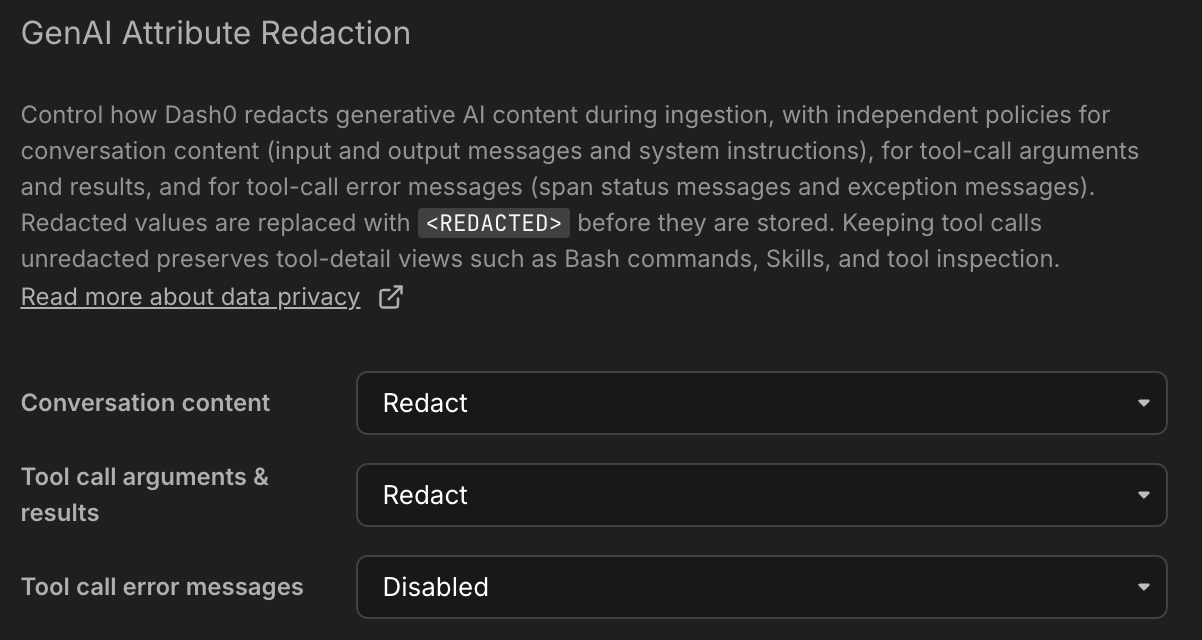
GenAI Attribute Redaction has three independent policies, each of which can be set to Disabled or Redact:
- Conversation content: Input and output messages and system instructions. Set to
Redactto replace conversation text with<REDACTED>. - Tool call arguments & results: The arguments passed to tools and the values they return. Keeping this policy
Disabledpreserves tool-detail views such as Bash commands, Skills, and tool inspection, so you can redact conversation text while still reading what the agent did. - Tool call error messages: The failure text a tool call produces. A failing tool call often echoes the offending command, file path, or payload into its error message, so this content can be as sensitive as the tool arguments themselves. Set to
Redactto replace it with<REDACTED>.
All three policies default to Disabled, so no ingestion redaction happens until you enable it.
Set the policy on every dataset that receives coding-agent telemetry. A dataset with GenAI Attribute Redaction disabled stores whatever the plugin sends, so if the plugin runs with omit_io set to false, raw prompts and tool I/O are stored unless a Redact policy replaces them first.
What Gets Redacted
During ingestion, before your telemetry is stored, Dash0 redacts a fixed set of fields. Each policy governs a distinct set:
| Policy | Fields redacted |
|---|---|
| Conversation content | gen_ai.input.messages, gen_ai.output.messages, gen_ai.system_instructions |
| Tool call arguments & results | gen_ai.tool.call.arguments, gen_ai.tool.call.result |
| Tool call error messages | The span status message, and exception.message on spans, span events, and log records |
The error policy applies only to telemetry that carries a gen_ai.tool.name attribute, so errors from the rest of your services in the same dataset are never affected.
No other fields are touched. Model names, token counts, tool names, durations, message roles, timestamps, and version-control metadata are preserved, so cost, adoption, productivity, and tool-detail views keep working on redacted data. This is why keeping the tool-call policy Disabled still lets you read Bash commands, Skills, and tool inspection while conversation text is redacted.
exception.type and exception.stacktrace are also preserved, so even with the error policy set to Redact you can still see that a tool call failed, what kind of failure it was, and where in the code it happened.
Because exception.stacktrace is preserved, and a stack trace often repeats the exception message in its first line, the error policy reduces exposure rather than guaranteeing that no error text is stored. Use source redaction when you need that guarantee.
How Values Are Replaced
Within the redacted attributes, Dash0 replaces the sensitive content, the message text and any tool arguments or results, with <REDACTED>, while leaving the surrounding structure such as message roles in place. If a value cannot be partially redacted, the entire value is replaced with <REDACTED> so nothing sensitive slips through.
When Redaction Happens
- Before storage, and irreversibly: Redaction is applied on the way in, before the telemetry is stored. Once a value is stored as
<REDACTED>, the original content is gone from Dash0 and cannot be recovered. - After processing: The original content is available to processing that runs on ingestion, such as evaluations and classifiers, before it is redacted. Only what gets persisted is replaced with
<REDACTED>. This is the reason to prefer ingestion redaction over source redaction when you want to analyze prompts without storing them.
Choosing an Approach
- Content must never leave the machine: Keep
omit_ioat its default oftrue. Nothing sensitive is transmitted, and ingestion redaction is not needed. - You want to read full conversations in Dash0: Set
omit_iotofalseand keep GenAI Attribute Redaction disabled. Prompts and tool I/O are stored and visible on the Sessions tab. - You want to run evaluations or classifiers over prompts, but not store raw content: Set
omit_iotofalseso content is transmitted, and set the relevant GenAI Attribute Redaction policies toRedact. Content is available to in-pipeline processing, and the stored values are replaced with<REDACTED>. - You want conversation text protected but the agent's actions readable: Set Conversation content to
Redactand keep Tool call arguments & results atDisabled. - You want to debug failing tool calls: Keep Tool call error messages at
Disabled. Error text is often the fastest way to see why an agent got stuck, so redact it only when your tools surface sensitive content in their failures.
Further Reading
- About AI Coding Insights: Overview of the feature.
- Set Up AI Coding Insights: Connect an agent, attribute usage to teams, and verify the data arrives.
- Key Concepts: How sessions, prompts, and teams map onto the data.
- Explore Sessions: Drill into individual sessions and their conversation content.