


Alerts land in Slack, and incidents get investigated in a thread. By then the thread already holds the context: what changed, who deployed, what somebody ruled out. Tag @Dash0 in it and Agent0 starts from that context. The answer lands in front of the whole channel, so nobody has to relay findings, and anyone can pick it up with a follow-up.
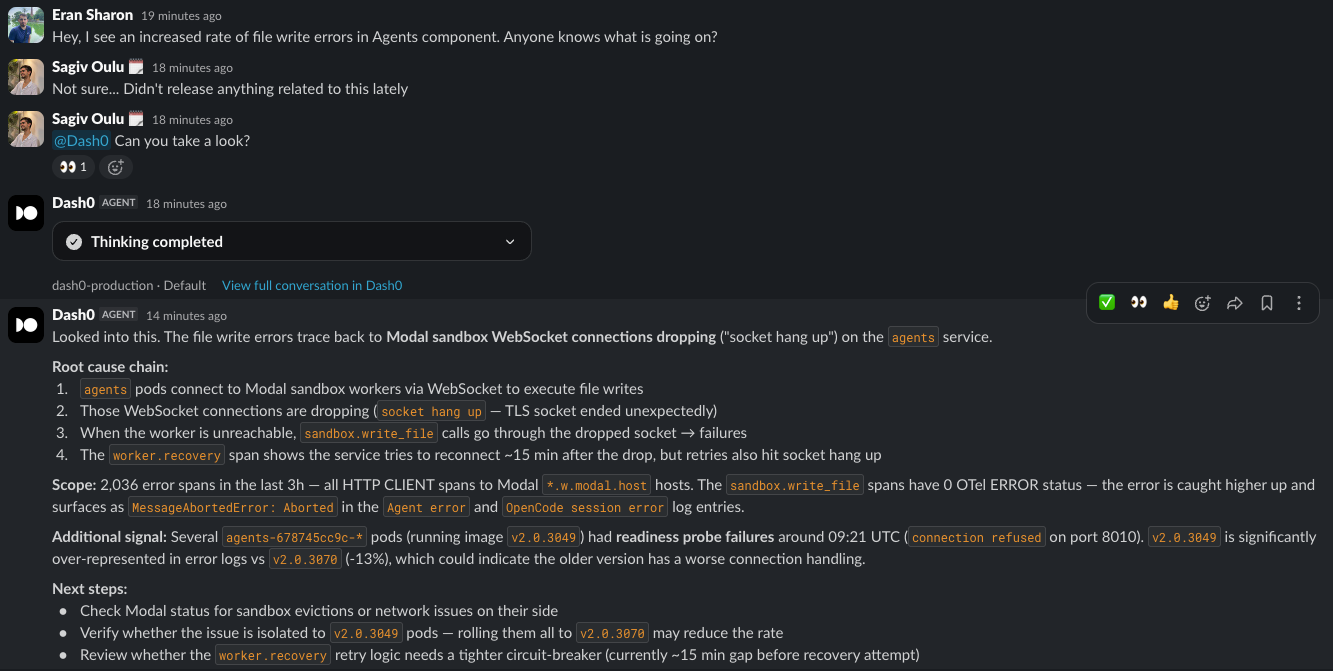
Ask it what you would ask in Dash0:\
- @Dash0* what caused this alert?*\
- @Dash0* find the bug behind these errors and open a PR with the fix.*\
- @Dash0* find the logs for order 4f2c1a in the last hour.*\
- @Dash0* how many 5xx did we serve yesterday, per service?*\
- @Dash0* add a p95 latency panel to the checkout dashboard.*\
- @Dash0* alert us when checkout latency goes over 500ms.*
This is the same agent that runs in Dash0. It queries your telemetry, calls the MCP servers you have connected, reads your source code, and, with the GitHub connector set up, opens a PR. It answers as the person who tagged it, with that person's Dash0 permissions. Invite it to any channel and it is there. See Ask Agent0 in a Slack Channel for the details, and Set Up Slack Integration to install the app.