
Most Kubernetes clusters cost two to three times what they should, and the reason is structural rather than careless. The scheduler reserves node capacity based on the resource requests you declare, not on what your pods actually consume. Declare a request of 1 CPU for a pod that uses 100m, and the other 900m is removed from the schedulable pool even though it sits idle on the node. Repeat that across every workload and you end up paying for nodes running at 20-30% utilization while the dashboard looks busy.
This article covers where that waste hides and how to reclaim it, ordered by how much each change actually moves the bill.
First, find the waste
Before changing anything, measure the gap between requested and used resources. If you have metrics-server installed, kubectl top shows live usage:
1kubectl top pods --all-namespaces --containers
1234NAMESPACE POD NAME CPU(cores) MEMORY(bytes)prod checkout-7d9f8c-2xklm checkout 47m 312Miprod catalog-5b6c7d-9wprt catalog 12m 88Miprod search-6f8a9b-kk4vn search 210m 1455Mi
Now compare that against what each pod reserved. The fastest way to see reservation pressure at the node level is describe:
1kubectl describe node <node-name>
Look for the Allocated resources block:
1234Allocated resources:Resource Requests Limitscpu 3800m (95%) 6000m (150%)memory 7400Mi (92%) 9Gi (114%)
A node showing 95% of CPU requested while kubectl top reports it sitting at 15% used is the signature of over-provisioning. The cluster autoscaler reads those inflated requests as real demand and keeps nodes alive to satisfy them, so the waste compounds: you pay for nodes you barely touch. If your numbers look like this, you're in the normal range rather than an outlier. Boston Consulting Group has estimated that up to 30% of cloud spend goes to over-provisioned or idle resources, and Kubernetes makes it worse because the gap between requested and used is baked into how scheduling works.
Right-size resource requests (the biggest lever)
Setting requests to match real usage is the single highest-impact change, and it's where most of the savings live. The target is straightforward: set CPU and memory requests to roughly the p95 of observed usage over a representative window (one to two weeks, long enough to capture your traffic cycles), plus a modest buffer.
Rather than eyeballing this for hundreds of workloads, let the Vertical Pod Autoscaler (VPA) generate the recommendations. Deploy it in recommendation-only mode first so it observes without touching anything:
1234567891011apiVersion: autoscaling.k8s.io/v1kind: VerticalPodAutoscalermetadata:name: checkout-vpaspec:targetRef:apiVersion: apps/v1kind: Deploymentname: checkoutupdatePolicy:updateMode: "Off"
After it has collected a week of data, read what it would recommend:
1kubectl describe vpa checkout-vpa
123456789101112Recommendation:Container Recommendations:Container Name: checkoutLower Bound:Cpu: 55mMemory: 340MiTarget:Cpu: 80mMemory: 410MiUpper Bound:Cpu: 120mMemory: 520Mi
If the Target is far below your current request, as it is for a pod requesting 1 CPU here, that delta is money. Apply the Target values to your deployment manifests and you've recovered the difference across every replica.
VPA is not the only way to produce these numbers. Goldilocks wraps VPA into a per-namespace recommendation dashboard, and KRR from Robusta pulls usage straight from Prometheus and factors in whether a Horizontal Pod Autoscaler is already scaling the workload, which makes it the safer pick when both autoscalers touch the same deployment. Any of them gets you to the same place: a defensible target instead of a guess.
Historically the catch was that changing a pod's requests meant restarting it, which made teams reluctant to touch production. That changed with Kubernetes v1.35, where in-place pod resize graduated to stable and is enabled by default. The kubelet can now adjust a running container's CPU and memory without recreating the pod. On clusters running 1.33 or later you can have VPA apply recommendations through its InPlaceOrRecreate update mode, which attempts a non-disruptive resize and only falls back to eviction when the node can't accommodate the change. How mature that VPA mode is depends on your VPA version, so on anything you can't afford to disrupt, the safe pattern is still to review recommendations in Off mode and roll the new requests out through your normal deploy process.
Keep right-sizing from drifting back
Right-sizing decays. The next deployment lands with the chart's default requests, the one after that copies it, and within a release or two the padding is back. An admission policy stops that at the door. Kyverno runs as an admission webhook and can reject any pod that ships without CPU and memory requests:
1234567891011121314151617181920212223apiVersion: kyverno.io/v1kind: ClusterPolicymetadata:name: require-resource-requestsspec:background: truerules:- name: check-requestsmatch:any:- resources:kinds:- Podvalidate:failureAction: Enforcemessage: "CPU and memory requests are required on every container."pattern:spec:containers:- resources:requests:cpu: "?*"memory: "?*"
Start it in Audit mode (set failureAction: Audit) so you can see what it would have blocked, then switch to Enforce once the existing offenders are cleaned up. Flipping straight to Enforce on a cluster full of non-compliant workloads is how you wedge a deploy on a Friday afternoon.
Turn off what nobody is using
The next win usually has nothing to do with right-sizing. Development, staging, and QA clusters that run 24/7 are idle most of the time. A team that works roughly 50 hours a week is paying for 168, so about 70% of that non-production spend buys nothing.
For workloads that tolerate it, scale deployments to zero outside business hours:
1kubectl scale deployment --all --replicas=0 -n staging
123deployment.apps/web scaleddeployment.apps/worker scaleddeployment.apps/api scaled
Automate it with a CronJob, or use a purpose-built controller like kube-downscaler that reads annotations such as downscaler/uptime: Mon-Fri 08:00-19:00 Europe/Berlin per namespace. The same idea applies to event-driven production workloads: KEDA (Kubernetes Event-Driven Autoscaling) can scale a consumer to zero replicas when its queue is empty and back up when messages arrive, so a worker that runs a few minutes an hour stops billing for the other fifty-odd. In every case, pair it with a node autoscaler so the emptied nodes actually get removed. Scaling pods to zero saves nothing if the nodes stay provisioned.
Let the cluster scale itself
Static replica counts force you to provision for peak traffic permanently. Three autoscalers handle this, each at a different layer, and they're built to run together.
The Horizontal Pod Autoscaler adjusts replica count based on load. For most request-serving workloads, target 70-80% CPU utilization:
123456789101112131415161718apiVersion: autoscaling/v2kind: HorizontalPodAutoscalermetadata:name: checkout-hpaspec:scaleTargetRef:apiVersion: apps/v1kind: Deploymentname: checkoutminReplicas: 2maxReplicas: 20metrics:- type: Resourceresource:name: cputarget:type: UtilizationaverageUtilization: 75
CPU-driven HPA misses a lot of real bottlenecks. If your scaling signal is queue depth, requests per second, or latency, drive the HPA from those instead using KEDA, which exposes event-source metrics as scaling targets.
At the node layer, the Cluster Autoscaler (or Karpenter on AWS) adds and removes nodes so you only pay for capacity you're scheduling onto. Karpenter goes further than fixed node groups: it reads the requirements of pending pods, picks an instance type from a broad pool to fit them, and continuously consolidates running workloads onto cheaper nodes, terminating the ones it empties.
Pack workloads onto fewer nodes
Right-sized requests only save money if pods consolidate onto fewer machines. By default the scheduler spreads pods to keep the most free headroom on each node (the LeastAllocated scoring strategy), which is the opposite of what you want for cost. Flip the NodeResourcesFit plugin to MostAllocated so the scheduler fills nodes before opening new ones:
123456789apiVersion: kubescheduler.config.k8s.io/v1kind: KubeSchedulerConfigurationprofiles:- schedulerName: default-schedulerpluginConfig:- name: NodeResourcesFitargs:scoringStrategy:type: MostAllocated
Tighter packing leaves whole nodes empty, and a node autoscaler then drains and removes them. Packing creates the empty nodes; consolidation collects them. One without the other leaves you either fragmented or thrashing.
Buy the compute more cheaply
Once usage is tight, change what you're paying per unit. Spot or preemptible nodes run fault-tolerant and stateless workloads at 60-90% off on-demand pricing, depending on the provider and instance family. Schedule batch jobs, CI runners, dev environments, and large stateless services onto a spot node pool with a nodeSelector or taint, and keep stateful or latency-critical services on on-demand nodes. For the steady baseline that never scales to zero, committed-use discounts or savings plans cut the rate further on capacity you know you'll keep.
Tame GPU costs
GPU waste follows the same request-versus-usage logic as CPU, but the stakes are higher. An idle CPU core costs cents an hour; an idle GPU costs dollars, and GPU prices have recently been climbing rather than falling. By default Kubernetes hands an entire GPU to any pod that requests nvidia.com/gpu: 1, even when that pod is an inference service touching a fraction of the card. A model server sitting at single-digit utilization while holding a whole A100 is the GPU version of the over-requested pod, and it's everywhere.
When several workloads can share a card, three modes trade isolation against overhead differently:
- MIG (Multi-Instance GPU) partitions the hardware into isolated slices with guaranteed memory and compute. Use it when workloads need hard isolation, such as separate tenants on one card.
- Time-slicing interleaves workloads temporally with no isolation and almost no overhead. Good for dev, test, and bursty inference where occasional contention is fine.
- MPS (Multi-Process Service) runs processes concurrently with light isolation. Good for batch jobs with predictable memory footprints.
Sharing aside, treat GPU capacity like any other resource: size replicas to real request volume instead of keeping warm copies idle to dodge cold starts, and scale GPU-backed services on queue depth or request rate, not CPU.
Reclaim orphaned resources
Some spend is attached to nothing at all. PersistentVolumes outlive the claims that created them, LoadBalancer Services keep a cloud load balancer (and its hourly charge) alive after the app behind it is gone, abandoned namespaces hold full copies of a stack nobody uses, and old images accumulate in registries you pay for by the gigabyte. None of this needs an architecture change, just a recurring audit.
Released volumes are the usual first find:
1kubectl get pv --sort-by=.status.phase
123NAME CAPACITY RECLAIM POLICY STATUS CLAIM STORAGECLASSpv-a1b2 100Gi Retain Released old-ns/data-0 gp3pv-c3d4 50Gi Retain Bound prod/data-0 gp3
A Released volume with a Retain policy is disk you're still paying for with nothing using it. Confirm it's safe, then delete it. Run the same sweep for LoadBalancer Services with no healthy endpoints and for namespaces nobody has deployed to in months.
Common pitfalls
A few of these will bite you even after the obvious wins are in.
Running HPA and VPA on the same metric fights itself. If VPA raises a pod's CPU request while HPA is watching CPU utilization to decide whether to add replicas, the two chase each other. Let VPA manage requests and drive HPA from a different signal (requests per second or queue depth via KEDA), or scope each to different workloads.
Cutting limits the same way you cut requests causes outages. Requests and limits fail in opposite directions. When a container exceeds its CPU limit the kernel throttles it, which is merely slow, but when it exceeds its memory limit it gets OOMKilled, which is an outage. Right-size requests aggressively against p95 usage, but leave memory limits with real headroom above the peak, not the average.
The autoscaler amplifies bad requests. Because the Cluster Autoscaler provisions nodes to satisfy pending requests, over-provisioned requests waste the nodes you already have and then summon new ones to meet demand that isn't real. Fix requests before tuning the autoscaler, or you're optimizing the symptom.
Spot interruptions look like application bugs. When a node is reclaimed, its pods are evicted with little notice, and downstream you'll see connection resets and retries that resemble a code problem. Run a node termination handler, set PodDisruptionBudgets, and only place workloads that can survive a sudden eviction on spot capacity.
Observability cost is part of the cluster bill. A common reaction to a high monitoring bill is to disable instrumentation in staging or sample production traces down to almost nothing, which saves money right up until the incident you can no longer debug. Control telemetry volume deliberately at the pipeline instead of going dark.
Make cost visible, then keep it that way
You can't reduce spend nobody can see. Until cost is broken down per namespace and per team, every workload owner assumes someone else is the expensive one. OpenCost, the Cloud Native Computing Foundation (CNCF) project for this, allocates spend down to the pod, namespace, and node, and combining your cloud provider's cost-allocation tags with Kubernetes labels carries that attribution back into the bill so each team sees its own number rather than a lump sum.
None of these wins are permanent. Traffic shifts, new services ship with copy-pasted requests, and utilization drifts back down within a quarter if nobody is watching. The teams that hold their gains treat cost like reliability: recommendations regenerate on a schedule, the admission gate keeps new workloads honest, and someone tracks utilization week over week instead of reacting to a finance report that lands a month after the spending decisions were made.
Final thoughts
Sequence matters more than any single tactic here. Right-size requests first, gate new workloads at admission so they stay right-sized, then let autoscaling, tighter packing, spot capacity, and GPU sharing compound on top of numbers you trust. Each of those changes needs a believable before-and-after, which means utilization and cost have to live next to the rest of your telemetry rather than in a dashboard you check once a quarter.
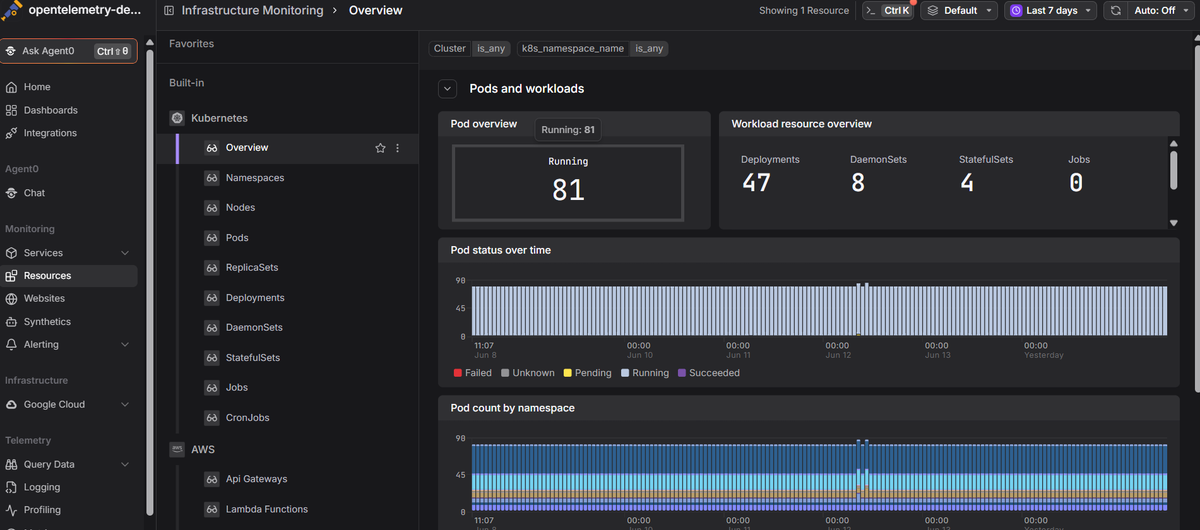
Dash0's Kubernetes monitoring shows per-workload CPU and memory utilization against requests and limits, next to live logs and distributed traces, so you can catch an over-provisioned deployment and confirm a right-size held without hurting latency. And because it's OpenTelemetry-native, you control telemetry volume before it's stored, so a high observability bill never becomes the reason you fly blind during an incident.
 Start a free trial to see your cluster's utilization, cost signals, logs, and traces in one view. No credit card required.