
Last updated: September 16, 2026
Audit Logs
Audit Logs provide a detailed, timestamped record of actions performed within your Dash0 organization. Every configuration change, from auth token creation to dashboard updates, is captured along with the actor who performed it. This gives security and platform teams full visibility into who changed what and when.
Audit Logs are accessible to organization admins only. Navigate to Organization Settings → Audit Logs to view them.
Viewing Audit Logs
The Audit Logs page displays a searchable table of all recorded events. Each entry includes:
- Timestamp: When the action occurred.
- Action: The type of change, for example
check_rule.updatedordashboard.created. - Actor: The user or auth token that performed the action.
Click on any entry to expand its details. The detail view shows the full structured payload including the actor identity, affected resource attributes, and any additional context.
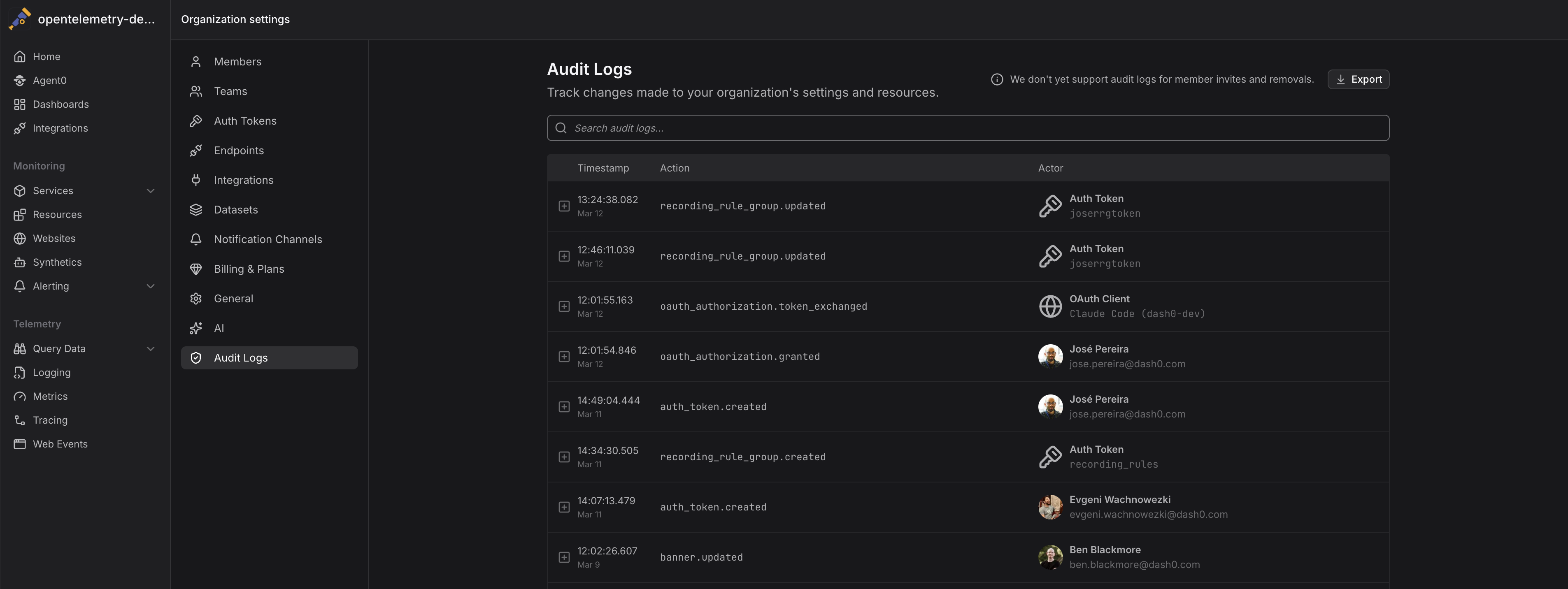
Use the search bar to filter audit log entries by action type, actor, or any other attribute.
What is Tracked
Audit logs cover a wide range of organization-level actions, including but not limited to:
- Auth Tokens: Creation, updates, and deletion of API tokens.
- Datasets: Changes to dataset configuration.
- Dashboards and Views: Creation, modification, and removal of dashboards and saved views.
- Check Rules: Updates to alerting and check rule definitions.
- Teams: Team creation, deletion, and membership changes.
- Notification Channels and Rules: Changes to alerting delivery configuration.
- Integrations: Creation, updates, and removal of integrations and cloud connections.
- Cost Control: Changes to sampling rules, time series aggregations, and signal-to-metrics configurations.
Each audit log entry includes structured attributes specific to the resource type, such as the resource name, ID, and a diff of what changed for update operations.
Downloading Audit Logs
You can download a full export of your audit logs directly from the UI. Click the Export button in the top-right corner of the Audit Logs page. This downloads a ZIP archive containing the following structure:
metadata.json: Contains export metadata including the export timestamp, total number of parts, and total record count.audit-logs-part-*.json: The audit log entries split across multiple JSON files. Each file contains an array of audit log entries with the action, actor, attributes, timestamp, and organization information.
Streaming Audit Logs via OTLP
Dash0 supports exporting audit logs to external systems using the OpenTelemetry Protocol (OTLP). This allows you to stream audit events to any OTLP-compatible backend, SIEM, or long-term storage system for compliance and retention purposes.
Why OTLP?
Rather than a proprietary webhook or CSV export, audit log export uses OTLP as the wire format. This keeps audit data compatible with the same pipelines and tooling you already use for traces, metrics, and logs. No custom parsers, no format translations, no additional agents required.
Configuring an Export
- Navigate to Organization Settings → Integrations.
- Click Export in the Audit Logs section.
- Configure the export:
- Name: A descriptive label for the export, for example "Audit Log Export to Dash0".
- URL: The OTLP HTTP endpoint that will receive the logs, for example
https://ingress.eu-west-1.aws.dash0.com/v1/logs. - Authentication: Choose between Basic Auth or Bearer Token to authenticate with the receiving endpoint.
- Custom Headers: Any additional HTTP headers required by your backend, for example a
Dash0-Datasetheader to route logs into a specific dataset.
- Click Save to activate the export.
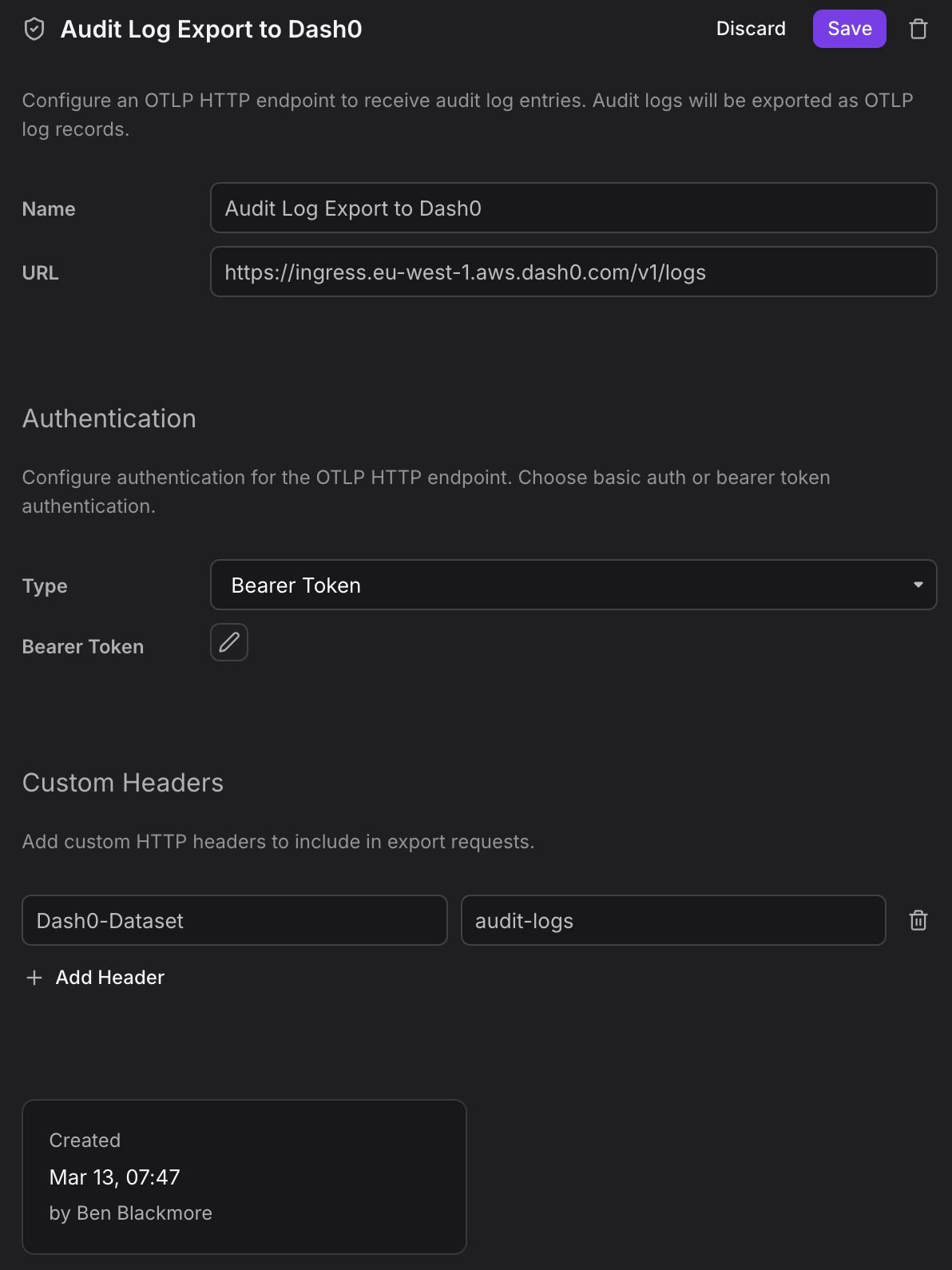
Once enabled, Dash0 continuously streams audit events as structured OpenTelemetry log records to your configured endpoint. You can route them into a self-hosted OpenTelemetry Collector for further processing, a compliance-focused storage backend, or back into Dash0 itself for correlation with your operational telemetry.