

Modern systems generate an overwhelming amount of telemetry, yet our ability to interpret it has not kept pace. The challenge is rarely missing data; more often, it’s deciding what matters within an excess of it.
When an alert fires in the middle of the night, you’re met with logs, metrics, and traces that each reveal only part of the story. Turning those fragments into a complete picture is still mostly manual work.
AI has been pitched as the fix for years, but early tools rarely delivered. Some acted like chatbots that guessed their way through incidents, while others were opaque systems that claimed to know the root cause without showing how they got there.
Agent0 approaches the problem differently by distributing the work across several focused agents, each built for a specific part of the observability lifecycle: The Seeker finds root causes, The Oracle translates natural language into PromQL, The Pathfinder guides you through instrumenting your stack, The Threadweaver maps relationships across services, and The Artist produces dashboards and alerts as code.
These agents come with domain knowledge and guardrails that make them feel less like generic assistants and more like specialist tools. They take on the mechanical analysis, highlight the signals that matter, and expose the reasoning behind their output.
When pressure is high and time is short, Agent0 helps cut through the noise and bring the most important details to the surface. The following five use cases show how that plays out in practice.
1. Speeding up root cause analysis and incident triage
When a critical service fails, every minute of downtime equates to lost revenue and eroded customer trust.
Triage usually looks the same everywhere: you acknowledge the alert, pull up a dashboard, sift through logs, run a few frantic searches, and try to piece together whether the latency spike has anything to do with that deployment from earlier. It’s a lot of manual detective work at the exact moment when you have the least time for it.
With Agent0’s The Seeker, you can offload this work entirely.
When an alert fires, you don’t have to start combing through dashboards or querying logs. You can just open a new thread and ask a simple question like, “I just received an alert, what is going on?”
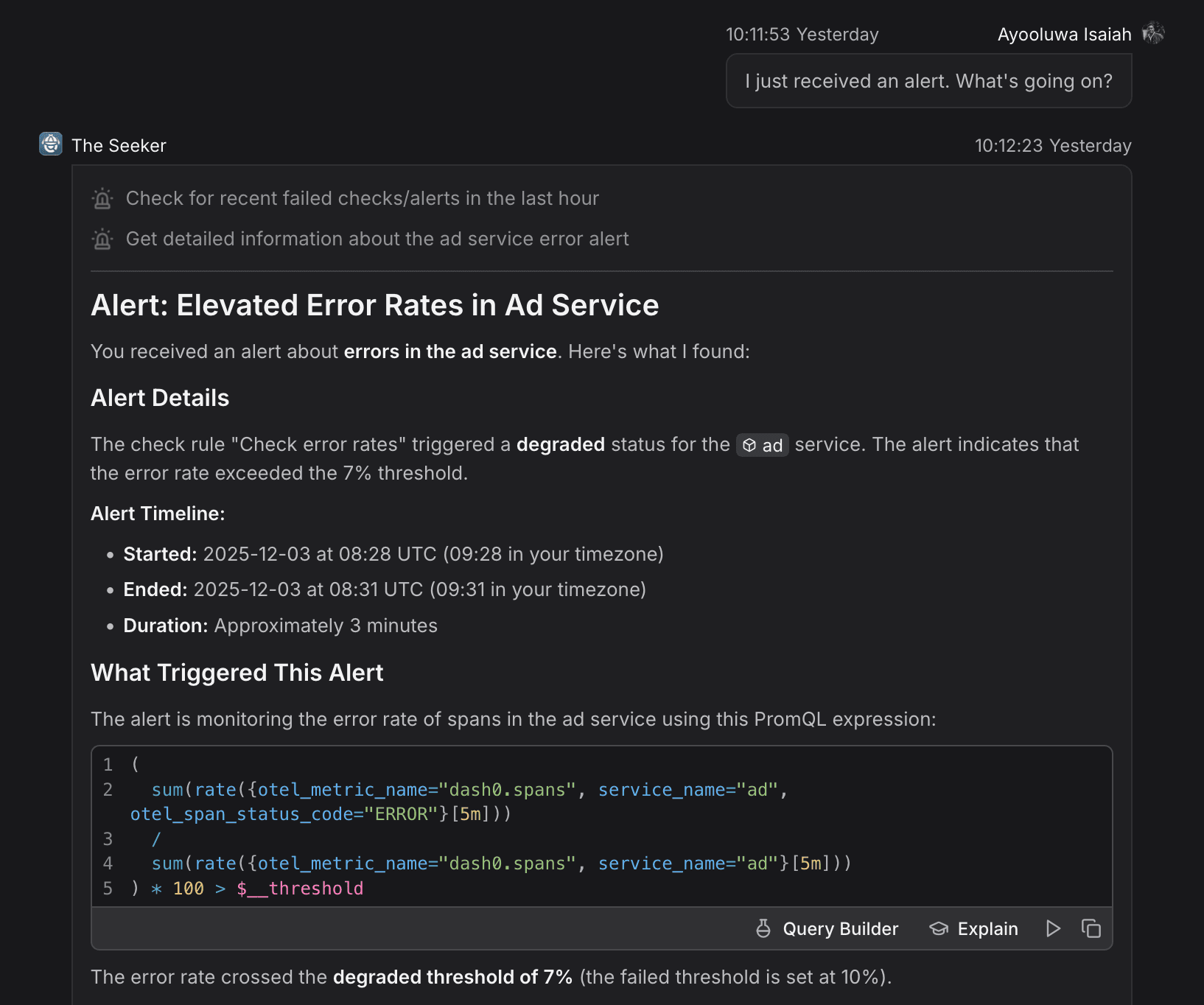
The Seeker then walks through an investigation that looks a lot like what an experienced SRE would do:
- Context gathering: It starts with the affected service and gathers the relevant context, such as what triggered the alert in the first place.
- Telemetry correlation: It checks error rates, request volume, and latency together rather than in isolation.
- Signal analysis: It examines logs, metrics, and traces together to surface patterns or anomalies that stand out.
- Change detection: It checks for any recent system changes or shifts in behavior that line up with the issue.
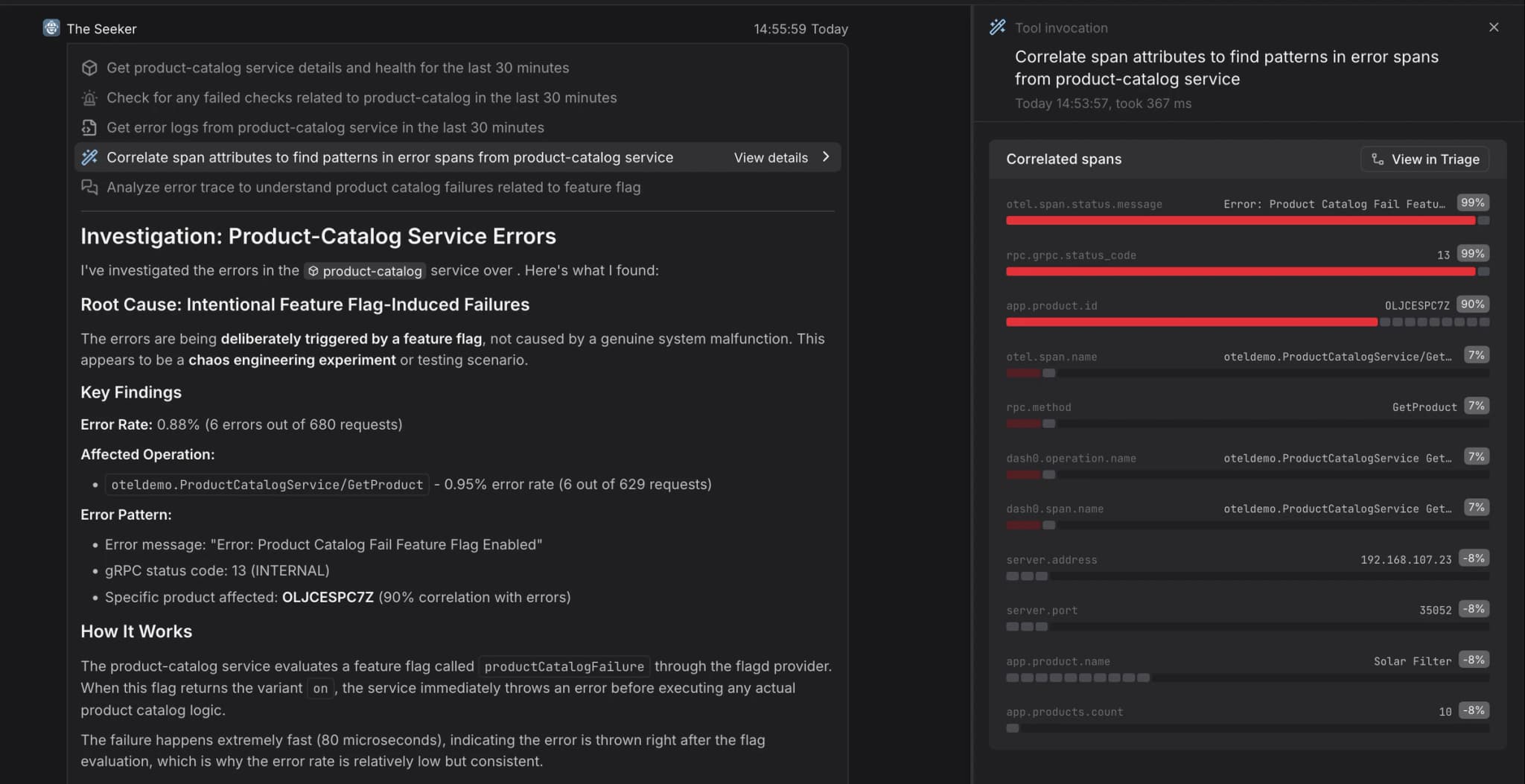
Crucially, The Seeker shows its work. It doesn’t just output a conclusion; it lists the specific tools it called, the queries it ran, and the data it used to form its hypothesis. This audit trail means you don’t have to blindly trust the AI since you can verify its logic yourself.
Once it identifies a likely root cause, it produces a clear and structured analysis that identifies the exact issue, shows where it originated, and links its rise to a recent shift in system behavior that likely triggered the incident.
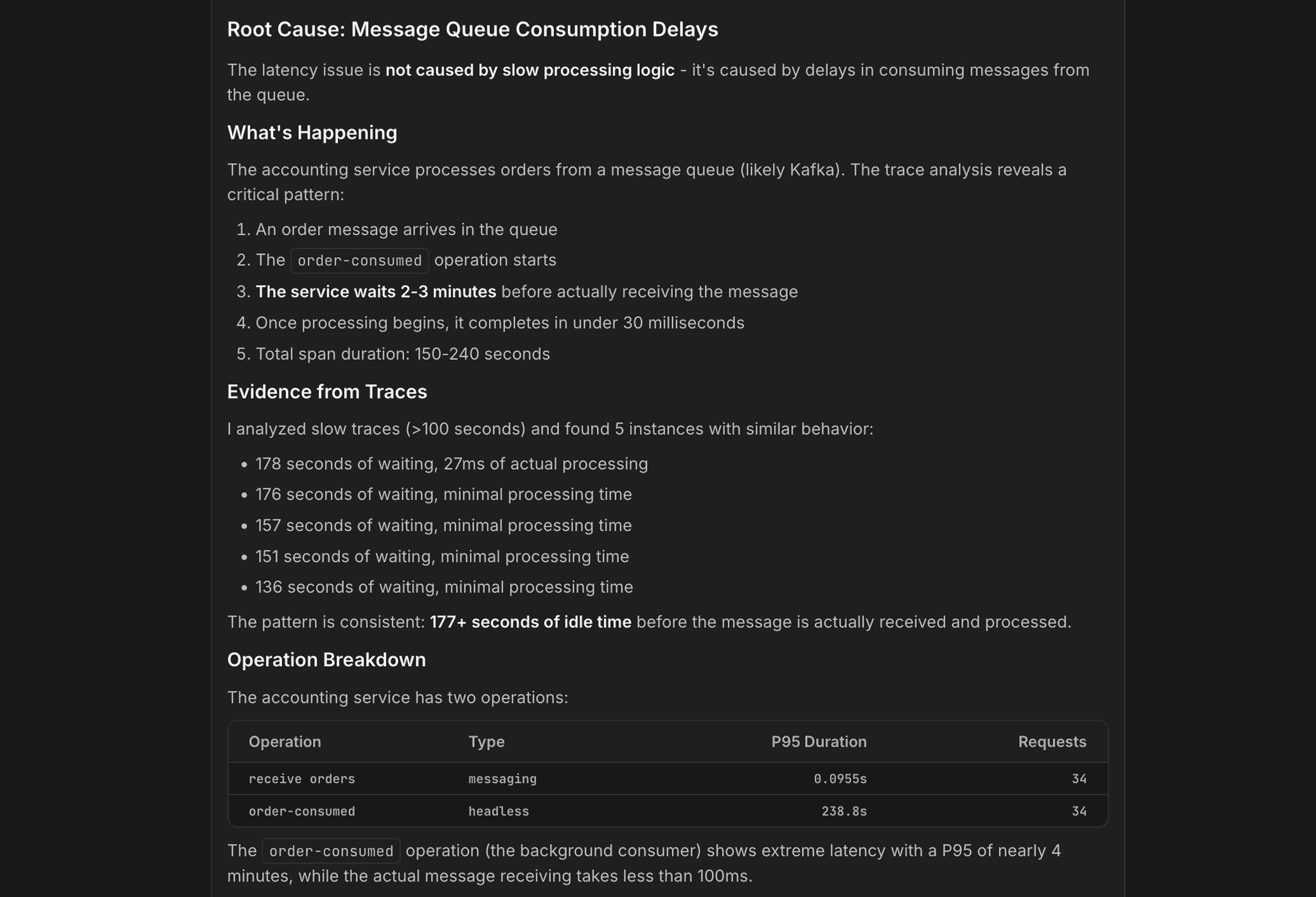
You get the smoking gun right away along with the evidence to back it up, which means you can move straight to the fix instead of spending hours trying to figure out what happened.
2. Turning natural language into production-ready PromQL
PromQL powers metrics analysis in cloud native systems, but while it is extremely flexible, it is also hard to learn, with a steep learning curve that challenges even experienced engineers.
The Oracle removes that barrier entirely and makes PromQL accessible to everyone on the team, not just the experts.
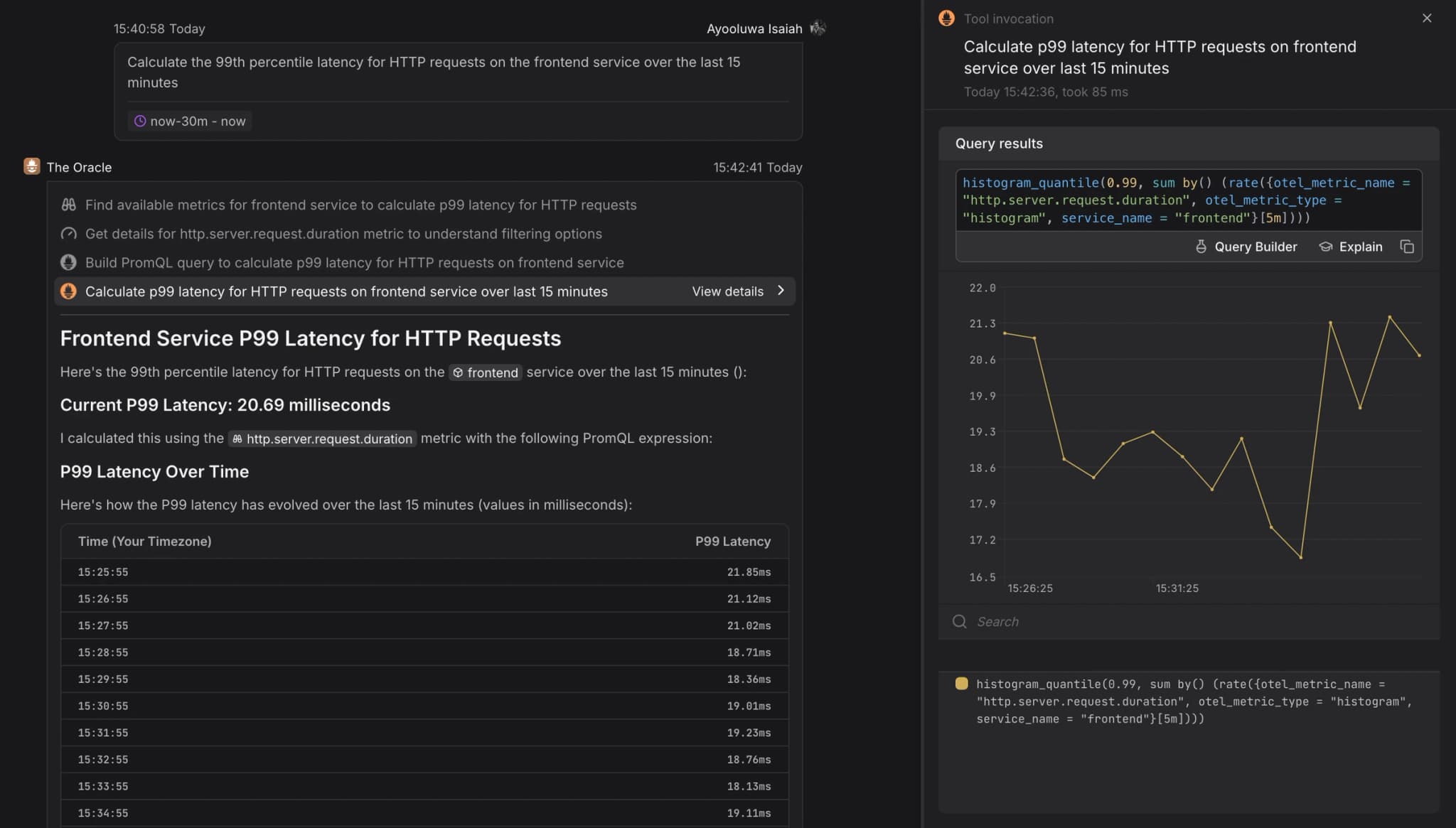
Instead of wrestling with histogram buckets, vector matching, or aggregation rules, you simply talk to The Oracle the way you would talk to a data analyst sitting beside you. You type a question in plain language: “Calculate the 99th percentile latency for HTTP requests on the frontend service over the last 15 minutes”.
The Oracle goes beyond simple "text-to-PromQL" translation. It uses the full context of your environment to figure out exactly which metrics and attributes are relevant to your question. This means the query is reasoned from your actual data, not just guessed by an LLM.
It then runs the query, returns the graph right in the thread, and shows you the exact code it generated so you can learn from it. It also explains why the query works, how the functions were chosen, and what the results mean.
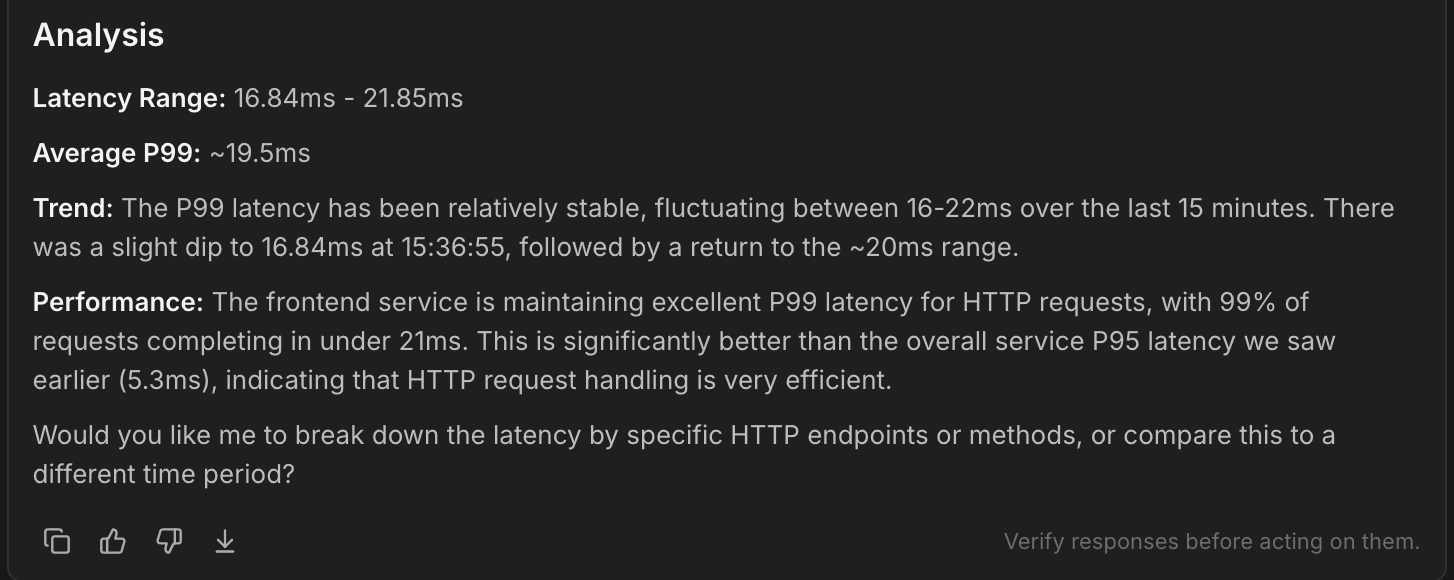
This helps senior engineers move faster because they no longer have to write long, repetitive PromQL expressions by hand. At the same time, junior engineers gain confidence because they see natural language converted into working PromQL and get a short explanation of the logic behind it.
Over time, the whole team picks up the patterns. What used to be a steep learning curve becomes a simple conversation, and PromQL stops feeling like a specialized skill reserved for a few experts.
3. Seeing the cause and effect behind every slow request
In a distributed microservices architecture, a single user request might touch dozens of different services, caches, and databases.
Distributed tracing is supposed to make this complexity understandable, but a raw waterfall full of hundreds of spans often feels like staring at a bowl of spaghetti. Finding the one span that actually matters can be painful.
The Threadweaver exists to turn that chaos into a readable story. It analyzes the entire trace and reconstructs the sequence of events in a way that makes sense to humans.
Let’s say you notice intermittent latency on a checkout transaction. You can ask Agent0 to analyze the recent traces for that specific transaction instead of manually scrolling through spans to find the interesting ones.
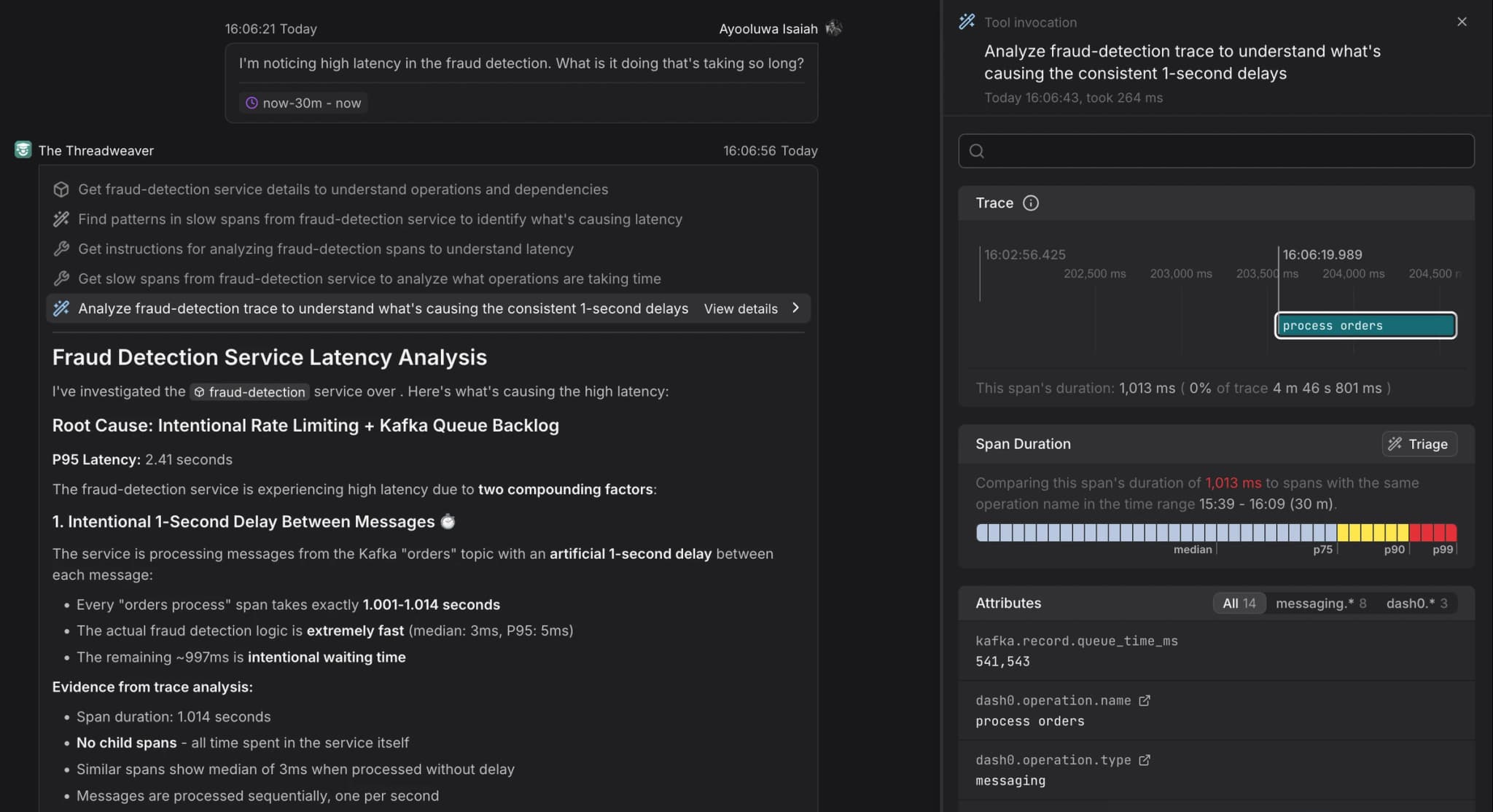
The Threadweaver looks for unusual patterns in timing, structure, and relationships between spans. It might show that although a service appears slow on the surface, the real delay comes from a downstream dependency.
The result is that a dense trace is transformed into a straightforward explanation that is easily understood. This prevents you from tuning the wrong part of the system and focuses your attention where it actually belongs.
By adding context to high-cardinality trace data and pointing out bottlenecks that are easy to overlook, The Threadweaver helps you understand not just what happened, but why.
4. Building dashboards and alert rules in minutes (as code)
While Agent0 can give you a narrative view of what is happening in your system, there are still plenty of situations where a well crafted dashboard is the right tool.
The problem is that building them usually turns into ClickOps: endless menus, widget tweaking, and hand built configurations that drift away from anything checked into version control.
The Artist changes this by automating the hard parts of dashboard and alert creation while staying true to configuration as code principles.
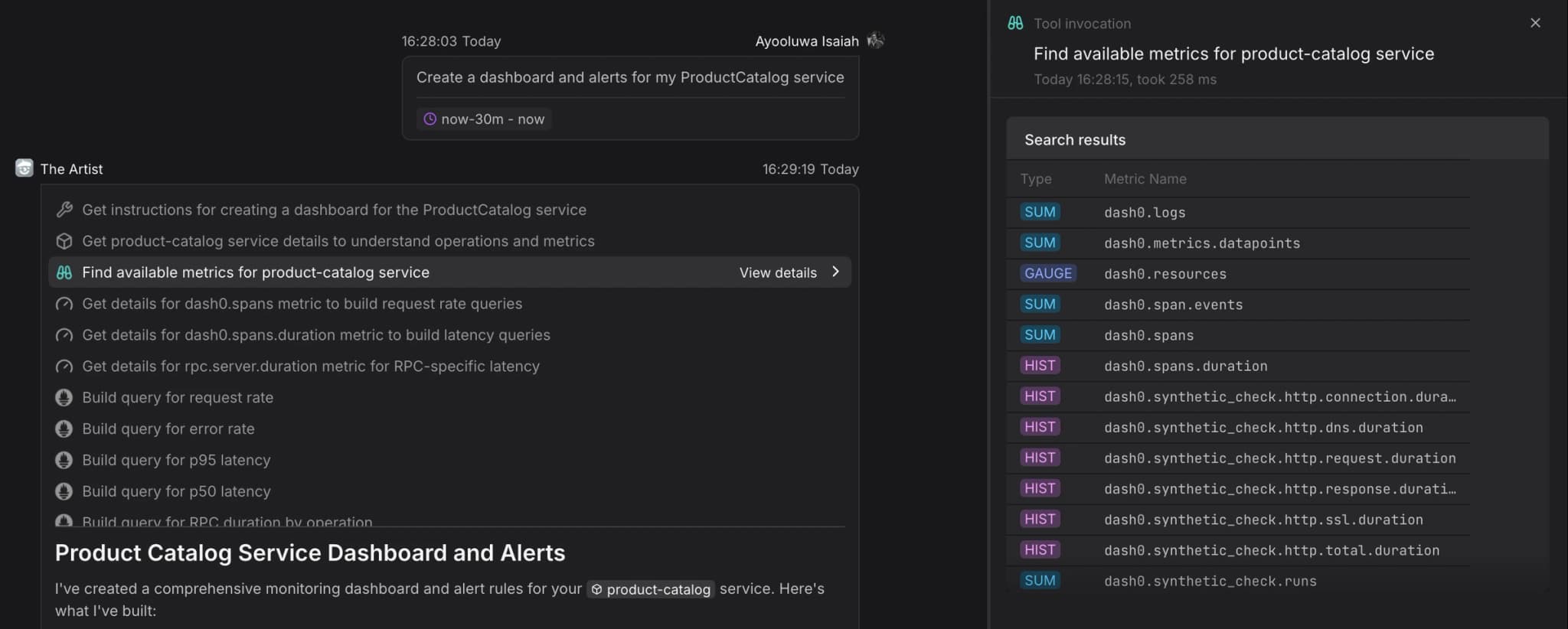
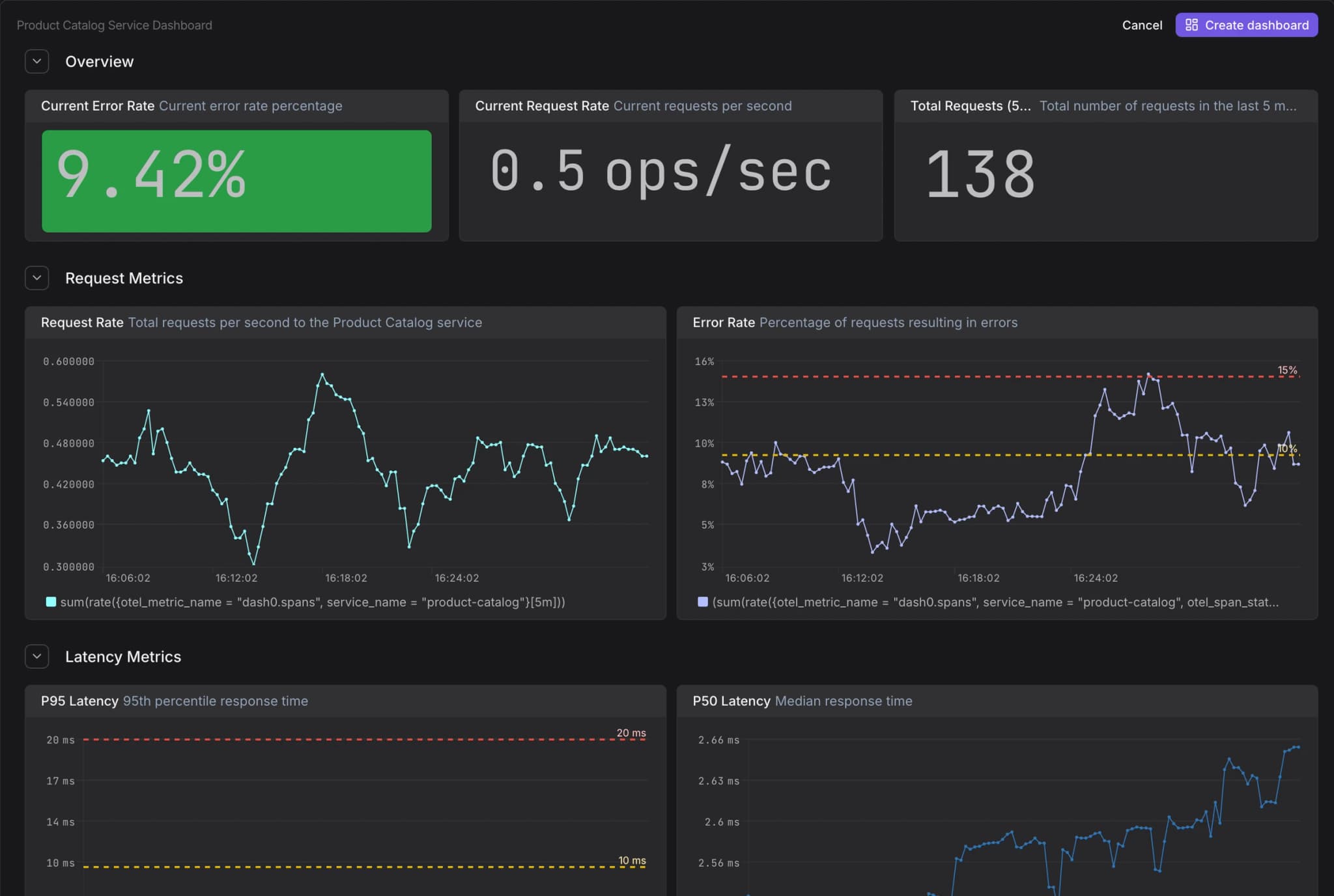
You start by giving The Artist a simple instruction, such as: “Create a dashboard and alerts for my ProductCatalog service”.
The Artist reviews the available telemetry to understand what matters for that service. Instead of throwing together a pile of random charts, it applies established observability practices like the RED method (Rate, Errors, Duration).
It then produces panels for latency, error rates, throughput, and even resource usage if the data is available. At the same time, it drafts alert rules based on SLO-style thresholds derived from the service’s behavior.
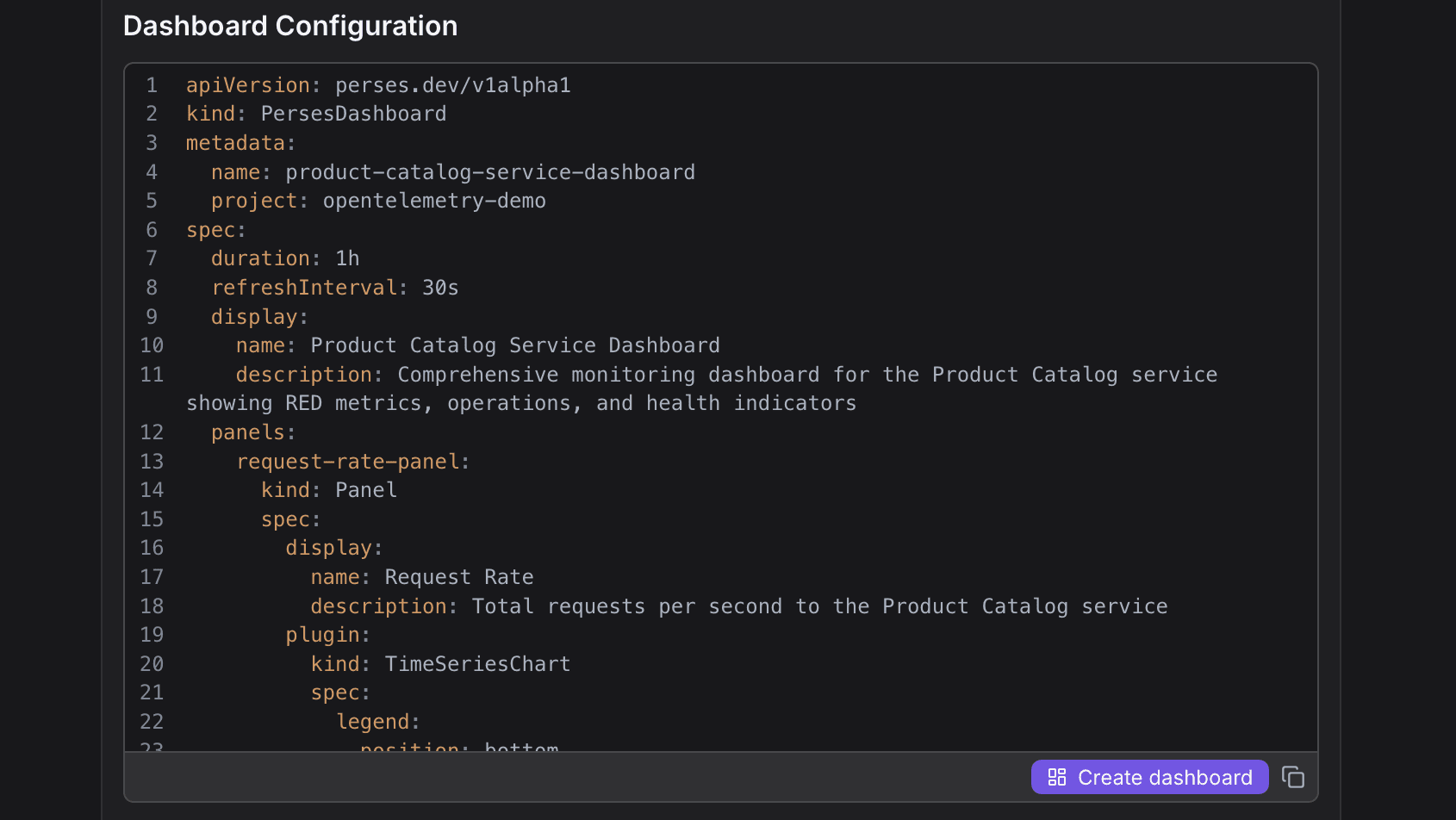

The Artist follows Dash0’s philosophy of developer-first tooling. It doesn’t create dashboards behind the scenes where you have no control. Instead, it hands you a YAML definition that’s fully compatible with Perses, the new open source standard for dashboards.
You can check that YAML into Git, integrate it with your infrastructure pipeline, or click the Create Dashboard button to see it immediately. This gives you the convenience of AI-assisted creation along with the reliability and traceability of GitOps.
5. Instrumenting applications from scratch with guided onboarding
Even the best observability platform is useless without telemetry data. The challenge is that instrumenting your applications and infrastructure so they emit traces, metrics, and logs is often the hardest part of the journey.
OpenTelemetry is the industry standard, but setting up the instrumentation libraries, configuring exporters, and getting context propagation right can be downright intimidating if you’ve never done it before.
The Pathfinder is the onboarding specialist that’s designed to get your telemetry flowing in minutes, not weeks. When you need to instrument a new microservice, you can simply ask: “How do I instrument my Node.js service?”
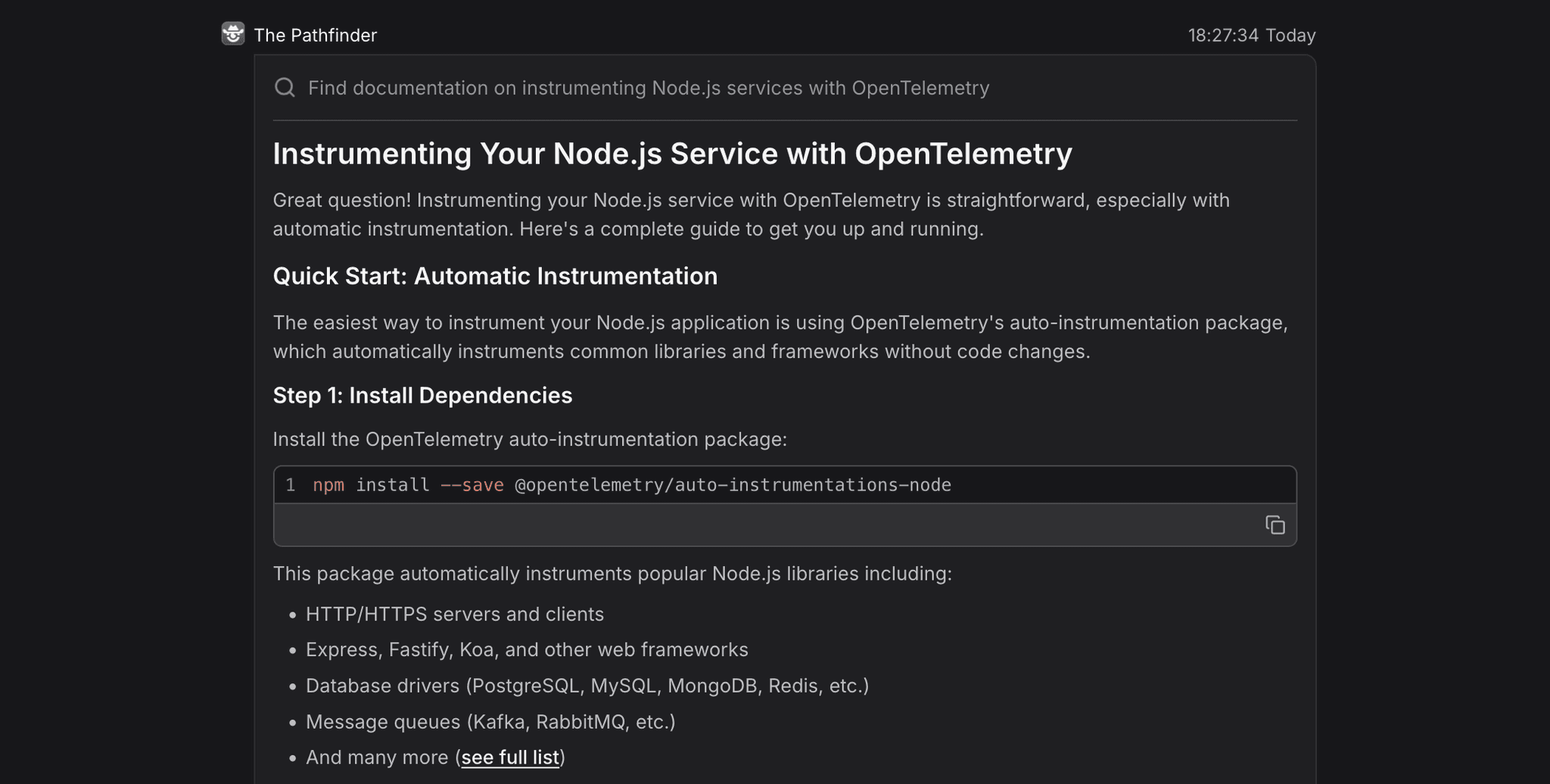
It uses Dash0’s OpenTelemetry integration and internal knowledge to generate a tailored, step by step guide. It provides the exact instructions, code snippets, and environment variables needed for your specific stack and environment.
For a Node.js service, The Pathfinder might walk you through downloading the OTel auto instrumentation agent, setting the right environment variables, and configuring the exporter so data flows directly into Dash0. It guides you through each step so the service connects cleanly and begins appearing on the Service Map right away.
This lowers the friction of adoption and helps teams achieve full observability coverage across their systems much faster.
Agent0 is your AI SRE Copilot
Observability work demands clarity as you cannot act on an answer unless you understand where it came from and why it’s trustworthy. This is the core principle behind Agent0.
Every agent in the system is designed to make its reasoning visible. When it investigates an issue or forms a hypothesis, it exposes the exact data it examined and the steps it took to reach a conclusion.
The output is always inspectable: tool calls, queried data, dashboard YAML, instrumentation guidance, or a plain language explanation of its logic.
The goal isn't to replace engineers. It’s to offload the mechanical tasks—sifting through telemetry, assembling dashboards, writing repetitive queries—so you can focus on decisions that require judgment and context.
When used together, the agents feel like an extra set of hands on your SRE team. They’re quick, they surface the right context at the right moment, and their work can be verified at every step.
That’s the Agent0 model: specialized tools that make the hard parts of observability much easier.