Last updated: August 21, 2026
What Is Managed Kubernetes?
Managed Kubernetes means a cloud provider runs the Kubernetes control plane for you: the API server, etcd, scheduler, and controller manager that make a cluster a cluster. You get a working API endpoint to point kubectl at, and the provider keeps those components highly available, patched, and backed up.
These services exist because the control plane is the part of Kubernetes most likely to ruin your week. A corrupted etcd, an API server that runs out of memory, or a botched control plane upgrade can take down every workload in the cluster, and recovering an etcd quorum by hand is not a skill most teams want to keep on call. Handing that to AWS, Google, or Azure removes a whole category of failure from your plate.
What it does not remove is everything else. The biggest misconception about managed Kubernetes is that "managed" means "you don't operate anything." This article draws the actual line between what the provider runs and what stays your job, covers how much of the rest you can also offload, and flags the parts that bite people who assumed the service handled more than it does.
What the provider actually runs
A Kubernetes cluster has two halves. The control plane is the brain: it stores cluster state in etcd, exposes the API, decides where pods should run, and reconciles desired state against reality. The data plane is the muscle: the worker nodes that run a kubelet, a container runtime, and your actual pods.
Managed Kubernetes, at its baseline, means the provider owns the control plane half. With EKS, GKE, or AKS, you never SSH into an API server, you never size an etcd disk, and you never run an etcd backup cron job. The provider runs the control plane across multiple availability zones, applies security patches, and gives you a service-level agreement (SLA) on its uptime.
You can see the boundary directly. On a self-hosted cluster, kubectl get nodes lists control plane nodes alongside workers. On managed Kubernetes, it shows only your worker nodes:
1kubectl get nodes
1234NAME STATUS ROLES AGE VERSIONip-10-0-1-23.ec2.internal Ready <none> 12d v1.34.3ip-10-0-2-87.ec2.internal Ready <none> 12d v1.34.3ip-10-0-3-14.ec2.internal Ready <none> 5d v1.34.3
There are no control plane nodes in that output because they live in the provider's account, not yours. That invisibility is the whole point: the control plane became someone else's operational problem.
What stays your job
Everything from the worker nodes up is, by default, still yours. The provider hands you a control plane and an empty data plane, and the rest is on you:
- Worker nodes. You pick the instance types, size the node pool, and keep the node OS patched. An unpatched kernel CVE on your nodes is yours to fix, not the provider's.
- Networking and add-ons. The Container Network Interface (CNI) plugin,
kube-proxy, CoreDNS, ingress controllers, and Container Storage Interface (CSI) drivers all run on your nodes, and their versions have to stay compatible with each control plane bump. - Your workloads. Deployments, resource requests and limits, autoscaling policy, the application code itself. The scheduler places pods, but only according to the specs you write.
- Security inside the cluster. Role-based access control (RBAC), network policies, pod security standards, secrets handling. The provider secures the control plane; what runs on it is your job.
And then there's observability, the line item teams most often forget to budget for. The provider tells you the control plane is up. It will not tell you why a pod is stuck in CrashLoopBackOff or why your p99 latency tripled after the last deploy. That part is entirely on you.
This is the gap newcomers underestimate. A managed control plane takes maybe a third of the operational surface off your hands. The data plane and the workloads on top are where the day-to-day toil actually lives.
How much gets managed: the spectrum
"Managed" is a slider, not a switch. Each provider lets you push more of the data plane onto them, in roughly three tiers.
Self-managed nodes sit at the bottom. You run raw EC2 instances (or VMs) and join them to the cluster yourself, owning the Amazon Machine Image (AMI), the scaling logic, and every upgrade. Total control, total responsibility.
Managed node groups (EKS) and node pools (GKE, AKS) are the common middle ground. The provider provisions nodes from a managed template and handles the mechanics of a node upgrade, draining and replacing instances for you when you trigger one. You still pick instance types and decide when to upgrade, but the rolling-replacement choreography is taken care of.
Fully managed node modes push the data plane onto the provider too. GKE Autopilot and EKS Auto Mode provision, scale, patch, and replace nodes automatically based on the pods you schedule. With EKS Auto Mode, AWS runs your worker nodes as managed instances on a minimal OS and enforces a 21-day maximum node lifetime, so nodes get rotated out for freshly patched ones on a schedule whether you act or not. You stop thinking about nodes almost entirely, and you give up the ability to tune or even log into them.
There is no universally correct tier. Autopilot-style modes are great for teams that want to ship apps and never touch a node, and a poor fit for workloads that need privileged daemonsets, specific kernel modules, or GPU configurations the managed mode restricts.
What it costs
The control plane has a surprisingly simple price, and it is not where your bill comes from.
As of June 2026, EKS charges $0.10 per hour per cluster for the control plane, about $73 a month, flat, whether the cluster is idle or running 500 nodes. GKE charges the same $0.10 per hour per cluster across both Standard and Autopilot modes, offset by a free-tier credit of $74.40 per month that covers one zonal or Autopilot cluster per billing account. AKS gives you the control plane free on its Free tier with a 99.5% uptime target, or charges $0.10 per hour for the Standard tier that raises the SLA to 99.95%.
So the control plane fee is rounding error on a real cluster. Worker node compute, load balancers, NAT gateways, persistent volumes, and cross-zone data transfer are what actually drive the bill, often 90% or more of it. The one place the flat per-cluster fee does sting is when you run many small or ephemeral clusters: eight short-lived staging clusters on EKS still cost eight times $0.10 per hour for control planes that are barely doing anything.
Common pitfalls
The word "managed" creates expectations the service does not meet, and a few of them cause real incidents.
The first is assuming control plane upgrades are hands-off. The provider upgrades the control plane components, but it will not rewrite your manifests. If you are still using an API version that the new Kubernetes release removed, your resources break after the upgrade, and the provider upgraded right over them without complaint. You have to audit for removed APIs and fix your manifests before every upgrade.
The second is version skew. After a control plane upgrade, your nodes can lag behind, and Kubernetes only supports a kubelet up to three minor versions behind the API server. On a plain managed cluster, upgrading the control plane and forgetting the nodes leaves you drifting toward an unsupported gap that surfaces as confusing failures weeks later.
The third is support windows. EKS supports at least four production-ready Kubernetes versions at any given time and retires older ones after about 14 months of standard support, after which you either upgrade or start paying an extended-support surcharge. A cluster you stood up and stopped touching is quietly accumulating a forced migration.
The fourth is the observability blind spot. A managed control plane reports its own health, but it has no opinion about your application. When a deploy degrades latency or a node pressure-evicts pods, the managed service is working perfectly while your users are not. Closing that gap is the part of running Kubernetes that no control plane fee covers.
Final thoughts
Managed Kubernetes is best understood as a division of labor. The provider takes the control plane, the one part that is dangerous to run yourself, and hands you a stable API to build on. How much of the data plane you also offload, through managed node groups or fully managed modes like Autopilot and EKS Auto Mode, is a real decision, and the trade-off between control and convenience is worth making on purpose rather than by default. What never transfers is visibility into your own workloads.
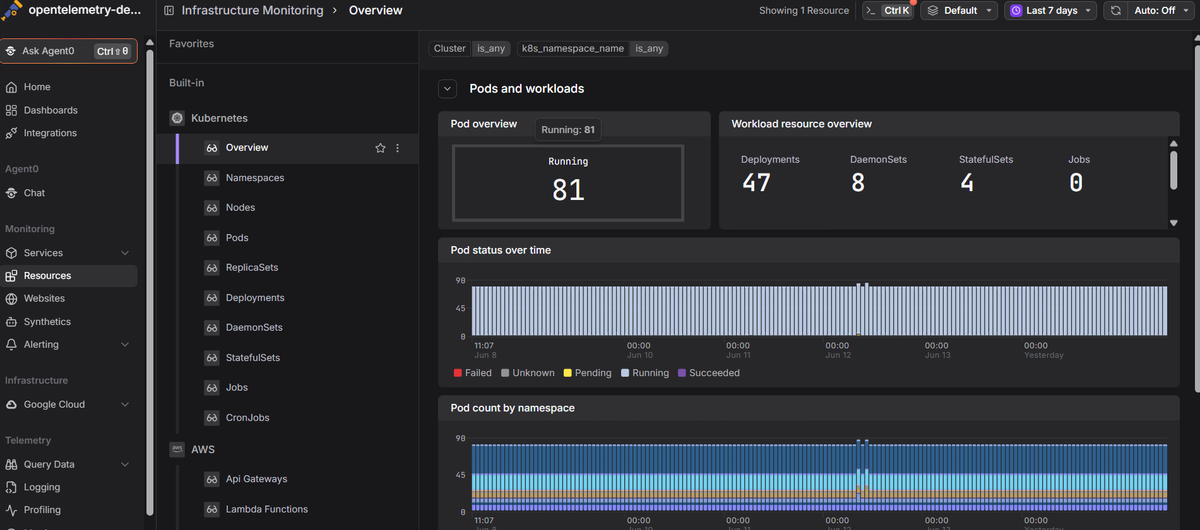
That is where most teams hit the ceiling of "managed." Your provider proves the cluster is up; it cannot tell you why a service is slow, which deploy caused a regression, or where a request died across a dozen pods. Dash0's Kubernetes monitoring is OpenTelemetry-native and built around the Dash0 Kubernetes Operator. It pulls cluster and node health together with your live logs, metrics, and distributed traces in one view, so you can diagnose the workloads the managed service has no insight into. If you want to go deeper on tooling, our guide to Kubernetes monitoring tools compares the options.
 Start a free trial to see your cluster's metrics, logs, and traces together. No credit card required.