
Helm is the package manager for Kubernetes. It bundles a set of Kubernetes manifests into one versioned unit called a chart, fills in the environment-specific values from a separate file, and installs the rendered result into your cluster as a tracked release you can upgrade or roll back with a single command.
The problem it solves is mundane and universal. A single application needs a Deployment, a Service, a ConfigMap, probably an Ingress, and a Secret or two, and you need slightly different versions of all of them for dev, staging, and production. Maintaining that by hand means copying YAML and editing it in a dozen places, which is exactly how configuration drift creeps in. Helm turns those manifests into templates and keeps the per-environment differences in one place.
Most of Helm reduces to four concepts and one workflow. Here is how it actually works, plus the Helm 4 change from November 2025 that quietly bites you on your first upgrade.
How Helm actually works
A chart is a directory with three things that matter: a templates/ folder containing Kubernetes manifests written with Go template placeholders, a values.yaml file holding the default configuration, and a Chart.yaml with metadata like the name, version, and dependencies.
When you run helm install, Helm reads the templates, substitutes the values (defaults from values.yaml, overridden by anything you pass on the command line), and produces plain Kubernetes YAML. It then sends that YAML to the cluster's API server, the same endpoint kubectl apply talks to. Finally, it records what it deployed as a release.
That last step is the part people miss. Helm does not just fire manifests at the cluster and forget about them. It stores the full state of each release, including the rendered manifests and the values used, as a Kubernetes Secret in the release's namespace. That stored history is what makes helm rollback possible: Helm knows exactly what revision 2 looked like because it kept a copy.
There is no agent running in your cluster. Since Helm 3 removed the old Tiller server component, Helm is just a CLI on your machine plus a Go library that does the work, talking directly to the Kubernetes API using your existing kubeconfig credentials. Whatever you can do with kubectl, Helm can do, and nothing more.
The four concepts you actually need
Most of Helm comes down to four nouns.
A chart is the package: the templates, defaults, and metadata that describe an application. Think of it the way you'd think of an apt or npm package, but for a whole Kubernetes application instead of a single binary.
Values are the configuration you inject into a chart. The chart ships sane defaults in values.yaml, and you override the parts that differ between environments, like the replica count, image tag, or ingress hostname, without editing the templates themselves. This is the mechanism that lets one chart serve every environment.
A release is a running instance of a chart in your cluster. Install the same chart three times and you get three independent releases, each with its own name and its own revision history. Every helm upgrade bumps the revision number, which is what you target when you roll back.
A repository is where charts are hosted, like a registry for packages. Artifact Hub, a CNCF project, is the central place to search across public chart repositories. Charts can also be stored as OCI artifacts in any container registry, which is increasingly the default.
A working example
The fastest way to see all of this is to install something. The example below uses podinfo, a small demo app built specifically for this purpose, so it won't drag in heavy dependencies.
First, add the chart repository and refresh the local index:
12helm repo add podinfo https://stefanprodan.github.io/podinfohelm repo update
Now install the chart, giving the release the name my-app:
1helm install my-app podinfo/podinfo
Helm renders the templates, applies the manifests, and reports the result:
12345NAME: my-appLAST DEPLOYED: Thu Jun 18 10:14:22 2026NAMESPACE: defaultSTATUS: deployedREVISION: 1
You can list every release Helm is tracking in the cluster:
1helm list
12NAME NAMESPACE REVISION UPDATED STATUS CHART APP VERSIONmy-app default 1 2026-06-18 10:14:22 ... deployed podinfo-6.x.x 6.x.x
To change the configuration, override a value and upgrade. This scales the deployment to three replicas without touching a single template file:
1helm upgrade my-app podinfo/podinfo --set replicaCount=3
The release is now at revision 2. If something looks wrong, roll back to the previous revision:
1helm rollback my-app 1
You can also inspect what Helm actually deployed, which is useful when a release behaves differently from what you expected:
1helm get manifest my-app
If you only want to see the rendered YAML without touching the cluster, use helm template instead. It runs the templating engine locally and prints the manifests, which is handy in CI pipelines and for debugging:
1helm template my-app podinfo/podinfo
The difference matters: helm template never contacts the API server, so it won't catch errors that only surface against a live cluster, like an invalid namespace or a missing CRD (CustomResourceDefinition).
What changed in Helm 4
Helm 4 shipped at KubeCon North America in November 2025, the first major version in six years. The headline change is how Helm applies manifests. Helm 3 used a three-way strategic merge to reconcile changes, an approach Kubernetes itself stopped using years ago. Helm 4 switches to Server-Side Apply (SSA), which moves field ownership and conflict resolution to the API server. When another controller owns a field your chart also sets, you get an explicit error instead of a silent overwrite.
The part that trips up migration plans: Helm 4 only defaults to SSA for new installations. For upgrades and rollbacks of existing releases, it keeps whatever apply method the release was originally created with. So every release you created under Helm 3 keeps using client-side apply even after you upgrade the Helm binary to v4. You opt a release into SSA explicitly with the --server-side flag. If you assumed the upgrade flipped everything to SSA at once, it didn't, and that assumption is how migrations go sideways.
A few other changes worth knowing:
- The
--waitlogic now uses the kstatus library, so Helm understands the readiness of far more resource types instead of guessing. Two annotations,helm.sh/readiness-successandhelm.sh/readiness-failure, let chart authors define exactly what "ready" means before the next resource group deploys. - The
--forceflag was renamed to--force-replace. The old name still works but emits a deprecation warning, so update your automation scripts. - The plugin system was rebuilt to support WebAssembly plugins, which run portably across operating systems and architectures. Existing plugins still work.
- Support for Kubernetes 1.15 and earlier was dropped.
If you're not ready to move, Helm 3 receives bug fixes until July 8, 2026 and security fixes until November 11, 2026. After that, you're on your own. Existing Helm 3 charts continue to work under Helm 4, so for most teams the migration is low-risk as long as you account for the SSA latching behavior above.
Common pitfalls
The biggest operational risk with Helm comes from the charts you depend on, not from Helm itself. A chart is code that someone else wrote and that runs against your cluster with your credentials. Charts can include lifecycle hooks that execute jobs during install and upgrade, and reference container images you don't control. When a popular chart's maintainer changes the rules, your deployments break.
The Bitnami catalog is the cautionary tale here. For years, half the tutorials on the internet, and probably half the production clusters, installed things with helm install ... bitnami/nginx. In August and September 2025, Broadcom moved most of the Bitnami catalog behind a paid subscription and shifted versioned images to an unsupported legacy repository. Clusters pulling those images started failing with ImagePullBackOff on the next pod reschedule. The lesson is to pin chart and image versions, and to mirror the charts and images you depend on into a registry you control rather than pulling them live from a third party at deploy time.
Another common trap is treating helm template output as a guarantee. It renders correctly but never validates against the cluster, so a chart that templates cleanly can still fail on helm install because of a missing CRD, an admission webhook rejection, or an RBAC (Role-Based Access Control) restriction. When a deploy fails, check whether the manifests are even valid against your specific cluster, not just whether they render.
Finally, Helm's handling of CRDs remains weak. Helm installs CRDs from a chart's crds/ directory on first install but does not upgrade or delete them afterward, by design, to avoid wiping custom resources. If you expect helm upgrade to update a CRD, it won't, and you'll need to apply CRD changes out of band.
Final thoughts
Helm turns a pile of Kubernetes manifests into versioned applications you can install, upgrade, and roll back, and the four concepts (charts, values, releases, repositories) carry most of the weight. The Helm 4 move to Server-Side Apply is the change to plan for, particularly the latching behavior on existing releases. Beyond that, the discipline that pays off is treating charts as the third party supply chain dependency they are: pin versions, mirror what you depend on, and know what each chart actually deploys.
Once your charts are running, the next problem is knowing whether a release is healthy after it deploys. Helm tells you a release succeeded, but not whether the application inside it is actually serving traffic, which is where you need observability across the workloads Helm just installed.
If you're running Helm already, the Dash0 Kubernetes Operator installs the same way — helm repo add and helm install. Dash0's Kubernetes monitoring is OpenTelemetry-native and surfaces cluster and workload health alongside resource metrics, real-time logs, and distributed traces, so you can confirm a Helm release is healthy and diagnose it from a single place when it isn't.
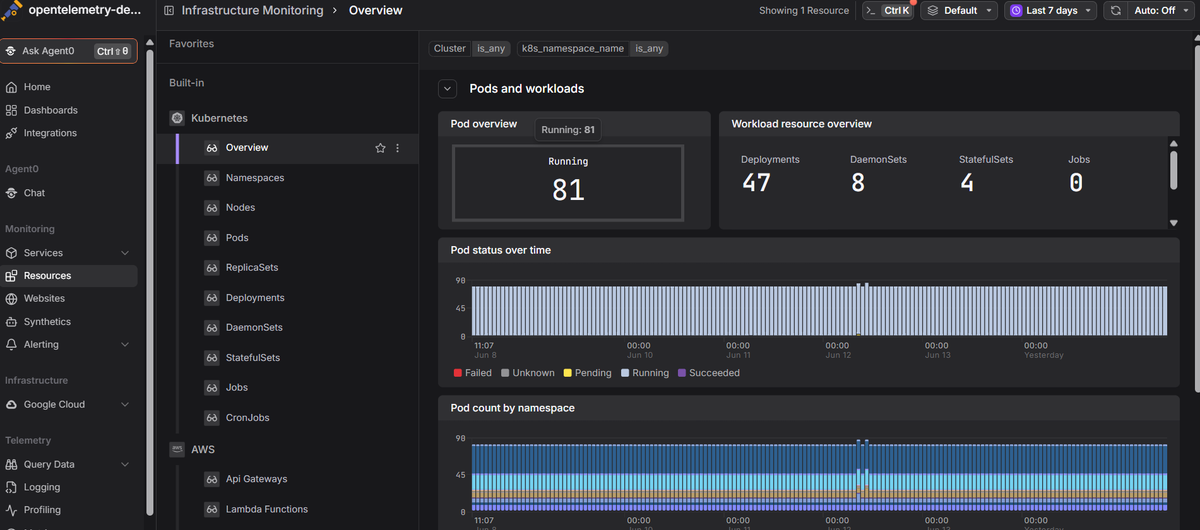 Start a free trial to see your cluster metrics, logs, and traces in one view.