
The "OpenShift vs. Kubernetes" framing is misleading, and it's worth saying that upfront. OpenShift isn't a Kubernetes competitor. It's a Kubernetes distribution, in the same way Red Hat Enterprise Linux is a distribution of Linux. The real question isn't which to pick; it's how much you want pre-integrated on top of Kubernetes, and what you're willing to pay for it.
What OpenShift adds on top of Kubernetes
Vanilla Kubernetes is an orchestration engine. It handles scheduling, scaling, and networking, but it doesn't tell you how to build container images, enforce security policies, or give your developers a usable interface. OpenShift bundles all of that into a single, opinionated platform.
The most significant architectural difference is security enforcement. Kubernetes relies on Pod Security Admission (and previously Pod Security Policies, which are deprecated) to restrict what pods can do. They're opt-in, requiring explicit configuration per namespace. OpenShift uses Security Context Constraints (SCCs), enforced by default across the entire cluster. The default restricted-v2 SCC prevents containers from running as root, drops all Linux capabilities, and requires a runtime/default seccomp profile. Your cluster is hardened before you deploy anything. The catch, which we'll get to, is that many third-party images assume root or broad capabilities and break immediately.
Beyond security, OpenShift ships with a full-featured web console, Source-to-Image (S2I) builds that produce container images directly from source code without a Dockerfile, and the Operator Lifecycle Manager (OLM) for day-two operations on stateful applications. The cluster itself upgrades through a declarative over-the-air process managed by the Cluster Version Operator. It's more automated than self-managing Kubernetes upgrades.
OpenShift is also a commercial product with Red Hat Service Level Agreements (SLAs), FIPS 140-2 (Federal Information Processing Standard) validated cryptographic modules, CIS (Center for Internet Security) benchmarks, and DISA STIG (Defense Information Systems Agency Security Technical Implementation Guide) hardening profiles. For organizations in finance, healthcare, or government, this is often the actual reason teams choose it: assembling equivalent certifications on vanilla Kubernetes takes months.
Where OpenShift creates friction
SCC friction on third-party workloads
This is the one that bites teams hardest, and most comparisons underreport it. The default restricted-v2 SCC is strict enough that a significant portion of official Docker Hub images fail on OpenShift without modification. Engineers spend days debugging why a microservice that works on every other cluster won't start, only to find it's trying to write to a path it doesn't own, or run as UID 0. Every new third-party dependency becomes a potential SCC negotiation with the platform team. It's not a hypothetical edge case; platform engineers on OpenShift clusters deal with this routinely.
Upgrade complexity
OpenShift bundles over 100 open-source projects into a single versioned release. Upgrades must follow strict minor-version sequences; skipping one can break Custom Resource Definitions or Operators in ways that are difficult to recover from. Platform teams treat upgrades as planned events, not routine maintenance. In 2026, this is one of the most-cited operational frustrations: significant engineering time goes to Day 2 platform work instead of shipping product.
Resource overhead and cost
OpenShift's additional components (the console, integrated monitoring stack, internal registry, and OLM) consume real compute and memory. On a small cluster, the overhead is noticeable. The enterprise OpenShift Container Platform also requires a Red Hat subscription that scales with node count. For small teams, that cost is hard to justify against EKS, GKE, or AKS. (The community version, OKD, is free, but you lose the support and compliance story.)
Vendor lock-in
OpenShift has historically introduced proprietary abstractions: DeploymentConfigs (deprecated since 4.14, though still present on many production clusters that haven't migrated), its own build system, and tight integration with the Red Hat ecosystem. Migrating off means replacing those abstractions with Cloud Native Computing Foundation (CNCF)-native equivalents. Following VMware's acquisition by Broadcom, enterprise architects are scrutinizing this kind of platform dependency considerably more carefully than they were two years ago.
Where vanilla Kubernetes creates friction
Kubernetes isn't a platform—it's a framework for building one. Choosing it means accepting responsibility for everything OpenShift pre-integrates.
On a fresh cluster, you need your own ingress controller, certificate management, secrets management, container registry, CI/CD system, security policy enforcement, logging stack, and monitoring stack. None of that is optional in production. The assembly work is real, and so is maintaining it afterward.
The security gap deserves particular attention. Kubernetes allows root containers by default unless you've configured Pod Security Admission across namespaces. Most teams harden clusters incrementally, which means the early days of a Kubernetes deployment often have weaker security posture than OpenShift from day one. Running Kubernetes well also requires deep platform expertise. Without dedicated SREs or platform engineers, cluster operations eat more time than teams expect.
When to use OpenShift vs. Kubernetes
If you're operating under HIPAA (Health Insurance Portability and Accountability Act), PCI-DSS (Payment Card Industry Data Security Standard), or FedRAMP (Federal Risk and Authorization Management Program), OpenShift is often the right call, and the math is pretty concrete. One team migrating from on-premises OpenShift to Azure found that matching their existing compliance posture on Azure Kubernetes Service would have required four to six months of security hardening. OpenShift provided it by default. If demonstrating security controls to auditors is a recurring requirement, that compression is real and valuable.
OpenShift also fits organizations with distributed developer teams without deep Kubernetes expertise. The web console, S2I builds, and opinionated defaults reduce the number of decisions developers need to make to ship. If you're already invested in the Red Hat ecosystem (Red Hat Enterprise Linux, Ansible), the integration is coherent and the operational overhead easier to absorb.
For teams where compliance isn't the primary driver, a managed Kubernetes service (EKS, GKE, or AKS) is usually the better path. These have closed most of the operational gap with OpenShift: automated control plane management, in-place upgrades, integrated monitoring, without proprietary abstractions or subscription costs. If you need specific ingress controllers, service mesh configurations, or secrets backends that conflict with OpenShift's defaults, managed Kubernetes gives you that flexibility. You pay for it in assembly time and platform expertise, but you own the stack and stay close to upstream tooling.
The compliance question
The platform decision often comes down to one question: do you need OpenShift's compliance posture ready on day one, or can you build it?
If you need it immediately and can't spend months hardening from scratch, OpenShift's value is concrete. If compliance isn't a first-order constraint, managed Kubernetes has made the DIY path much more viable than it was a few years ago, without the cost or the lock-in risk.
Final thoughts
OpenShift is a purchase decision with a vendor behind it. Kubernetes is a foundation you build on. The teams that get the most out of OpenShift are the ones where compliance requirements are non-negotiable and a dedicated platform team can absorb the operational complexity. For everyone else, managed Kubernetes is almost always the better starting point.
Once you're running either platform in production, visibility into what's happening inside your clusters is what separates fast incident response from guesswork. Scheduling decisions, resource pressure, and deployment failures are much easier to diagnose with proper observability in place. If you're starting from scratch on instrumentation, the Dash0 guide to Kubernetes observability with the OpenTelemetry Operator is a practical starting point.
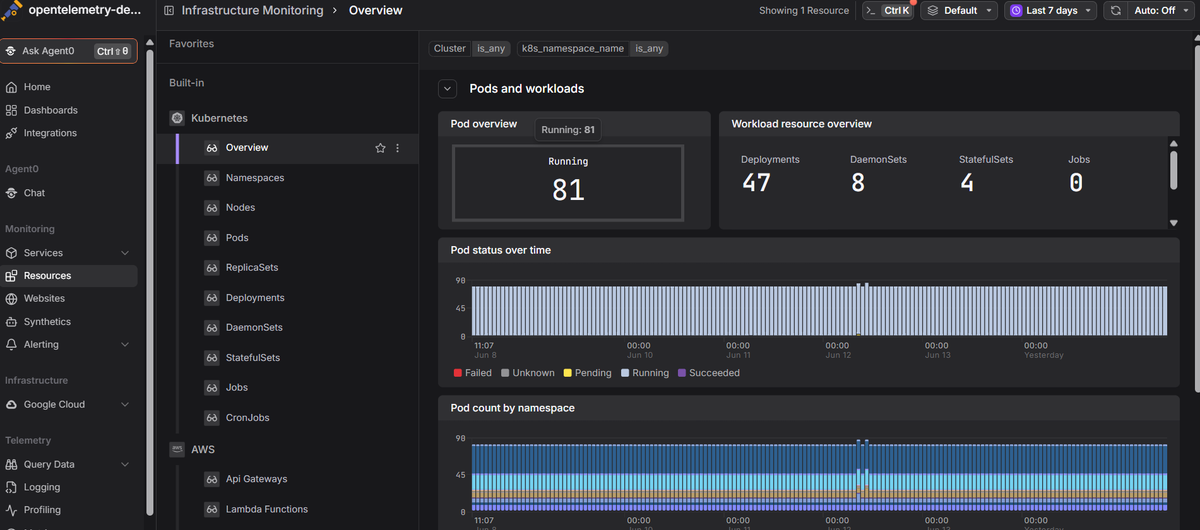
Dash0's Kubernetes monitoring works across both OpenShift and vanilla Kubernetes, surfacing pod health, resource metrics, and real-time logs and distributed traces in a single view, built on OpenTelemetry, using the OpenTelemetry Collector rather than a proprietary agent.
 Start a free trial to see your cluster's health, performance, and traces in one place. No credit card required.