Dash0 acquires Polar Signals

Monitor PostgreSQL database performance, query execution, and resource utilization. Track connection pools, disk usage, replication lag, and database health.
PostgreSQL is a powerful, open-source relational database system renowned for its reliability, feature robustness, and performance. It supports advanced SQL features, complex queries, and provides extensibility with custom data types, operators, and functions.
PostgreSQL exposes comprehensive metrics through its built-in statistics views that can be collected using the OpenTelemetry Collector's PostgreSQL receiver. This integration provides deep visibility into database performance, query execution, connection management, and resource utilization.
Before setting up PostgreSQL monitoring, ensure:
pg_stat_statements extension is enabled for query-level metrics (optional but recommended)For Kubernetes environments, we recommend using a PostgreSQL operator for production-ready deployments. Here's an example using CloudNativePG, which provides comprehensive PostgreSQL clusters with built-in monitoring capabilities.
Note: This is just one example of a production setup. You can use any PostgreSQL deployment method (including other operators like Zalando PostgreSQL Operator, CrunchyData PGO, or manual deployments) as long as the PostgreSQL receiver can connect to your database.
helm repo add cnpg https://cloudnative-pg.github.io/charts
helm repo update
helm upgrade --install cnpg \
  --namespace cnpg-system \
  --create-namespace \
cnpg/cloudnative-pgHere's a simple example that relies on CloudNativePG's defaults:
apiVersion: postgresql.cnpg.io/v1
kind: Cluster
metadata:
  name: postgresql
spec:
  instances: 3

  # Enable monitoring with pg_stat_statements
  postgresql:
    shared_preload_libraries:
      - "pg_stat_statements"

  # Create monitoring user on initialization
  bootstrap:
    initdb:
      postInitApplicationSQL:
        - CREATE EXTENSION IF NOT EXISTS pg_stat_statements;
        - CREATE USER dash0_monitor WITH PASSWORD 'monitor_password'; # Use secrets in production!
        - GRANT pg_monitor TO dash0_monitor;
        - GRANT SELECT ON pg_stat_statements TO dash0_monitor;

  # Storage - only specify what you need to change
  storage:
size: 10Gi # Default is 1GiFor production environments:
instances: 3 for high availabilityFor non-Kubernetes environments or custom setups:
For comprehensive query monitoring, enable the pg_stat_statements extension:
Add to your postgresql.conf:
shared_preload_libraries = 'pg_stat_statements'
pg_stat_statements.max = 10000
pg_stat_statements.track = all
track_io_timing = onConnect to your database and run:
CREATE EXTENSION IF NOT EXISTS pg_stat_statements;For security best practices, create a dedicated monitoring user with the built-in pg_monitor role:
-- Create monitoring user
CREATE USER dash0_monitor WITH PASSWORD 'secure_password';

-- Grant the pg_monitor role for comprehensive monitoring access
GRANT pg_monitor TO dash0_monitor;

-- If using pg_stat_statements for top query collection
CREATE EXTENSION IF NOT EXISTS pg_stat_statements;
GRANT SELECT ON pg_stat_statements TO dash0_monitor;The OpenTelemetry Collector uses the PostgreSQL receiver to collect metrics from PostgreSQL statistics views. Add the following configuration to your OpenTelemetry collector:
Add the PostgreSQL receiver to your collector configuration:
receivers:
  postgresql:
    endpoint: postgresql.your-namespace.svc.cluster.local:5432
    databases:
      - your_database
    username: dash0_monitor
    password: monitor_password # Use ${env:POSTGRES_PASSWORD} in production!
    collection_interval: 10s
    tls:
      insecure: true
      insecure_skip_verify: true
    initial_delay: 1s
For more options see the PostgreSQL receiver documentation
Deploy the OpenTelemetry Collector with the PostgreSQL receiver configuration. For detailed deployment instructions, see our other integrations for deploying the OpenTelemetry Collector:
After configuring the collector, verify that metrics are being collected:
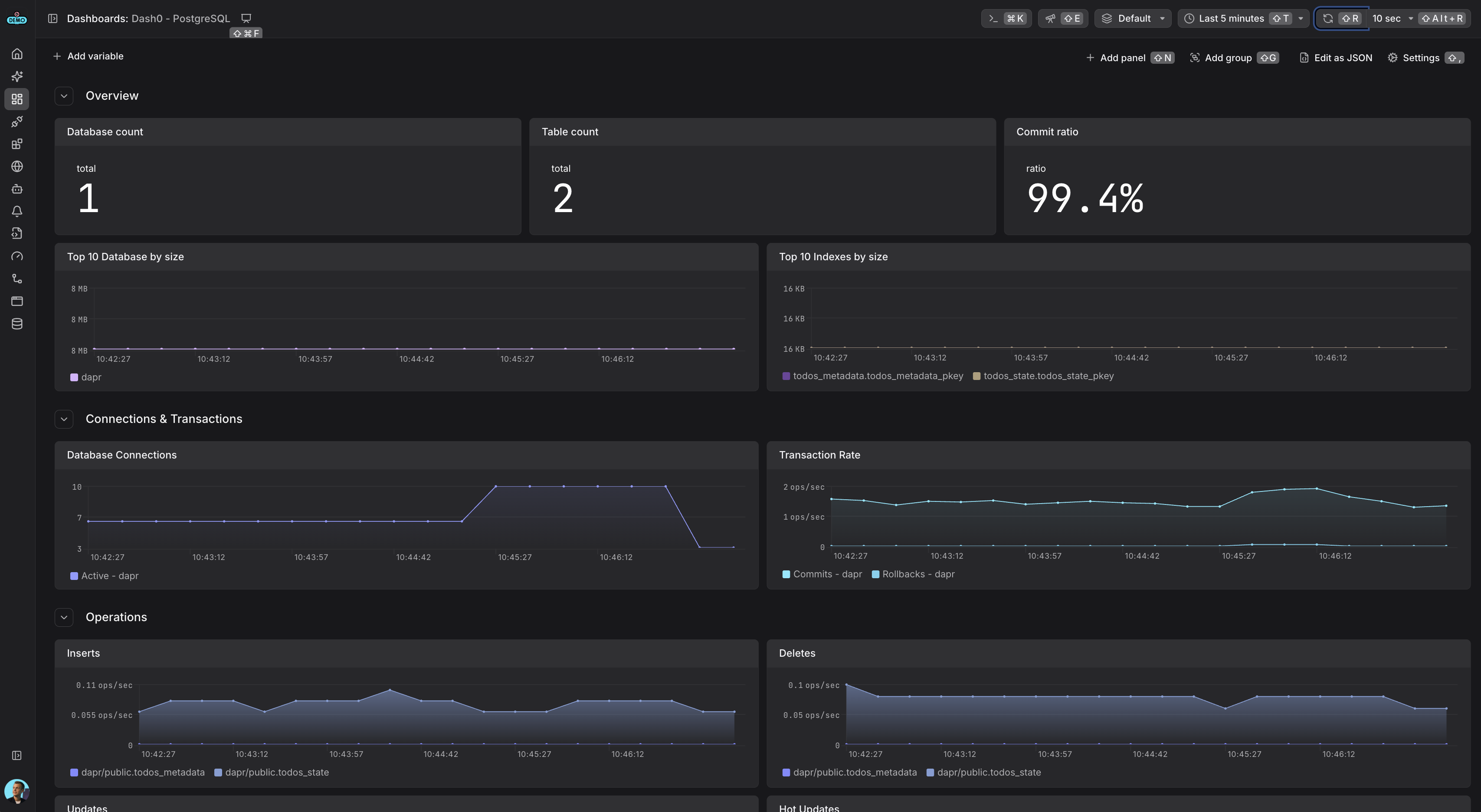
postgresql.*postgresql.backends (active connections)postgresql.connection.max (configured max connections)postgresql.db_size (database size in bytes)postgresql.commits (transaction commits)postgresql.rollbacks (transaction rollbacks)PostgreSQL monitoring dashboard showing database metrics, connection health, and performance statistics