Dash0 acquires Polar Signals

Monitor Karpenter node provisioning and lifecycle with OpenTelemetry metrics to understand autoscaling behavior, node churn, and cloud cost efficiency.
Karpenter monitoring dashboard covering node lifecycle, scheduling duration, disruption, and NodePool resource usage
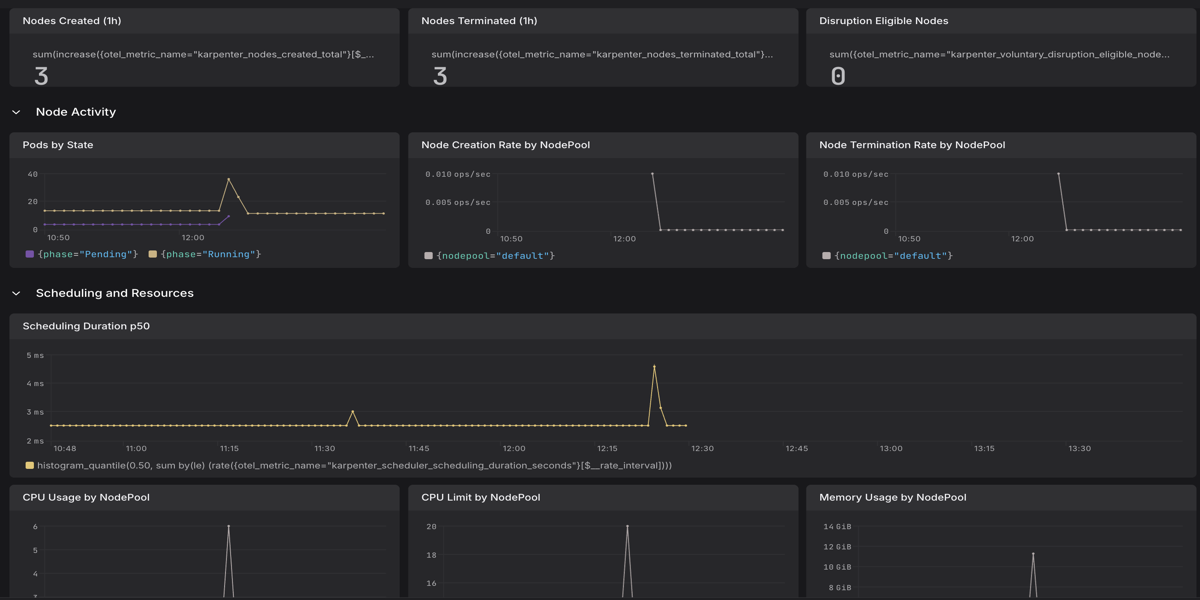
Karpenter is an open-source, high-performance Kubernetes node autoscaler that provisions right-sized compute nodes in response to unschedulable pods. Unlike the Cluster Autoscaler, Karpenter works directly with your cloud provider to launch nodes that exactly match workload requirements, reducing both scheduling latency and cloud spend.
This Dash0 integration surfaces Karpenter's Prometheus metrics via OpenTelemetry so you can observe node provisioning rates, disruption events, pod churn, and scheduling latency — giving you the insight needed to tune NodePools and consolidation policies effectively.
For more information, visit the Karpenter Project Page.
Optimize Kubernetes infrastructure costs and reliability with this integration:
This guide covers two observability signals for Karpenter:
8080 in the kube-system namespace. The OpenTelemetry Collector scrapes this and forwards metrics to Dash0 using the karpenter_ metric prefix, covering node provisioning, disruption, pod scheduling, and resource allocation.filelog receiver.Before setting up Karpenter monitoring, ensure:
kubectl get pods -n kube-system -l app.kubernetes.io/name=karpenter shows healthy pods)kube-system namespacekube-system namespaceYou'll need an OpenTelemetry Collector deployed. Consider using:
Helm Chart for The OpenTelemetry Collector
Karpenter exposes Prometheus metrics on port 8080 and creates a Kubernetes Service named karpenter in kube-system. Configure the OpenTelemetry Collector's Prometheus receiver to scrape it:
If you run Karpenter with multiple replicas, only the leader pod handles provisioning. Service scraping may route to a non-leader pod and return incomplete activity metrics. In that case, use pod-level scraping instead:
If you are using the Dash0 Operator, first create a Dash0Monitoring resource in the kube-system namespace to enable Prometheus scraping. The instrumentWorkloads.mode: none setting is required because the operator does not support auto-instrumentation of system namespaces:
For more options, see the Prometheus Receiver documentation.
Karpenter controllers write structured JSON logs using the Zap logger through controller-runtime. Log lines include fields like the controller name, reconciled object, log level, and message — making them straightforward to filter in Dash0.
Dash0 Operator
If you applied a Dash0Monitoring resource to the kube-system namespace (as shown in the Collector Configuration section above), the Dash0 Operator automatically collects pod logs from all Karpenter controllers in that namespace. No additional configuration is required.
OTel Operator or Helm Chart
To collect Karpenter logs manually, add a filelog receiver targeting the kube-system namespace and filtering for Karpenter pods:
To increase log verbosity for debugging, set the LOG_LEVEL environment variable on the Karpenter deployment to debug:
Metrics
karpenter targetkarpenter_karpenter_nodes_created_total and karpenter_scheduler_scheduling_duration_seconds only appear after Karpenter has provisioned at least one node. Deploy a workload that requests more resources than the existing nodes provide to trigger provisioning.
Logs
namespace: kube-system and k8s.deployment.name: karpenterKey metrics to verify:
| Metric | Description |
|---|---|
karpenter_nodes_created_total | Total nodes created by Karpenter |
karpenter_scheduler_scheduling_duration_seconds | Duration of scheduling simulations in seconds |
karpenter_voluntary_disruption_eligible_nodes | Nodes currently eligible for disruption by Karpenter |
karpenter_pods_state | Pod counts by scheduling state |
karpenter_nodepools_usage | Resource usage per NodePool (CPU, memory, pods) |