
The confusion here usually comes from "ingress" meaning two different things. There's the
Kubernetes Ingress resource, which routes external HTTP/HTTPS traffic into your cluster, and
then there's ingress as a direction — any traffic entering the cluster from outside. Egress is the
other direction. It has no dedicated resource; you control it through NetworkPolicy rules.
The conceptual layer: ingress and egress as traffic directions
Ingress traffic is anything entering the cluster from the outside world: a browser request, a webhook payload, a deployment pipeline. Pods are isolated by default. Nothing reaches them until you explicitly expose them.
Egress is the reverse. Traffic leaves the cluster when your pods reach out to something: a service calling a payment API, a backend querying an external database. By default, pods are not isolated for egress. They can reach anything on the network unless you restrict them.
That asymmetry is where most teams slip up. Ingress requires configuration to open access; egress requires configuration to close it. Most teams configure ingress carefully and leave egress wide open.
The Kubernetes Ingress resource
The Ingress API object manages external HTTP and HTTPS access to services inside your cluster.
Instead of giving each service its own load balancer, an Ingress routes traffic to multiple
services from a single entry point based on hostnames and URL paths.
To use it, you need the Ingress resource (which defines the routing rules) and an Ingress
controller that reads those rules and configures the actual proxy. Kubernetes ships the API but
not the controller. You install one separately. NGINX, Envoy, and Traefik are common choices.
Here's a basic Ingress routing traffic to two services by URL path:
123456789101112131415161718192021222324apiVersion: networking.k8s.io/v1kind: Ingressmetadata:name: app-ingressspec:ingressClassName: nginxrules:- host: api.example.comhttp:paths:- path: /userspathType: Prefixbackend:service:name: users-serviceport:number: 80- path: /orderspathType: Prefixbackend:service:name: orders-serviceport:number: 80
Once applied, run kubectl describe ingress app-ingress to verify the rules loaded and the
controller assigned an external address:
123456789101112Name: app-ingressNamespace: defaultAddress: 34.120.0.1Rules:Host Path Backends---- ---- --------api.example.com /users users-service:80/orders orders-service:80Events:Type Reason Age From Message---- ------ ---- ---- -------Normal Sync 10s nginx-ingress-controller Scheduled for sync
If the Address field is still empty after a couple of minutes, the controller hasn't picked up
the resource. Check its logs for sync errors and mismatched ingressClassName values:
1kubectl logs -n ingress-nginx -l app.kubernetes.io/name=ingress-nginx
The Ingress API is frozen, and ingress-nginx is gone
The Kubernetes project has frozen the Ingress API. No new features are coming. The recommended
path for new clusters is Gateway API,
which replaces Ingress with a more expressive set of resources: Gateway, HTTPRoute,
GRPCRoute, and others. Gateway API v1.0 became generally available in 2023 and is where all
active development is happening.
More urgently: ingress-nginx was retired in March 2026. It no longer receives bug fixes or
security patches. If your cluster depends on it, the official ingress-nginx migration
guide covers the
transition, and the ingress2gateway tool handles most of the resource conversion automatically.
Envoy Gateway, Traefik, and
kgateway (Cloud Native Computing Foundation sandbox) are common replacements.
If you're migrating off ingress-nginx, Dash0's guide to observing Kubernetes ingress controllers
with OpenTelemetry
covers what to instrument and what to watch during the transition.
To be clear: the Ingress API itself is not being removed. If you have existing Ingress resources
running on a controller that isn't ingress-nginx, there's no immediate pressure to change
anything.
Controlling egress with NetworkPolicy
There's no Egress API object. Egress is managed through NetworkPolicy resources. By default,
a pod in a namespace with no policies can reach any destination, internal or external. For
anything handling sensitive data, that default is a liability.
A NetworkPolicy restricting a backend pod to only reach a payment API over HTTPS looks like
this:
123456789101112131415161718apiVersion: networking.k8s.io/v1kind: NetworkPolicymetadata:name: backend-egressnamespace: productionspec:podSelector:matchLabels:app: backendpolicyTypes:- Egressegress:- to:- ipBlock:cidr: 203.0.113.0/24 # Payment provider IP rangeports:- protocol: TCPport: 443
Once applied, those backend pods can only connect to that CIDR (Classless Inter-Domain Routing)
block on port 443. Everything else is dropped. You can combine ingress and egress rules in the same NetworkPolicy if you need
to control both directions for the same pod set.
To deny all outbound traffic from a pod, add an Egress policyType with no egress entries. The
absence of rules is intentional:
1234567spec:podSelector:matchLabels:app: restricted-servicepolicyTypes:- Egress# No egress rules = all outbound blocked
One thing to sort out before writing any of this: NetworkPolicy enforcement requires a CNI
(Container Network Interface) plugin that supports it. Calico and Cilium both do. Flannel on its
own does not — apply a NetworkPolicy on a Flannel-only cluster and it will be silently ignored,
with no indication anything is wrong. (Canal, a Flannel + Calico combination, does enforce
policies.)
Common pitfalls
The naming collision. When someone says "ingress isn't working," they might mean the Ingress
API object, the controller process, or just inbound traffic in general. NetworkPolicy resources
add another layer: they use ingress and egress as rule type labels inside policyTypes. When
debugging, be specific about which layer you mean. "The nginx-ingress-controller pod isn't
syncing" is a useful problem statement; "ingress is broken" is not.
Egress being open by default. Most networking guides focus on opening ingress access, so egress ends up an afterthought until it isn't. A compromised pod can freely call external infrastructure if no egress policies are in place. Egress policies belong in your baseline cluster setup, not added retroactively after an incident.
NetworkPolicy rules are additive, not ordered. If multiple policies select the same pod, the allowed traffic is the union of all matching rules. There's no explicit deny that overrides an allow from another policy. If access isn't being blocked the way you expect, check whether a broader policy in the same namespace is quietly permitting it.
IP rewriting at the load balancer. Some cloud load balancers rewrite the source IP of incoming
traffic before it reaches the cluster. When that happens, ingress NetworkPolicy rules that
filter on source IP may not work as expected: the policy sees the load balancer's IP, not the
original client's. This varies by cloud provider and CNI. Verify source IP preservation in your
provider's docs before relying on it.
Final thoughts
Ingress and egress are the two sides of the cluster boundary. Ingress gets more attention because it's what makes applications accessible, but egress is where you'll get burned if you're not paying attention. An uncontrolled egress path is a data exfiltration risk, and it's a much easier problem to prevent than fix after the fact.
If you're building new infrastructure, use Gateway API
instead of the frozen Ingress API. Write egress NetworkPolicy rules early. And then actually
verify that your policies behave the way you expect once load balancers and CNI plugins are in
the mix, because rules that look correct in YAML don't always survive contact with production
infrastructure.
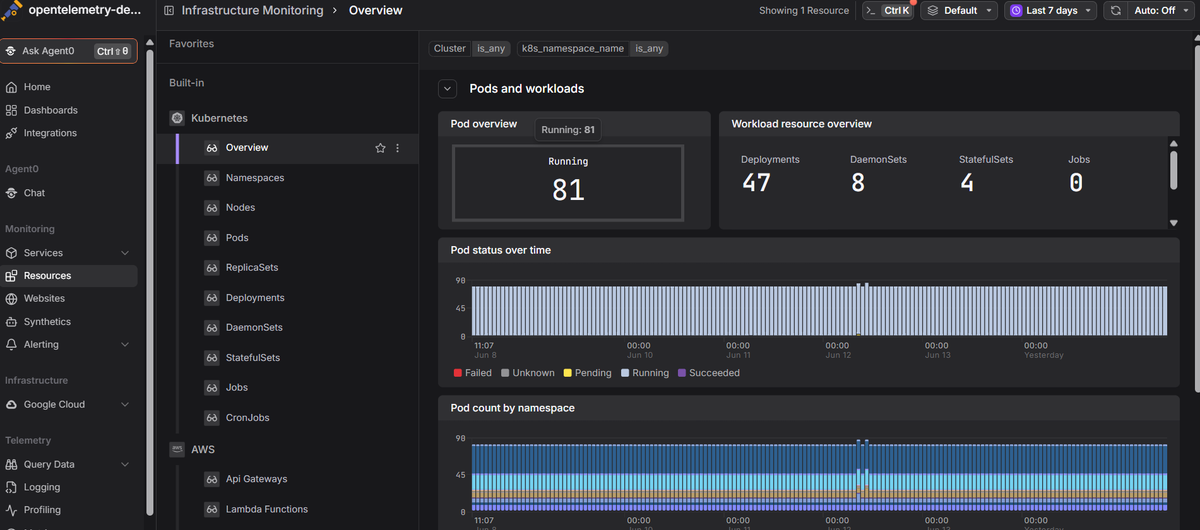
Dash0's Kubernetes monitoring shows you actual
traffic crossing your cluster boundary alongside pod health, resource metrics, logs, and
distributed traces, so unexpected external connections show up in your dashboards before they
show up in an incident report.
 Start a free trial to see your cluster's metrics, logs, and
traces in one place. No credit card required.
Start a free trial to see your cluster's metrics, logs, and
traces in one place. No credit card required.