
If you're running more than one team, application, or environment on a shared cluster, namespaces are how Kubernetes keeps things from colliding. A namespace is a logical partition inside a cluster that gives resources their own scope for names, access controls, and resource limits. Two deployments named api can coexist without conflict as long as they live in different namespaces.
Namespaces are not process isolation, though. They don't create separate network stacks or kernel boundaries. They create an organizational and policy boundary that Kubernetes enforces through its API, which is less exciting than it sounds but exactly what you need for multi-team clusters.
What a namespace actually does
Putting a resource inside a namespace does three things, and they're worth understanding separately because they get conflated a lot.
Names get scoped. You can have a Secret named db-credentials in staging and another one with the same name in production, and Kubernetes treats them as entirely separate objects. Without namespaces, name collisions across teams become a real operational headache at scale.
Role-based access control (RBAC) bindings get scoped too. A RoleBinding in the payments namespace only grants permissions within that namespace. This is how most teams give developers access to their own workloads without letting them anywhere near production or system components.
Resource quotas get scoped. A ResourceQuota attached to a namespace caps how much CPU, memory, and how many objects (pods, services, secrets) that namespace can consume. That's how platform teams prevent one badly-behaved tenant from starving the rest of the cluster. If you want to see what happens when limits aren't set and a container runs out of memory, the Kubernetes OOMKilled guide covers that in detail.
The namespaces Kubernetes ships with
Every cluster starts with four. Run kubectl get namespaces to see them:
1kubectl get namespaces
12345NAME STATUS AGEdefault Active 5dkube-node-lease Active 5dkube-public Active 5dkube-system Active 5d
kube-system is where Kubernetes runs its own components: CoreDNS, kube-proxy, and — in self-hosted clusters — static pods for the scheduler and controller manager. In managed clusters (GKE, EKS, AKS), the control plane runs outside your cluster entirely, so you'll mainly see CoreDNS and CNI pods there. Don't put your workloads in kube-system and don't modify what's already in it.
kube-node-lease holds Lease objects that each node uses to send heartbeats to the control plane. You'll rarely look at this namespace directly.
kube-public is readable by all clients, including unauthenticated ones. It exists for a specific convention (cluster discovery data), not as a general-purpose public bucket.
default is where everything goes when you don't specify a namespace. Fine for quick experiments, but you shouldn't run production workloads there. The name has no semantic meaning and RBAC policies applied to default tend to sprawl.
Creating a namespace
The imperative way:
1kubectl create namespace payments
1namespace/payments created
Or declaratively, which is what you want for anything tracked in version control:
1234apiVersion: v1kind: Namespacemetadata:name: payments
1kubectl apply -f namespace.yaml
1namespace/payments created
To deploy a resource into that namespace, add namespace: payments to the resource's metadata block, or pass --namespace=payments to kubectl. If you're working in one namespace for an extended session, you can set it as the current default so you stop typing -n constantly:
1kubectl config set-context --current --namespace=payments
All kubectl commands in this context will now target payments.
Cross-namespace DNS
Services within the same namespace can reach each other by short name. A service named order-service in payments is reachable at order-service from any other pod in payments.
Reaching a service in a different namespace requires the full DNS form:
1<service-name>.<namespace>.svc.cluster.local
So from the shipping namespace, the same service becomes order-service.payments.svc.cluster.local. With default cluster DNS settings (ndots: 5 and standard CoreDNS search domains), you can often drop the .svc.cluster.local suffix and use order-service.payments — but the full form is unambiguous and safer if your cluster uses a non-default DNS configuration. This is the gotcha that bites engineers most often: a service works fine in testing, then silently fails after a cross-namespace deploy because the DNS name changed.
What namespaces don't isolate
Namespaces are a Kubernetes API concept, not a kernel or network concept. By default, a pod in staging can open a TCP connection to a pod in production; the namespace boundary doesn't stop it. If you need network isolation between namespaces, you have to add NetworkPolicy resources explicitly.
Cluster-scoped resources (Nodes, PersistentVolumes, StorageClasses, ClusterRoles) exist outside any namespace entirely. You can list and (depending on RBAC) modify them from any namespace.
For workloads that need stronger isolation guarantees, look at virtual clusters or separate physical clusters.
Common pitfalls
Staying in default. It's the path of least resistance, but it means your RBAC policies, resource quotas, and network policies all need to be written carefully to avoid affecting everything. Most platform teams regret not enforcing a namespace-per-team convention from day one.
Namespaces stuck in Terminating. Deleting a namespace is asynchronous. If a custom resource in the namespace has a finalizer that never resolves, the namespace hangs in Terminating indefinitely. This is more common than it should be. The fix is to find the stuck resource and patch out its finalizers, but kubectl get all -n <namespace> won't show custom resources. Run kubectl api-resources --verbs=list --namespaced -o name to get every resource type, then query each one.
Confusing namespace isolation with security isolation. A developer who can create pods in a namespace can do a lot of damage if PodSecurityAdmission isn't configured. Namespaces are a boundary for policy application, not a security perimeter on their own.
Cross-namespace DNS surprise. If you're copying a service manifest from one namespace to another and it references other services by short name, those references will silently resolve to the wrong services, or fail entirely. Always audit service-to-service references when moving resources between namespaces.
Final thoughts
Most people ignore namespaces until they have to. By then they're already doing painful cleanup: renaming resources, reworking RBAC policies, untangling default from things it was never supposed to hold. Setting up a sensible namespace structure early is one of those boring decisions that pays off every time you onboard a new team or spin up a new environment.
Once your namespaces are set up, the next question is what's actually happening inside them. Dash0's Kubernetes monitoring shows pod health, resource utilization, and real-time logs per namespace, so you can see what a team's workloads are doing without sifting through cluster-wide noise. The Kubernetes monitoring docs cover how to enable per-namespace monitoring with the Dash0 operator.
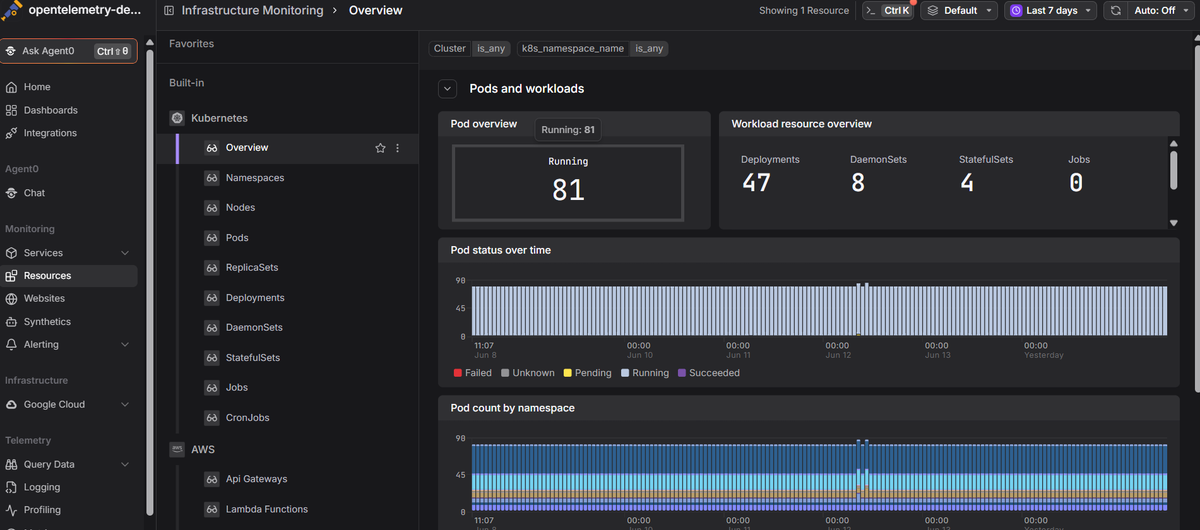 Start a free trial to see your cluster's namespaces, metrics, logs, and traces in one view. No credit card required.