vLLM ships with OpenTelemetry instrumentation built in, but wiring it up for production requires more than passing a single flag. Standard APM tells you a request was slow. It won't tell you whether the latency came from KV cache preemptions, scheduler queue pressure, a long prefill phase, or a decode bottleneck. Those distinctions require inference-specific signals: cache utilization, time to first token, preemption rate, queue depth.
This post covers how to collect those signals using the OTel Collector and Dash0 as the observability backend, what each signal means in practice, and how to use them for capacity planning and latency debugging. The full working example (a Docker Compose stack with a FastAPI RAG app, vLLM server, and OTel Collector) is in the dash0-examples repository.
Why LLM inference observability is its own problem
A slow HTTP service and a slow LLM inference server look the same from the outside. Both show elevated p99 latency, timeouts, and degraded UX. The causes are completely different, and so are the fixes.
With a standard service, high latency usually points to an upstream dependency, a slow query, or resource saturation. You look at your spans, find the slow component, and fix it.
For vLLM, latency has distinct phases. Scheduling, prefill, and decode behave differently under load and require different tuning strategies. KV cache pressure causes preemption events that degrade throughput without showing up as errors. Time to first token and time per output token are independent metrics that can diverge significantly under batched workloads. Queue depth tells you whether you're approaching capacity before users start noticing.
None of that is visible without LLM-specific instrumentation, and none of it maps cleanly to standard HTTP or RPC semantics. vLLM's OpenTelemetry integration addresses this by exposing distributed traces for per-request visibility and a Prometheus-compatible metrics endpoint for the inference-specific signals you need for dashboards and alerting.
What vLLM emits
Traces
vLLM exports OTel spans for each inference request when the --otlp-traces-endpoint flag is set. OTel support is an optional dependency. Install it with pip install vllm[otel], which pulls in opentelemetry-sdk, opentelemetry-api, opentelemetry-exporter-otlp, and opentelemetry-semantic-conventions-ai (all >=1.26.0). Without it, the flag is silently ignored.
The span attributes are defined in vLLM's own SpanAttributes class in vllm/tracing/utils.py. The code comment there says it directly: these are "copied from OTel semantic conventions to avoid version conflicts." vLLM deliberately pins its own attribute names rather than tracking the evolving OTel GenAI semconv spec. This is intentional stability. It also means vLLM does not emit OTel span events at all. The tracing is entirely attribute-based and does not capture prompt or completion content.
Span attributes
| Attribute | What it tells you |
|---|---|
| gen_ai.request.model / gen_ai.response.model | What model handled the request |
| gen_ai.usage.prompt_tokens | Input token count, for cost and capacity tracking |
| gen_ai.usage.completion_tokens | Output token count |
| gen_ai.latency.e2e | Full request duration |
| gen_ai.latency.time_to_first_token | TTFT, the most user-visible latency signal for streaming applications |
| gen_ai.latency.time_in_queue | Time waiting before execution started; rising values signal capacity pressure before latency visibly degrades |
vLLM also emits a full set of internal latency breakdowns (gen_ai.latency.time_in_model_prefill, gen_ai.latency.time_in_model_decode, gen_ai.latency.time_in_model_forward, and others). These are useful for debugging individual slow traces but not needed in dashboards.
One naming difference to be aware of: vLLM uses gen_ai.usage.prompt_tokens and gen_ai.usage.completion_tokens, not the input_tokens / output_tokens names in the current OTel GenAI semconv spec. The gen_ai.latency.* namespace is also vLLM-specific. These are the exact names you will query in Dash0.
Resource attributes
Resource attributes travel with every span from the process. The ones worth setting explicitly and the ones vLLM adds automatically:
| Attribute | Source |
|---|---|
| service.name | Set via OTEL_SERVICE_NAME. The primary attribute for filtering in Dash0 |
| service.version | Set via OTEL_SERVICE_VERSION |
| deployment.environment.name | Set via the Collector's resource processor |
| vllm.instrumenting_module_name | Added by vLLM automatically |
| vllm.process_id | Added by vLLM automatically |
| vllm.process_kind / vllm.process_name | Added automatically on GPU worker subprocesses |
Set OTEL_SERVICE_NAME, OTEL_SERVICE_VERSION, and deployment.environment.name explicitly. These are what you will filter by in Dash0. Note that deployment.environment.name is the current attribute name as of OTel semantic conventions 1.27; the older deployment.environment still works in most tools but is deprecated.
Trace propagation
vLLM reads W3C traceparent context from both HTTP request headers and environment variables. The environment variable path is how it propagates context to its own GPU worker subprocesses: when a request arrives, the main process injects traceparent into the environment before spawning workers, so all worker spans link back to the same trace. If your application code creates a span and injects into the outbound request headers, the vLLM span becomes a child of yours and the GPU worker spans become children of that, giving you a single trace covering the full request path.
| Metric | Type | What it tells you |
|---|---|---|
| vllm:e2e_request_latency_seconds | Histogram | Full request latency. Watch p95/p99; averages hide long-tail issues |
| vllm:time_to_first_token_seconds | Histogram | Time until the first token streams. Most important latency signal for interactive apps |
| vllm:time_per_output_token_seconds | Histogram | Per-token decode latency, useful for detecting decode-phase bottlenecks |
| vllm:inter_token_latency_seconds | Histogram | Time between consecutive tokens, directly user-visible in streaming UIs |
| vllm:prompt_tokens_total | Counter | Cumulative input tokens. Use rate() for tokens/second |
| vllm:generation_tokens_total | Counter | Cumulative output tokens. Primary capacity metric for GPU sizing |
| vllm:gpu_cache_usage_perc | Gauge | KV cache fill percentage. Approaching 1.0 means preemptions are imminent |
| vllm:num_requests_waiting | Gauge | Queue depth. Rising before latency degrades is your earliest capacity warning |
| vllm:num_preemptions_total | Counter | Requests evicted from memory. A growing rate correlated with high cache usage means your configuration needs adjustment |
| vllm:prefix_cache_hit_rate | Gauge | Prefix cache efficiency. A low rate is a tuning opportunity if you are serving repeated system prompts or RAG with shared context |
When the Collector scrapes the /metrics endpoint, Prometheus automatically adds job and instance labels. Additional context like environment, cluster, or namespace requires explicit configuration of the Collector's resource processor or the Kubernetes attributes processor.
The pipeline
The collection architecture keeps things OTel-native end to end. vLLM pushes traces to the OTel Collector via OTLP/gRPC. The Collector scrapes vLLM's /metrics endpoint using the Prometheus receiver. Both signals flow through the same pipeline and are exported to Dash0 over OTLP.
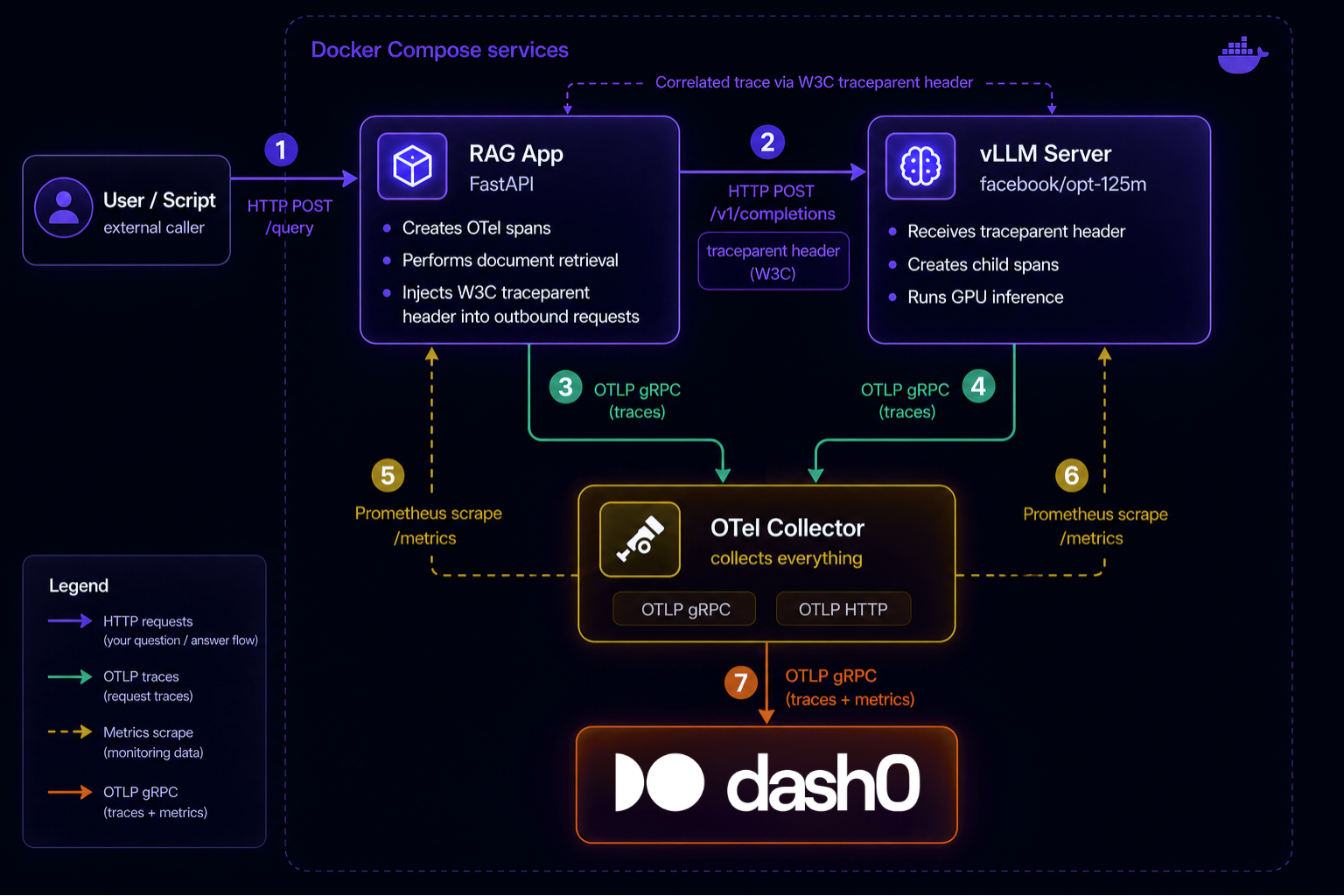
Why route through the Collector instead of exporting directly to Dash0?
Direct export works, but you lose the ability to enrich telemetry with resource attributes, filter or sample before sending, route signals to multiple backends, and handle retries independently of the application. The Collector decouples instrumentation from export policy. For development this matters less, but for any production deployment the Collector belongs in the pipeline.
Why does the Collector use both OTLP push and Prometheus pull?
vLLM sends traces via OTLP push: each request generates a span that is sent immediately. Metrics come from the Prometheus scrape endpoint, which requires periodic pull. The OTel Collector handles both natively. The prometheus receiver converts scraped metrics into OTel data points and forwards them through the same otlp/dash0 exporter as traces, so Dash0 receives everything over a single OTLP connection.
Setup
The full working example is at dash0-examples/vllm. Here's a walkthrough of the key configuration pieces.
vLLM
The vLLM Docker image (vllm/vllm-openai) requires an NVIDIA GPU. For testing without production hardware, a g4dn.xlarge EC2 instance (one T4 GPU) is sufficient to run facebook/opt-125m and validate the full telemetry pipeline. Without a GPU, you can still test the pipeline on CPU by removing the deploy.resources block from docker-compose.yml. Inference will be slow, but traces and metrics flow correctly.
Enable tracing by passing the OTLP endpoint:
12vllm serve facebook/opt-125m \--otlp-traces-endpoint=http://otel-collector:4317
Set these environment variables alongside it:
123OTEL_SERVICE_NAME=vllm-serverOTEL_EXPORTER_OTLP_TRACES_ENDPOINT=http://otel-collector:4317OTEL_EXPORTER_OTLP_TRACES_INSECURE=true
OTel Collector configuration
123456789101112131415161718192021222324252627282930313233343536373839404142434445464748495051525354555657extensions:health_check:endpoint: 0.0.0.0:13133extensions:health_check:endpoint: 0.0.0.0:13133receivers:otlp:protocols:grpc:endpoint: 0.0.0.0:4317http:endpoint: 0.0.0.0:4318prometheus:config:global:scrape_interval: 15sscrape_configs:- job_name: vllmstatic_configs:- targets: ["vllm:8000"]- job_name: rag-appstatic_configs:- targets: ["rag-app:8001"]processors:batch:timeout: 1ssend_batch_size: 1024exporters:debug:verbosity: detailedsampling_initial: 5sampling_thereafter: 200otlp/dash0:endpoint: ${env:DASH0_ENDPOINT_OTLP_GRPC_HOSTNAME}:${env:DASH0_ENDPOINT_OTLP_GRPC_PORT}headers:Authorization: Bearer ${env:DASH0_AUTH_TOKEN}Dash0-Dataset: ${env:DASH0_DATASET}service:extensions: [health_check]pipelines:traces:receivers: [otlp]processors: [batch]exporters: [debug, otlp/dash0]metrics:receivers: [otlp, prometheus]processors: [batch]exporters: [debug, otlp/dash0]
A few things worth noting here:
The batch processor reduces overhead and is fine for development. For production, the OpenTelemetry community recommends moving away from it: the batch processor acknowledges data before durably storing it, which means a Collector restart can silently drop spans. The alternative is exporter-level batching with persistent storage. See Why the OpenTelemetry Batch Processor Is Going Away Eventually for the details.
The debug exporter logs telemetry to stdout. The sampling configuration above prints the first 5 items then 1 in every 200, which is enough to confirm data is flowing during setup without flooding logs. Remove it for production.
The Prometheus scrape interval of 15 seconds is a reasonable default. vLLM's metrics endpoint updates on the scheduler cycle, so scraping more frequently than every 5 seconds adds Collector CPU overhead without giving you meaningfully fresher data.
Instrumenting the application layer
If you are calling vLLM from application code (a RAG pipeline, an agent, or anything else), you need to propagate trace context so the vLLM span connects to your application span.
Use the OTel API directly in your application code. Configure the SDK via environment variables and let opentelemetry.trace.get_tracer() pick up the provider automatically. This keeps application code decoupled from SDK initialization, which is the same separation vLLM uses internally in vllm/tracing/__init__.py where it exposes a clean instrument decorator rather than leaking TracerProvider and BatchSpanProcessor to callers.
12345678910111213141516171819202122232425262728293031from opentelemetry import tracefrom opentelemetry.trace.propagation.tracecontext import TraceContextTextMapPropagatorimport requests# SDK auto-configures from environment variables:# OTEL_SERVICE_NAME=rag-app# OTEL_EXPORTER_OTLP_ENDPOINT=http://otel-collector:4317# OTEL_EXPORTER_OTLP_INSECURE=truetracer = trace.get_tracer("rag-app")def call_vllm(prompt: str) -> str:with tracer.start_as_current_span("rag.generate") as span:span.set_attribute("gen_ai.request.model", "facebook/opt-125m")span.set_attribute("gen_ai.request.max_tokens", 100)# Inject trace context into outgoing request headersheaders = {}TraceContextTextMapPropagator().inject(headers)response = requests.post("http://vllm:8000/v1/completions",headers=headers,json={"model": "facebook/opt-125m", "prompt": prompt, "max_tokens": 100})result = response.json()usage = result.get("usage", {})span.set_attribute("gen_ai.usage.prompt_tokens", usage.get("prompt_tokens", 0))span.set_attribute("gen_ai.usage.completion_tokens", usage.get("completion_tokens", 0))return result["choices"][0]["text"]
TraceContextTextMapPropagator().inject(headers) serializes the current span context into the traceparent header. vLLM reads that header when it starts processing the request and creates its span as a child of yours. Without this step, you get two disconnected traces instead of one continuous waterfall.
The attribute names in the example above (gen_ai.usage.prompt_tokens and gen_ai.usage.completion_tokens) match what vLLM emits. Using consistent names means both your application span and the vLLM span appear correctly in the same Dash0 GenAI views.
What you see in Dash0
Traces
A fully propagated trace from the RAG app through to vLLM looks like this in the waterfall view:
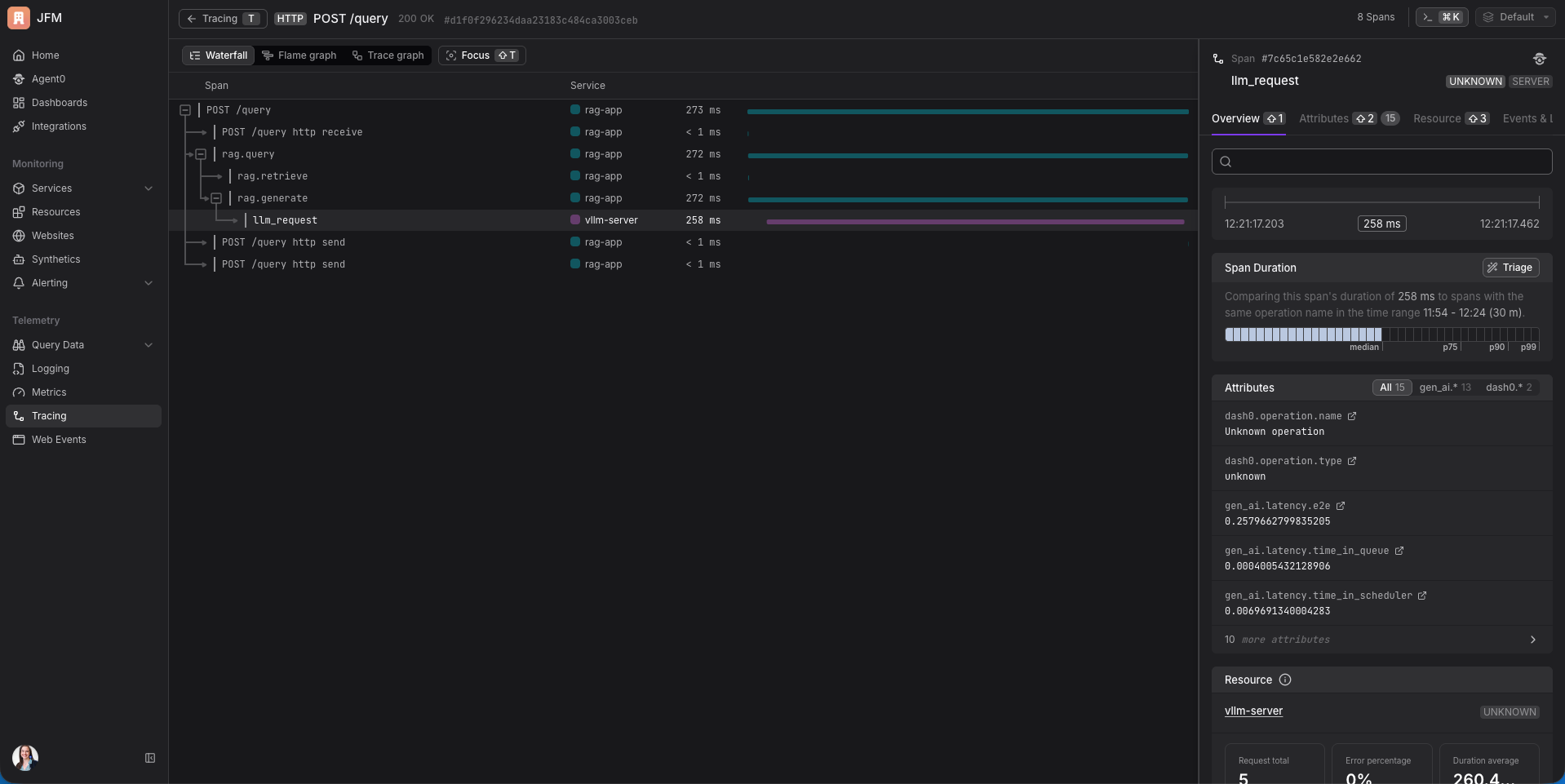
This single trace gives you answers that would otherwise require instrumenting each service separately. You can see whether your latency problem is in document retrieval or in model generation. A growing gap between rag.generate starting and llm_request starting indicates queue pressure before the request has even begun executing.
Clicking into the llm_request span reveals the full set of gen_ai.latency.* attributes vLLM populates on that span: gen_ai.latency.time_in_queue, gen_ai.latency.time_in_model_prefill, gen_ai.latency.time_in_model_decode, and others. These are span attributes, not child spans, so they do not appear as rows in the waterfall. They are the per-phase latency breakdown for that single inference request. A long time_in_queue means scheduler pressure, not a slow model. A long time_in_model_prefill means your prompt is large relative to your hardware.
Metrics in Dash0
Once the Prometheus receiver is scraping and the pipeline is running, vLLM metrics appear in Dash0 as standard OTel metrics, queryable alongside trace data from the same services.
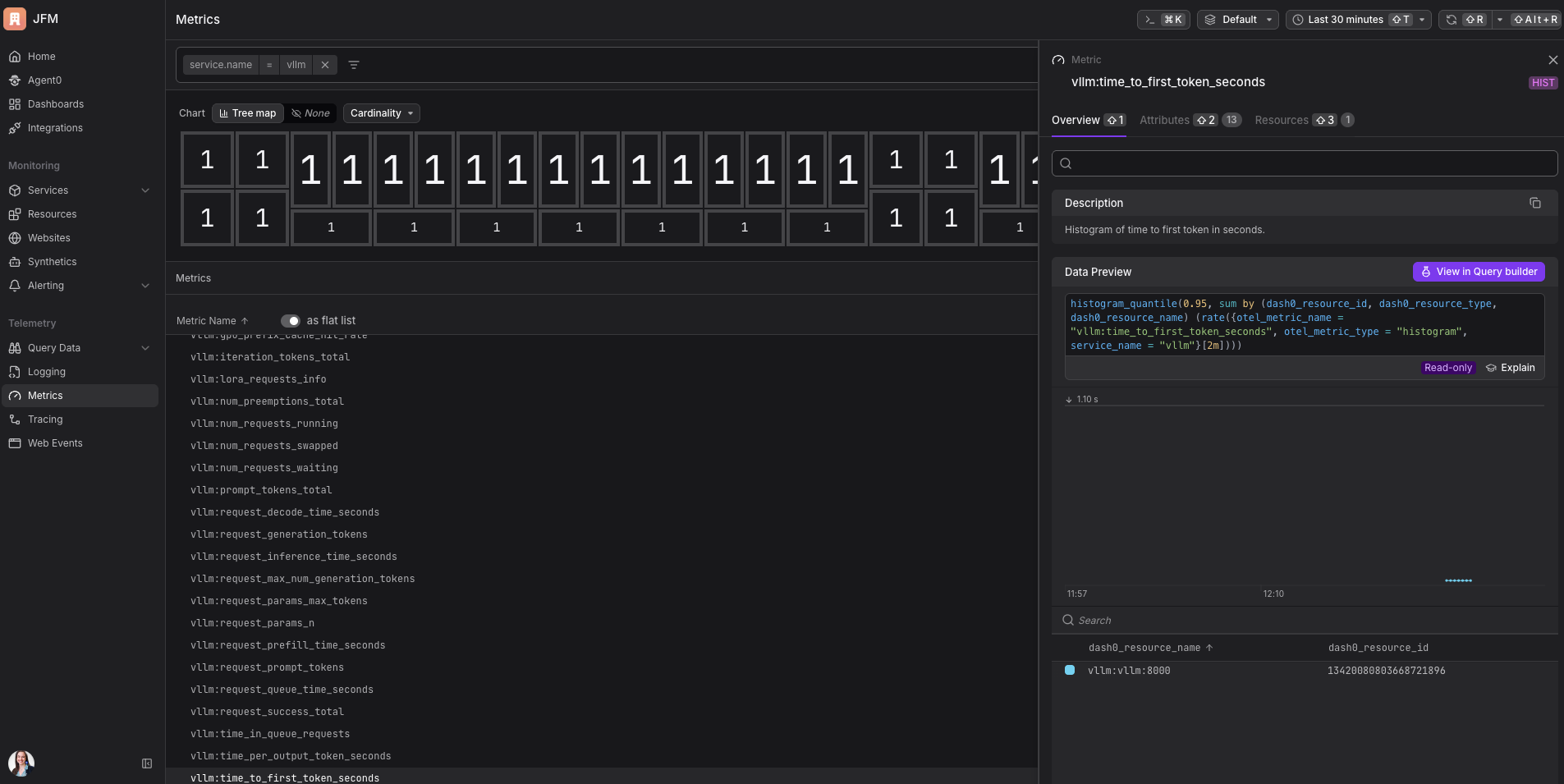
The full vllm:* metric list is available as soon as the Collector starts scraping. Selecting any metric surfaces its description, available attributes, and a pre-built query for common aggregations.
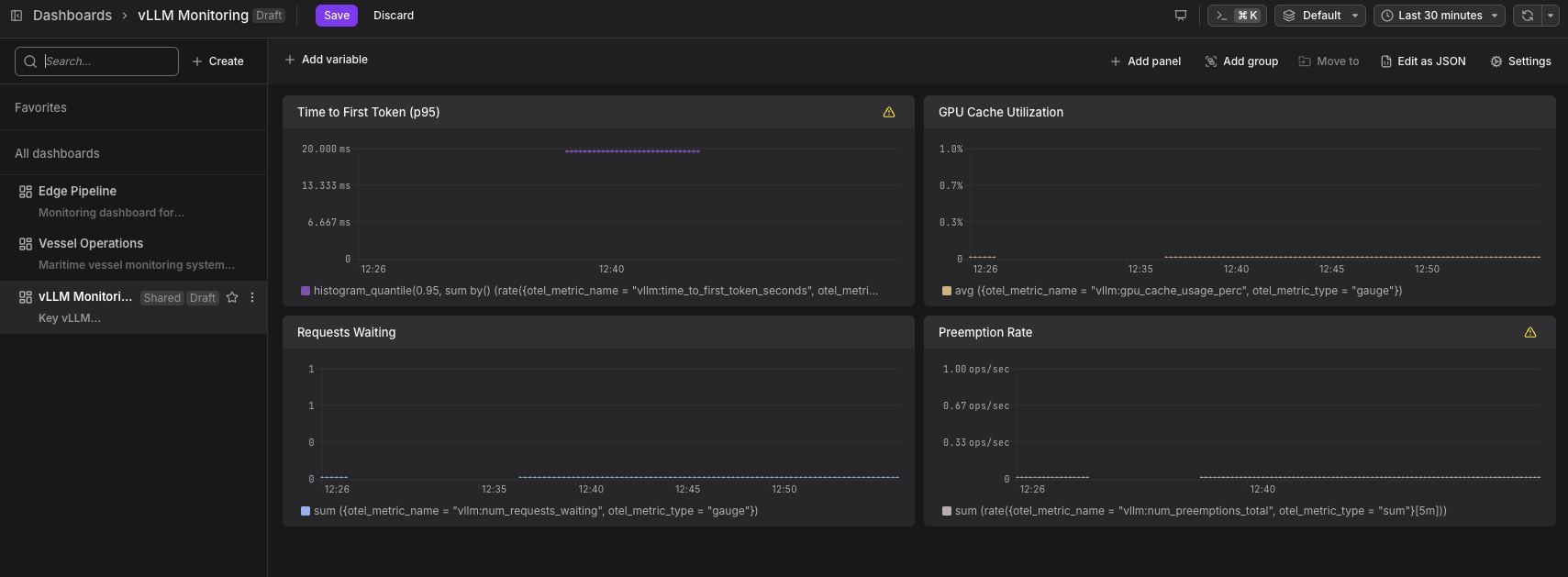
For capacity planning: watch vllm:gpu_cache_usage_perc and vllm:num_requests_waiting together. Cache utilization above 90% combined with a non-zero wait queue is a reliable signal that you need more GPU memory or additional replicas.
For latency SLOs: use vllm:time_to_first_token_seconds at p95 for streaming applications and vllm:e2e_request_latency_seconds at p99 for non-streaming. Set alerts on both before they affect users. Dash0 supports Prometheus-format alert rules natively — see Configure Alert Checks.
For debugging latency spikes: check vllm:num_preemptions_total as a rate. Preemptions do not show up as errors. They show up as requests that suddenly take much longer because the scheduler had to evict in-flight KV cache state. If you are seeing unexplained p99 spikes and gpu_cache_usage_perc is high, the preemption rate is where to look.
For throughput monitoring: rate(vllm:generation_tokens_total[5m]) gives you tokens per second, the most direct measure of whether your serving configuration is efficiently utilizing available compute.
Agent0
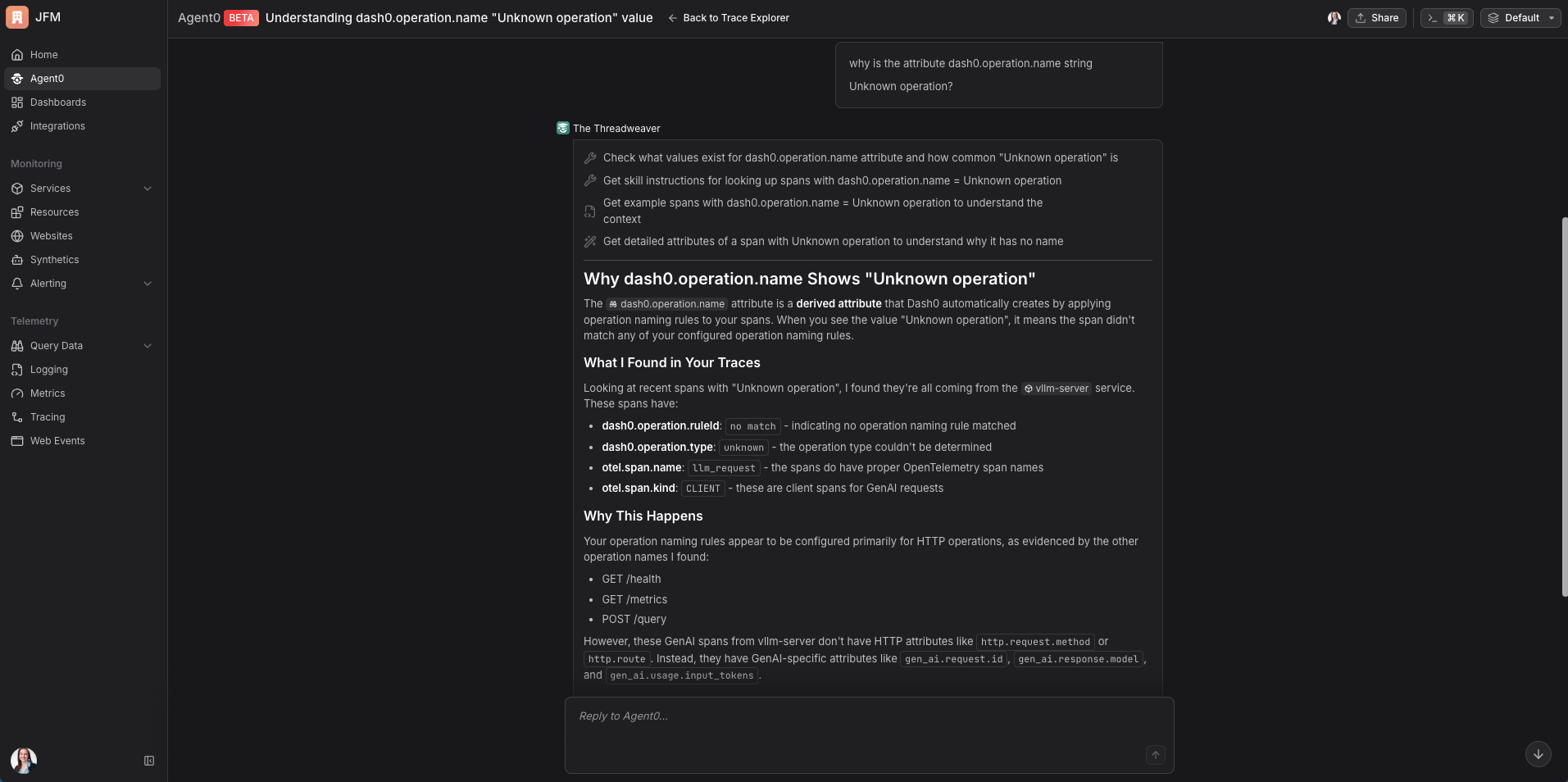
Agent0 can help you investigate and act on your vLLM telemetry directly. For example, you might notice that vLLM spans appear in the traces view but are grouped differently from your HTTP spans. Asking Agent0 "why does dash0.operation.name show Unknown operation for my vLLM spans?" gives you an immediate explanation: GenAI spans use a different attribute vocabulary than HTTP spans (gen_ai.* attributes rather than http.*), and you can add a custom operation naming rule in Dash0's settings to match them. Agent0 identifies the affected spans, explains why it happened, and tells you exactly what to configure.
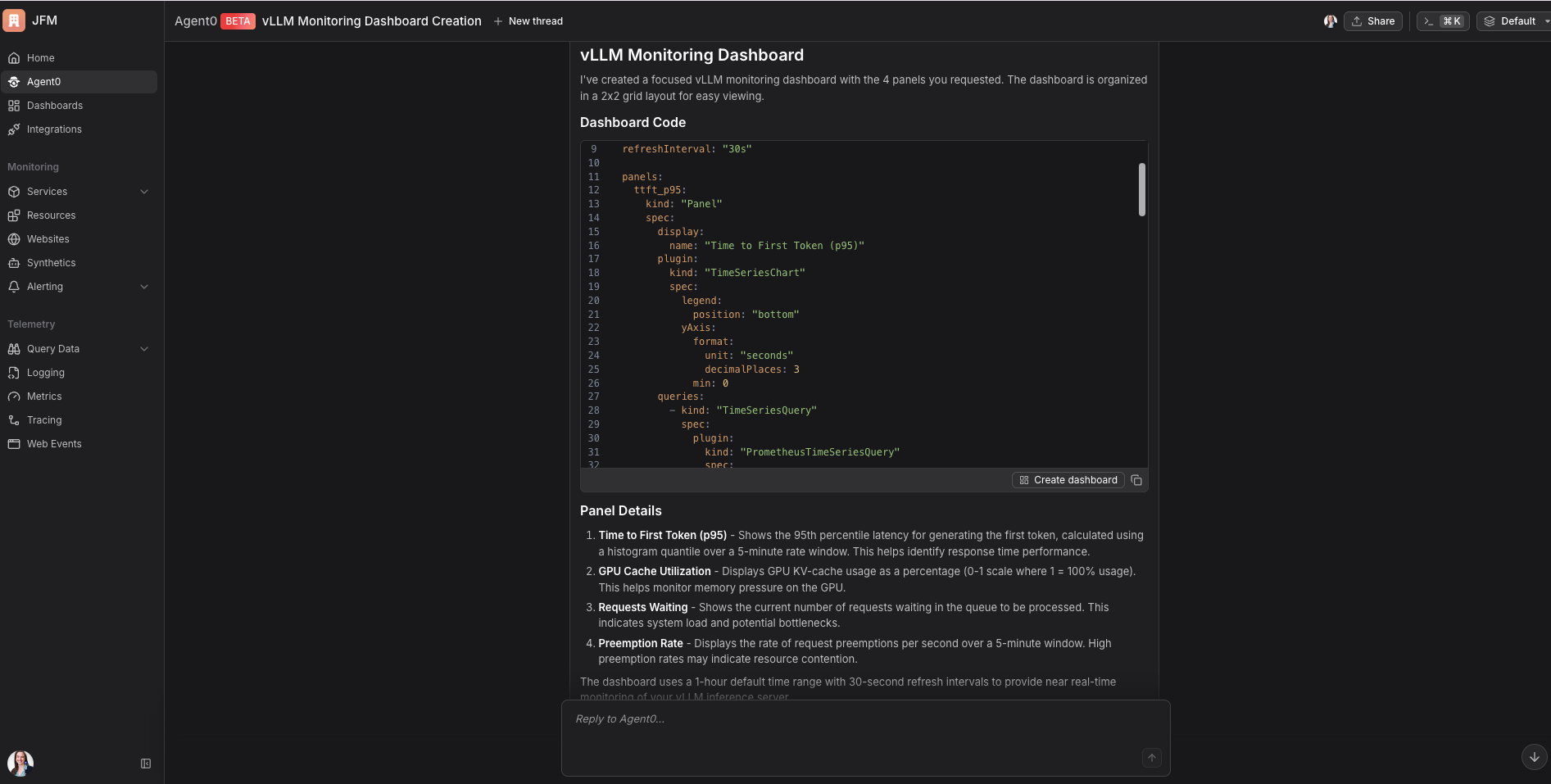
You can also ask Agent0 to create a monitoring dashboard from your metric names directly. Giving it the list of vllm:* metrics you care about produces a working dashboard in seconds.
Extending to agent pipelines
The same pipeline works when vLLM sits inside a multi-agent system. Each turn of a conversation with an agent may involve multiple tool calls and LLM calls. If each of those calls propagates trace context, they all become spans in the same trace, so a single user message produces one trace that shows everything the agent did to respond, with vLLM's inference spans as leaves in the tree.
The GenAI semantic conventions define the attributes you would want on those agent spans: gen_ai.operation.name for the type of operation, gen_ai.agent.name for the agent identity, gen_ai.tool.name for tool invocations. When your agent framework uses these attributes and vLLM emits its own gen_ai.* span attributes, both sets of spans live in the same namespace and are queryable together in Dash0.
The inference observability in this post is the foundation. Agent observability applies the same pattern one layer up. Dash0's Practical Guide to Agentic Observability covers how to extend this to full agent pipelines. For AI observability using higher-level SDKs rather than raw OTel, see the OpenLIT and OpenLLMetry integrations as complementary approaches.
Running the example
Clone the repository and navigate to the vllm directory:
12git clone https://github.com/dash0hq/dash0-examples.gitcd dash0-examples/vllm
Set your Dash0 credentials in the root .env file:
.env1234DASH0_AUTH_TOKEN=your_auth_tokenDASH0_DATASET=defaultDASH0_ENDPOINT_OTLP_GRPC_HOSTNAME=ingress.eu-west-1.aws.dash0.comDASH0_ENDPOINT_OTLP_GRPC_PORT=4317
Start the stack (requires an NVIDIA GPU - or see the vLLM setup section above for how to run on CPU):
1docker compose up -build
Wait for vLLM to finish loading the model (~2–5 minutes on a T4), then send test requests:
1python scripts/send-request.py
The README in the example directory covers prerequisites, the full expected output, and what to look for in Dash0 once data is flowing.
vLLM's built-in OTel support means the instrumentation cost is low. The configuration needed to connect it to a production-grade pipeline is small. The signals you get in return (trace-level visibility into inference phases and metric-level visibility into GPU utilization, cache pressure, and queue depth) are the ones that actually let you operate an LLM serving layer with confidence.
The full working example is at dash0-examples/vllm. Clone it, point it at your model, and see your inference layer become observable in minutes. Start your free Dash0 trial if you don't have an account yet.